The Alienware AW2721D and AW2521HF review verdict: the AW2721D is the sharper, brighter 27-inch 1440p 240Hz monitor with native G-SYNC Ultimate and DisplayHDR 600, while the AW2521HF is the smaller 24.5-inch 1080p 240Hz screen built for competitive play on any GPU. Pick the AW2721D for image quality on an NVIDIA card, and the AW2521HF for a compact esports setup.
Alienware sells these two 240Hz IPS monitors side by side, so shoppers often ask which one fits. This guide pulls together maker specifications and editorial review findings from Trusted Reviews, RTINGS, PC Monitors and Gadget Review. It is research-based: we did not use either monitor ourselves, and anything we could not confirm is marked “check the maker”.
Our Top Picks


Top 3 picks at a glance
Quick Verdict
- AW2721D best for: NVIDIA GPU owners who want 1440p sharpness, wide color and 240Hz in a 27-inch screen.
- AW2521HF best for: esports players on a 1080p budget, small desks and anyone using an AMD card or a G-SYNC Compatible setup.
- AW2721D weak points: reviewers list backlight bleed, low contrast, edge-lit dimming with limited zones and no HDMI 2.1.
- AW2521HF weak points: 1080p on a 24.5-inch panel is softer than 1440p, and it has no HDR support according to RTINGS.
- Skip if: you want deep blacks (look at OLED) or a 4K console screen with HDMI 2.1.
Specs at a Glance
| Spec | Alienware AW2721D | Alienware AW2521HF |
|---|---|---|
| Screen size | 27 inches | 24.5 inches |
| Resolution | 2560 x 1440 (QHD) | 1920 x 1080 (FHD) |
| Pixel density | About 109 ppi | About 90 ppi |
| Panel type | Fast IPS | IPS-type (AHVA) from AUO per PC Monitors |
| Refresh rate | 240Hz | 240Hz |
| Response time | 1ms GtG | 1ms GtG |
| Sync | NVIDIA G-SYNC Ultimate (native module) | Adaptive-Sync: AMD FreeSync Premium and G-SYNC Compatible |
| HDR | DisplayHDR 600, edge-lit with 32 zones per reviewers | None per RTINGS |
| Brightness | About 450 nits per Versus; 600 in HDR | 400 cd/m2 typical |
| Color | 98% DCI-P3, 131% sRGB per reviewers | 8-bit; gamut figure not listed here, check the maker |
| Contrast | Low, per Trusted Reviews | 1,000:1 |
| HDMI | Not HDMI 2.1 | Check the maker |
The table shows the core trade-off. Both models share the 240Hz refresh rate and 1ms response claim, so the gap comes from resolution, HDR, sync method and size.
Is the Alienware AW2721D Worth It?
The AW2721D is worth it if you play on an NVIDIA GPU and value sharpness. It pairs 1440p with 240Hz and a native G-SYNC module, a combination few older monitors matched.
Trusted Reviews and Gadget Review both describe low input lag and strong motion handling. The color coverage is wide at 98% DCI-P3, which helps games with rich palettes look more vivid than on a basic sRGB panel.
What reviewers liked
- Sharp 27-inch 1440p image with about 109 pixels per inch.
- 240Hz with a native G-SYNC Ultimate module for smooth variable refresh.
- Wide color gamut and DisplayHDR 600 certification.
- Low input lag suited to fast shooters.
What reviewers disliked
- Backlight bleed on some units, a common IPS trait.
- Low contrast for an HDR-certified screen; blacks look gray in dark rooms.
- Edge-lit dimming with only 32 zones, so HDR is modest next to full-array or OLED panels.
- 10-bit color is limited to 144Hz and below, per the comparison data we found.
- No HDMI 2.1, so consoles cannot use 4K 120Hz.
AW2721D best buy and availability
The AW2721D is an older model, so availability and condition vary by seller. Check the model number carefully, confirm the finish you want, and read the warranty terms on the listing. Alienware sells newer 27-inch 1440p monitors that may suit you better; see the alternatives below.
Alienware AW2721D 27-Inch 240Hz Fast IPS Monitor
As an Amazon Associate we earn from qualifying purchases at no extra cost to you.
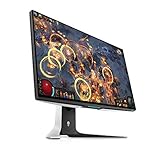
This listing describes a 27-inch Alienware monitor at 2560 x 1440 with a 240Hz Fast IPS panel, VESA DisplayHDR 600 and NVIDIA G-SYNC Ultimate certification, in a white finish carrying the AW2721D model number. It targets players who want 1440p detail without giving up high refresh.
- Best for: NVIDIA owners wanting sharp 1440p at 240Hz.
- Skip if: you want HDMI 2.1 or deep OLED-style blacks.
Is the Alienware AW2521HF Good for Competitive Gaming?
Yes. The AW2521HF is a 24.5-inch 1080p 240Hz monitor with a 1ms GtG claim, and 24.5 inches is the size many esports players favor because the whole screen sits in view without moving your eyes.
PC Monitors describes the panel as an AUO-made IPS-type unit with true 8-bit color. It supports Adaptive-Sync, so it works with AMD FreeSync Premium and runs in NVIDIA G-SYNC Compatible mode.
Strengths
- Frame-rate friendly: a mid-range GPU can feed 1080p at high fps.
- Works with both AMD and NVIDIA through adaptive sync.
- 400 cd/m2 typical brightness and 1,000:1 contrast.
- Lighter and smaller than the AW2721D, so easier to fit on a tight desk or move.
Weaknesses
- 1080p is visibly less sharp at 24.5 inches than 1440p at 27.
- No HDR support per RTINGS.
- Color depth stays at 8-bit; fine for games, less ideal for color work.
Alienware AW2521HF 24.5-Inch 240Hz Gaming Monitor
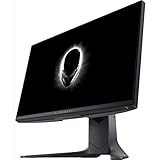
This listing is a 24.5-inch Full HD Alienware monitor with IPS technology and a 240Hz refresh rate in a Dark Side of the Moon finish, carrying the AW2521HF model number. It is aimed at fast shooters and battle royale players who value frame rate over resolution.
- Best for: esports play and compact setups.
- Skip if: you want 1440p or HDR highlights.
AW2721D vs AW2521HF: Which Should You Choose?
| If you want | Choose | Why |
|---|---|---|
| Sharper image | AW2721D | 1440p at 27 inches is about 109 ppi against 90 ppi. |
| Easier GPU load | AW2521HF | 1080p needs far fewer pixels at 240fps. |
| AMD card | AW2521HF | FreeSync Premium is supported; the AW2721D is G-SYNC-focused. |
| HDR highlights | AW2721D | DisplayHDR 600, though edge-lit. |
| Small desk | AW2521HF | 24.5 inches and much lighter per Versus data. |
| Lower power use | AW2521HF | Versus lists 24W against 31W. |
Performance by Use
Competitive shooters
Both reach 240Hz with 1ms GtG claims. The AW2521HF is easier to drive, which matters if you chase 240fps in Valorant, CS2 or Apex. The AW2721D needs a stronger GPU to hold 240fps at 1440p.
Single-player and story games
The AW2721D wins here. Higher pixel density, wider color and HDR 600 add richness. Do not expect OLED-like contrast, since reviewers flag low contrast.
Consoles
Neither is a great console choice. The AW2721D lacks HDMI 2.1, and 240Hz is wasted on current consoles. If you play on console, look for a 4K 120Hz model with HDMI 2.1.
Productivity
The extra screen area and sharpness of the AW2721D make it the better work monitor. The 27-inch panel fits two windows side by side comfortably.
Alienware AW2521HF Reddit and AW2721D Reddit: What Do Owners Say?
People searching these terms usually want owner opinions. We did not quote forum threads, because we cannot verify individual posts. The themes that match published reviews are consistent: the AW2721D draws praise for image quality and motion and criticism for backlight bleed and contrast, while the AW2521HF draws praise as a fast, simple esports screen.
Because panel quality varies by unit, read return and warranty terms before you commit, and check for bleed in a dark room when the monitor arrives.
What Is the Dell Alienware AW 20HF?
This is likely shorthand for the AW2521HF or a similar Dell Alienware “HF” model. Alienware has used HF in several 24- and 25-inch FHD fast-refresh names. Always match the full model number printed on the box or the maker page before buying.
Alternatives to Consider
Alienware AW2723DF

The listing describes a 27-inch 2560 x 1440 monitor with a 240Hz display over DisplayPort 1.4, a 1ms response claim, NVIDIA G-Sync, preset OSD modes and a height, tilt, swivel and pivot stand, in a Lunar Light finish. It is the closest newer match to the AW2721D concept.
- Best for: shoppers wanting a current 27-inch 1440p 240Hz Alienware.
- Skip if: you need HDMI 2.1 features; check the maker.
Alienware AW2726DL
This listing covers a 27-inch WQHD IPS monitor at 2560 x 1440 with a 280Hz refresh rate and 1ms response, listing 109 PPI, 93% DCI-P3, 400 cd/m2 brightness, 1000:1 contrast and HDMI plus DisplayPort inputs.
- Best for: higher refresh at 1440p with simple connectivity.
- Skip if: you need HDR performance beyond a basic level.
Dell AW2524HF

The listing describes a 24-inch FHD Fast IPS monitor with a 0.5ms response claim, AMD FreeSync Premium, 400 cd/m2 brightness, 99% sRGB, an anti-glare coating, 4.3 inches of height adjustment, pivot, swivel, VESA Adaptive-Sync and a USB 3.2 hub. TechRadar’s review title mentions 500Hz at a more accessible price.
- Best for: a modern replacement for the AW2521HF.
- Skip if: you want 1440p.
Buying Guide: Choosing Between 1080p and 1440p at 240Hz
- GPU first: 240fps at 1440p needs a much stronger card than 240fps at 1080p. Match the monitor to the frames your PC can produce.
- Sync type: native G-SYNC modules suit NVIDIA; Adaptive-Sync works with both brands. Confirm your GPU before buying.
- Size and distance: 24-25 inches suits close esports setups; 27 inches suits a normal desk distance.
- HDR expectations: edge-lit HDR 600 is a small step up. Treat it as a bonus.
- Ports: if you own a console or modern GPU with HDMI 2.1, check the port version on the maker page.
Image Quality in More Detail
Sharpness and screen size
Pixel density is the easiest way to see the gap. The AW2721D packs about 109 pixels per inch, which makes text and in-game UI clean at normal desk distance. The AW2521HF sits near 90 pixels per inch. That is fine for fast games where you track movement rather than fine detail, but you may notice softer text in menus and when you use the screen for browsing.
Color and brightness
The AW2721D lists 98% DCI-P3 coverage and around 450 nits typical brightness per the comparison data, rising in HDR mode. The AW2521HF lists 400 cd/m2 typical brightness with 8-bit color. In a bright room, both are bright enough for gaming. The AW2721D has more color headroom for games with strong palettes.
Contrast, blacks and backlight bleed
Both screens use IPS-type panels, so neither delivers the deep blacks of a VA or OLED display. Trusted Reviews and Gadget Review call out low contrast and bleed on the AW2721D. On the AW2521HF the listed contrast is 1,000:1, typical for IPS. If you play in a dark room, expect gray blacks and some glow at the edges on either model. Bleed varies from one unit to another, so inspect your screen with a dark scene soon after unboxing.
HDR reality check
DisplayHDR 600 on the AW2721D sounds attractive, yet edge-lit dimming with 32 zones cannot darken small areas independently. Highlights get a lift, but the effect is far smaller than on mini-LED or OLED monitors. Treat HDR as a bonus rather than a reason to buy.
Motion Clarity, Input Lag and Sync
Both models advertise 1ms GtG response and a 240Hz refresh rate, so the motion difference is small on paper. The real gap is sync. The AW2721D uses a native G-SYNC module with G-SYNC Ultimate certification, which tends to deliver variable refresh across a wide range and reliable behavior with NVIDIA cards. The AW2521HF relies on Adaptive-Sync. It works as FreeSync Premium on AMD cards and as G-SYNC Compatible on NVIDIA cards, which is convenient if you might change GPU brands later.
Input lag is low on both according to the reviews we read. The AW2721D has no motion blur reduction mode per the comparison data, so do not buy it expecting a strobing feature. Check the maker page if backlight strobing matters to you.
Design, Stand and Connectivity
| Feature | AW2721D | AW2521HF |
|---|---|---|
| Weight (Versus) | About 10.9 kg | About 3.54 kg |
| Power draw (Versus) | About 31W | About 24W |
| Stand | Check the maker for adjustment range | Check the maker for adjustment range |
| Best desk fit | Standard or large desk | Small desk, close viewing |
The weight figures come from comparison data and may include the stand, so treat them as a rough guide. If you plan to use a monitor arm, confirm VESA mount support on the maker page for the exact model you buy.
Setting Up 240Hz Correctly
Many owners leave a 240Hz monitor running at 60Hz because Windows does not switch automatically. Follow these steps after setup.
- Connect with the DisplayPort cable supplied or a certified DisplayPort cable. Do not use an old HDMI cable for 240Hz.
- Open Windows display settings, choose Advanced display and pick 240Hz from the refresh-rate list.
- In the NVIDIA Control Panel, enable G-SYNC (or G-SYNC Compatible) for the monitor and apply to full screen.
- Turn on the monitor’s overdrive at a moderate level; the strongest setting can create overshoot trails.
- Cap your in-game frame rate a few frames below 240 to stay inside the sync range.
Who Should Skip These Monitors
- Console owners: look for HDMI 2.1 and 4K 120Hz instead.
- Dark room players who want deep blacks: consider an OLED gaming monitor.
- Buyers who need a current warranty and latest ports: consider the newer Alienware 27-inch 1440p models listed above.
- Creators who need color accuracy: neither model is marketed as a color-critical display; check calibration reports first.
How We Compared These Monitors
We did not use either monitor. This comparison uses published maker specifications, review findings from Trusted Reviews, RTINGS, PC Monitors and Gadget Review, and comparison data from Versus.com. Where sources disagreed, such as release date and street cost, we left the detail out. Where a spec was not confirmed, the article says “check the maker”. Listing details for the products in the store come from the store listing text.
Matching Each Monitor to Your GPU
A 240Hz screen only helps if your graphics card can produce frames that high. Use this as a rough planning guide, and check benchmarks for your exact games.
| Your goal | Monitor fit | GPU note |
|---|---|---|
| 240fps in light esports titles | AW2521HF | A mid-range card can often feed 1080p in lighter games. |
| 144-165fps in modern shooters at 1440p | AW2721D | Needs a stronger card; 240Hz is a ceiling, not a promise. |
| 60-100fps in demanding single-player games | AW2721D | Variable refresh keeps lower frame rates smooth. |
| Mixed use with a future GPU swap | AW2521HF | Adaptive-Sync works with AMD and NVIDIA. |
Variable refresh matters most when frame rate dips. On the AW2721D the native module handles that range, so a 1440p game running at 90fps can still look smooth instead of tearing. On the AW2521HF, Adaptive-Sync does the same job, with the usual limits of the sync window listed by the maker.
Common Mistakes When Buying a 240Hz Monitor
- Ignoring the cable: using HDMI 1.4 or a low-grade cable can cap the refresh rate.
- Skipping the refresh-rate setting: Windows may keep the screen at 60Hz until you change it.
- Judging by resolution alone: 1440p looks sharper, but a card that cannot hold frames wastes the 240Hz panel.
- Expecting OLED contrast from IPS: both models show gray blacks in dark scenes.
- Not checking the return window: bleed and uniformity vary from one unit to the next.
FAQ
Is the AW2721D a good monitor?
Yes for NVIDIA owners who want 1440p at 240Hz. Reviewers praise motion and color but flag backlight bleed, low contrast and the lack of HDMI 2.1.
Does the AW2521HF support G-SYNC?
It supports G-SYNC Compatible mode through Adaptive-Sync, and also AMD FreeSync Premium, according to PC Monitors. It does not use a native G-SYNC module.
Which is better for esports, AW2721D or AW2521HF?
The AW2521HF is easier to run at 240fps and its 24.5-inch size suits esports. The AW2721D is better if your GPU can hold high frame rates at 1440p.
Does the AW2721D have HDR?
It is DisplayHDR 600 certified, but dimming is edge-lit with 32 zones, so HDR looks modest next to OLED or full-array screens.
Is the AW2721D good for PS5 or Xbox?
Not ideal. It lacks HDMI 2.1, so 4K 120Hz is unavailable, and consoles cannot use 240Hz anyway.
Is 1440p worth it over 1080p at 240Hz?
If your GPU can hold the frame rate, yes, for the extra sharpness. If you chase maximum fps in shooters, 1080p is easier to drive.
What is a good newer alternative to the AW2721D?
The AW2723DF and AW2726DL are current 27-inch 1440p Alienware options. Compare ports, sync support and warranty on the maker page.
Can I use the AW2521HF with an AMD graphics card?
Yes. It supports Adaptive-Sync and is listed as FreeSync Premium compatible, so variable refresh works on AMD cards without extra hardware. Enable FreeSync in the AMD driver after connecting over DisplayPort.
How big a graphics card do I need for 240Hz at 1440p?
It depends on the game. Lighter esports titles can reach very high frame rates on mid-range cards, while demanding games will not. Check benchmarks for your exact titles and settings.
Which One Should You Buy?
Buy the AW2721D if you have an NVIDIA GPU that can push high frame rates at 1440p and you value detail, color and a larger screen. Buy the AW2521HF if you play competitive shooters, own an AMD card, or need a small, light monitor. If you are shopping new, compare the AW2723DF, AW2726DL and AW2524HF against these older models first, since they may offer better value and longer warranty coverage.
Sources
- Trusted Reviews, Alienware AW2721D review
- RTINGS, Dell Alienware AW2521H review
- PC Monitors, Dell Alienware AW2521HF review
- Gadget Review, Alienware AW2721D review
- Versus.com, AW2521HF vs AW2721D comparison
Last updated: November 2026
Related guides
More from Amazon
Programs that pair well with the guide above. Offers and eligibility are set by Amazon and may change.
Free shipping on eligible items, Prime Video and more. Eligible new members can start with a free trial.
Start a Prime free trialAd-free music streaming. Eligible new subscribers can start with a free trial.
Try Music Unlimited freeA Prime membership for ages 18-24 with a trial period. Eligibility is set by Amazon.
See Prime for Young AdultsAudiobooks and podcasts to listen to on the go. Eligible new members can start with a free trial.
Try Audible freeAs an Amazon Associate we earn from qualifying purchases.