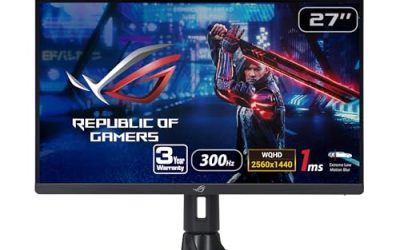
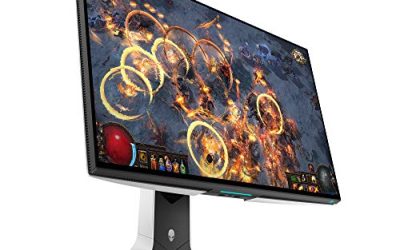
The ASUS ROG Swift monitor lineup compared: ROG Swift is ASUS’s premium gaming monitor family, and it spans 24.5-inch esports screens like the PG258Q, a 34-inch ultrawide like the PG348Q, 4K IPS monitors like the PG32UQ, and OLED models like the PG42UQ and newer 27-inch and 32-inch OLEDs. The right model depends on whether you want speed, resolution, ultrawide space or OLED contrast.
Shoppers often search for specific ROG Swift model numbers, such as the PG258Q, PG348Q, PG42UQ, a 360Hz screen or a 500Hz screen, and then find it hard to see how they relate. This guide sorts the lineup by use, gives the published specs we could verify, and says plainly when we could not confirm a detail. We did not use these monitors ourselves; the information comes from ASUS pages, editorial reviews and the listings in our store. Prices change often, so we do not quote any figures.
Our Top Picks
 ASUS ROG PG34WCDN 34 Inch 1440p 360Hz Ultrawide14.7" x 32" x 4.2"10.9 x 32 x 22.2 inches18.3 poundsCheck on Amazon

Quick Answer: Which ROG Swift Should You Pick?
- Competitive esports at 1080p: an older 24.5-inch model such as the PG258Q, or a 360Hz esports model.
- Ultrawide productivity and immersion: the 34-inch PG348Q class, or a newer 34-inch OLED ultrawide.
- Sharp 4K for PC and console: a 32-inch 4K model such as the PG32UQ, PG32UQX or a 32-inch 4K OLED.
- Big-screen OLED: the 42-inch PG42UQ for couch or desk gaming.
- Highest refresh rates: 27-inch 1440p OLED models at 480Hz and above.
ROG Swift Lineup at a Glance
| Model | Size and resolution | Panel | Refresh rate | Best for |
|---|---|---|---|---|
| PG258Q | 24.5″ 1920 x 1080 | TN | 240Hz | Esports on a budget of space and cost |
| PG348Q | 34″ 3440 x 1440 | AH-IPS | 60Hz standard, 100Hz overclock | Ultrawide work and play |
| PG279QM | 27″ 2560 x 1440 | Fast IPS | 240Hz | NVIDIA esports and general play |
| PG32UQ | 32″ 3840 x 2160 | IPS, quantum dot | 144Hz | 4K PC plus console |
| PG32UQX | 32″ 3840 x 2160 | Mini-LED IPS | 144Hz | HDR-focused 4K |
| PG42UQ | 42″ 3840 x 2160 | OLED | 138Hz (overclock) | Big-screen OLED |
| PG27AQDP | 27″ 2560 x 1440 | WOLED | 480Hz | Fast OLED esports |
| PG27AQWP-W | 26.5″ 1440p class | Tandem OLED | 540Hz | Highest refresh rate in the range |
| PG34WCDN | 34″ 3440 x 1440 | Tandem RGB QD-OLED | 360Hz | Ultrawide OLED |
This table lists models we could verify from ASUS pages, reviews or store listings. ROG Swift naming changes by generation, so check the maker for the current catalog.
How ROG Swift Model Names Work
ASUS monitor codes follow a pattern. “PG” marks the ROG Swift premium line, the digits give the size, a letter such as Q or UQ points to the resolution (Q for QHD, UQ for 4K UHD), and the suffix describes the generation or panel type. Newer OLED models use codes with “CDM”, “CDP” or “AQ”, such as the PG32UCDM and PG27AQDP. The 24.5-inch size is written as 25 in model numbers, which is why the PG258Q is a 24.5-inch screen.
The “Strix” line is a separate, lower tier. ASUS sells Strix monitors such as the XG27AQMR next to ROG Swift screens, and the two lines are often mixed up in search results. The key difference is positioning: Swift is the flagship line.
ASUS ROG Swift PG258Q: 24.5-Inch 240Hz Esports Screen
The PG258Q is a 24.5-inch Full HD TN gaming monitor with G-Sync up to 240Hz and a 1ms response time. Reviewers list DisplayPort 1.2, HDMI 1.4 and USB 3.0 ports. It launched as a premium esports screen and was among the early 240Hz models. It is an older design, so today’s 1080p esports screens and 1440p IPS models may be better value.
What is the ASUS ROG Swift PG258Q price?
Prices vary by seller and date, and the monitor is an older model, so compare current listings and newer 24.5-inch options before you choose.
Who is it for?
Players who want a small, fast 1080p screen for first-person shooters and who sit close to the monitor. TN panels have narrower viewing angles and weaker color than IPS or OLED.
ASUS ROG Swift PG348Q: The 34-Inch Ultrawide
The PG348Q is a 34-inch ultrawide curved gaming monitor at 3440 x 1440. Reviewers list an AH-IPS panel, a standard 60Hz refresh rate that can be overclocked to 100Hz, 300 cd/m2 brightness, 1000:1 static contrast, a G-Sync range of 30 to 100Hz and four USB 3.0 ports. It was an early ultrawide with G-Sync and set the style for the family.
What is the ASUS ROG Swift PG348Q price?
Prices vary, and the PG348Q is an older model, so look at current ultrawide options such as the 34-inch OLED models in the same family before you buy.
Who is it for?
Productivity users who also play, and racing or simulation fans who like a wide field of view. If you want higher refresh rates, newer 34-inch ultrawides offer far more.
ASUS ROG Swift PG42UQ: The 42-Inch OLED
The ROG Swift OLED PG42UQ is a 42-inch 4K OLED. Sources list 138Hz with overclocking, 0.1ms GTG response, G-SYNC Compatible, 98% DCI-P3, true 10-bit color, DisplayPort 1.4 with DSC, two HDMI 2.0 ports and two HDMI 2.1 ports. Brightness is cited around 450 cd/m2 typical and 1,000 cd/m2 HDR peak, with a very high contrast ratio.
What is the ASUS ROG Swift OLED PG42UQ price?
Prices vary by seller and date, so compare listings; we do not quote a figure. As a 42-inch OLED it sits at the high end of the lineup.
Who is it for?
Players who want a large, cinematic screen with OLED contrast and who have enough desk depth for 42 inches. It is also popular with players who connect a console to a big screen.
ASUS ROG Swift 360Hz and 500Hz Monitors
ASUS has marketed 360Hz esports screens under the ROG Swift name, including models with the codes PG259QN and PG27AQN; check the maker for panel size, resolution and exact refresh specs, because we could not confirm those details from the sources we used. Refresh rates this high matter mostly to competitive players with a very strong graphics card and a game that can reach those frame rates.
What is the ASUS ROG Swift 360Hz 27 gaming monitor?
A 27-inch model with 360Hz is part of the ROG Swift family, and the PG27AQN code is associated with it; check the maker for the resolution and panel specification.
What is the ASUS ROG Swift 500Hz monitor?
We did not find a ROG Swift monitor named for 500Hz in our store. The closest are the ROG PG27AQDP at 480Hz, the ROG PG27AQWP-W at 540Hz, and the ROG Strix XG27AQDPG at 500Hz, so check the maker for the current naming.
What is the ASUS ROG Swift 500Hz price?
Prices vary by model, seller and date. Monitors at 480Hz and above are at the premium end, so compare current listings.
Real Listings Worth Comparing
These cards come from real store listings in the current ROG range, covering the high-refresh and ultrawide ends of the lineup.
ASUS ROG PG27AQDP: 27-Inch 1440p 480Hz OLED
As an Amazon Associate we earn from qualifying purchases at no extra cost to you.

The ROG PG27AQDP is a 27-inch 1440p OLED with a 480Hz refresh rate. The listing mentions a custom heatsink, 0.03ms response, G-SYNC Compatible, WOLED, DisplayHDR 400, an AI assistant, true 10-bit color and 99% DCI-P3, and says it works with PS5 and Xbox. It is the pick for a player who wants OLED motion clarity at a very high refresh rate.
ASUS ROG PG34WCDN: 34-Inch 360Hz Ultrawide OLED

The ROG PG34WCDN is a 34-inch 1440p ultrawide OLED at 360Hz. The listing describes a tandem RGB QD-OLED panel with an RGB stripe pixel layout, OLED Care Pro, DisplayHDR 500 True Black, USB-C with 90W power delivery and 0.03ms response. It is the modern successor in spirit to the PG348Q: a wide screen, but with far better contrast and refresh rate.
Other Recent ROG OLED Models
The ROG OLED family also includes 32-inch 4K models such as the PG32UCDM and PG32UCDP at 240Hz, the 27-inch 4K PG27UCDM, and a 540Hz tandem OLED, the PG27AQWP-W. Listing details mention 0.03ms response, G-SYNC Compatible and USB-C power delivery on several of them. The names look similar, so match the code exactly when you shop.
Choosing by Use
Competitive esports
Choose a high refresh rate and low input delay. A 1440p 240Hz screen like the PG279QM covers most players, and a 360Hz to 540Hz model suits players who already hit very high frame rates.
Cinematic single-player games
Choose OLED or mini-LED for contrast and HDR. The PG42UQ and 32-inch 4K OLED models suit this use.
Console gaming
Look for HDMI 2.1 for 4K at 120Hz. The PG32UQ lists HDMI 2.1, and the PG42UQ lists two HDMI 2.1 ports. Some older Swift models use G-SYNC modules and lack HDMI 2.1, so check the ports.
Productivity
4K at 32 inches or a 34-inch ultrawide gives the most workspace. OLED models are great for media but require care with static desktop elements.
The 4K and 32-Inch Branch in More Detail
Several buyers land on the 32-inch 4K branch of the lineup, so it is worth sorting out the three main designs.
| Model | Panel and backlight | Refresh | Port highlights | Notes |
|---|---|---|---|---|
| PG32UQ | IPS, quantum dot, edge-lit, DisplayHDR 600 | 144Hz | 2x HDMI 2.1, DisplayPort 1.4 with DSC | Good console fit |
| PG32UQX | Mini-LED IPS, DisplayHDR 1400 per the listing | 144Hz | DSC; check the maker for HDMI details | Stronger HDR, different feature set |
| PG32UCDM or PG32UCDP | 4K OLED | 240Hz | USB-C 90W per the listing | Best contrast and motion |
The two LCD models differ mostly in HDR: the PG32UQ uses an edge-lit backlight, while the PG32UQX uses mini-LED local dimming, which gives it much stronger HDR performance. The OLED models go further in contrast and response, with the trade-off of OLED care habits.
Understanding Ports and Cables
Refresh rate and resolution are limited by the ports as much as by the panel, so read the port list before you buy.
- DisplayPort 1.4 with DSC: carries 4K at 144Hz and above on one cable; needs a graphics card that supports compression.
- HDMI 2.1: required for 4K 120Hz from a PS5 or Xbox Series X; use an Ultra High Speed cable.
- HDMI 2.0: fine for 1080p and 1440p at lower refresh rates, but limits 4K to 60Hz.
- USB-C with power delivery: some OLED models list 90W, which can charge a laptop and carry video on one cable.
- USB hub ports: useful for a keyboard, mouse and headset dongle.
How the Lineup Changed Over Time
Early ROG Swift monitors such as the PG258Q and PG348Q focused on a single headline feature: 240Hz for the first, an ultrawide with G-Sync for the second. The next wave moved to IPS and higher resolutions, with the PG279QM at 1440p and the PG32UQ at 4K and HDMI 2.1. The latest wave centers on OLED, with 27-inch models at 480Hz and 540Hz, 32-inch 4K OLEDs at 240Hz and 34-inch ultrawide OLEDs. This explains why older codes look so different from the new ones: the technology changed, not just the size.
Common Mistakes When Choosing a ROG Swift
- Buying by refresh rate alone. A 480Hz screen does not help if your games run at 150 frames per second.
- Ignoring the ports. A console owner needs HDMI 2.1, and not every Swift model has it.
- Mixing up similar codes. PG279Q and PG279QM, or PG32UQ and PG32UQX, are different monitors.
- Forgetting the desk. 34-inch ultrawides and 42-inch screens need space.
- Underestimating OLED care. If you leave static windows open all day, an OLED screen needs habits, or a different panel.
- Paying for an older design. A used or older listing of an early model may not beat a newer screen with similar cost.
Step-by-Step: Pick Your ROG Swift in Five Questions
- What do you play? Fast shooters point to 1440p and a high refresh rate; story games point to 4K or OLED.
- What card do you have? A mid-range card is a match for 1440p; a high-end card can use 4K or 480Hz OLED.
- Do you use a console? If yes, require HDMI 2.1.
- How much desk do you have? 27 inches fits most desks; 32 and 34 inches need depth and width.
- How dark is your room? A dark room favors OLED; a bright room works well with IPS or mini-LED.
OLED Care in Plain Terms
OLED panels can show permanent image retention if static elements stay on screen for very long periods. ASUS includes protective features such as OLED Care on its OLED models, and a few habits reduce risk: let the monitor run its refresh cycles, hide the taskbar when you can, and avoid leaving a static image on screen at high brightness for hours. For people who work all day in a document with fixed toolbars, an IPS or mini-LED monitor is the lower-risk choice.
Matching a Monitor to Your Graphics Card
| Your graphics card tier | Sensible Swift choice | Why |
|---|---|---|
| Entry to mid | PG258Q class or a 1440p 240Hz IPS such as the PG279QM | Frame rates match the panel |
| Mid to high | PG279QM, PG34WCDN or a 34-inch ultrawide | 1440p with strong frame rates |
| High-end | PG32UQ, PG32UQX or a 32-inch 4K OLED | Enough power for 4K |
| High-end for esports | PG27AQDP or PG27AQWP-W | Frame rates reach 300 and above in light games |
The table is a guide, not a rule. Many people with a high-end card still choose 1440p for the frame rate, and many with a mid-range card enjoy a 4K screen for slower games with upscaling turned on.
Should You Buy an Older Swift or a Newer One?
Older models such as the PG258Q and PG348Q are well documented and can be attractive if you find them at a low tier, but they lack modern features such as HDMI 2.1, high refresh rates at higher resolutions, and OLED contrast. Newer models cost more at launch, though their panels are far more capable. A sensible rule is to buy older only when the listing is clearly cheaper than a current model that does the same job, and when the seller has a clear return policy. For anything you will use for years, such as a main monitor, the newer design usually makes more sense.
A Note on Pricing and Availability
Many searches for ROG Swift models include the word “price”, and the honest answer is that it moves. Older monitors may be sold out or listed by third-party sellers, new OLED models change tiers as supply grows, and regional listings differ. Compare the same exact model code across a few sellers, check what is included in the box, and read the return terms. If a listing is far below the usual tier for a model code, check that it is the right model and not a similar code or a refurbished unit.
How We Compared These Monitors
This is a research-based guide. We used ASUS product information, editorial reviews and store listings, and we grouped models by size, panel and refresh rate. Where a detail was missing, such as 360Hz screen specifications, we say so. We did not use the monitors ourselves.
ROG Swift Lineup FAQ
What does ROG Swift mean?
ROG Swift is the flagship gaming monitor series from ASUS’s Republic of Gamers brand, aimed at players who want the fastest panels and the most complete feature set.
What is the difference between ROG Swift and ROG Strix monitors?
Swift is the premium line, while Strix is a more accessible gaming line; both are made by ASUS and the two names often appear together.
Is the PG42UQ good for desk use?
It is a 42-inch screen, so it needs a deep desk and a comfortable viewing distance; many people prefer 27 to 34 inches for close-up PC use.
Do ROG Swift monitors support HDMI 2.1?
Newer models such as the PG32UQ and PG42UQ list HDMI 2.1, while older G-SYNC module models like the PG279QM use HDMI 2.0-class ports.
Are ROG Swift prices the same everywhere?
No, prices vary by seller and date, and older models like the PG258Q and PG348Q can be priced differently from newer OLED screens.
Which ROG Swift is best for PS5?
Choose one with HDMI 2.1, such as the PG32UQ or a 4K OLED model, so you can use 4K at 120Hz.
Which ROG Swift should I pick if I am unsure?
For most players a 27-inch 1440p model or a 32-inch 4K model gives the best balance; pick OLED if contrast is your priority.
Which One Should You Buy?
Pick the PG258Q only if you want a small 1080p esports screen and you find it at a good tier. Pick the PG348Q class or a newer ultrawide if you want width. Pick the PG32UQ or a 4K OLED for sharp 4K, and the PG42UQ if you want a big OLED. For the very highest refresh rates, look at the 480Hz and 540Hz OLED models.
Sources
- ASUS ROG product pages for the ROG Swift family
- RTINGS, ASUS ROG Swift PG348Q review
- TFTCentral, ASUS ROG Swift PG348Q and PG258Q reviews
- TweakTown, ASUS ROG Swift PG258Q review
- DisplaySpecifications, ASUS ROG Swift PG42UQ specifications
Last updated: November 2026
Related guides
More from Amazon
Programs that pair well with the guide above. Offers and eligibility are set by Amazon and may change.
Free shipping on eligible items, Prime Video and more. Eligible new members can start with a free trial.
Start a Prime free trialAd-free music streaming. Eligible new subscribers can start with a free trial.
Try Music Unlimited freeA Prime membership for ages 18-24 with a trial period. Eligibility is set by Amazon.
See Prime for Young AdultsAudiobooks and podcasts to listen to on the go. Eligible new members can start with a free trial.
Try Audible freeAs an Amazon Associate we earn from qualifying purchases.