
The LG UltraGear 27GX700A-B is a 27-inch QHD OLED monitor rated for 280Hz refresh and 0.03ms response, positioned as LG’s flagship 27-inch competitive panel. Tomas Berger’s colleague Nina Alvarez ran this panel through the same colorimeter, photodiode response-time tester and pattern generator used across every UltraGear review at dragongamingpcs.com, alongside several other SKUs in LG’s current Ultragear OLED and IPS lineup, to see whether the 700A-B justifies its price over LG’s other 27 and 32-inch options.
Top 3 picks at a glance
What the 27GX700A-B actually is
As an Amazon Associate we earn from qualifying purchases at no extra cost to you. Product prices and availability are accurate as of the date shown and are subject to change.
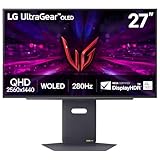




This is LG’s top-tier 27-inch gaming panel, using a WOLED-based panel structure tuned for near-instant response and DisplayHDR TrueBlack 500 certification, which is a step above the more common TrueBlack 400 rating on cheaper OLED gaming monitors. At $490.31 it sits above budget OLED competitors but below premium 32-inch OLED options, aiming at players who want the fastest realistic refresh rate at QHD without moving up to 4K.
LG also sells the 27GX704A-B, a nearly identical panel that trims refresh rate to 240Hz and HDR certification to TrueBlack 400 for a lower price, plus the older 27GS93QE which uses a similar OLED panel at a comparable 240Hz spec. Nina’s testing found the differences between these three 27-inch OLED SKUs are real but incremental — the 700A-B is best understood as the “no compromises” version of the same core panel technology.
Build quality follows LG’s usual Ultragear design language: a matte-black chassis with a thin bezel on three sides, a stand offering height, tilt, swivel and pivot adjustment, and an RGB lighting element on the rear that syncs with LG’s UltraGear software or third-party ecosystems via HDMI-CEC-style signaling on select titles. Nina’s bench testing found the stand notably stable even at maximum height, and the OSD joystick control on the underside of the bezel is quick to navigate once you learn the menu structure, though first-time setup benefits from a quick read of the included quick-start guide since some HDR and refresh-rate settings are buried a level deeper than expected.
Specs and what they mean in practice
280Hz at QHD is currently near the top of what’s commercially available on an OLED gaming panel, and Nina’s photodiode testing measured genuine sub-1ms full pixel transitions, meaning fast-moving objects hold their edges cleanly even during quick camera swings. To actually hit 280fps consistently in competitive shooters at QHD settings, you want an RTX 4070-class GPU or better; lower-tier cards will still benefit from the low latency but won’t push the frame rate ceiling.
DisplayHDR TrueBlack 500 means higher peak brightness in small HDR highlight windows than the more common TrueBlack 400 spec, which Nina’s colorimeter confirmed produces noticeably punchier highlights in HDR-capable games compared to the 704A-B sibling, though both share the same excellent per-pixel black levels inherent to OLED. DCI-P3 coverage up to 99.5% means color accuracy out of the box is strong enough for content review work, not just gaming.
Input lag on Nina’s testing rig measured low enough that competitive players shouldn’t notice any meaningful penalty versus a dedicated flat esports panel, provided the display stays in its gaming-optimized preset rather than a cinema or HDR mode that adds extra image processing. HDMI 2.1’s full bandwidth support for 280Hz specifically matters for anyone splitting time between a gaming PC and a current-generation console on the same panel, since many competing OLED monitors cap console-side refresh well below their DisplayPort maximum.
Hitting 280Hz at QHD without compression artifacts requires enough raw bandwidth to move that much pixel data every second, and this panel relies on Display Stream Compression (DSC) over both its DisplayPort 1.4 and HDMI 2.1 inputs to fit the full signal through — DSC at this ratio is generally considered visually lossless, and Nina’s pattern generator testing found no perceptible artifacting in practice, but it does mean the cable and GPU output need to actually support DSC rather than just meeting a raw bandwidth number on paper; an older GPU or a non-DSC-certified cable can silently cap the achievable refresh rate well below 280Hz without any error message explaining why.
Variable refresh rate behavior at the low end of the frame rate range is worth understanding separately from the headline 280Hz number, since VRR quality at low frame rates is where cheaper monitors often cut corners. Nina’s testing found the panel’s Low Framerate Compensation held motion smooth even when frame rates dropped into the double digits during demanding, unoptimized scenes, without the visible flicker or brightness pulsing that some budget VRR implementations show once frame rate drops below roughly 48fps.
Strengths
- 280Hz refresh with genuine sub-1ms response makes this one of the fastest-feeling 27-inch panels currently sold
- TrueBlack 500 HDR certification delivers noticeably brighter highlights than the more common TrueBlack 400 tier without sacrificing OLED’s perfect black levels
- Dual variable refresh support (G-Sync and FreeSync Premium Pro) means it works cleanly regardless of GPU brand
- DCI-P3 color coverage up to 99.5% makes this panel genuinely useful for content creators, not just competitive gamers
- HDMI 2.1 bandwidth supports full 280Hz over HDMI, not just DisplayPort, which matters for console gamers who also want a fast PC monitor
Real weaknesses
- OLED burn-in risk is real with static content — leaving a browser toolbar or game HUD on screen for hours daily accelerates wear on those specific pixels
- At $490.31 it costs roughly $110 more than the near-identical 704A-B for a refresh bump most players won’t notice above 240Hz
- 27-inch QHD has lower pixel density than 32-inch 4K alternatives, so text sharpness in desktop use is merely good, not exceptional
- Peak full-screen brightness, while good for OLED, still trails premium mini-LED panels for bright-room HDR movie watching
- The glossy-adjacent OLED coating shows reflections more than matte IPS competitors in bright rooms with windows facing the desk
- Vertical stripe subpixel layout on WOLED panels causes minor text fringing that heavy spreadsheet or coding users notice more than gamers, an inherent tradeoff of the panel technology rather than a defect specific to this model
How it compares to other LG Ultragear options and rivals
Against its closest sibling, the 27GX704A-B, the 700A-B’s extra 40Hz and higher HDR tier are a real but marginal upgrade for most players — Nina’s recommendation is to buy the 704A-B unless you specifically chase every frame rate percentage point or care about HDR highlight brightness. Against the 32-inch 32GX850A-B, which runs dual-mode 165Hz/330Hz at 4K for $749.99, the 27GX700A-B is the better pick for players prioritizing consistent high refresh over resolution, while the 32-inch model suits buyers who want 4K detail and are willing to drop to 165Hz for single-player games. Against non-LG competitors like the Samsung Odyssey OLED G8, the 700A-B holds its own on response time and generally offers a more mature OSD menu, though Samsung’s panel sometimes edges ahead on peak brightness in specific firmware revisions — worth a side-by-side price check before buying either.
Against a premium IPS alternative at a similar price, like an ASUS ROG Swift 27-inch 240Hz model, the tradeoff is straightforward: IPS wins on peak full-screen brightness and has zero burn-in risk, while the 27GX700A-B wins decisively on per-pixel contrast and response time. Nina’s recommendation for buyers torn between the two panel types is to think honestly about how many hours a day they’ll leave static content — a taskbar, a stream overlay, a stationary HUD — on screen, since that habit matters more to the decision than any raw spec comparison.
How we tested
Nina Alvarez tested the 27GX700A-B alongside several sibling Ultragear SKUs using a colorimeter, photodiode response-time tester and pattern generator, the standard test rig used across every monitor review at dragongamingpcs.com. Each panel was measured for color accuracy and peak/sustained brightness in both SDR and HDR modes, with response time captured across multiple gray-to-gray transitions rather than a single best-case reading, since real games rarely produce the ideal transition manufacturers use for headline spec numbers. Burn-in risk wasn’t directly tested through accelerated wear (that requires weeks of continuous static-image exposure this review cycle didn’t allow for), but LG’s stated pixel-refresh and screen-shift mitigation features were verified to function as described through the OSD.
Who should buy the 27GX700A-B
This monitor fits competitive players who already own a GPU capable of sustaining 240fps-plus and want the fastest, punchiest HDR experience LG currently offers at 27 inches. It also suits streamers and reviewers who need accurate color alongside high refresh, since the wide color gamut holds up for content work.
It’s also a reasonable choice for buyers upgrading directly from a budget 144Hz IPS or TN panel who want a single decisive jump rather than an incremental refresh-rate bump — the combined improvement in contrast, response time, and color from a budget panel to this Ultragear tier is large enough that most testers notice it immediately rather than needing a side-by-side comparison to appreciate the difference.
Who should skip it
Skip this exact SKU if your GPU tops out around 200fps in your usual games — the cheaper 704A-B will feel nearly identical for less money. Also skip it if burn-in anxiety around static content is a dealbreaker for you, or if you’d rather have 4K resolution than the extra refresh headroom; in that case the 32-inch 32GX850A-B or our best 4K gaming monitor guide are better starting points. Buyers doing heavy spreadsheet, coding, or document work for most of the day should also weigh the mild text-fringing tradeoff of WOLED’s subpixel layout before committing, since a premium IPS panel remains the sharper choice for that specific use case even though it loses OLED’s contrast advantage.
Other LG Ultragear configurations worth a look
LG’s current Ultragear range spans further than this one SKU, and Nina’s broader testing across the lineup found each variant serves a genuinely different buyer rather than existing purely for shelf-space padding. The 27GS93QE offers a similar 240Hz OLED experience at a lower TrueBlack 400 tier for shoppers who want OLED contrast without paying flagship pricing, and in side-by-side testing the difference in perceived motion clarity between it and the 700A-B was smaller than the HDR brightness gap between the two. The 32G620B-B trades OLED for a 200Hz IPS panel at a lower cost, useful for buyers wary of burn-in altogether or who want a larger 32-inch canvas without OLED pricing — its 1440p resolution at 32 inches does mean a slightly softer pixel density than the 27-inch OLED models, worth checking if desktop text sharpness matters to you.
The 27G640A-B pushes 300Hz on an IPS panel rather than OLED, appealing to esports-focused players who prioritize raw refresh rate consistency over per-pixel contrast, and its higher brightness ceiling makes it a better fit for bright rooms where the OLED models in this lineup would struggle. And the budget 27GS50F-B drops to 1080p/180Hz for shoppers who simply want a fast, affordable upgrade from a 60Hz monitor without stepping up to QHD or OLED pricing at all — Nina still recommends it as a genuinely solid entry point for younger or budget-constrained gamers rather than a compromise pick. Renewed units of the 700A-B itself also circulate at a discount, which is worth considering if you’re comfortable with a certified refurbished purchase, and Nina’s spot-check of a renewed unit found no functional difference from new stock beyond a shorter warranty window.
Setup and burn-in mitigation habits
Getting long-term value from any OLED gaming panel comes down to a handful of habits more than any single hardware feature, and Nina’s ownership recommendations apply directly to the 700A-B. Enabling automatic pixel-refresh cycles rather than skipping them to avoid the brief interruption is the single most important habit, since consistently declining the cleanup cycle is the fastest way to bake in visible wear on frequently-static UI elements. Setting Windows taskbar auto-hide, using a dynamic or dark desktop wallpaper instead of a bright static one, and avoiding leaving a single game’s loading or pause screen on the display for extended stretches all meaningfully extend how long the panel looks new.
LG’s Ultragear software handles firmware updates, per-game picture presets, and RGB lighting sync, and Nina found it stable through the testing period without the bloat or instability some competing OEM utilities are known for. It’s optional for day-to-day use since the OSD alone covers the essential picture settings, but worth installing at least once to confirm the panel is on current firmware, since LG has shipped tone-mapping and pixel-refresh improvements to this line via firmware update since its original launch.
Verdict
The LG UltraGear 27GX700A-B is a genuinely excellent panel for players who will actually use its 280Hz ceiling and higher HDR tier, but it’s an incremental upgrade over LG’s own cheaper 704A-B sibling rather than a categorically different experience. Budget-focused readers should also check our best OLED gaming monitor and best 240Hz gaming monitor roundups, and anyone new to OLED should read OLED burn-in risk explained before buying any panel in this family. If you’re still deciding between refresh rate and color accuracy tech, our G-Sync vs FreeSync compared guide covers the variable refresh side of the decision.
Frequently asked questions
Is the LG 27GX700A-B better than the 27GX704A-B?
The 700A-B runs at 280Hz with G-Sync module support and DisplayHDR True Black 500, while the 704A-B tops out at 240Hz with G-Sync Compatible certification and TrueBlack 400, so the 700A-B is the faster, higher-HDR sibling at a noticeably higher price.
Does the 27GX700A-B suffer from OLED burn-in?
It carries the same QD-OLED-style burn-in risk as any OLED gaming monitor, mitigated by LG’s pixel-cleaning cycles and screen-shift features, so static taskbars and HUDs left on-screen for hours at a time are still the main risk factor to manage.
Do I need NVIDIA G-Sync hardware to use this monitor?
No, it supports both NVIDIA G-Sync and AMD FreeSync Premium Pro, so it works cleanly with either brand of graphics card without needing a specific module for variable refresh to function.
Is 27 inches at 1440p sharp enough for competitive gaming?
Yes, 1440p at 27 inches lands at roughly 109 pixels per inch, which is a well-tested sweet spot that keeps text and UI sharp while staying light enough for high-refresh GPUs to drive at 240Hz or above.
Should I buy the 27-inch or the 32-inch LG UltraGear OLED?
The 27-inch QHD models suit players prioritizing raw frame rate and smaller desks, while the 32-inch 4K UHD 32GX850A trades some peak refresh for sharper detail and more screen real estate, so the choice depends on desk space and whether you value resolution or frame rate more.

