
An adult looking for a tablet usually has one goal: a large, bright screen that makes reading, streaming, and casual browsing genuinely comfortable without the bulk of a laptop. That sounds simple until you compare eight models across a tenfold price range and discover that a $55 tablet and a $300 tablet can share identical resolution specs while feeling worlds apart in day-to-day use.
The difference comes down to a handful of things most buyers learn too late: how much RAM actually keeps apps warm between sessions, whether the panel has true Full HD pixels or a marketing label, and if the manufacturer will push security patches beyond the first year. The best tablets 2026 for adults all clear those bars, though they clear them at different budgets and with different trade-offs between raw performance, screen quality, and ecosystem convenience.
As an Amazon Associate we earn from qualifying purchases at no extra cost to you. Product prices and availability are accurate as of the date shown and are subject to change.


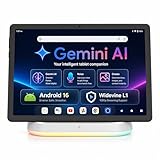


Top 3 picks at a glance
Quick Picks
| Product | Best For | Price |
|---|---|---|
| Amazon Fire HD 10 | Relaxation and media streaming | $154.99 |
| Android 16 Tablet 10 Inch | Sheer spec value | $79.99 |
| Samsung Galaxy Tab A11+ | Long-term software support | $299.99 |
| Jeazans 2026 Upgraded Android 16 | Students and families | $109.99 |
| Gleeso Tablet | Balanced mid-range features | $79.98 |
| COOPERS Tablet 10 inch | Lowest viable entry price | $54.99 |
| ECOPAD 10.1 Inch | Dual-band connectivity on a budget | $65.99 |
| Vyrolinia Tablet Android 16 | 2-in-1 keyboard bundle | $62.99 |
How We Picked
We narrowed the field on four criteria: usable RAM (minimum 4 GB for smooth multitasking), display resolution true to the spec sheet, storage headroom after system files, and manufacturer commitment to updates or warranty. Price anchored each choice relative to what the category offers, so a $55 tablet only competes with other $55 tablets.
The 8 Best Tablets 2026 For Adults in 2026
Amazon Fire HD 10 Tablet
This is the default recommendation for an adult who mostly watches video, reads books, and browses news. The 10.1-inch Full HD screen is the brightest and sharpest in this lineup at its price tier, and the octa-core chip with 4 GB RAM keeps Prime Video, Kindle, and Chrome warm simultaneously. The downside is FireOS: no native Play Store, which limits app selection to Amazon’s curated catalog. Skip this if you need full Android freedom, Gmail sync, or sideloaded productivity apps. Owners consistently praise the screen but flag the lock-screen ads that Amazon embeds unless you pay to remove them.
Android 16 Tablet 10 Inch
On paper this unit looks absurd: 24 GB of RAM and WiFi 6 at under $80. In practice, the RAM figure likely combines physical memory with virtual swap, so treat it as a headline number rather than a performance guarantee. Pros include genuinely current Android 16 and Bluetooth 5.4 for modern peripherals. The con is the unknown panel quality—HD IPS is a broad term that can mean anything from 720p to 1080p. Skip if you need guaranteed Full HD or a recognizable brand warranty.
Samsung Galaxy Tab A11+
The priciest entry here, and the only one with a named manufacturer willing to commit to multi-year security patches. Six gigabytes of physical RAM and 128 GB of internal storage give real headroom for offline media and multitasking without constant juggling. Expandable storage means you never hit a wall. The con is obvious: the price is roughly double what the closest spec rival charges, and the base resolution lags the Fire HD 10. Skip this only if budget is your absolute ceiling or if you are locked into the Amazon ecosystem.
Jeazans 2026 Upgraded Android 16 Tablet
Positioned squarely for students and parents who need one device that works for homework, streaming, and light email. The 8-core processor handles Android 16 and Gemini AI queries without stutter, and the included dock station lets you park it on a desk for video calls. Three years of protection is unusually generous in this bracket. The con is a middling display that resolves below Full HD, so text sharpness at reading distance is a step down from the Fire HD 10. Skip if you primarily consume high-resolution video and want the crispest panel available.
Gleeso Tablet
A well-rounded pick that bundles Widevine L1 certification (meaning true HD Netflix playback, not a software-downgraded stream), a 6000 mAh cell for full-day use, and split-screen multitasking. The 24 GB combined RAM figure suffers the same inflation caveat as the Android 16 entry above, but the 64 GB base storage is real. Face ID adds convenience for shared household devices. The con: the 10-inch HD display is adequate but not exceptional. Skip if you need the sharpest possible text for long reading sessions.
COOPERS Tablet 10 inch
The cheapest tablet that still runs Android and has a usable 1280×800 IPS panel. For an adult who just needs email, PDFs, and occasional YouTube, the quad-core chip and 2 GB of physical RAM are serviceable, though 8 GB total storage after system overhead will fill fast without the 1 TB expansion. The con is raw performance: app switching shows lag that pricier models hide. Skip this if you run more than two or three apps concurrently or need a tablet that feels responsive after a year.
ECOPAD 10.1 Inch Tablet
Combines a familiar 1280×800 IPS screen with the practical advantage of dual-band WiFi, which keeps connections stable on congested home networks. Google Mobile Services certification means Play Store access works out of the box. The 4+8 GB RAM labeling again implies a physical-plus-virtual split, so manage expectations on heavy multitasking. The con is the Bluetooth 5.0 radio, a generation behind WiFi 6 rivals. Skip if you rely on low-latency Bluetooth audio for calls or plan to use newer wireless peripherals.
Vyrolinia Tablet Android 16
The 2-in-1 bundle—keyboard case, mouse, and stylus included—makes this the most laptop-alike option at $63. Android 16 is current, WiFi 6 is a genuine upgrade over older radios, and the 1280×800 touch screen handles typing and handwriting recognition. The pink color option is cosmetic, but the bundle itself is the real story. The con: build quality of the keyboard case is thin by laptop standards, so it serves occasional emails rather than all-day writing. Skip if you need a dependable daily driver for serious keyboard work.
Buying Guide
RAM: What the Numbers Actually Mean
Several tablets on this list advertise 24 GB or 12 GB of RAM. In budget Android, those figures routinely combine physical memory with virtual swap stored on the slow eMMC flash. The practical question is how much genuine RAM the board carries. Four gigabytes is the floor for comfortable multitasking; six or more is where app switching stops feeling sluggish. If a listing does not state the physical RAM amount, assume the low number.
Display Resolution and Widevine Certification
HD labels vary wildly. A true 1920×1080 panel renders text and video noticeably sharper than a 1280×800 one at the same 10-inch size. Separately, Widevine L1 certification determines whether Netflix and Prime Video stream in HD or fall back to a 480p software decode. If video consumption matters, confirm L1 support in the spec sheet or owner reviews before purchasing.
Software Support and Ecosystem Lock-In
Amazon FireOS devices are easy to use but restricted to Amazon’s app store, which omits many Play Store titles. Full Android with GMS certification lets you install anything. Samsung offers the longest guaranteed update window in this price segment. Unbranded Android tablets may ship with a recent OS but receive no further patches, a real concern for anyone handling email or banking.
Our Verdict
Top pick: Samsung Galaxy Tab A11+ — the only tablet here that balances a modern OS, genuine RAM, expandable storage, and long-term security support under one recognizable brand.
Budget pick: Amazon Fire HD 10 — at $155 it delivers the sharpest screen in the group and a polished media experience that costs nothing extra to maintain.
Condition that flips the ranking: If you need a tablet that doubles as a laptop for email and documents, the Vyrolinia’s keyboard bundle wins despite its modest screen, because no other option in this price range ships one included.
FAQ
Can I use these tablets for banking and email without security risk?
Yes, provided the device runs a recent Android version and the manufacturer issues patches. Unbranded models without GMS certification may not receive updates, so enable biometric locks and two-factor authentication on every account as a baseline precaution.
Do 10-inch tablets need a protective case?
Budget tablets frequently ship without one, and the large screen is vulnerable to drops and pressure marks. A basic case costs under $10 and adds grip, making it a worthwhile first accessory regardless of which model you choose.
Is expandable storage faster than internal storage?
No. MicroSD cards typically read and write at a fraction of the speed of built-in flash, which is why streaming apps and system updates still rely on the internal partition. Use expansion for photos, videos, and downloaded documents rather than installed applications.
Can I connect a Bluetooth keyboard and mouse simultaneously?
All eight models support Bluetooth pairing, and Android allows one keyboard plus one pointer to connect at the same time. Check the Bluetooth version only if you need low-latency audio; keyboards and mice work fine on 5.0 or earlier.

