
Our Top Picks
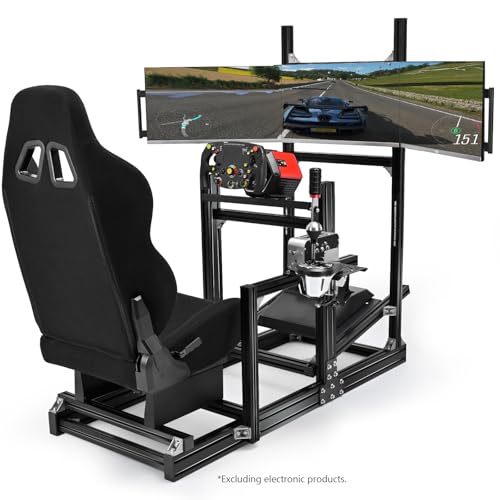
 Dardoo Racing Simulator Cockpit with Triple Monitor Stand50mm round tube51.2 x 22.4 x 66 InchesCheck on Amazon
The Short Answer
It depends on one condition: do you have the space, the PC power, and the commitment to use it regularly? If yes, a triple monitor setup is worth it for sim racing and is the single biggest upgrade for immersion and spatial awareness after a proper cockpit and wheel. If you race casually a few hours a month, lack a dedicated space, or run a mid-range PC or console without triple output, it is not worth the cost and complexity – a single ultrawide or VR headset makes more sense.
For serious hobbyists who race online multiple times per week and want to judge braking points, door-to-door battles, and apexes without button-look or virtual mirrors, triples deliver a tangible competitive advantage that a single screen cannot match. For everyone else, the expense, footprint, and setup time outweigh the benefits.
As an Amazon Associate we earn from qualifying purchases at no extra cost to you.

What You Actually Get
A triple monitor setup replaces the narrow, letterbox view of a single 16:9 screen with a panoramic field of view that wraps around you. With three 27-inch to 32-inch monitors angled at 45 to 60 degrees, you get roughly 150 to 180 degrees of horizontal vision versus about 60 to 75 degrees on a single screen. That means you see the actual side windows of the car, the car alongside your front fender, and the apex as you turn in, rather than a cropped, flat approximation.
In practical terms, most racers run three identical 1080p or 1440p monitors at 144Hz to 165Hz. A triple 27-inch 1440p setup spans about 62 to 68 inches wide when angled, and with a cockpit frame and monitor stand, the total footprint is typically 70 to 80 inches wide by 55 to 65 inches deep. Total weight for three monitors plus a heavy-duty steel or aluminum stand is 75 to 120 pounds before the cockpit itself. Power draw is also worth planning for: three gaming monitors draw roughly 90 to 180 watts combined, plus 500 to 850 watts for a PC powerful enough to drive them at 7680×1440.
To make that view seamless, you need bezel-free kits or thin-bezel monitors with bezels under 8mm, and a rigid stand that holds alignment. Budget standalone triple stands start around $149 to $249, while integrated cockpit-and-stand bundles solve alignment and flex issues out of the box. For example, the Dardoo Racing Simulator Cockpit with Triple Monitor Stand and Black Seat at around $400 combines a steel-tube cockpit rated for direct-drive wheels with an integrated triple mount that keeps all three screens at the same height and angle. The Anman Aluminum Profile Racing Sim Cockpit with Triple TV Mount at around $600 uses an 80/20 aluminum extrusion frame, which offers more rigidity and infinite adjustability for monitors up to 43 inches per panel and heavier wheel bases up to 25 Nm of torque.
In 2026, most current sims including iRacing, Assetto Corsa Competizione, rFactor 2, and Automobilista 2 support proper triple projection and bezel correction natively, so the image does not stretch unnaturally on the side monitors. You set the angle, distance to eyes, and bezel width in software once, and the sim renders three correct viewpoints instead of one stretched one.
Pros
- True spatial awareness: You can see a competitor on your left or right without looking left/right on a hat switch. This reduces side-to-side contact and makes defending and overtaking far safer and more intuitive.
- Accurate sense of speed and depth: Peripheral motion across three screens gives a much better cue for braking points and corner entry speed than a single screen, where distance compression is a common issue.
- Correct 1:1 scale and perspective: With proper FOV calculation, tracks and cars appear life-size. A 27-inch triple setup at 24 to 30 inches from your eyes reproduces a near-correct cockpit width, so apexes appear where they would in a real car.
- Competitive consistency: Most experienced drivers report 0.3 to 1.0 second per lap improvement on technical tracks after switching from single screen, not from raw speed but from fewer mistakes, better apex consistency, and earlier throttle application due to improved visibility.
- No VR trade-offs: You keep high resolution, no battery limits, no motion sickness, and you can see your button box, keyboard, and wheel display. Long endurance stints of 60 to 120 minutes are more comfortable for many drivers than in a headset.
- Multi-use value: Outside sim racing, the same setup works exceptionally well for flight sims, trucking sims, and productivity, spreading the investment beyond one genre.
Cons
- High total cost: Three decent 27-inch 1440p 144Hz monitors cost $600 to $900 total, plus $150 to $600 for a stand or cockpit with integrated mount. The full upgrade often totals $800 to $1,500 before the PC is considered.
- Demanding hardware requirements: Driving triple 1440p at 120+ fps requires a high-end GPU with 12GB to 16GB of VRAM and a modern CPU. Triple 1080p is more forgiving but still needs roughly 2.5 to 3 times the pixels of single-screen 1440p. Expect to lower settings or upgrade your GPU if you are on a mid-range card.
- Large, permanent footprint: You need a dedicated rectangle of at least 6 by 5 feet that will not move. Lightweight desks flex and wobble; a rock-solid cockpit and stand are mandatory for alignment.
- Complex setup and maintenance: You must align height, angle, and bezel gaps precisely, manage three DisplayPort cables, configure Nvidia Surround or AMD Eyefinity, and set bezel correction and triple projection in each sim. Even a 1/4-inch misalignment is obvious when a straight wall crosses bezels.
- Bezels and center seam: Even with thin-bezel monitors, you have two vertical lines in your peripheral vision. Most drivers tune them out within a week, but they never fully disappear like they do on a single ultrawide or in VR.
- Higher power and heat: Three monitors and a GPU running at 90 to 100 percent utilization will noticeably increase room temperature and electricity use during long sessions, often adding 400 to 700 watts of continuous load.
Who Should Buy It
You should buy a triple setup if you already own a dedicated sim cockpit and a direct-drive or strong belt-driven wheel base, and you race two or more times per week in competitive lobbies or leagues. It is especially valuable if you race road cars, GT3, open-wheel, or multiclass where side-by-side awareness prevents incidents and protests.
It is also the right choice if you tried VR and found it uncomfortable, or you need to be able to see your rig, take notes, or stream without taking a headset on and off. Drivers who prioritize consistency and racecraft over outright hot-lap pace benefit the most.
If you are building a permanent sim room and want a set-and-forget solution that will last 5 to 7 years, an integrated bundle like a cockpit with a built-in triple stand is a smart foundation. Aluminum profile rigs in the $500 to $900 range will handle future upgrades to heavier monitors, larger screens, or stronger wheel bases without flex.
Who Should Skip It
Skip triples if you race on a desk or wheel stand in a shared living space, or you need to fold and store your rig after each session. The daily alignment and space penalty will kill your motivation.
Skip if your PC uses a GPU below the equivalent of an RTX 4070 / RX 7800 XT for triple 1440p, or below an RTX 4060 / RX 7600 for triple 1080p, and you are not planning a GPU upgrade. You will either run at low settings or struggle to hold 60 fps, which negates the immersion advantage.
Console-only racers on PlayStation or Xbox should generally skip as well, since neither platform supports native triple output for most titles without complex adapters that add latency and limit frame rate.
Finally, skip if you race less than three hours a month or primarily play arcade racers. A single 34-inch to 49-inch ultrawide at 3440×1440 or 5120×1440 gives you 70 percent of the immersion with a fraction of the hassle and cost.
Cheaper Alternatives
| Option | Cost | Trade-off |
|---|---|---|
| Single 34-inch Ultrawide (3440×1440, 144Hz+) | $300 – $600 | Much smaller FOV than triples; no true side window view; easy setup and low GPU load. |
| 49-inch Super Ultrawide (5120×1440, 32:9) | $650 – $1,100 | Seamless image with no bezels; still less FOV and more distortion at edges than angled triples. |
| VR Headset (PCVR) | $300 – $700 | Full 360-degree 3D immersion; lower sharpness, potential motion sickness, heat, and fatigue on long stints. |
| Single 27-inch / 32-inch 1440p + TrackIR / Head Tracking | $250 – $450 + $150 for tracker | Look to apex with head movement; cheap and light but less natural than true peripheral vision. |
| Single Large TV (55-inch 4K, 120Hz) | $400 – $700 | Big, sharp image; flat, narrow FOV and no side visibility; can cause viewing distance issues in small rooms. |
FAQ
What PC specs do I need for triple monitors in sim racing?
For triple 1080p at 144Hz, aim for a CPU from the last two generations (Intel i5/Ryzen 5 or better), 16GB to 32GB of RAM, and a GPU with at least 8GB VRAM such as an RTX 4060 Ti or RX 7700 XT. For triple 1440p at high refresh, you will want 32GB RAM and a GPU with 12GB+ VRAM such as an RTX 4070 Super or higher, or RX 7800 XT or higher. Always use three DisplayPort 1.4 connections when possible for stable high refresh rates.
Is a triple 27-inch or triple 32-inch setup better?
Triple 27-inch at 1440p is the sweet spot for most rigs. It fits in a typical bedroom or office, keeps pixel density high, and is lighter on your stand. Triple 32-inch adds more vertical height and immersion but requires a much stronger stand, more GPU power, and a wider rig – total width can exceed 75 inches. If your seating distance is under 28 inches, 27-inch panels often feel sharper and easier to see across without excessive head turning.
Can I mix monitors or do they need to be identical?
They should be identical in size, resolution, and refresh rate. Mixing a 144Hz panel with a 60Hz panel or 1080p with 1440p causes stuttering, scaling issues, and uneven bezel correction that even good software cannot fully fix. Buy three of the same model with thin bezels and the same panel type (IPS or VA) for consistent color and response.
Do I need an expensive cockpit to run triples?
You need rigidity more than expense. A wobbly desk stand will sag and lose alignment every time you lean on the wheel. An integrated cockpit with a triple stand, whether a steel-tube frame around $350 to $450 or an aluminum profile frame around $500 to $850, keeps the monitors locked to the seat position so FOV never shifts. If you already have a solid cockpit, a standalone heavy-duty free-standing triple stand rated for 3x 32-inch and 60 to 90 pounds total is often enough.









