
Every buyer shopping for cool keyboards faces the same tension: you want something that turns heads on your desk and feels satisfying under your fingers, but a surprising number of boards sacrifice one goal for the other. A keyboard with an aggressive RGB glow or a retro typewriter shell means nothing if the switches bottom out with a hollow clack or the keycaps wear shiny within a month. The real question is whether the design language supports actual typing, not just a product photo.
What separates the worthwhile options from the disappointments comes down to switch quality, cap material, layout intelligence, and how well a board earns its price tag. A $28 wireless board with pre-lubed switches can outperform a $70 board that ships with scratchy stock stems and ABS caps that look greasy after two weeks. This roundup covers eight cool keyboards spanning wired and wireless builds, typewriter aesthetics and modern 75% layouts, all at prices that make them realistic upgrades rather than aspirational purchases.
As an Amazon Associate we earn from qualifying purchases at no extra cost to you. Product prices and availability are accurate as of the date shown and are subject to change.


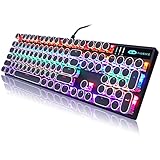
Top 3 picks at a glance
Quick Picks
| Product | Best for | Price |
|---|---|---|
| Womier SK80 | Visual personality with a multimedia display | $51.29 |
| AULA S99 | Wireless typing on a tight budget | $27.99 |
| RK S108 | Retro typewriter look with full number pad | $59.99 |
| AULA F75 Pro | Hot-swappable customization with triple connectivity | $69.99 |
| TECKNET Wired | Lowest entry price with a metal panel feel | $26.99 |
| AULA F2088 | Typewriter style with a media control knob | $48.99 |
| AULA F99 | Creamy switch sound in a near-full layout | $69.99 |
| Camiysn Typewriter | Retro punk round keycaps at a sub-$40 price | $35.98 |
How We Picked
Three criteria drive every selection here. First, switch character and sound profile, because a board marketed as cool earns that label through tactile and auditory personality, not just lighting. Second, layout practicality, since a 75% or 96% arrangement that eliminates a number pad or crams arrow keys into awkward positions will frustrate anyone who switches between gaming and spreadsheet work. Third, value relative to price, which means asking whether a board delivers build quality and features that justify its sticker over a cheaper competitor. Connectivity mode matters too, but only when it comes without a significant cost jump.
The 8 Best Cool Keyboards in 2026
Womier SK80
The SK80 is the pick for anyone who wants their keyboard to do more than sit passively on the desk. The built-in color multimedia display can show custom images, audio levels, or system stats, giving it a visual identity that no static RGB strip can match. The 75% layout keeps your mouse close while retaining arrow keys and a dedicated function row.
- Pro: The multimedia display adds genuine desk personality without requiring external software always running.
- Pro: 75% layout balances compactness with usability for mixed work-and-gaming setups.
- Con: The display consumes battery quickly in wireless mode, pushing you toward a wired connection for daily use.
Skip this one if you refuse to keep a cable nearby or if the screen is a gimmick you would never configure.
AULA S99
At under $28, the S99 is the cheapest way to get a wireless mechanical feel without settling for membrane mush. The creamy switch tuning gives it a sound character that boards twice its price sometimes fail to achieve. It targets students, secondary-desk buyers, or anyone curious about wireless mechanical keyboards who does not want to spend $70 to find out.
- Pro: Creamy switch sound and feel at a price that is genuinely hard to beat.
- Pro: Wireless connection frees desk space without adding cable clutter.
- Con: Keycap quality and legends are basic, and the overall build lacks the heft of more expensive boards.
Skip this one if you need PBT keycaps, hot-swap sockets, or a premium case material.
RK S108
The S108 leans into typewriter nostalgia with round keycaps and a detachable wrist rest, making it one of the most visually distinctive cool keyboards on this list. The 108-key layout includes a full number pad, so spreadsheet and finance work are not sacrificed for aesthetics. Blue switches deliver the clicky, tactile feedback that typewriter enthusiasts expect, and the RGB sidelight adds a glow that complements the retro shell rather than contradicting it.
- Pro: Full-size layout with number pad eliminates the compromise of compact boards.
- Pro: The round keycap design is bold and immediately recognizable on a desk.
- Con: Blue switches are loud enough that shared-office use will draw complaints.
Skip this one if you need a quiet typing partner or prefer a low-profile, slim aesthetic.
AULA F75 Pro
The F75 Pro is the customization king of this group. Hot-swappable sockets mean you can change switch types without soldering, the rotary knob handles volume or zoom with a single twist, and pre-lubed Reaper switches deliver a smooth, consistent feel out of the box. Triple connectivity via 2.4GHz, USB-C, and Bluetooth 5.0 lets you move between a desktop, laptop, and tablet without unplugging anything. Side-printed PBT keycaps resist shine far longer than the ABS caps found on cheaper boards.
- Pro: Hot-swap sockets plus pre-lubed switches mean you can tune the feel without opening the case or soldering.
- Pro: Three wireless and wired modes cover every device you own.
- Con: At $69.99 it is the most expensive board here, and the 75% layout drops the number pad permanently.
Skip this one if your workflow requires a dedicated number pad or if $70 stretches your budget too thin.
TECKNET Wired
The TECKNET is the floor-priced entry in this roundup and the only board here that leans on a metal panel rather than a full plastic case. That construction gives it a sense of weight and stability that all-plastic boards under $30 rarely match. RGB backlighting is straightforward, and the wired connection means zero latency concerns for competitive gaming.
- Pro: Metal panel design adds rigidity and a premium look at the lowest price in the group.
- Pro: Wired-only eliminates battery anxiety and input lag entirely.
- Con: Switch quality is average, and the board is not mechanical, so it lacks the tactile depth of the others here.
Skip this one if you want the click and feel of genuine mechanical switches or need wireless flexibility.
AULA F2088
The F2088 combines a typewriter-style round keycap design with a media control knob and a removable wrist rest, making it a practical choice for people who want the retro look without losing modern convenience. Blue switches provide the same clicky feedback as the RK S108, and the 104-key layout covers gaming and productivity without a number-pad gap. At $48.99 it undercuts both the RK and the AULA F99 while delivering a similar visual impact.
- Pro: The media knob adds quick volume and playback control without reaching for the mouse or keyboard shortcuts.
- Pro: Round keycaps with a removable wrist rest make it comfortable for long sessions without committing to permanent accessory clutter.
- Con: The rainbow LED backlighting is a fixed pattern rather than true per-key RGB, limiting customization.
Skip this one if you need per-key lighting control or software-driven macro programming.
AULA F99
The F99 occupies the 96% space, which means it keeps a number pad while shaving off the function row and media keys to stay narrower than a full-size board. That compromise makes it the best pick here for anyone who genuinely needs a numpad but does not want to give up desk width for a 108 or 104-key layout. The creamy switch sound is the board’s main selling point, and it delivers a satisfying, muted thock that appeals to people who find clicky blue switches too aggressive.
- Pro: 96% layout retains a number pad in a noticeably more compact footprint than full-size boards.
- Pro: Creamy, deep switch sound provides tactile satisfaction without the high-pitched click of blue switches.
- Con: The removed function row means you rely on the Fn layer for F-keys, which takes adjustment.
Skip this one if you use F-keys constantly without an Fn modifier, such as for video editing shortcuts or specialized software.
Camiysn Typewriter
At $35.98 the Camiysn delivers the typewriter and retro punk aesthetic for significantly less than the RK S108. Round keycaps, blue switches, RGB backlighting, and a 104-key wired layout make it a credible alternative for buyers who love the look but balk at paying $24 more. Compatibility spans Windows and Mac, though Mac support is limited to basic typing rather than media-key functionality.
- Pro: The retro round-keycap design is a standout visual at a price that leaves budget for a good mousepad.
- Pro: Wired connection and 104-key layout mean no battery worries and full number-pad access.
- Con: Build materials and switch quality are noticeably a step below the RK S108, which costs more for reasons beyond branding.
Skip this one if you want a tactile typing experience that rivals premium boards or plan to use this daily for many hours.
Buying Guide
Switch Type and Sound Profile
The switch under each keycap determines whether your board clicks, thocks, or stays silent. Blue switches are tactile and loud, ideal for typewriter-style boards where the sound is part of the appeal but wrong for open offices. Creamy or linear-tuned switches produce a deeper, muted sound that feels more controlled and is generally preferred for shared spaces. Pre-lubed switches, like those in the AULA F75 Pro, eliminate factory stem scratch out of the box, which is a meaningful quality indicator at this price tier.
Layout and Connectivity Tradeoffs
A 75% layout saves roughly an inch of desk width compared to a 96% board but removes the number pad entirely. If you enter data, manage finances, or play games that use numpad bindings, that tradeoff will sting within a week. On the connectivity side, wireless boards with 2.4GHz and Bluetooth give you flexibility, but each radio mode can introduce a small latency bump compared to wired. For gaming specifically, the difference is marginal on modern 2.4GHz links but worth considering if you play at the highest competitive level.
Keycap Material and Build Quality
PBT keycaps resist oil and shine far longer than ABS caps, which means legends remain legible and surfaces stay matte after months of use. Side-printed keycaps, like those on the AULA F75 Pro, add a visual accent but can feel different to clean. The case material matters for stability too: a metal panel or heavy plastic base prevents the board from sliding during intense sessions, while ultralight shells rock on the desk with each keystroke.
Our Verdict
The AULA F75 Pro is the top pick among these cool keyboards. It combines hot-swappable sockets, pre-lubed switches, triple connectivity, PBT caps, and a rotary knob into a package that has no meaningful compromise for the price. The budget pick is the AULA S99, which delivers wireless mechanical feel and a creamy sound profile for less than $28. However, if you need a number pad and a typewriter shell in the same board, the RK S108 wins that specific comparison because its full 108-key layout and build quality leave nothing desired on the feature front.
FAQ
What makes a keyboard “cool” beyond RGB lighting?
Distinctive case shapes, round or sculpted keycap profiles, multimedia displays, rotary knobs, and switch sound character all contribute to personality without relying on lighting. A board that looks like nothing else on a desk earns the label more effectively than one that simply glows in twelve colors.
Are wireless mechanical keyboards good enough for competitive gaming?
Modern 2.4GHz wireless links introduce latency measured in fractions of a millisecond, which is imperceptible in practice and comparable to wired. Bluetooth mode adds more delay and is better suited to productivity than fast-twitch gaming, so use 2.4GHz or USB-C when playing.
Do I really need hot-swap sockets?
Only if you want to change switch types without soldering or plan to try multiple stem profiles over time. For a first mechanical keyboard, hot-swap is a nice future-proofing feature but not essential, and boards without it are often cheaper for identical out-of-box performance.
How loud are typewriter-style keyboards?
Boards with blue switches and round keycaps typically produce a sharp, high-pitched click that carries across a quiet room and is clearly audible to anyone within several feet. If noise sensitivity matters, seek linear or creamy-tuned switches instead, which generate a lower-frequency sound that dissipates faster.


