The best docking station for dual monitors is the one whose video claim, power delivery and host requirements all match your specific laptop, not the one with the longest port list. A dock that advertises two HDMI outputs can still show a mirrored picture if the laptop’s USB-C port cannot split its signal, and a dock that cannot charge your laptop turns a tidy desk into a cable hunt. The nine listings below run from compact hub-style adapters to a premium dock built for several displays.
The Dell WD25 and the Anker Prime sit at the confident, premium end of the set, while the UGREEN and Anker 8-in-1 are the value anchors. Titles can overstate what two screens will do, so run the checks below before you buy.
Our Top Picks
 Plugable USB 3.0 Universal Laptop Docking StationDual Display6.4 x 3.2 x 4 inches0.8 PoundsCheck on Amazon
Top picks at a glance

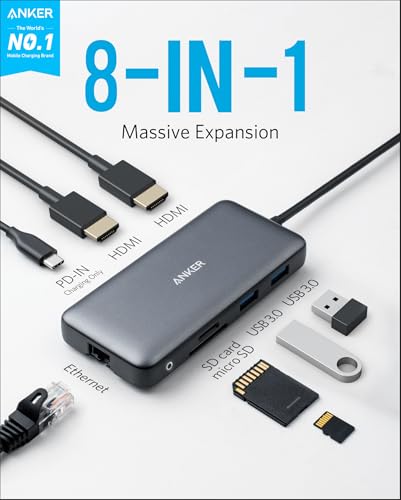
Anker Laptop Docking Station Dual Monitor, 8-in-1 USB C Hub with 4K HDMI | Dual HDMI USB C Dock, 1Gbps Ethernet, 85W Max PD, SD/TF Card Reader, for USB C Laptops, XPS and More (Charger Not Included)


As an Amazon Associate we earn from qualifying purchases. Product prices and availability are accurate as of the date/time indicated.

Selore USB C Docking Station Dual Monitor, USB C to Dual HDMI Adapter | Dual 4K@60Hz HDMI Ports, PD Charging, SD/microSD, USB A&C 3.0 Ports,Laptop Docking Station for Dell XPS/HP/Lenovo/Surface etc


As an Amazon Associate we earn from qualifying purchases. Product prices and availability are accurate as of the date/time indicated.
Plugable USB 3.0 Universal Laptop Docking Station, Dual HDMI Monitor | for Windows and Mac (Driver Required), USB 3.0 or USB-C, 2x HDMI, Gigabit Ethernet, Audio, 6 USB Ports UD-3900


As an Amazon Associate we earn from qualifying purchases. Product prices and availability are accurate as of the date/time indicated.

Dell Pro Laptop Docking Station WD25, USB-C, 100W, DisplayPort, HDMI | Universal Dock, Ethernet, USB-A Ports, USB-C Ports, Power Delivery Charging, Quad Display, Plug and Play, Office Ready, WD25


As an Amazon Associate we earn from qualifying purchases. Product prices and availability are accurate as of the date/time indicated.

USB C Docking Station Dual Monitor for HP,Laptop Docking Station 3 Monitors | USB C Hub Quad Display USB C Adapter to 4K HDMI+DP+VGA,3USB 2.0,PD,USB C Dock Dongle 8 in 1 Computer Docking Station for Dell


As an Amazon Associate we earn from qualifying purchases. Product prices and availability are accurate as of the date/time indicated.

Anker Prime Docking Station, 14-in-1 Laptop Docking Station Dual Monitor | Dual 4K HDMI, 160W Max Output, 10Gbps Data Transfer, Smart Interface, Audio and Ethernet Ports for Dell, HP, Lenovo and More



As an Amazon Associate we earn from qualifying purchases. Product prices and availability are accurate as of the date/time indicated.

UGREEN USB C Docking Station Dual Monitor, 7-in-1 Aluminum Dock with 2xHDMI | Dual 4K@60Hz, 4x10Gbps USB-A&C Data Port, 100W PD, Revodok Pro Laptop Docking Station for HP, Thinkpad, Dell and More Laptop


As an Amazon Associate we earn from qualifying purchases. Product prices and availability are accurate as of the date/time indicated.

Acer USB-C Docking Station Dual Monitor, 9-in-1 Laptop Dock with 2 HDMI | Laptop Docking Station with 4K@60Hz HDMI, USB A&C 3.0, SD/Micro SD, 100W PD Compatible with Acer/Dell XPS/HP/Mac (0.65FT)




As an Amazon Associate we earn from qualifying purchases. Product prices and availability are accurate as of the date/time indicated.

MOKiN Laptop Docking Station Dual Monitor 4K HDMI USB C Hub for Dell/HP/Mac | 14-in-1, 2 HDMI 2 DP,Triple 4K, 87W PD, Ethernet, SD/TF Card Reader, Turn off Screen Button, USB C Dock for Laptop, MacBook


As an Amazon Associate we earn from qualifying purchases. Product prices and availability are accurate as of the date/time indicated.
| Model | Key point from the title | Price tier | Best for |
|---|---|---|---|
| Anker 8-in-1 Dual Monitor Dock | 4K HDMI plus second HDMI, 85W max PD, charger not included | Budget | Light office laptops |
| Selore USB C Docking Station | Dual 4K@60Hz HDMI claim, PD, SD/microSD | Budget | Cheap two-screen starter |
| Plugable UD-3900 | Driver required, 2x HDMI, Gigabit Ethernet, 6 USB ports | Mid-range | Mac and older laptops |
| Dell Pro WD25 | 100W, DisplayPort and HDMI, quad display claim | Premium | Managed office fleets |
| HODO 8-in-1 Dock | 4K HDMI + DP + VGA, three or four screen claim | Budget | Legacy VGA monitors |
| Anker Prime 14-in-1 | Dual 4K HDMI, 160W max output, 10Gbps data | Premium | High-wattage laptops |
| UGREEN Revodok Pro 7-in-1 | 2 HDMI at 4K@60Hz, 4 x 10Gbps ports, 100W PD | Budget | Fast peripherals on a budget |
| Acer 9-in-1 Dock | 2 HDMI, 4K@60Hz HDMI, 100W PD compatible, 0.65FT cable | Mid-range | Portable travel desks |
| MOKiN 14-in-1 Dock | 2 HDMI + 2 DP, triple 4K claim, 87W PD, screen-off button | Budget | Three-screen experiments |
What is changing in dock buying
USB-C video has gotten confusing because one connector now carries power, data and several video modes. Docks in this category divide into three families: DisplayPort Alt Mode docks that rely on the laptop’s own video engine, DisplayLink-style docks that render over USB with a driver, and Thunderbolt or USB4 docks with the largest link budget. Nothing in a listing title tells you which family you are buying, so the host laptop’s specification sheet matters as much as the dock’s.
Display counts are also stretching. Titles now advertise triple and quad display setups, but those numbers usually describe the dock’s maximum output under ideal conditions, often at reduced refresh rates or with the laptop supporting multi-stream transport. Treat anything beyond two screens as something to confirm against your laptop manual.
How we picked these
We worked from published specifications, manufacturer documentation and buyer reviews, and we kept only products that call themselves a dock or dual-display hub. Nobody on the team used or measured these units. Where a title is vague or oversells, we say so in the entry.
The nine docks, one by one
Anker Laptop Docking Station Dual Monitor, 8-in-1 USB C Hub
The title offers a 4K HDMI plus a second HDMI, 1Gbps Ethernet, an SD/TF card reader and up to 85W of pass-through power, with the note that the charger is not included. That last point matters: you must plug your own USB-C charger into the dock for the laptop to charge through it. It reads as a hub-style adapter, so the sensible use case is a thin-and-light laptop at a desk with two ordinary monitors and an Ethernet cable.
It suits a student or remote worker who wants one cable from laptop to desk. Check the listing for what resolution each HDMI port supports when both are in use.
A realistic scene: a thin laptop on a shared desk, two 1080p office monitors, a wired network jack and a phone on the same cable run. The question to ask before buying is whether both HDMI ports run at the same time at your monitors’ native resolution, because the 4K label on one port does not promise the same for the other.
Pros
- 85W pass-through covers most 65W ultrabook chargers
- Ethernet and card reader in a small body
- Anker name is easy to cross-check for support
Cons
- Charger not included, so cost and clutter rise
- Dual-screen refresh rates are not spelled out in the title
Selore USB C Docking Station Dual Monitor, USB C to Dual HDMI Adapter
Selore leads with dual 4K@60Hz HDMI, PD charging, an SD/microSD slot and USB-A and USB-C 3.0 ports. The dual 4K60 claim is the ambitious part, since a hub of this type typically shares one USB-C video link between both outputs. Treat it as a headline number and look in the listing for fine print about single versus dual screen modes.
It is the cheapest entry that still claims two high-refresh outputs, so it fits someone deciding whether a dual monitor desk is worth a permanent investment. Titles that mix “adapter” and “dock” usually signal a small cable-mounted unit.
In a small home office with two ordinary 1080p screens, a dock like this would handle email, browsing and video calls. The question to ask before buying is what the laptop will actually charge at, since the title says only PD. If your laptop needs more than the stated wattage, it may charge slowly while docked.
Pros
- Low entry cost for a two-HDMI dock
- Dell, HP, Lenovo and Surface named as targets
Cons
- Dual 4K@60Hz is the kind of claim worth verifying
- PD wattage is not stated in the title
- Little protection from brand recognition if support is needed
Plugable USB 3.0 Universal Laptop Docking Station, Dual HDMI (UD-3900)
This is the driver-based option. The title says Windows and Mac, driver required, USB 3.0 or USB-C connection, two HDMI ports, Gigabit Ethernet, audio and six USB ports. That structure means it does not depend on your laptop splitting a DisplayPort signal, which is why it is a common answer when a Mac only offers a single external display natively. The trade is a software install and compressed video.
Note that the title does not mention laptop charging, so assume you keep your own charger plugged into the laptop. It suits office work, spreadsheets and video calls more than fast games.
A typical scene is a Mac laptop used for accounting work with two matching monitors, where steady text rendering matters more than frame rate. The question to ask before buying is whether your operating system version and your IT policy allow the driver, because without it the dock is just a port bar with no extra screen.
Pros
- Works around host limits on external displays
- Six USB ports and wired Ethernet
Cons
- Driver required, which locked-down work laptops may block
- No charging mentioned in the title
- Not the pick for motion-heavy gaming
Dell Pro Laptop Docking Station WD25
Dell’s listing states a 100W USB-C dock with DisplayPort and HDMI, Ethernet, USB-A and USB-C ports, power delivery charging, quad display capability and plug-and-play use. It is the office-ready end of the set and likely the safest bet for Dell business laptops because the vendor controls both ends of the connection.
The quad display line refers to the dock’s capability, and what your laptop supports will be lower. A WD-series dock is also the more practical choice if you manage several identical laptops. Check which Dell and non-Dell models the listing lists as compatible.
Picture a hybrid worker who carries one laptop between home and office and wants identical desks in both places. A dock like this is built for that routine: land, plug one cable, work. The question to ask before buying is how many of the quad display outputs your own laptop can drive, since that number comes from the laptop, not the dock.
Pros
- 100W power for sizeable work laptops
- Both DisplayPort and HDMI outputs
- Vendor-backed support path
Cons
- Premium tier for an office-class feature set
- Quad display depends on your host laptop
USB C Docking Station Dual Monitor for HP, Laptop Docking Station 3 Monitors (HODO)
The title packs in a lot: 3 monitors, quad display, 4K HDMI plus DP plus VGA, three USB 2.0 ports, PD and 8-in-1. Some of those claims contradict each other, which is a flag. A listing that promises both dual and triple and quad displays is describing combinations, and the real limit depends on the laptop’s MST support.
The inclusion of VGA makes it useful if you still own an older monitor. USB 2.0 ports are slow for external drives, but fine for keyboard and mouse.
A fitting scene is an older office with a VGA monitor next to a newer HDMI panel, where nobody wants to buy another screen. The question to ask before buying is the real display limit with your laptop. If the seller cannot say how the three and four screen claims combine, assume two screens and treat anything extra as a bonus.
Pros
- VGA output for older displays
- Low cost with many video connectors
Cons
- Marketing claims are inconsistent, so verify before relying on three screens
- USB 2.0 ports cap peripheral speed
- Typo-style title wording makes the exact feature list unclear
Anker Prime Docking Station, 14-in-1
The headline is dual 4K HDMI, 160W max output, 10Gbps data transfer, audio, Ethernet and a “smart interface.” The wattage is the notable part: 160W makes it a candidate for larger laptops that ship with big chargers. At 14-in-1 it also has the port count to anchor a full desk.
It is the priciest here after Dell and aimed at buyers who want a single cable and enough power for demanding laptops. Whether that 160W is split across laptop charging and USB device charging is a question for the listing.
Think of a creator laptop with a big charger, two monitors, an external SSD and a microphone interface, all landing on one cable. The question to ask before buying is how the 160W is shared between the laptop and charging ports, and whether your laptop negotiates the highest PD profile with this dock. Also confirm which cable ships in the box.
Pros
- 160W max output
- 10Gbps data ports and many connectors
Cons
- Premium tier
- Dual 4K only, so not for three-screen plans
UGREEN USB C Docking Station Dual Monitor, 7-in-1 Aluminum (Revodok Pro)
UGREEN lists two HDMI ports at 4K@60Hz, four 10Gbps USB-A and USB-C data ports and 100W PD in an aluminum body. For the money, the 10Gbps ports and 100W are the stand-out numbers, and aluminum helps with heat. Seven ports is lean: no Ethernet is named in the title.
It fits creators who plug in fast SSDs and want charging through the dock. As with the other dual 4K60 claims, confirm the host laptop can support it.
The use-case is a developer or editor moving files from a fast SSD while two monitors stay lit. Four 10Gbps ports reduce the need for a second hub. The question to ask before buying is whether the video link and the data ports compete when all are busy, since a shared connection can slow one or the other.
Pros
- Four fast data ports
- 100W PD
- Metal housing
Cons
- No Ethernet in the title
- Dual 4K60 depends on the laptop
Acer USB-C Docking Station Dual Monitor, 9-in-1
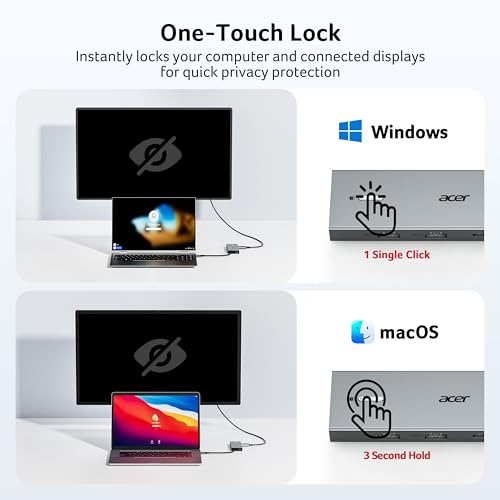
Acer’s listing gives 2 HDMI, 4K@60Hz HDMI, USB-A and USB-C 3.0, SD and microSD, and 100W PD compatibility on a short 0.65FT cable. That short cable is a design choice: the unit hangs close to the laptop, which suits a travel bag but may force the dock to sit awkwardly on a desk.
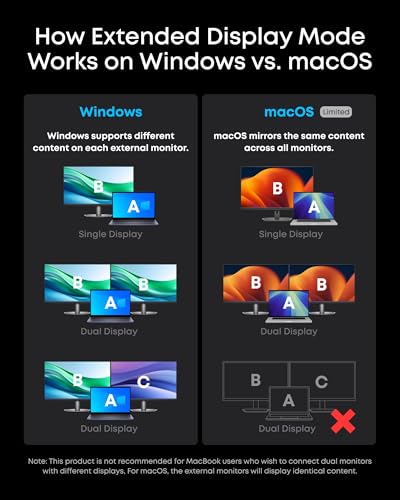
The title names Acer, Dell XPS, HP and Mac. For Mac, the same display-mode caveat applies as for all HDMI-splitting hubs. It is a portable choice for someone moving between a home and a coworking desk.
Imagine a consultant who works from a spare desk at a client site two days a week. A dock on a short cable rides in a bag easily and plugs into any pair of HDMI monitors. The question to ask before buying is whether your laptop USB-C port supports video output at all, since some ports are data and charging only.
Pros
- Compact travel format
- 100W PD compatibility named
Cons
- Short cable limits placement
- Mac behavior needs confirmation
MOKiN Laptop Docking Station Dual Monitor, 14-in-1
MOKiN lists 2 HDMI, 2 DP, a triple 4K claim, 87W PD, Ethernet, an SD/TF reader and a turn-off screen button. The odd standout is that button, which turns off the dock’s video outputs without unplugging. The port count suggests more outputs than most laptops can drive at once.
The triple 4K statement needs a laptop with the right multi-stream support. 87W PD is enough for most mid-range laptops. For buyers curious about three screens, this gives the most connectors for the least money, and the most to verify.
This is the dock for the tinkerer who wants to see what a laptop can drive. The screen-off button is helpful when you want the monitors dark without pulling the cable. The question to ask before buying is the exact combination of ports that can run together, because four video sockets rarely all work at full resolution at the same time.
Pros
- Four video ports and Ethernet
- Screen-off button is practical
Cons
- Triple 4K claim is easily over-read
- 87W stops short of big gaming laptops
Which dock for which user
| User | Look at | Why |
|---|---|---|
| Windows ultrabook, 65W charger | Anker 8-in-1, UGREEN, Acer | 85-100W pass-through covers it |
| Mac with a single native external display | Plugable UD-3900 | Driver-based video avoids the host limit |
| Managed Dell fleet | Dell WD25 | Same-vendor support and 100W |
| High-wattage workstation laptop | Anker Prime 14-in-1 | 160W ceiling |
| Old VGA monitor in the mix | HODO | Only title with VGA |
| Three-screen curiosity | MOKiN | Most video ports; confirm host support |
Buying guide: bandwidth, power and host rules
Match the link to the screens
USB-C carries video as DisplayPort Alt Mode, and the lanes are shared with USB data. A common arrangement gives video two lanes and USB 3 the other two, or all four lanes to video when no fast USB is used. Two lanes of the DisplayPort 1.4 spec carry roughly 13 Gbps of data, which is about one 4K60 stream, so a dock claiming dual 4K60 should either use four lanes, use compression, or rely on a host that provides both.
Check the power math
Take the laptop’s original charger wattage, add a margin and compare to the dock’s PD figure. The dock also keeps a share for itself and its connected devices.
Look at the host side
Laptop makers publish how many external displays and what resolution they support over USB-C. That page beats any dock title. Thunderbolt hosts have more headroom than plain USB-C hosts.
| Spec concept | What to look for | Why |
|---|---|---|
| Video family | DP Alt Mode, DisplayLink or Thunderbolt | Decides host compatibility and motion quality |
| PD wattage | Above the laptop charger rating | Prevents slow or no charging |
| Refresh rate with two screens | A figure for dual mode, not just single | Dual modes often drop |
| Data ports | 10Gbps for SSDs, USB 2.0 for input only | Prevents slow drives |
| Cable length | Matches desk layout | Short cables force awkward placement |
Worked example: two 4K monitors and a 65W laptop
These are estimates with stated assumptions, not readings. Assume two 4K monitors at 60Hz with 8-bit color and a laptop with a USB4 or Thunderbolt port supporting a full four-lane DisplayPort 1.4 link. One uncompressed 4K60 stream needs about 12.5 Gbps including blanking. Two need about 25 Gbps. A four-lane DP 1.4 link offers roughly 25.9 Gbps of data after encoding.
| Item | Assumption | Result |
|---|---|---|
| Two 4K60 streams | 8-bit, standard blanking | About 25 Gbps |
| Four-lane link | No USB 3 data on those lanes | Fits, with little headroom |
| Two-lane link | Lanes shared with USB data | Only one 4K60 fits |
| Laptop charger | 65W | Needs a 85W+ dock, plus your own charger if the dock needs one |
So the dual 4K60 claim holds only on the best host and link. On a two-lane laptop, drop the second screen to 1080p or 30Hz. For different monitor sizes, see setting up dual monitors with different sizes, and if the refresh rates differ, this mismatched refresh rate guide helps.
Mistakes buyers make
| Mistake or symptom | Likely cause | Fix |
|---|---|---|
| Both screens show the same image | Host lacks multi-stream support | Choose a DisplayLink-style dock or change laptop port |
| Laptop battery drains while docked | PD too low or charger missing | Use a dock with enough wattage and plug in the supplied power |
| Flicker at 4K | Cable or port limit | Use the shortest included cable, reduce refresh rate |
| Dock gets warm and drops out | Heat and load | Give it airflow, avoid stacking |
| Screens misaligned on the desk | Different sizes or heights | See the alignment guide |
Another common one is trusting a port count. Fourteen ports do not matter if the video claim is one screen at 4K30. A desk that holds two screens also benefits from the right layout, such as an L-shaped desk sized for dual screens or a single dual-monitor arm.
Verdict by use case
For the safest office setup, the Dell WD25 or Anker Prime. For a budget starter, the UGREEN Revodok Pro or the Anker 8-in-1. For a Mac that only allows one native external display, the Plugable UD-3900. For legacy screens, HODO. For three screens, treat the MOKiN as an experiment and confirm your laptop first.
Frequently asked questions
Will any USB-C dock run two monitors from my laptop?
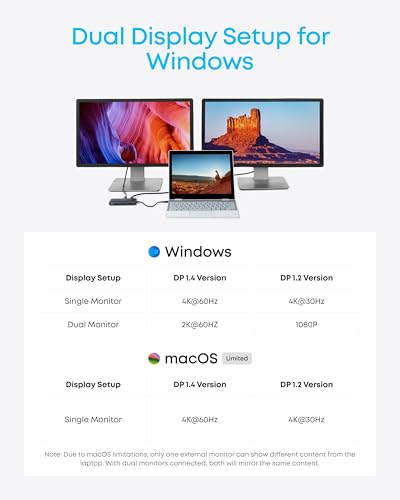
No. The laptop’s USB-C port has to carry DisplayPort video, and the host has to support splitting that signal across two outputs or use a driver-based dock. Many budget dual-HDMI docks show two different screens on Windows but fall back to mirroring on some Macs. Check your laptop maker’s external display limits first, then the dock’s stated resolution and refresh rate for two screens.
What does 100W PD on a dock actually mean for my laptop?
It is the maximum power the dock can pass through to the laptop, and real delivery is lower because the dock itself draws some. Match it to your laptop’s original charger rating with a margin. A 65W laptop is comfortable on an 85W or 100W dock, while a 140W gaming laptop will charge slowly or not at all on a smaller one. Some listings also need your own charger plugged in.
Do I need a DisplayLink dock?
Only if your laptop cannot output two independent screens over USB-C, which is common on some Macs and older ultrabooks. DisplayLink docks compress video through a USB connection and need a driver installed. They are flexible on host compatibility, but they are a poor fit for fast gaming, and some corporate laptops block driver installs. For office work and video calls they are usually fine.
Is a dual 4K@60Hz claim realistic on a budget dock?
It can be, but only when the host and cable provide a full four-lane DisplayPort link and the dock does not split those lanes with USB data. A dock that lists 4K60 on both outputs is making a specific claim worth checking against your laptop’s port specification. Many listings give 4K60 on one screen and a lower refresh rate when both are in use.
Can I game on a docking station setup?
Light and esports titles are workable if the dock passes through a full-speed video link and your laptop charges adequately. The dock does not add graphics power, so the laptop’s GPU still limits what you see. For a dedicated gaming laptop, plug the primary monitor straight into the laptop’s own HDMI or DisplayPort output and use the dock for peripherals and a second screen.
Dock or USB-C hub: what is the difference?
There is no formal line, but docks usually mean a larger unit with its own power input, more ports and steadier charging, while hubs are small cable-attached adapters that run on laptop power. Several budget picks here are hub-style devices marketed as docks. Treat the label loosely and compare the video outputs, power delivery and port counts stated in the listing.