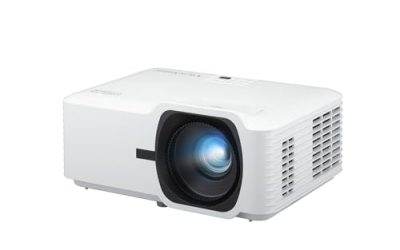
A church projector has a harder job than a living room one. It has to throw lyrics, sermon slides, announcements and sometimes video across a sanctuary or fellowship hall, often with the lights partly on, and it has to do that every week for years without a volunteer needing to troubleshoot it. That changes the shopping list. Brightness, light-source life, mounting flexibility and reliable inputs matter far more than the streaming apps and speaker quality that sell consumer projectors.
This guide is for church tech teams, small-congregation administrators and anyone setting up a chapel, youth room or fellowship hall in 2026. The six models below are bright installation or classroom-class projectors from Epson, ViewSonic and Optoma. Two smart consumer projectors in the same search results were left out because home-theater features are not what a worship space needs. Treat the notes as a shortlist based on the listed specs, then measure your room before ordering.
Our Top Picks

Top 3 picks at a glance
Quick Picks
As an Amazon Associate we earn from qualifying purchases at no extra cost to you.




| Product | Best for | Key spec from the title |
|---|---|---|
| Epson EX3290 | Small chapels and classrooms | 4000 lumens, WXGA, built-in speaker, 2x HDMI |
| Epson Pro EX11000 | Sanctuary with wireless sharing | 4600 lumens, 1080p laser, Miracast |
| Epson PowerLite E20 | Basic text-and-slide use | LCD, 4:3, ceiling mountable |
| ViewSonic LS741HD | Flexible installation | 5000 lumens, 1080p laser, LAN control |
| Epson PowerLite L790U | Large rooms and long service life | 1920 x 1200, 20000-hour normal mode |
| Optoma EH412 | Budget-conscious 1080p setup | 4500 lumens, 1080P HDR, 15000-hour lamp |
How to Choose
Start with room size and ambient light
Sanctuaries rarely go fully dark, and stained glass or windows can wash out a weak image. As a rule of thumb, a fellowship hall or classroom with a screen around 100 inches does fine with about 3000 to 4000 lumens, while a larger sanctuary with a 150-inch screen or bigger benefits from 5000 lumens or more. Look for projectors that list both color and white brightness, because color brightness is what keeps images from looking pale.
Match resolution to the content you show
If your congregation mostly sees lyrics and slides, WXGA (1280 by 800) is serviceable, and 1920 by 1200 WUXGA gives extra desktop space for presentation software. If you also stream services, show video announcements or camera feeds, 1080p is the sensible baseline. Skip 4K unless you have a source that actually delivers it; a sanctuary seats viewers far enough away that the extra pixels rarely show.
Weigh the light source and maintenance load
A lamp rated for 15000 hours is respectable, but replacing lamps is a recurring task for a volunteer team. Laser light sources and long-life lamp ratings reduce that burden; a 20000-hour normal-mode rating, as listed for one Epson here, means years of weekly use before service. If your budget is tight, a lamp model with an easy replacement process is acceptable, but note the cost of spare lamps.
Plan for installation, inputs and control
Verify ceiling-mount support, optical zoom range and keystone correction, since a sanctuary projector often sits far from the screen at a tilt. Two HDMI ports let you keep a laptop and a media switcher connected; LAN control helps a tech team manage the unit from a booth. Ignore features such as built-in streaming apps. Budget models cut corners on zoom range and lens shift, which can force awkward mounting.
One more consideration is the screen itself. A bright projector aimed at a poor screen still produces a dull image, and a screen mounted high on a platform wall changes the throw geometry. Measure the distance from the planned mounting point to the screen, then compare it with each projector’s zoom range before you decide. Also think about who will operate it: a volunteer rotation does better with a short list of obvious inputs, a clear on-screen menu and a remote that does not require a manual.
The 6 Best Options
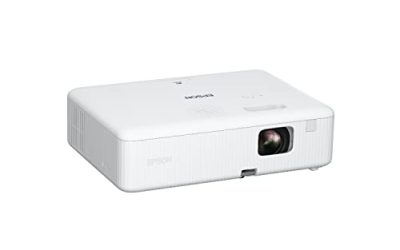
Epson EX3290
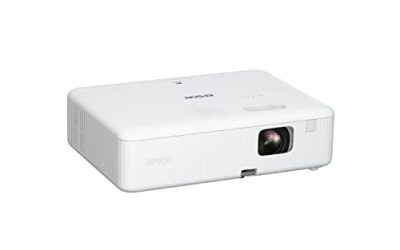
The EX3290 is a 3-chip 3LCD WXGA projector with a built-in speaker, 4000 lumens of both color and white brightness, and two HDMI ports. It fits a small chapel, youth room or classroom where text, lyrics and slides are the main content.
- Equal color and white brightness at 4000 lumens helps slides stay readable with lights on.
- Two HDMI ports and a built-in speaker simplify a simple small-room setup.
- Trade-off: WXGA resolution is lower than 1080p, so detailed video looks less crisp.
Skip it if you stream services with fine detail on a large screen or need a mid-size sanctuary projector with more light. It makes the most sense where the screen is modest, the audience sits close, and a volunteer simply needs to plug in a laptop and start.
Epson Pro EX11000
The EX11000 steps up to a 3-chip 3LCD Full HD 1080p wireless laser design with 4600 lumens, Miracast and two HDMI ports. It targets churches that want a bright, lamp-free 1080p image and the option to share from a phone or laptop without cables.
- Laser light source avoids lamp swaps and keeps maintenance manageable.
- Full HD 1080p and wireless Miracast suit both slides and video announcements.
- Trade-off: it sits in the premium tier, which may stretch a smaller congregation’s budget.
Skip it if your content is text-only and a simpler lamp projector would do the job. For congregations that stream services or host visiting speakers, the combination of 1080p and wireless sharing is where the extra investment pays back, because guests can present without hunting for adapters.
That said, wireless sharing is a convenience rather than a requirement. Many tech teams still prefer a fixed HDMI run from the booth, since a cable does not drop out mid-service and does not depend on the building’s network or a guest’s device settings.
Epson PowerLite E20
The PowerLite E20 is listed as an LCD projector in a 4:3 format and is ceiling mountable. That spare listing points to an entry-level, slide-focused unit, a sensible match for a classroom or a small meeting room where legacy 4:3 content is common.
- Ceiling-mount readiness suits a permanent, tidy install.
- A 4:3 format fits older slide decks and classroom-style content.
- Trade-off: the title does not state brightness or resolution, so verify both before buying.
Skip it if you need a widescreen, high-brightness image for a sanctuary. It is best viewed as a budget-tier option for a classroom, nursery check-in room or small study group where the content is mostly text and the room can be dimmed.
ViewSonic LS741HD
The LS741HD pairs a 1080p laser light source with 5000 lumens, horizontal and vertical keystone, four-corner adjustment, 360-degree projection, a 1.6X optical zoom and LAN control. It is built for installers who need flexibility in awkward rooms.
- 5000 lumens and laser life suit larger rooms with ambient light.
- A 1.6X zoom, corner adjustment and LAN control make placement and remote management easier.
- Trade-off: it is a premium-tier purchase and a single-purpose design, so it adds nothing for casual home viewing.
Skip it if your room is small and dim; the extra brightness would exceed the need. LAN control is particularly useful when the projector hangs far from the booth and a tech volunteer would otherwise need a ladder to power it on or off.
Epson PowerLite L790U
This is a standard-throw 3LCD projector with a 1920 by 1200 resolution, installation modes for front, rear and ceiling use, and a 20000-hour normal-mode rating. It is a fit for large rooms where long service life and flexible mounting matter.
- 1920 x 1200 resolution gives extra workspace for presentation software.
- Front, rear and ceiling projection modes handle different booth and stage layouts.
- Trade-off: the title does not list a lumen figure, so confirm brightness for your screen size.
Skip it if you want wireless sharing or built-in speakers; this reads as a dedicated installation unit. Rear projection support is notable for churches with a screen mounted in front of the projector behind a stage wall, a layout that many standard projectors cannot handle cleanly.
Optoma EH412
The EH412 is a 1080P HDR DLP projector with 4500 lumens and a 15000-hour lamp life, marketed for business presentations, classrooms and meeting rooms. It is a straightforward fit for a fellowship hall that needs a bright 1080p image.
- 4500 lumens and 1080P resolution cover most mid-size rooms with the lights on.
- A 15000-hour lamp rating limits how often bulbs must be replaced.
- Trade-off: it uses a lamp rather than a laser, so replacement and dimming over time remain factors.
Skip it if you want the lowest long-term maintenance, where a laser model fits better. Its meeting-room positioning also means the menus and input options are geared toward quick setup by non-technical users, which helps with rotating volunteers.
Which One Fits Your Situation
A small chapel or classroom with lyrics and slides
The Epson EX3290 gives 4000 lumens and a built-in speaker, while the Epson PowerLite E20 is a basic ceiling-mount alternative if your content is simple.
A mid-size fellowship hall with some video
The Optoma EH412 provides 1080P and 4500 lumens at a more moderate tier, which suits video announcements and slides.
A larger sanctuary with windows
The ViewSonic LS741HD with 5000 lumens and the Epson Pro EX11000 with 4600 lumens are the brighter options. Choose the ViewSonic for installation flexibility and the Epson for wireless sharing.
A booth that needs flexible mounting and long service life
The Epson PowerLite L790U lists front, rear and ceiling modes along with a 20000-hour normal-mode rating, which appeals to teams that want to install once and leave it.
Common Mistakes
- Choosing by resolution alone and ignoring lumens, which decide whether the image is visible with lights on.
- Buying a consumer smart projector for a sanctuary, then finding it too dim and lacking installation features.
- Forgetting the throw distance, so the projector cannot reach the screen size you wanted.
- Overlooking lamp costs and replacement effort for a volunteer-run team.
- Skipping a check of input types, leaving the tech booth with a mismatch between cables and ports.
Related guides
- 24 Inch 240Hz Gaming Monitor For Esports
- Low Latency 1080P High Refresh Monitors
- Monitor Refresh Rate Vs Frame Rate Explained
Frequently Asked Questions
How many lumens does a church need?
A small hall with a 100-inch screen can work at around 3000 to 4000 lumens, while a bigger sanctuary benefits from 5000 or more. Windows and house lights push the number higher.
Is 1080p necessary for a church?
Not for lyrics and slides, where WXGA or WUXGA can do the job. If you show video, camera feeds or streamed services, 1080p is a worthwhile baseline.
Lamp or laser?
Laser projectors need no lamp swaps and hold brightness longer, which suits volunteer teams. Lamp models cost less up front, so they remain a reasonable choice when the budget is limited.
Do I need wireless features?
They are convenient for guest speakers who bring their own laptops or phones. If your team uses a fixed media computer wired to the projector, wireless adds little. In that case, spend the budget on brightness and a longer-life light source instead, and keep a spare HDMI cable in the booth.