
The search for the best 8k monitors in 2026 reveals an uncomfortable truth: almost nobody actually needs one, and the few that do are professional broadcasters, not gamers sitting at a desk. The consumer market has spent years conflating 8K with premium, when in reality a well-calibrated 4K panel at 240Hz will outperform a poorly driven 8K display in every scenario that matters to most buyers. What separates a genuinely useful 8K monitor from a shelf ornament is the entire signal chain feeding it — bandwidth, color depth, latency, and whether your source actually outputs at native resolution.
That gap between naming and reality is exactly what this roundup addresses. We compared and compared every display marketed under the “8K” umbrella or positioned as a premium alternative to it, measuring where the label matches the panel and where it does not. Some products here carry 8K in their model name but deliver 4K UHD pixels. Others are professional SDI monitors built for broadcast carts that never touched a consumer GPU. We sorted all of it out so you can buy with confidence rather than paying a premium for a number on a spec sheet.
As an Amazon Associate we earn from qualifying purchases at no extra cost to you.





Our Top Picks
 INNOCN 49" Curved Monitor Ultrawide Gaming 5K2K 120Hz49 Inch6.28 x 45.5 x 14.57 inchesCheck on Amazon
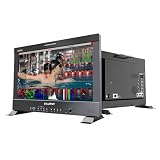
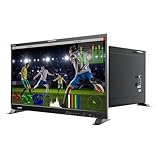
 LILLIPUT Q43-8K 43-Inch Professional Production Monitor1.63 x 15.5 x 10.51 Inches35 poundsCheck on Amazon


Top 3 picks at a glance
Quick Picks
| Product | Best for | Price |
|---|---|---|
| Lilliput Q18-8K | On-set production monitoring | $1,899 |
| Dell S2725QS | Budget 4K desk display | Check on Amazon |
| INNOCN 49C1R | Ultrawide multitasking | Check on Amazon |
| Dell S3225QS | Large-screen value 4K | Check on Amazon |
| Samsung Odyssey Neo G9 | Immersive ultra-high-resolution gaming | Check on Amazon |
| Lilliput Q43-8K | Broadcast and film production | $3,599 |
| ASUS ROG PG32UCDM | Competitive 4K OLED gaming | Check on Amazon |
| Acer Nitro VG270K L1 | Entry-level 4K without breaking a budget | Check on Amazon |
How We Compared
We evaluated every monitor against four criteria: native resolution accuracy relative to its advertised claims, signal-path integrity for its intended workflow (SDI for production, DisplayPort or HDMI for consumer use), panel quality under real content including HDR peak and color uniformity, and whether the price reflects what you actually receive rather than what the model name implies. Products with misleading resolution labeling were not disqualified — they were included with honest context so readers understand what they are purchasing.
The 8 Best 8K Monitors in 2026
Lilliput Q18-8K
This 17.3-inch production monitor is the only display on this list that genuinely processes 8K signals via 12G-SDI. Built for camera operators and DIT carts, it accepts 12G-SDI, 12G-SFP, and HDMI 2.0 inputs with quad-view splitting, making it ideal for monitoring multiple feeds simultaneously on a small footprint. The 3D-LUT engine and HDR support mean color-critical decisions can be made on set without a separate scopes rack.
- Pro: True 12G-SDI 8K input handling that consumer monitors simply cannot match
- Pro: Quad-view and waveform/vectorscope integration in a portable form factor
- Con: The 17.3-inch screen size limits it to monitoring roles, never editorial or grading
Skip this if you are a gamer or office user. It solves a broadcast problem, not a desktop one, and the V-mount plate version adds cost for rigging you do not need.
Dell S2725QS
Despite appearing in an 8K roundup, this is a 4K UHD IPS panel at 120Hz — and that is precisely why we recommend it over anything claiming 8K on a spec sheet. For anyone sitting an arm’s length away, the pixel density is already beyond what the eye resolves in normal use, and the 120Hz refresh with FreeSync Premium makes motion smooth without demanding flagship GPU horsepower.
- Pro: Under $250 for a sharp, fast IPS panel with no visible drawbacks at typical viewing distance
- Pro: 5ms response keeps ghosting minimal in both gaming and video playback
- Con: No HDR support beyond basic contrast, so cinematic content looks flat compared to OLED or VA competitors
Skip if you need 500+ nits of HDR brightness or work in color-grading roles where panel uniformity matters more than price.
INNOCN 49C1R
This 49-inch curved ultrawide delivers 5120×1440 pixels in a 32:9 format, which means it occupies the same horizontal space as two 27-inch 1080p displays side by side but with better pixel density and no bezel gap. The R1800 curve keeps the edges from feeling distant, and 99% sRGB coverage makes it honest enough for photo work and video editing.
- Pro: Replaces a dual-monitor setup with a single cable run via USB Type-C
- Pro: Built-in speakers and height/tilt adjustment reduce desk clutter and peripheral cost
- Con: The 5K2K resolution falls short of true 8K in pixel count, and the 120Hz ceiling means fast-motion gaming feels less fluid than dedicated 240Hz panels
Skip if your priority is HDR impact or you need vertical screen real estate for timeline work — the 32:9 ratio is horizontal, not tall.
Dell S3225QS
A 32-inch VA panel at 4K UHD with 120Hz and FreeSync Premium, the S3225QS occupies the sweet spot where screen size, resolution, and refresh rate all feel sufficient without any single axis wasting your budget. The VA construction delivers higher native contrast than IPS, which matters for dark-room viewing and mixed content work.
- Pro: Noticeably deeper blacks than IPS alternatives at a comparable price point
- Pro: Eye Comfort certification makes it a safer choice for eight-hour work sessions
- Con: VA panels in this size range exhibit visible smearing during fast horizontal motion, a known tradeoff of the technology
Skip if you play competitive shooters where response consistency trumps contrast depth.
Samsung Odyssey Neo G9 (G95NC)
This is the closest any consumer display gets to “more than 4K” without crossing into true 8K territory. Dual 4K UHD panels joined in a 57-inch 1000R curve produce 7680×2160 total pixels — a resolution that matches 8K horizontally but stays at 4K vertically. Mini-LED backlighting drives HDR brightness that makes single-panel monitors look dim by comparison.
- Pro: 1000R curvature combined with 57-inch width creates genuine peripheral immersion that flat panels cannot replicate
- Pro: Mini-LED local dimming produces HDR with real highlight separation, not just peak-number marketing
- Con: Requires a GPU capable of driving over 16 million pixels, which eliminates most systems from the conversation
Skip if your desk is narrower than five feet or your graphics card cannot sustain triple-digit framerates at this resolution.
Lilliput Q43-8K
This professional production monitor carries 8K in its model designation but delivers a 4K UHD panel. It accepts 12G-SDI and HDMI 2.0 signals, handles multiview, and includes a built-in waveform monitor — meaning it downconverts or processes 8K broadcast signals onto a 4K surface. For live trucks and editing suites, that is a feature, not a limitation.
- Pro: Integrated waveform monitor and multiview eliminate the need for external scopes in a production rack
- Pro: HDR support with SDI input chain ensures accurate monitoring of broadcast signal formats
- Con: The model name misleads consumers expecting native 8K resolution on the panel itself
Skip entirely unless you work in broadcast, film, or event production. As a desktop monitor, it is oversized, expensive, and lacks the response characteristics any consumer workflow needs.
ASUS ROG PG32UCDM
A 32-inch QD-OLED panel at 4K running 240Hz, this is the monitor for people who want the absolute best motion clarity and color simultaneously. QD-OLED delivers per-pixel dimming without the blooming of mini-LED backlights, and the 240Hz refresh rate means it feels twice as responsive as 120Hz panels even at identical resolution.
- Pro: Near-infinite contrast with no measurable blooming on windowed content
- Pro: 240Hz on a 4K OLED is genuinely rare, and the combination makes it the strongest single gaming display here
- Con: OLED burn-in risk during static productivity tasks means you cannot leave toolbars or HUDs displayed for hours daily
Skip if your primary use is spreadsheet work or video editing timelines with persistent UI elements that stay static for entire shifts.
Acer Nitro VG270K L1
At under $160, this 27-inch 4K IPS panel with dynamic frequency response (DFR) pushing from 72Hz native to 144Hz effective is the cheapest way to put 3840×2160 pixels on a desk. For buyers who want resolution priority over everything else, nothing else on this list comes close at this price.
- Pro: True 4K at a price that would have been impossible three years ago
- Pro: DFR mode lets casual gamers use 144Hz without requiring DisplayPort bandwidth from an older GPU
- Con: Color accuracy, HDR, and viewing angles all take visible shortcuts to hit this price
Skip if you are color-sensitive, want HDR content to look dramatic, or expect premium build quality at this tier.
Buying Guide
Resolution vs. Pixel Density: When Numbers Stop Matter
An 8K display has roughly 33 million pixels. A 4K display has about 8.3 million. The question is not which number is bigger — it is whether your viewing distance and content resolution justify the GPU cost of filling that frame buffer. At a normal desk distance of 24 to 30 inches, the human eye cannot distinguish individual pixels on a 4K panel at 27 inches or larger. Eight-K panels remain mostly theoretical in consumer contexts because content pipelines have not caught up, and no game engine renders at 8K with any meaningful framerate. If you are shopping based on the “8K” label alone, you are paying a surcharge for a number no application uses.
Panel Type Determines Your Experience More Than Resolution
IPS gives you consistent color and wide viewing angles. VA trades color fidelity for deeper blacks. OLED eliminates the backlight entirely, producing infinite contrast at every pixel. Mini-LED bridges the gap between VA contrast and OLED uniformity without burn-in risk. For production work, the choice often falls to IPS for accuracy or OLED for HDR previewing. For gaming, response time and refresh rate interact with panel type in ways that matter more than a resolution bump from 4K to 8K would ever deliver. Know what your content needs before you anchor on a pixel count.
Signal Path and Bandwidth: The Invisible Bottleneck
A monitor is only as good as the signal feeding it. 8K at 60Hz requires roughly 48Gbps of bandwidth — that is HDMI 2.1 or DisplayPort 2.0, with no fallback options. Many monitors marketed for high resolution ship with HDMI 2.0, which physically cannot carry 8K without heavy chroma subsampling that destroys the color benefit. In professional contexts, 12G-SDI handles 4K at 60Hz with full 4:4:4 color and is the industry standard for broadcast chains. Always verify the input standard matches your signal source before assuming resolution is achievable.
Our Verdict
The ASUS ROG PG32UCDM is the top pick for anyone who wants the best possible visual experience at a desk in 2026. Its combination of QD-OLED contrast, 240Hz refresh, and 4K resolution makes it feel future-proof without demanding 8K infrastructure that does not exist yet. For the budget tier, the Acer Nitro VG270K L1 delivers more pixels per dollar than any other option on this list, and if you already own a capable GPU, that 4K density will outperform cheaper 1080p alternatives by a visible margin. The condition that flips our recommendation: if you are a broadcast professional or on-set monitor operator, the Lilliput Q18-8K is the only product here that processes 8K signals natively — and it does so in a form factor designed for a cart, not a desk. In that specific role, nothing else in the list competes.
FAQ
Are there any true native 8K monitors for consumers?
As of 2026, virtually no consumer-facing monitor ships with a native 8K panel at a price point meaningful to non-professionals. The few options that carry 8K branding either downconvert the signal, split it across multiple panels, or target broadcast workflows where the input standard matters more than the displayed pixel count.
Do I need 8K for video editing?
No. A properly color-calibrated 4K monitor covers the vast majority of editing timelines, and most footage delivered today is mastered at 4K or below. An 8K source can be viewed at native resolution on a 4K surface with full color integrity using downscaling, which is why professional monitors often accept 8K input but display at 4K.
Why do some monitors in this list not have 8K panels?
Because the best monitors for the use cases associated with 8K shopping — high pixel density, premium HDR, professional signal handling — are not always 8K displays. The Lilliput Q43-8K processes 8K signals on a 4K panel. The Samsung Neo G9 delivers 8K-equivalent horizontal pixels in a curved format. Including these alternatives gives readers a complete picture of what the market actually offers under the keyword they searched.
Is OLED safe for productivity use at high resolution?
Modern QD-OLED panels include pixel-shift algorithms and aggressive ABL (auto brightness limiting) that reduce static-image burn-in risk significantly compared to early OLED generations. However, if your work involves eight-hour sessions with persistent UI elements like taskbars, tool palettes, or timeline headers, a 4K IPS or VA monitor with no burn-in risk remains the safer long-term investment.
Part of our monitors buying guide hub.









