As an Amazon Associate we earn from qualifying purchases at no extra cost to you.


When you’re shopping for an ultrawide gaming monitor, the real decision isn’t just size or refresh rate — it’s whether the curve itself helps or hurts your competitive play. Curved screens promise immersion and edge-to-edge consistency, while flat panels promise pixel-perfect aim and easier multi-monitor setups. Both camps have passionate defenders, and the right answer depends less on specs and more on how you play, how much desk you have, and how long you plan to keep the monitor.
Our Top Picks
 Sceptre Curved 24-inch Gaming Monitor 1080p R1500 98%24-Inches16.04 x 21.61 x 9.06 Inches6 PoundsCheck on Amazon
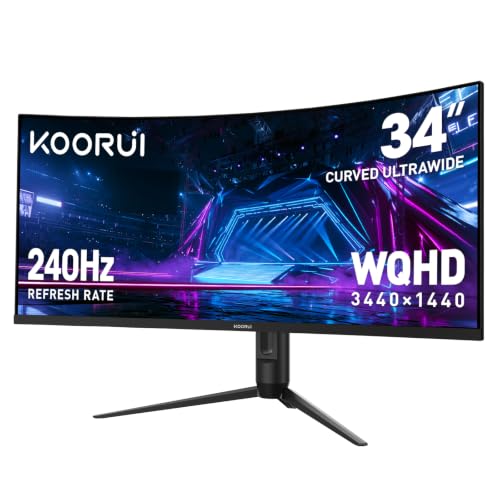 KOORUI 34 Inch 240Hz WQHD 3440x1440 Ultrawide Curved34inch 240Hz/WQHD/Curved10.63 x 31.83 x 20.24 inches17.6 PoundsCheck on Amazon

Top 3 picks at a glance
Quick Verdict
If you mostly play competitive shooters and care about raw aim and reaction time, a flat ultrawide is the safer choice — aiming lines stay true across the entire panel, and competitive tournament environments overwhelmingly use flat displays. If you split your time between immersive single-player games and casual ranked play, or you sit close to a large screen, a 1500R–1800R curve reduces eye strain and makes the edges feel natural. Budget note: you no longer need to spend four figures. A 34-inch 240Hz WQHD curved model like the KOORUI sits around $300, which would have been unthinkable a few years ago. Curved and flat ultrawides now start around $250 and $300 respectively, with premium flat esports panels reaching $800–$1,100.
Side by Side
| Factor | Curved Ultrawide | Flat Ultrawide |
|---|---|---|
| Viewing comfort | Equal screen-to-eye distance across panel; less eye movement fatigue at 100cm or closer | Edges sit farther away; slight distortion at extreme periphery on 34″+ panels |
| Aim accuracy | Slight horizontal distortion at edges can affect long-range flicks; negligible under 100cm | Straight lines render true; preferred for pixel-level precision |
| Durability | Comparable panel life (30,000–60,000 hours); curved bezels slightly more exposed at edges | Comparable panel life; flat glass easier to protect |
| Price range | $250–$700 for mainstream 34″ WQHD models | $300–$1,100 depending on refresh rate and panel type |
| Maintenance | Cleaning needs curved motion along the arc; standard microfiber works fine | Straight-line cleaning; easier to apply flat screen protectors |
| Space needed | Curves inward; effective depth slightly less on desk | Full width protrudes; needs ~5–8cm more clearance for wide-body stands |
| Look | Immersive, wraparound cockpit feel; visually striking | Clean, symmetrical, integrates with multi-monitor or wall setups |
| Resale | Smaller buyer pool; prices depreciate faster | Broader appeal; holds value better on used market |
| Glare handling | Curvature can catch window light at certain angles | More predictable reflections; easier to angle away from windows |
| Best for | Immersion-first players, sim racing, single-player plus casual FPS | Serious competitive FPS, content work, multi-monitor users |
Where Curved Wins
Curved ultrawides earn their keep in three areas. First, uniform viewing distance: on a 34-inch panel, a 1500R or 1800R curve keeps every point of the screen roughly the same distance from your eyes, which reduces the constant micro-focusing your eyes do on a flat panel’s edges. Over a three-hour session, many players report noticeably less eye fatigue.
Second, immersion. Racing sims, flight games, and open-world shooters feel dramatically more enveloping when the screen wraps toward you. Even in competitive titles, the widened peripheral view feels more natural — enemies entering from the side appear within your field of vision rather than off in a corner.
Third, value. Because curved panels dominate the budget and midrange ultrawide market, you get more refresh rate for your dollar. A 34-inch 240Hz WQHD curved display at around $300 undercuts most flat equivalents by $150 or more, and even entry-level curved monitors — like a basic 24-inch 1080p R1500 model — can be had for under $80 if you want a secondary screen for Discord, streams, or a second PC. A 27-inch 1800R curved display around $143 makes a solid companion panel without crowding a smaller desk.
Where Flat Ultrawide for Competitive Fps Wins
Competitive FPS players have legitimate reasons to prefer flat panels, and the strongest one is geometric. When a screen curves, straight lines in-game — sightlines down a lane, the edge of a wall, the horizon — are rendered across a physically curved surface. At typical viewing distances your brain mostly compensates, but at the edges there’s a small horizontal distortion. For pixel-level aiming, holding a tight angle, or tracking at long range, flat panels remove that variable entirely.
Tournament standard matters too. LAN events and pro play run flat displays almost exclusively, so practicing on a flat ultrawide means your muscle memory transfers directly to tournament conditions. If you travel to locals or dream of qualifiers, training on the same geometry matters.
Flat ultrawides are also more practical outside the game. They mount flush on VESA arms and wall mounts, tile cleanly if you ever run two panels, and handle shared use better — a spouse editing photos or a kid doing homework won’t fight the curve for straight lines in spreadsheets and design tools. Reflections are more predictable, which matters if your desk sits near a window.
Cost Over 5 Years
Assume a 34-inch WQHD ultrawide bought today and kept for five years:
Curved route: $250–$450 for a 144Hz–240Hz WQHD model. Power draw runs roughly 35–55 watts typical use, or about $20–$35 per year at average American electricity rates. Five-year energy cost: $100–$175. No meaningful maintenance beyond a $10 microfiber kit. Potential resale in year five: $60–$120.
Flat route: $300–$800 for comparable specs, or $800–$1,100 if you jump to a premium fast-IPS esports panel. Power draw is similar, 35–60 watts, so $100–$175 over five years. Better resale: $100–$250 in year five thanks to broader demand.
Net difference over five years is roughly $50–$150 in the curved route’s favor at the budget tier, but the math flips at the premium tier where flat panels hold value better. Either way, the monitor itself dominates the cost — energy and accessories are rounding errors.
Which One for Your Home
Small Apartment or Dorm
Space is the constraint, not geometry. A curved ultrawide pulls the screen edges toward you, letting you sit closer without the periphery feeling distorted — useful when your desk is 60cm deep and your chair backs against the wall. Look for a slim stand or plan $40–$70 for a VESA arm to reclaim desk surface. A budget curved 24-inch at around $80 works if you’re also gaming on a console or laptop; step up to a 34-inch curved 1500R if ultrawide is the main event.
Family with Kids or Pets
Durability and placement matter more than curvature. Flat panels are easier to mount high on a wall out of reach, and their predictable shape makes child-safe mounting brackets simpler. Curved screens present their outer edges at an angle that’s slightly more vulnerable to bumps in high-traffic rooms. If the monitor lives in a shared living space, a mid-priced flat or gently curved 27–34 inch model in the $140–$300 range keeps the financial stakes reasonable — a $143 curved 27-inch stings far less to replace than a $900 flat ultrawide if a controller flies.
Rental You’ll Leave in a Few Years
Think resale and portability. Flat ultrawides sell faster and closer to asking price on the used market, and they pack more predictably — flat boxes fit standard moving blankets and monitor bags. If you’ll resell in two to three years, a flat panel in the $300–$500 range will recoup 30–40% of its cost; a curved equivalent typically recoups 20–30%. If resale isn’t a priority and you game mostly solo, buy the cheaper curved option and enjoy it.
Long-Term Home
Buy for how you actually play. If competitive FPS is your primary genre and you play ranked several nights a week, invest in a flat fast-IPS ultrawide at 240Hz — $700–$1,100 — and it will still be relevant in five years. If your library is a mix of shooters, sims, and story games, a $300 curved 34-inch 240Hz WQHD panel delivers 90% of the experience at 40% of the price, and by 2026 the price gap between curved and flat high-refresh panels should keep narrowing in your favor.
FAQ
Do pro FPS players use curved or flat monitors?
Competitive tournaments almost universally use flat panels, and most professionals practice on flat displays so their aim translates directly to event conditions. Some streamers and content creators use curved screens for viewer experience, but if tournament play is your goal, flat is the standard.
Does a curved monitor hurt your aim in shooters?
Not meaningfully for most players at normal seating distances of 70–90cm from a 34-inch screen. The horizontal distortion at the edges is subtle, and your brain adapts within a few sessions. Players who do precise long-range aiming or pixel-perfect angle holding notice it most, which is why competitive purists lean flat.
Is 1500R or 1800R better for gaming?
The number is the radius in centimeters — lower means a stronger curve. 1500R is more aggressive and immersive, best when you sit 70–90cm away. 1800R is gentler and more forgiving for mixed use, larger rooms, or when others share the screen from different angles. For a dedicated gaming desk at typical distance, 1500R feels more enveloping.
Can I mount a curved ultrawide on a monitor arm?
Yes — curved ultrawides use the same 100x100mm VESA pattern as flat panels (some ultrawides use 100x50mm, so check the spec sheet). Just verify the arm’s weight rating: a 34-inch ultrawide typically weighs 6–9kg without the stand, and you’ll want an arm rated for at least 9–12kg with a wide enough reach to handle the panel’s 80cm-plus width.