The best dual monitor arm under 100 is a clamp-on, full-motion model whose per-arm weight rating clears your heaviest screen with room to spare, and for most two-27-inch desks that points to the 22-pound-rated steel arms from WALI and ErGear. Extra range matters mostly if you own ultrawides or heavier panels, where the budget ceiling starts to pinch.
The ten listings below cover side-by-side arms, freestanding bases, stacked vertical mounts and one wall mount. Two entries are listed above the under-100 line and are included because they show what stepping past the cap buys.
Our Top Picks
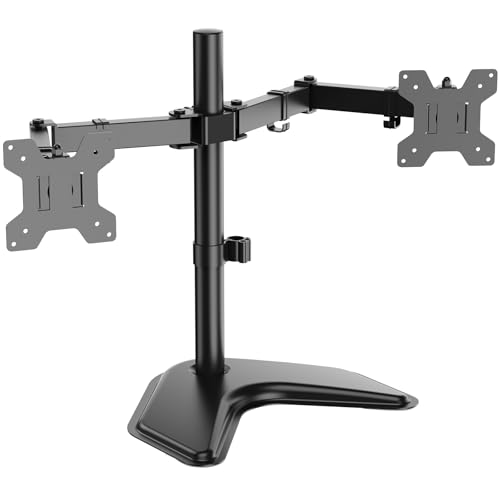 WALI Freestanding Dual Monitor Stand for 13-27 inchDual17.05 x 10.75 x 3.46 Inches7.4 PoundsCheck on Amazon
Top picks at a glance

ErGear Dual Monitor Stand up to 33 inches Screen, Load-Bearing Max 22 lbs Each Arm, Adjustable Dual Monitor Mount, Sturdy Steel vesa Monitor Mount with Stable VESA 75x75 100x100mm


As an Amazon Associate we earn from qualifying purchases. Product prices and availability are accurate as of the date/time indicated.

WALI Adjustable Dual Monitor Arm for 13-32 inch Screens, 22 lbs per Arm | Dual Monitor Stand for Desk, Full Motion with Tilt, Swivel, Rotation, C-Clamp & Grommet Base, VESA 75/100mm (GSMP002N), Black


As an Amazon Associate we earn from qualifying purchases. Product prices and availability are accurate as of the date/time indicated.
WALI Freestanding Dual Monitor Stand for 13-27 inch Screens, 22 lbs per Arm | 2 Monitor Desk Mount, Dual Monitors Arm Full Motion with Tilt, Swivel, Rotation, VESA 75/100mm (MF002), Black


As an Amazon Associate we earn from qualifying purchases. Product prices and availability are accurate as of the date/time indicated.

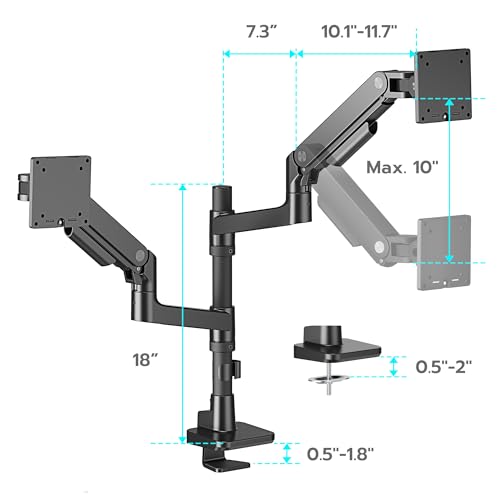
Dual Monitor Arm Desk Mount for 17-49 Inch Monitors Holds 44 lbs, Black | Heavy Duty Monitor Mount Stacked Monitor Arm Desk Full Motion Gas Spring Vertical Monitor Mount, 75/100 VESA Mount


As an Amazon Associate we earn from qualifying purchases. Product prices and availability are accurate as of the date/time indicated.

Stacked Monitor Mount for Max 32" Screens, Vertical Dual Monitor Stand | Vertical Monitor Mount Holds Up to 17.6 lbs, Full Motion Computer Monitor Arm with Swivel, Tilt, VESA 75x75/100x100mm


As an Amazon Associate we earn from qualifying purchases. Product prices and availability are accurate as of the date/time indicated.

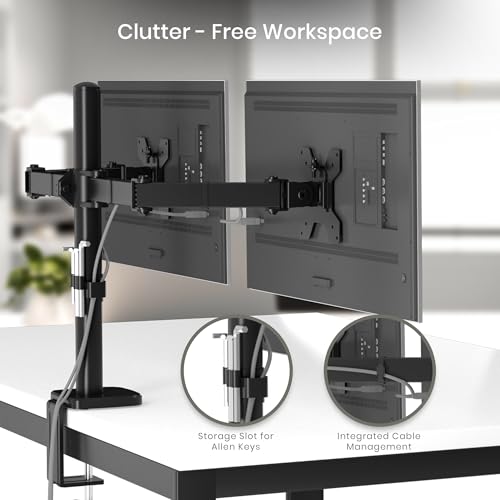
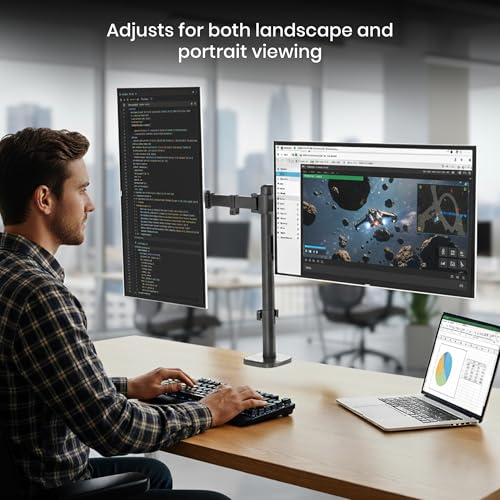
Utopia Home Dual Monitor Arm Adjustable Screen, Arm Desk Mount for 13-32 Inch Screens, VESA 75/100mm, Full Motion Tilt & 360° Rotation, Max 10kg per Arm, Height Adjustable up to 410mm (Black)






As an Amazon Associate we earn from qualifying purchases. Product prices and availability are accurate as of the date/time indicated.

ARES WING Dual Monitor Wall Mount for 17-49 Inch Ultrawide Screens, Black | Heavy Duty Wall Mount Monitor Arm Holds 44 lbs Each, Fully Adjustable Gas Spring Monitor Arm, 75x75/100x100 VESA Mount


As an Amazon Associate we earn from qualifying purchases. Product prices and availability are accurate as of the date/time indicated.

VIVO Dual Ultrawide Aluminum Articulating Monitor Arm, Up to 40" Screens | Holds 30 lbs per Arm, Desk Mount Tension Spring Monitor Stand, For 2 Screens, VESA 75x75mm and 100x100mm, Black, STAND-V220Q


As an Amazon Associate we earn from qualifying purchases. Product prices and availability are accurate as of the date/time indicated.

Bracwiser Dual Monitor Stand Free Standing Desk Mount, Premium Dual Monitor Arm Fits Two Screens up to 40 inch 26.45 lbs Fully Adjustable Arms with Heavy-Duty Wooden Base, Max VESA 100x100mm (MLXSPC)


As an Amazon Associate we earn from qualifying purchases. Product prices and availability are accurate as of the date/time indicated.

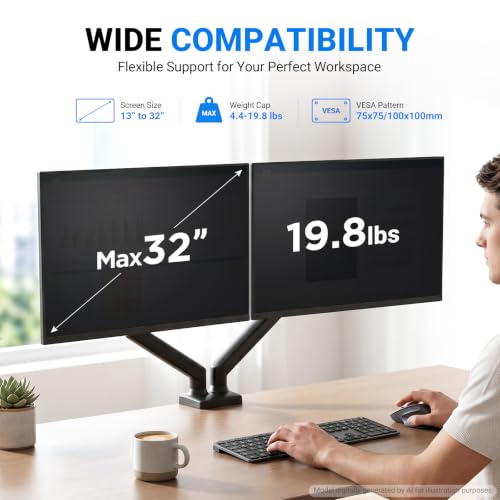
GRIFEMA Gas Spring Monitor Mount for 13-32″, Dual Monitor Arm, Easy Install | Full Motion Adjustable 360° Rotate Swivel Tilt, Up to 19.8 Lbs Each, VESA 75/100mm, Monitor Stand for Home Office Gaming Desk


As an Amazon Associate we earn from qualifying purchases. Product prices and availability are accurate as of the date/time indicated.
| Model | Key point from the title | Price tier | Best for |
|---|---|---|---|
| ErGear Dual Monitor Stand | Up to 33 inches, 22 lbs per arm, steel, VESA 75/100 | Budget | Standard two-screen desks |
| WALI GSMP002N | 13-32 inch, 22 lbs per arm, C-clamp and grommet base | Budget | Flexible clamp install |
| WALI MF002 | Freestanding, 13-27 inch, 22 lbs per arm | Budget | No-clamp setups |
| ARES WING stacked arm | 17-49 inch, holds 44 lbs, gas spring, vertical stack | Over the cap | Heavy or ultrawide screens |
| MOUNT PRO stacked mount | Max 32 inch, 17.6 lbs, vertical dual | Budget | Narrow desks |
| Utopia Home dual arm | 13-32 inch, 10kg per arm, up to 410mm height | Budget | Tight budgets |
| ARES WING wall mount | 17-49 inch, 44 lbs each, gas spring, wall mount | Over the cap | Wall-mounted installs only |
| VIVO STAND-V220Q | Ultrawide up to 40 inch, 30 lbs each, aluminum, pneumatic | Upper budget | Heavier screens |
| Bracwiser freestanding stand | Up to 40 inch, 26.45 lbs, wooden base | Upper budget | Glass or thin desks |
| GRIFEMA gas spring mount | 13-32 inch, 19.8 lbs each, 360 rotate | Mid-range | Easy height adjustment |
What is changing in this category
Budget dual arms used to be fixed-height poles with a clamp. Today the cheapest listings already advertise full motion, rotation to portrait and cable routing, and gas spring or pneumatic arms are creeping into the upper end of the price range. That means the choice has shifted from whether an arm can move to how smoothly it holds a position once you let go.
Listings also overstate compatibility. A title that says up to 49 inches usually describes a mounting range, not a promise that the arm holds an ultrawide steady in the extended position. Weight, VESA pattern and the leverage of a long arm are more useful than the headline screen size.
How we picked these
We worked from published specifications, manufacturer documentation and buyer reviews, and kept listings that sell a dual-screen desk arm, stacked mount or wall mount. Nobody on the team used or measured these units. Two entries sit above the budget line and one is a wall mount, so we say so plainly in their entries.
The ten mounts, one by one
ErGear Dual Monitor Stand up to 33 inches
The title gives a clean spec set: screens to 33 inches, 22 pounds per arm, steel construction, adjustable and VESA 75×75 and 100×100. It reads as the plain-vanilla choice: a clamp-on pair of arms for two ordinary monitors. The listing does not say whether it uses gas springs, so assume manual friction joints you tighten with a hex key.
It suits a home office with two 24 to 27 inch monitors and a standard desk edge. Before buying, ask whether the clamp fits your desk thickness and whether a grommet option is included.
Picture a work-from-home desk with two matching 24-inch panels at roughly 6 to 8 pounds each. The arms would carry them with plenty of margin, and the saved desk surface is the immediate gain. Check the listing for the maximum clamp opening and whether the pole height can be changed, because the title mentions adjustability without giving the range.
Pros
- 22 lbs per arm is a sturdy rating at this tier
- Steel build and both common VESA patterns
- Simple, predictable design
Cons
- No gas spring stated, so height changes take a tool
- Mounting hardware details are not in the title
WALI Adjustable Dual Monitor Arm for 13-32 inch Screens (GSMP002N)
WALI lists 13 to 32 inch screens, 22 pounds per arm, full motion with tilt, swivel and rotation, and both C-clamp and grommet bases. The two mounting options are the interesting part: you can clamp it to a desk edge or pass it through a cable hole. It is also the more flexible of the two WALI listings.
It fits someone with two 27-inch monitors who wants portrait rotation for coding or documents. The question to ask before buying is the maximum desk thickness the clamp takes, and whether the arm can fully extend without hitting the wall behind the desk.
A typical user here is a developer with one monitor in landscape and one in portrait for logs and documents. Rotation is the feature they would use daily. Ask whether the arm needs the VESA plate to be attached before it goes on the pole, and check the listing for the cable management clips, which the title does not mention.
Pros
- Clamp or grommet base
- Full motion including rotation
- 22 lbs per arm
Cons
- Upper size limit of 32 inches is below some ultrawides
- Black only in this listing
WALI Freestanding Dual Monitor Stand for 13-27 inch Screens (MF002)
The freestanding model has a base that sits on the desk, so no clamp is needed. It lists 13 to 27 inch screens, 22 pounds per arm and tilt, swivel and rotation. The lower screen size cap versus the clamp model matters: the base has to counterweight the arms, so the maker limits the screens.
It suits a rented desk or a glass top where clamping is not an option. The question to ask before buying is how much desk surface the base uses and how it behaves when both arms are fully extended with heavy screens.
This is the answer for a student desk or a rented office where clamping is forbidden or the top is too thin. Two 24-inch screens fit its range comfortably. Ask how far the arms can extend before the base wants to tip, and keep the heavier screen closer to the pole if the listing says nothing about balance.
Pros
- No clamp or drilling
- 22 lbs per arm
- Low cost for a freestanding design
Cons
- Base takes up desk space
- Limited to 27 inch screens
Dual Monitor Arm Desk Mount for 17-49 Inch Monitors Holds 44 lbs (ARES WING)
This stacked, gas spring arm lists 17 to 49 inch screens and 44 pounds, with a heavy-duty vertical layout. The title is ambiguous about whether 44 pounds is per arm or total. It is also listed above the under-100 line, so it is here as a step-up example, not a budget pick.
It suits someone with a heavy ultrawide on top and a smaller secondary screen below. A stacked layout saves desk width. Ask the seller whether the 44 pounds is per arm and how the weight range works with the gas spring.
A buyer who owns one 34-inch ultrawide and a smaller secondary display is the target here. Placing the ultrawide on top gives a command-center layout without adding width. Ask the seller how the 44 pounds is split between the two arms, and confirm the minimum weight each gas spring needs to hold position properly.
Pros
- Large size and weight ceiling
- Gas spring adjustment
- Saves horizontal space
Cons
- Above the 100 ceiling
- Weight rating wording is unclear
Stacked Monitor Mount for Max 32 Inch Screens (MOUNT PRO)
This one is a vertical dual stand holding up to 17.6 pounds and screens to 32 inches, with swivel and tilt. The 17.6 pound figure is low relative to the others, and it is unclear whether it is per screen or total. Treat it as suited to lighter panels.
A stacked arrangement helps on a narrow desk. The question to ask before buying is the monitor weight of each screen and how stable a tall vertical pole is when you adjust the upper display.
Imagine a small apartment desk against a wall, where two side-by-side screens would not fit. Putting a trading chart or chat window on the upper screen and the main work on the lower one is the sensible split. Ask the seller for the per-screen weight limit, and check how the pole is anchored to the desk.
Pros
- Vertical layout saves desk width
- Low entry cost
Cons
- Low weight rating
- Ambiguous whether the weight limit is total or per screen
- Upper screen sits high for long sessions
Utopia Home Dual Monitor Arm Adjustable Screen
Utopia lists 13 to 32 inch screens, VESA 75 and 100, full motion tilt and 360 degree rotation, 10 kg per arm (about 22 pounds) and height adjustment up to 410 mm. It is the cheapest in the set by listing, and the metric weight spec matches the WALI and ErGear ratings.
It suits a first-time arm buyer who wants to test whether an arm improves posture. Before buying, ask about the clamp range and check buyer reviews for joint stiffness over time, since budget friction joints can loosen.
The scenario is a spare-room desk with two light screens where the aim is just to lift them off the surface and free the space. The height range is stated as up to 410 mm, which is useful if you are tall. Ask what the clamp range is, and look at buyer reviews for notes on whether the arms drift under load.
Pros
- Lowest tier price
- 10 kg per arm
- Rotation and tilt
Cons
- Little brand track record
- Metal quality is not described in the title
ARES WING Dual Monitor Wall Mount for 17-49 Inch Ultrawide Screens
This is not a desk arm. It is a wall mount with gas spring arms for ultrawide screens up to 49 inches and 44 pounds each, and it is listed above the under-100 line. It is a different product type from the rest of the set, so it only matters if you plan to bolt into a wall stud or suitable wall.
It suits a standing setup or a wall-focused workspace. Wall installation needs suitable studs or anchors and the manufacturer’s instructions, and a professional if you are unsure about the wall.
A fit would be a dedicated studio wall with two ultrawides for editing or trading, where the desk below needs to stay clear for audio gear. Because the listing is aimed at permanent mounting, ask about the stud spacing, the wall types it supports and the hardware included before you drill anything. Follow the manufacturer’s instructions and local building guidance.
Pros
- High weight ceiling and ultrawide range
- Frees up the entire desk surface
Cons
- Wall mount, not a desk arm
- Priced above the cap
- Installation is permanent-ish
VIVO Premium Aluminum Heavy Duty Dual Monitor Arm (STAND-V220Q)
VIVO lists ultrawides up to 40 inches, 30 pounds each, aluminum construction, pneumatic height adjustment and a maximum VESA of 100×100. The 30 pound rating per arm is the highest among the genuine desk arms priced under the cap, and it sits right at the top of the budget tier.
It suits heavier 32 to 34 inch screens and anyone who adjusts height often. The pneumatic action means you set the arm by hand rather than with a tool. Ask the seller about the weight range the gas spring is calibrated for.
Think of a pair of 32-inch screens weighing around 14 pounds each, adjusted several times a day between sitting and standing. The 30-pound rating gives roughly double the load as headroom, which is the margin that makes gas or pneumatic arms feel smooth. Ask what weight window the pneumatic cylinder is tuned for, since heavy-duty arms may not like very light panels.
Pros
- 30 lbs per arm
- Pneumatic height adjustment
- Aluminum build
Cons
- Sits at the top of the budget
- Max VESA 100×100 only
Bracwiser Dual Monitor Stand Free Standing Desk Mount
Bracwiser pairs fully adjustable arms with a heavy wooden base for two screens up to 40 inches, 26.45 pounds, and VESA 100×100. The base is the selling point: the wood adds weight to counter the leverage, so it is a freestanding choice that aims at larger screens than the WALI freestanding model.
It suits a glass or thin desk and users who rearrange often. The question to ask is the footprint of the base and whether it blocks the keyboard tray or desk drawers.
A common use is a glass-top or lightweight desk where clamping is not an option and the user wants two large screens. The wooden base supplies the counterweight, so placement near the back edge of the desk helps stability. Ask for the base dimensions and whether the arms can be mounted at different heights on the pole.
Pros
- Freestanding with a heavy base
- Handles larger screens
- No clamp pressure on the desk
Cons
- Large footprint
- VESA 100×100 only
GRIFEMA Gas Spring Monitor Mount for 13-32 Inch (Dual)
GRIFEMA offers a dual arm with gas spring lift, 360 degree rotation, swivel and tilt, 19.8 pounds each, and VESA 75 and 100. The gas spring is what separates it from the plain friction arms: height moves with one hand and stays put when set, provided your monitors are in the spring’s weight range.
It suits a lighter 24 to 27 inch pair where you want sit-stand style adjustments. Before buying, check the weight range the springs are rated for, because a very light screen may rise on its own.
The ideal scene is a sit-stand desk where you shift the screen height a few times a day and do not want a tool each time. Two 24-inch monitors at 7 to 9 pounds are a plausible match. Ask what weight range the gas spring covers, and look at buyer reviews for notes on whether the arm holds its height after months of use.
Pros
- Gas spring adjustment
- Rotation and tilt
- Easy install claim
Cons
- 19.8 lbs each is lower than the 22 lb arms
- Spring minimum weight is not in the title
Which arm for which user
| User | Look at | Why |
|---|---|---|
| Two standard 24-27 inch monitors | ErGear, WALI GSMP002N, Utopia | 22 lb class, clamp mount |
| Glass, thin or rented desk | WALI MF002, Bracwiser | No clamp needed |
| Heavier 32 inch screens | VIVO, Bracwiser | 26-30 lb ratings |
| Frequent height changes | VIVO, GRIFEMA | Gas or pneumatic lift |
| Narrow desk | MOUNT PRO, ARES WING stacked | Vertical stack |
| Wall instead of desk | ARES WING wall mount | The only wall mount |
Buying guide: weight, size and desk fit
Weight comes first
Find your monitor’s weight without its stand in the manual, then add margin. A spec like 22 lbs per arm describes the design limit for a screen centered on the arm, not a recommendation to hit it. Longer reach adds leverage, so a monitor near the rating will feel more loaded when you extend the arm.
Size and VESA
Check the screen diagonal range and the VESA pattern. A 75 by 75 or 100 by 100 millimeter pattern is common, but curved or thin-bezel panels sometimes have recessed holes. For arm sizing, see what size dual arm fits two 27 inch monitors and the desk space needed for dual 32 inch screens.
Desk type and base
Clamps need a stable desk edge and enough thickness. Glass tops call for a freestanding base or an explicit manufacturer note; see dual arms for a glass desk.
| Spec concept | What to look for | Why |
|---|---|---|
| Per-arm weight | 20% or more above your screen weight | Prevents sag and slipping |
| Screen range | Includes your diagonal | Stated range is a mounting range |
| VESA pattern | 75×75 or 100×100 on both sides | Must match the monitor’s back |
| Base type | Clamp, grommet or freestanding | Depends on desk edge and top |
| Lift type | Friction, gas spring or pneumatic | Decides how easily height changes |
Worked example: a 27-inch and a 32-inch pair
These figures are estimates with stated assumptions, not readings. Assume one 27-inch 1440p monitor of about 11 pounds without the stand and one 32-inch monitor of about 15 pounds without the stand. Check your own manual for the real number.
| Arm | Rating per arm | Heaviest screen | Headroom |
|---|---|---|---|
| GRIFEMA | 19.8 lbs | 15 lbs | About 4.8 lbs, workable |
| ErGear / WALI / Utopia | About 22 lbs | 15 lbs | About 7 lbs, comfortable |
| VIVO | 30 lbs | 15 lbs | About 15 lbs, large margin |
| MOUNT PRO | 17.6 lbs | 15 lbs | 2.6 lbs, tight |
The pattern is that anything within 3 lbs of the screen is risky once the arm is extended. If you are considering whether the whole arm approach is worth it, read dual arm vs two desk stands.
Mistakes buyers make
| Mistake or symptom | Likely cause | Fix |
|---|---|---|
| Screen droops overnight | Joint not tightened, or weight too close to rating | Tighten with the supplied hex key or pick a higher rating |
| Screen rises on its own | Gas spring set for heavier monitor | Adjust the spring tension if the arm allows |
| Clamp does not fit | Desk too thick or has a lip | Use a grommet base or a freestanding stand |
| Cables snag | No slack at the joints | Route with clips; see cable organizing for dual arms |
| Monitor does not fit | No VESA holes | Check for a VESA adapter plate |
For ultrawides specifically, this ultrawide arm roundup narrows the field.
Verdict by use case
For most buyers the WALI GSMP002N or ErGear is the clean default. For a glass desk, take the Bracwiser or WALI MF002. For heavy 32 to 34 inch screens, the VIVO. If you only have a little budget, the Utopia Home. Skip the ARES WING pair unless you want to pay beyond the cap for the wall or stacked layout.
Frequently asked questions
How much weight should a dual monitor arm hold per screen?
Find your monitor’s weight without the stand, then pick an arm rated comfortably above it, since a rating sits at the edge of what the arm is designed to hold. A mainstream 27-inch panel is often in the 8 to 13 pound range, and ultrawides can be heavier. Gas spring arms also have a minimum weight range, so a screen that is too light may drift upward instead of staying put.
Is a clamp or a freestanding base better?
A clamp or grommet base is the stronger, more compact choice if your desk edge is thick enough and sturdy. A freestanding base avoids drilling or clamping and works on glass, thin or curved desks, but it takes up desk surface and can shift if the arms are extended far with heavy screens. Check the listing for the maximum desk thickness for clamps.
Will my monitor work with a VESA 75 or 100 arm?
Look at the back of the monitor for four screw holes in a square. If the spacing is 75 by 75 or 100 by 100 millimeters, the arms listed here fit. Some monitors have no VESA holes, a curved back, or a recessed panel that needs a spacer or adapter. Many ultrawides use 100 by 100, but check your own manual first.
Are stacked vertical arms a good idea?
They suit people with limited desk width because one screen sits above the other. The upper monitor puts more strain on neck posture unless it is used for reference only, such as a chat window or dashboard. Stacked arms also carry both screens on a single pole, so the weight rating and pole stability matter more than on a side-by-side design.
Can I install a dual arm on a glass desk?
Do not clamp onto a glass desk without a manufacturer note that says the arm is designed for it, because the clamp pressure can crack the glass. A freestanding base is the safer starting point, or a clamp with a reinforcement plate if the listing provides one. Also follow the manufacturer’s instructions for weight and surface limits.
How do I keep the cables tidy on a dual arm?
Use the cable clips or channels along the arms if the model has them, leave a little slack at each joint so movement does not pull on the connectors, and bundle the rest below the desk with hook-and-loop ties. Check the movement range before tightening everything. Do not run power cords tightly around a pivot.