Working from a spare bedroom or a corner of the dining room puts a monitor in front of your eyes for six to nine hours a day, far longer than a gaming session. That changes what matters. Refresh rate and response time, the numbers gaming monitors fight over, count for less than panel type, flicker control, size, and how comfortably two windows sit side by side. A home office monitor needs to render small text cleanly, avoid tiring your eyes, and fit on a desk that may also hold a laptop dock, a lamp, and a coffee mug.
This guide is for remote workers, freelancers, and students setting up in 2026 who want to add a second screen or replace a laptop display. It compares eight monitors, from single Philips and Acer panels to Kado two-packs for a dual setup in one box, using only the facts in their titles. Because the home office is a different job from esports, the picks lean toward 1080p clarity, eye-care features, and mounting flexibility rather than extreme refresh rates.
Our Top Picks
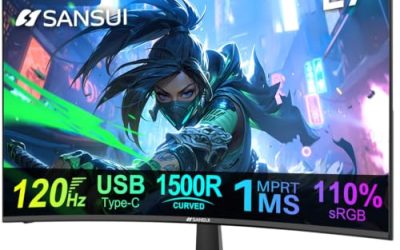
 Kado 2-Pack Dual 27" Curved 1500R 1920x1080 75Hz27" Curved 2-Pack2.83 x 24.46 x 14.56 inches11 PoundsCheck on Amazon
 Kado Dual Monitor 2-Pack 24" Curved 1500R 1920x108024" Curved 2-Pack2.21 x 21.17 x 12.65 inches11.64 poundsCheck on Amazon
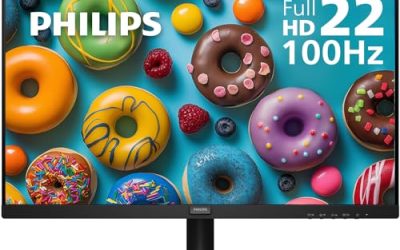
 Philips 22 Inch Computer Monitor FHD 100Hz VA22 inch 100Hz8.7 x 19.4 x 14.5 inches9.3 poundsCheck on Amazon
 Philips 24 Inch Computer Monitor FHD 100Hz VA24 inch 100Hz8.7 x 21.3 x 16.4 inches6.4 poundsCheck on Amazon
 Kado 2-Pack Dual 22" Flat Screen 1920x1080 75Hz22" 2-Pack1.46 x 19.93 x 11.92 inches16.5 poundsCheck on Amazon
Top 3 picks at a glance
Quick Picks
As an Amazon Associate we earn from qualifying purchases at no extra cost to you.


| Product | Best for | Key spec from the title |
|---|---|---|
| Kado 2-Pack Dual 27″ Curved | Large dual-screen workspace | 27 inch, 1500R curve, 1920×1080, 75Hz, 2-pack |
| Kado Dual 24″ Curved 2-Pack | Dual setup in a mid-size desk | 24 inch, 1500R curve, 1920×1080, 75Hz |
| Philips 221V8LB 22″ | Small desks and secondary screens | FHD, 100Hz, VA, flicker-free, 4ms GtG |
| Philips 241V8LB 24″ | Everyday single-monitor work | FHD, 100Hz, VA, flicker-free, Adaptive Sync |
| Kado 2-Pack Dual 22″ Flat | Flat panels for spreadsheets | 22 inch flat, 1920×1080, 75Hz, VESA mount |
| Philips 271V8LB 27″ | Larger single screen with eye care | FHD, 100Hz, VA, HDMI 1.4, VGA, low blue light |
| Acer KB272 G0bi 27″ | Color-accurate office work | IPS, 120Hz, 99% sRGB, HDMI, VGA, bluelight filter |
| Kado Dual 24″ Curved 2-Pack (HDMI) | Hybrid office and gaming dual setup | 24 inch curved, 75Hz, HDMI, VESA arm mount |
How to Choose
Size and resolution for text clarity
All eight monitors here run 1920×1080, so the pixel density depends on screen size. At 22 or 24 inches, 1080p gives crisp text at normal desk distance. At 27 inches, the same pixel count stretches wider, and small fonts look a little softer, especially if you sit closer than arm’s length. Buyers who spend most of the day in documents and spreadsheets will find 24 inches the sweet spot, while 27 inches suits video calls with a side-by-side reference window. If you want sharper type at 27 inches, a higher resolution is the upgrade path.
Panel type: IPS versus VA
The Acer uses IPS, which generally offers wider viewing angles and consistent color when you glance at the screen from the side, and its title states 99% sRGB coverage, helpful for photo editing and design reviews. The Philips models use VA panels, which usually deliver deeper blacks and stronger contrast for documents and video at a lower tier. Kado titles do not name the panel type, so check the product page. If color matters, favor IPS. If you mostly read text and watch videos, VA is fine.
Eye comfort features
Long days call for flicker-free backlights and low blue light modes. The Philips titles list flicker-free and either low blue mode or eye care, and the Acer lists a bluelight filter. These features reduce visible flicker and shift the color temperature warmer, which many buyers find easier on the eyes at night. Curved 1500R panels, as on the Kado models, wrap the image toward you, which can feel more natural on wide screens at close range, though some users prefer a flat panel for precise alignment of windows and documents.
Ports, mounting, and what budget models cut
HDMI is the essential port for a laptop; VGA appears on the Philips 271V8LB and the Acer for older equipment. HDMI 1.4, listed on the Philips models, handles 1080p at 60 or 100Hz fine but is not a concern for office work. For ergonomics, look for VESA mounting, which several titles list, so you can fit an arm and raise the screen to eye level. Budget monitors often cut height adjustment and offer tilt only, as the Philips titles state, so a monitor arm is worth considering. A sturdy arm also lets you rotate a screen or slide it aside when you need desk space for paperwork, which a fixed stand cannot do. Ignore high refresh rates beyond 75Hz unless you also game.
Setup details matter more than most spec sheets admit. The top edge of the screen should sit at or just below eye level, roughly an arm’s length away, so you are not craning your neck for hours. A pair of 24 inch screens needs about 42 inches of desk width, and two 27 inch screens need closer to 48, before you count speakers or a lamp. Measure your desk first, and if it is shallow, remember that a curved panel with a fixed stand takes more depth than a flat one on an arm.
Connection planning is the other practical step. A laptop with a single USB-C or HDMI output will need a dock or adapter to drive two monitors, and some laptops cannot run two external displays at all. Check the laptop’s display output specification, then match it to the monitor’s input list. A two-pack looks convenient, but it only works if the computer can actually feed both screens at once.
The 8 Best Options
Kado 2-Pack Dual 27″ Curved
A pair of 27 inch curved monitors with 1500R curvature, 1920×1080 resolution, 75Hz, HDMI, and VESA mounting. It is a one-box answer for someone who wants a dual setup without matching two separate models.
- Strength: two matching screens remove the mismatch problem in dual setups.
- Strength: 75Hz and VESA support help with smoother scrolling and arm mounting.
- Trade-off: 1080p at 27 inches shows softer text than a higher-resolution panel.
Skip it if you have a small desk, since two 27 inch screens need wide space.
Kado Dual 24″ Curved 2-Pack
A dual 24 inch curved pair at 1920×1080 and 75Hz. The title is brief, so confirm ports and mounting on the product page, but the size is among the most practical for home offices.
- Strength: 24 inch size gives sharp 1080p text.
- Strength: two screens cover multitasking from the start.
- Trade-off: the title does not list ports or VESA, so features need checking.
Skip it if you prefer a flat panel or want an IPS display.
Philips 221V8LB 22″
A 22 inch FHD monitor with a VA panel, 100Hz refresh, 4ms GtG response, Adaptive Sync, HDMI 1.4, tilt adjustment, and flicker-free technology. It is compact and well suited to a crowded desk or as a second screen.
- Strength: 100Hz refresh makes scrolling feel smoother than at 60Hz.
- Strength: flicker-free and low blue light features suit long sessions.
- Trade-off: tilt-only adjustment limits ergonomic positioning.
Skip it if you want a bigger screen or height adjustment.
Philips 241V8LB 24″
The 24 inch sibling of the 221V8LB with the same 100Hz VA panel, 4ms GtG, Adaptive Sync, HDMI 1.4, tilt adjustment, and flicker-free design. It suits a single monitor for most home office users.
- Strength: 24 inches at 1080p is a comfortable match for text work.
- Strength: the eye-care features are stated in the title.
- Trade-off: only tilt adjustment is listed, so height depends on desk or arm.
Skip it if you need IPS color accuracy.
Kado 2-Pack Dual 22″ Flat
A pair of 22 inch flat screens at 1920×1080 and 75Hz with HDMI and VESA mounting listed. Flat panels suit buyers who work with spreadsheets and table layouts.
- Strength: flat screens avoid curved distortion for grid layouts.
- Strength: VESA mounting supports wall or arm installation.
- Trade-off: 22 inches is small if you keep several windows open.
Skip it if you want a larger or curved display.
Philips 271V8LB 27″
A 27 inch VA monitor with 100Hz, 4ms GtG, HDMI 1.4, VGA, Adaptive Sync, flicker-free tech, and eye care features. It is a good fit for buyers who want one larger screen and older VGA connectivity.
- Strength: HDMI and VGA inputs cover modern and older devices.
- Strength: 100Hz and flicker-free design help comfort.
- Trade-off: 1080p at 27 inches softens small text.
Skip it if sharpness for fine type is a priority.
Acer KB272 G0bi 27″
A 27 inch IPS monitor with 120Hz refresh, 1ms response, AdaptiveSync, 99% sRGB, HDMI, VGA, VESA support, and a bluelight filter. It is aimed at office users who care about color and viewing angles.
- Strength: IPS panel with 99% sRGB suits color-sensitive work.
- Strength: 120Hz and VESA mounting add smoothness and flexibility.
- Trade-off: it is a single monitor, so a dual setup needs a second purchase.
Skip it if you want a dual-monitor bundle.
Kado Dual 24″ Curved 2-Pack (HDMI)
Another pair of 24 inch curved monitors, this listing adds that the setup is a hybrid for office and gaming with HDMI and VESA arm mounting. It suits people who work and play at the same desk.
- Strength: HDMI and VESA mounting are stated.
- Strength: dual-screen pack at 24 inches balances size and sharpness.
- Trade-off: 75Hz is modest for competitive gaming.
Skip it if you want IPS or a single-screen minimalist desk.
Which One Fits Your Situation
You work in spreadsheets all day
The Kado dual 22 inch flat pair or the Philips 241V8LB make sense, since flat panels and 24 inch size keep grids tidy.
You edit photos or review design work
The Acer KB272 G0bi with IPS and 99% sRGB is the logical choice for color checks.
You want two screens without hunting for a match
Choose the Kado 24 inch curved two-pack for a balance of size and sharpness, or the 27 inch pair if your desk is wide.
You need a compact screen for a tight desk
The Philips 221V8LB takes little room and still gives 100Hz and eye-care features. If you later want a second screen, adding another of the same Philips model keeps color and size consistent.
Common Mistakes
- Buying 27 inches at 1080p and expecting laptop-level sharpness.
- Ignoring ergonomics, then working for hours with the top of the screen below eye level.
- Paying for high refresh rates that office work never uses.
- Mixing two different monitors and living with color mismatch.
- Forgetting to check the port types on a laptop before buying.
Related guides
- 24 Inch 240Hz Gaming Monitor For Esports
- Monitor Refresh Rate Vs Frame Rate Explained
- Gaming Monitor For Competitive Shooters
Frequently Asked Questions
Is a curved monitor good for work?
It can be, especially at 27 inches and wider, where the curve keeps edges at a similar distance from your eyes. Flat panels are often preferred for design and precise alignment.
What size is best for a home office?
Twenty-four inches suits most desks and 1080p. Twenty-seven inches works if you have room and sit a bit farther back.
Do I need 100Hz or 120Hz for office work?
Not required. Higher refresh does make scrolling and cursor movement look smoother, which some buyers find more comfortable.
Should I buy a monitor arm?
If the monitor lists VESA support, an arm lets you set height and distance precisely and frees up desk space.