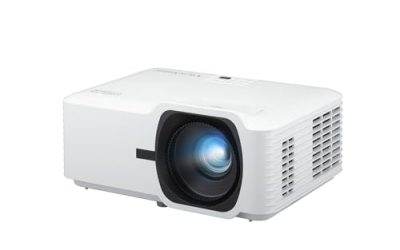
Searching for an LCD projector in 2026 is a narrower question than searching for a projector in general. It means you care about how the image is built: a 3LCD design splits white light into red, green, and blue paths and recombines them, so the color brightness matches the white brightness. Buyers who choose LCD over single-chip DLP are usually avoiding rainbow-flash artifacts, or they are placing the unit in a classroom, conference room, or lit living room where color brightness is as important as the headline lumen number.
This guide is for those buyers, whether the use case is a school or office, a ceiling-mounted installation, or a home theater that needs 1080p detail. It covers five LCD models drawn from the listings, from a portable 3000-lumen unit to a 1080p home cinema model. A DLP projector and two listings that never state their imaging technology were left out on purpose, so every pick below is described by what its title actually says rather than by assumptions about the panel inside.
Our Top Picks

Top 3 picks at a glance
Quick Picks
As an Amazon Associate we earn from qualifying purchases at no extra cost to you.




| Product | Best for | Key spec from the title |
|---|---|---|
| Epson EpiqVision Flex CO-W01 | Portable movie and presentation use | 3-chip 3LCD, 3000 lumens, up to 300-inch image |
| Epson PowerLite 118 | Fixed classroom or meeting-room installs | LCD, 4:3, ceiling mountable |
| Epson EX3290 | Bright rooms and mixed-source setups | 3LCD WXGA, 4000 lumens, 2 HDMI ports |
| Epson PowerLite 119W | Permanent ceiling installation | LCD, 4:3 format, ceiling mountable |
| Epson Home Cinema 980 | Movie nights with sharper detail | 3-chip 3LCD, 1080p |
How to Choose
Brightness: look for color lumens, not just white lumens
The defining advantage of 3LCD is that color light output equals white light output, which is why several titles say “color and white brightness.” In a fully dark room, roughly 1000 to 2000 lumens is enough for a large image. With some ambient light, such as an office with blinds partly open, aim for 3000 lumens or more. For classrooms with lights on, 3500 to 4000 lumens is a common target. Higher brightness helps, but it also means a louder fan and more heat, so match the number to the room instead of chasing the maximum. A useful habit is to size the image to the room: a smaller picture from a brighter unit looks richer than a giant picture stretched thin.
Resolution and aspect ratio decide what you can show
Presentations built on older slide formats suit a 4:3 projector, while video and modern laptops are 16:9 or 16:10. WXGA is a widescreen resolution of 1280 by 800, fine for slides and standard video. If you want a home theater image with fine detail, 1080p (1920 by 1080) is the threshold worth paying for, especially on screens wider than 100 inches, where lower resolutions start to show pixel structure. Do not confuse “supports 4K input” with native resolution; the native panel resolution sets what you see.
Placement, mounting, and connectivity
A ceiling-mountable design is only half the story; the throw ratio, lens shift, and zoom range determine whether the picture fits your screen from where the mount sits. Measure the distance from the mount point to the screen and compare it with the projector’s throw distance chart. For inputs, count the HDMI ports you need: a laptop, a streaming stick, and a game console already make three. Built-in speakers are fine for a small meeting room, but a larger space needs external audio. Also think about the screen itself: a matte white screen suits bright rooms, while a gray screen can help contrast in a dark room, and a wall painted flat white is a workable stand-in only for casual use.
What to ignore, and where budget models cut corners
Ignore claims of “300-inch” capability, since a maximum image size is a limit, not an advised setup, and brightness drops sharply as the picture grows. Be cautious about unlabeled imaging technology and inflated lumen figures that are not ANSI-rated. Budget projectors typically cut corners on lamp or light-source life, lens quality, manual-only focus and keystone correction, and the number of inputs. Also factor in running costs, since lamp-based models need replacements and filters need cleaning.
The 5 Best Options
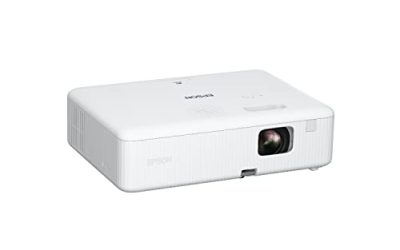
Epson EpiqVision Flex CO-W01
A portable 3LCD unit built for people who move between rooms. The title lists 3-chip 3LCD technology, 3000 lumens of color and white brightness, a display up to 300 inches, an HDMI port, and a built-in feature set that is cut off in the listing. It fits someone who wants one projector for a living-room movie, an outdoor screening, and the occasional work presentation. The equal color and white brightness helps pictures look vivid even when some light is present in the room.
- Strength: 3000 lumens of color and white brightness handles rooms that are not fully dark.
- Strength: portable design with an HDMI port keeps setup simple.
- Trade-off: the title lists only a single HDMI port, which limits multi-device setups without a switch.
Skip it if you need a permanent ceiling install or true 1080p detail.
Epson PowerLite 118
This is a no-frills LCD model for fixed installations. The title is brief: an Epson PowerLite 118 LCD projector in a 4:3 format that is ceiling mountable. That profile points to schools, training rooms, and meeting spaces that still use traditional presentation slides. The listing gives few feature claims, so buyers should confirm brightness, resolution, and input count on the full spec sheet before ordering. Its value lies in the Epson 3LCD lineage and the straightforward mounting approach.
- Strength: 4:3 format matches slide decks and older display standards.
- Strength: ceiling-mountable design suits permanent room installs.
- Trade-off: the title gives no brightness, resolution, or port information to compare.
Skip it if you mainly watch widescreen movies or want a documented lumen rating from the title.
Epson EX3290
This is the most flexible of the business-style models. The title lists 3-chip 3LCD, WXGA widescreen resolution, a built-in speaker, 4000 lumens of color and white brightness, and two HDMI ports. That much brightness makes it a fit for classrooms, conference rooms, and living rooms with windows, where a dimmer unit would wash out. Two HDMI ports let a laptop and a streaming device stay connected at the same time, which cuts down on cable swapping before a meeting begins.
- Strength: 4000 lumens of color and white brightness is the highest brightness in this group.
- Strength: two HDMI inputs and a built-in speaker reduce extra equipment.
- Trade-off: WXGA resolution is below 1080p, so fine detail on very large screens is limited.
Skip it if you want cinema-grade sharpness in a dark room.
Epson PowerLite 119W
A sibling to the PowerLite 118 aimed at permanent ceiling mounting. The title describes an LCD projector with a 4:3 format and a ceiling-mountable design, and the listing text is cut off after that. The W in the model name often signals a widescreen variant in the line, but the title itself states 4:3, so buyers should confirm the native resolution and aspect ratio on the manufacturer page before purchase. It suits institutional spaces where the mount and screen are already planned.
- Strength: LCD technology keeps color brightness in step with white brightness.
- Strength: ceiling-mount focus makes it a fit for classrooms and offices.
- Trade-off: the title leaves out lumens, ports, and resolution, so key specs need verification.
Skip it if you want a portable unit or a documented brightness figure in the listing.
Epson Home Cinema 980
The only model here sold as a movie projector. The title lists 3-chip 3LCD technology and 1080p resolution, repeated in the product description. Native Full HD detail is what separates it from the business-oriented picks above, and it is the one to consider for a dedicated media room or a living room used mostly at night. As a 3LCD design it avoids the single-chip rainbow artifacts some viewers notice during fast motion. Brightness and port counts are not stated in the title, so confirm them for your room.
- Strength: 1080p resolution gives finer detail for films and games.
- Strength: 3-chip 3LCD design means no color-wheel rainbow effect.
- Trade-off: the title does not list lumens, so check brightness if the room has ambient light.
Skip it if your main use is daytime presentations in a lit classroom.
Which One Fits Your Situation
You run a classroom or office with lights on
The Epson EX3290 is the stronger fit because its title cites 4000 lumens of color and white brightness, two HDMI ports, and a built-in speaker. That combination suits daytime sessions without extra gear.
You want a dedicated movie-night setup
Pick the Epson Home Cinema 980. Native 1080p and a 3LCD design are the right pairing for a dim room and a screen of 100 inches or more.
You need one projector that moves around
The Epson EpiqVision Flex CO-W01 is the portable choice, with 3000 lumens and a display of up to 300 inches listed. It works for presentations, backyard films, and moving between rooms.
Your room already has a ceiling mount and a 4:3 screen
The Epson PowerLite 118 and PowerLite 119W both list a 4:3, ceiling-mountable LCD design. Verify resolution and brightness on the full spec sheet, then choose whichever matches your screen and budget tier. Because the two titles are so similar, compare the model numbers on the manufacturer page rather than relying on the listing text, and confirm that the lens throw works with the distance from your mount to the screen.
Common Mistakes
- Comparing lumens across brands without checking whether the figure is color brightness, white brightness, or both.
- Choosing a 4:3 projector for widescreen video and then living with black bars and a smaller image.
- Assuming a ceiling-mountable label means the projector will fit your screen from the mount point without checking throw distance.
- Buying a high-lumen model for a dark basement, then dealing with excess fan noise and washed-out blacks.
- Forgetting ongoing costs such as replacement lamps and filter cleaning when comparing lamp-based projectors.
Related guides
- 24 Inch 240Hz Gaming Monitor For Esports
- Gaming Monitor For Competitive Shooters
- Low Latency 1080P High Refresh Monitors
Frequently Asked Questions
What is the difference between LCD and DLP projectors?
LCD projectors, specifically 3LCD designs, pass light through three separate panels, so color and white brightness match and there is no rainbow effect. DLP projectors in single-chip form use a spinning color wheel and a mirror array, often delivering sharper contrast and a more compact body.
How many lumens do I need for a lit room?
For a room with controlled ambient light, aim for 3000 lumens or more. For a classroom with the lights on, 3500 to 4000 is a common range. A dark home theater can work well with 1000 to 2000 lumens.
Is 1080p necessary for presentations?
Not usually. WXGA or 4:3 resolutions are adequate for slides and spreadsheets. 1080p becomes more important for movies, games, and large screens where pixel structure would otherwise show.
Can an LCD projector be used for gaming?
Yes, though input lag varies between models, and the titles here do not state it. Pick a 1080p model like the Home Cinema 980 for sharper gameplay in a darkened room, and check its spec sheet for latency.