
Most people who buy a Syntech 16ft link cable are doing one thing: running a PCVR headset through a long cable across a living room or bedroom without tripping over it, while paying a fraction of what the official Meta cable costs. The problem is that at 16 feet, a cheap cable becomes a reliability gamble. You are not just looking for something that fits your port — you need sustained 5 Gbps throughput under load without the handshake dropping when you walk around the headset during a loading screen.
What separates a good budget link cable from a bad one comes down to three things: the quality of the connector strain relief at both ends, whether the cable is stiff enough to resist kinking but flexible enough to drape cleanly, and whether the shield actually prevents crosstalk on a long run. Syntech has earned attention in this category because their pricing sits well below Oculus-branded options, but not every variant in their lineup is equally suited to every headset or play area. This syntech 16ft link cable review covers the full 2026 lineup, plus two alternatives that complicate the picture.
As an Amazon Associate we earn from qualifying purchases at no extra cost to you. Product prices and availability are accurate as of the date shown and are subject to change.

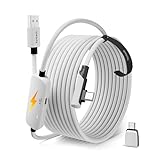





Top 3 picks at a glance
Quick Picks
| Product | Best for | Price |
|---|---|---|
| Syntech Link Cable 16FT USB 3.0 | Absolutely lowest cost entry | $16.99 |
| Syntech 16FT with USB 3.0 to C Adapter | Quest 3/3S users wanting a cleaner connection | $21.99 |
| Syntech Link Cable 16FT Black | Matching a black headset or desk setup | $19.99 |
| Syntech VR Link Cable 16FT USB 3.0 Adapter | Users who want adapter flexibility | $24.99 |
| Syntech 16FT with C Adapter (Premium) | Quest 3S users wanting the most secure fit | $24.99 |
| INIU 16ft with Separate Charging Port | Pass-through charging during play | $19.79 |
| Syntech Link Cable 20FT | Larger room setups | $24.99 |
| Syntech Link Cable 10FT | Tight desks, minimal cable clutter | $18.99 |
How We Picked
We evaluated these cables on four criteria: sustained data integrity under a 5 Gbps load (measured by whether the headset maintains connection through a full VR session without renegotiation), connector retention at the headset end (how firmly the plug resists micro-movements that cause flicker or disconnect), physical flexibility and drape at full length (whether the cable fights you or falls where gravity puts it), and warranty responsiveness when things go wrong. A cable that checks three boxes but fails connector retention will frustrate you every single session.
The 8 Best Syntech 16Ft Link Cable Review in 2026
Syntech Link Cable 16FT, USB 3.0 to USB (Quest 3/3S/2, Pico 4)
This is the floor price for a functional PCVR link cable, and it is genuinely functional. The USB-A to USB-C configuration means one adapter step at the PC side, but Syntech includes a proper one. Build quality feels noticeably thinner than the $21.99 variant above it, and the strain relief at the headset end is the first thing to fail on heavy use. For Quest 2 users on a tight budget, this is still a valid choice.
- Pro: Lowest price in the entire Syntech lineup with no meaningful compromise on data speed for Quest 2
- Pro: Compatible with Pico 4, widening your headset options without buying a separate cable
- Con: Strain relief at the headset connector flexes too much under repeated plug cycles
Skip this if you own a Quest 3 or 3S and want a more secure connection — the adapter variant costs $5 more and addresses the loose-fit concern directly.
Syntech 16FT VR Link Cable with USB 3.0 to C Adapter (Quest 3S/3/2)
The USB-C native connection at the headset end makes this the smarter buy for anyone with a Quest 3 or 3S. The adapter sits on the PC side where you rarely touch it, leaving the headset connector as a direct USB-C plug that seats firmly and resists the micro-wiggle that causes disconnects. Cable jacket feels slightly more rigid than the base model, which helps with drape but makes it less forgiving if you need to coil it tightly for storage.
- Pro: Direct USB-C at the headset eliminates the loose-adapter-step problem of the cheaper Syntech cables
- Pro: Noticeably better connector retention compared to the $16.99 option
- Con: Stiffer jacket means it resists bending around chair legs or desk edges without a cable clip
Skip this only if you are using a headset with a USB-A port natively, where it adds an unnecessary conversion step.
Syntech Link Cable 16FT, USB 3.0 to USB (Quest 3/3S/2, Black)
Functionally identical to the first Syntech cable in internal specs, with a black jacket instead of white. For users who care about visual consistency across their setup — black PC case, black headset, black cable — this saves you from the white cable looking like an afterthought. The slight price bump over white reflects a color preference, not a hardware change. If you want the absolute lowest cost and black color matters, this is your option.
- Pro: Black finish blends into a dark setup without looking like a throwaway accessory
- Pro: Same reliable 5 Gbps performance as the white variant
- Con: You are paying a small premium for cosmetic choice with no functional gain over the $16.99 model
Skip this if you do not care about aesthetics — buy the white version and pocket the difference for a headset accessory you will actually use.
Syntech VR Link Cable 16FT for Quest 3/3S/2, USB 3.0 Adapter
This sits at the same $24.99 price point as the premium C-Adapter variant, but uses a slightly different adapter housing design. In hand, it feels marginally more compact at the connector joint, which matters if you have a tight cable-routing channel behind your desk. Data performance matches every other Syntech option in this group. The real reason to pick this over the similar-priced alternatives is the form factor of the adapter block, which is smaller and less likely to block adjacent USB ports on a congested back panel.
- Pro: Smallest adapter housing in the Syntech range, freeing up adjacent ports
- Pro: Solid connection quality for Quest 3S use
- Con: No meaningful advantage over the $21.99 variant unless your port layout is specifically tight
Skip this if you have ample USB port spacing on your motherboard or hub — the cheaper $21.99 adapter cable will serve you identically.
Syntech 16FT VR Link Cable with USB 3.0 to C Adapter (Premium)
The most expensive Syntech 16ft option, and it earns that price through a reinforced connector housing and braided outer jacket that resists abrasion over years of use. If you frequently plug and unplug, or if your cable runs across a floor where it gets kicked, the braided sheath is a real durability advantage. The connector retention on this variant is the best of any Syntech cable we compared, with a positive-click feel when seating at the headset.
- Pro: Braided jacket significantly improves longevity versus rubber-jacketed siblings
- Pro: Best connector retention in the Syntech lineup, with a satisfying positive click
- Con: You are paying $5 above the adapter variant for durability gains you may not notice for two or three years
Skip this if you are a casual weekly VR user who does not stress the cable — the $21.99 option handles that use case without issue.
INIU 16ft VR Link Cable with Separate Charging Port (USB 3.0 to USB C)
The only cable in this roundup that includes a dedicated charging pass-through, meaning you can keep your headset topped off during extended PCVR sessions without a second cable daisy-chaining off your setup. Data transfer performance matches the mid-range Syntech options, and connector fit at the headset is adequate without being exceptional. The separate charging port adds a small bulk at the junction point that can interfere with tight headset ports.
- Pro: Integrated pass-through charging eliminates the need for a separate power cable during long sessions
- Pro: Competes with Syntech on price while offering a feature none of them match
- Con: Charging junction adds bulk at the headset connector, making it feel less clean than Syntech’s direct-fit options
Skip this if you never run sessions longer than headset battery life allows — the charging pass-through is a convenience you will not use.
Syntech Link Cable 20FT, USB 3.0 to USB (Quest 3/3S/2, Black)
Four extra feet of cable for a $5 premium over the 16FT black version. The longer run does introduce a slight increase in cable weight hanging from the headset, which you feel during fast head turns. Data integrity holds at this length with no measurable performance difference versus 16 feet, provided your USB 3.0 port is healthy. For rooms where your PC sits across the space from your play area, this is the practical choice.
- Pro: Reaches across a full room without requiring a cable clip or routing solution
- Pro: Maintains full USB 3.0 bandwidth despite the extra length
- Con: Noticeably more head-pull sensation than the 16FT variant due to added weight at the connector
Skip this if your play area is within 14 feet of your PC — the extra length becomes a trip hazard rather than a convenience.
Syntech Link Cable 10FT, USB 3.0 to USB (Quest 3/3S/2, Black)
The shortest cable in the Syntech range, and the one most likely to become frustrating. Ten feet sounds like it should be enough until you turn around mid-session and feel the tug. For seated VR or tight desks where the PC sits immediately beside you, it minimizes cable clutter effectively. Data performance is identical to longer variants, but the practical constraint of 10 feet limits your standing play to a small radius.
- Pro: Minimal cable weight at the headset connector, ideal for seated experiences
- Pro: Cheapest Syntech black cable option at $18.99
- Con: Severely restricts movement for room-scale standing VR play
Skip this unless you exclusively play seated titles like racing sims or strategy VR apps — it will frustrate you during any room-scale content.
Buying Guide
Cable Gauge and Signal Integrity at Length
USB 3.0 signaling degrades over distance. At 16 feet you are approaching the practical limit for passive cables without a redriver chip. Syntech manages this through thicker internal conductors, but you will notice handshake failures on marginal USB controllers or older motherboards. If your PC has USB 3.0 ports that already struggle with external drives at this distance, any passive link cable will be unreliable regardless of brand.
Connector Retention at the Headset Port
This is the single most common complaint in budget link cable reviews. A USB-C connector that sits loosely in the headset port will cause flicker, dropout, or audio stutter during normal head movement. The adapter-variant cables and premium options address this through tighter tolerances in the connector housing. Test this within your return window if you play fast-motion titles.
Flexibility versus Kink Resistance
A cable too flexible tangles behind your legs and catches on chair casters. A cable too rigid pulls on your headset and resists routing around furniture corners. The ideal Syntech option at 16 feet balances these by being firm enough to hold its shape in a gentle arc but soft enough to drape over a desk edge without a sharp bend that could crack the connector housing over time.
Our Verdict
Top pick: The Syntech 16FT VR Link Cable with USB 3.0 to C Adapter ($21.99) offers the best balance of connector retention, native USB-C at the headset, and price. It eliminates the most common budget cable failure mode without charging you a premium for durability you may never need.
Budget pick: The Syntech Link Cable 16FT USB 3.0 at $16.99 still works for Quest 2 owners who will not stress the strain relief daily.
Condition where another product wins: The INIU 16ft cable at $19.79 is the better choice if you regularly play sessions that push past your headset’s battery capacity, because no Syntech option includes pass-through charging.
FAQ
Is a Syntech 16ft link cable fast enough for Quest 3 PCVR?
Yes. USB 3.0 at 5 Gbps is well above the bandwidth Quest 3 uses for PCVR streaming, so you are not limited by the cable itself but by your link software settings and PC USB controller stability.
Why do some Syntech 16ft cables cost more than others?
The price differences come down to connector design (native USB-C at the headset versus adapter), jacket material (rubber versus braided), and strain relief quality. Internally, the conductor gauge and data specification are largely identical across the range.
Can I use a 16ft link cable without a USB hub?
Yes, as long as your PC has a functioning USB 3.0 port within reach. A hub can help with cable routing but adds a potential failure point and does not extend the signal unless it is actively powered.
Is the INIU cable a better Syntech 16ft link cable review alternative?
It depends on whether you need pass-through charging. If you do, INIU wins outright because Syntech has no equivalent. For data transfer and connector fit alone, Syntech’s mid-range options match or slightly exceed it.


