The best travel monitor for laptop users in October 2026 is the ARZOPA Z3FC. It packs a 16.1-inch 2560 x 1440 screen with a 180Hz refresh rate into a body that weighs about 1.7 lb, so it works as a sharp second screen for spreadsheets on the road and as a smooth gaming display for a handheld PC or console in a hotel room. If you care most about carrying weight, the runner-up is the Dell Pro 14 Plus P1425, a compact 14-inch screen that weighs roughly 1.36 lb with its stand, making it one of the lightest business-grade options you can buy.
A travel monitor is simply a slim, portable display that plugs into your laptop, usually with one USB-C cable that carries both video and power. The right one depends on what you pack it for: work, creative editing, gaming or all three. Below are seven main picks, four extra options, and a buying guide that explains which specs actually matter when you live out of a backpack.
Disclosure: We may earn a commission from qualifying purchases made through links on this page, at no extra cost to you.
Our Top Picks
 ASUS ZenScreen 15.6” 1080P Portable USB Monitor16 Inch14.16 x 8.91 x 0.31 inches3.2 poundsCheck on Amazon
 ViewSonic VX1655-4K-OLED 16 Inch 4K UHD OLED Portable15.6-Inch OLED0.6 x 13.9 x 8.78 inches1.5 poundsCheck on Amazon
Top Picks at a Glance
- Best Overall: ARZOPA Z3FC, 16.1-inch 1440p at 180Hz for work and play.
- Lightest Business Pick: Dell Pro 14 Plus P1425, about 1.36 lb with stand.
- Best Single-Cable Simplicity: ASUS ZenScreen MB16ACE, one USB-C cable and a folding smart case.
- Best Touchscreen: Lenovo ThinkVision M14t Gen 2, 14-inch 2240 x 1400 touch with stylus support.
- Best Picture Quality: ViewSonic VX1655-4K-OLED, 4K OLED in a 1.5 lb chassis.
- Best Dual-Screen: ASUS ZenScreen Duo MB14FCD, two 14-inch 1200p panels in one fold.
- Best Budget: ARZOPA Z1C, a 16.1-inch 1080p kickstand monitor in the lowest price tier.
Travel Monitor Comparison Table
| Monitor | Best For | Size / Resolution | Refresh | Weight | Watch For | Price Tier |
|---|---|---|---|---|---|---|
| ARZOPA Z3FC | Work and gaming | 16.1″ / 2560 x 1440 | 180Hz | About 1.72 lb | Bigger footprint than 14-inch screens | Budget to mid |
| Dell Pro 14 Plus P1425 | Ultralight business travel | 14″ | Standard | About 1.36 lb with stand | Smaller workspace | Mid-range |
| ASUS ZenScreen MB16ACE | Simple plug-and-play | 15.6″ / 1920 x 1080 IPS | 60Hz | About 1.7 lb | Only 1080p | Budget to mid |
| Lenovo ThinkVision M14t Gen 2 | Touch and pen input | 14″ / 2240 x 1400, 16:10 | Standard | Light 14-inch class | Upper price for its size | Upper-mid |
| ViewSonic VX1655-4K-OLED | Photo and video editing | 15.6″ / 3840 x 2160 OLED | 60Hz | About 1.5 lb | Premium price, OLED care | Premium |
| ASUS ZenScreen Duo MB14FCD | Two extra screens | 2x 14″ / 1920 x 1200 | 60Hz | 2.65 lb | Heaviest pick | Upper-mid |
| ARZOPA Z1C | Lowest cost | 16.1″ / 1920 x 1080 | Standard | Light 16-inch class | Basic brightness and color | Budget |
1. ARZOPA Z3FC: Best Travel Monitor for Laptop Overall

ARZOPA 16.1'' 180Hz 2.5K Portable Monitor, 2560x1440 QHD 107% sRGB -Z3FC | Kickstand Portable Gaming Monitor with HDR, Ultra Slim, Eye Care, External Second Screen for Laptop, PC, PS5, Mac, Xbox


As an Amazon Associate we earn from qualifying purchases. Product prices and availability are accurate as of the date/time indicated.
- Size / resolution: 16.1-inch, 2560 x 1440 (QHD)
- Refresh rate: 180Hz
- Color: about 107% sRGB per the maker
- Weight: about 1.72 lb
- Connection: USB-C video input
Best for: people who want one portable screen that handles office work during the day and gaming in the evening. Skip if: your bag is tight and a 14-inch screen would fit better.
Why we picked it: Most portable monitors stop at 1080p and 60Hz. The Z3FC jumps to 1440p and 180Hz, which changes how it feels in both work and play. At 16.1 inches, 1440p gives noticeably crisper text than 1080p and enough room to keep a document and a browser window side by side without squinting. The high refresh rate makes scrolling, cursor movement and window dragging feel smooth, and it is a genuine upgrade for gaming.
That gaming angle matters on a site like ours. If you travel with a handheld gaming PC, plugging into a 180Hz screen gives you a much bigger, smoother view than the built-in display, and it is easier to set up than a hotel TV. A laptop with a decent dedicated GPU can also push high frame rates in lighter games. Independent reviewers have named it a best-overall portable pick in 2026 roundups, largely because few rivals combine this resolution and refresh rate in this price tier.
The trade-off is size. A 16.1-inch screen is a little wider than a 15.6-inch laptop, so check your bag. At about 1.72 lb it is not heavy, but the 14-inch picks below are lighter. For most travelers who can spare the space, this is the best mix of sharpness, smoothness and value.
Pros
- 1440p resolution for crisper text than typical 1080p portables
- 180Hz refresh rate for smooth scrolling and gaming
- Strong value for the specs
- Pairs well with laptops and USB-C handheld PCs
Cons
- 16.1-inch footprint may not fit small bags
- Heavier than 14-inch picks
- High refresh only helps if your device can drive it
2. Dell Pro 14 Plus P1425: Lightest Business Travel Monitor

DELL Pro 14 Plus Portable Monitor P1425


As an Amazon Associate we earn from qualifying purchases. Product prices and availability are accurate as of the date/time indicated.
- Size: 14-inch
- Weight: about 1.36 lb including stand
- Connection: USB-C
- Design: business-grade Dell Pro line with an integrated stand
Best for: frequent flyers and consultants who want the lightest dependable second screen. Skip if: you want a large canvas or high refresh for gaming.
Why we picked it: Weight is the spec you notice every day when you travel, and the P1425 is one of the lightest serious options available. Including its stand, it comes in around 1.36 lb, which is about a third lighter than the 16-inch picks here. A 14-inch screen also matches the size of many work laptops, so the two sit evenly side by side and slip into the same sleeve.
Dell’s Pro line is aimed at business buyers, which usually means conservative design, solid build and good IT support. Reviewers who measured it in 2026 found the panel bright for a portable, which helps in airport lounges and sunny hotel rooms where many portables look washed out. The integrated stand means there is no folio cover to wrestle with on a cramped table.
The trade-off is space: a 14-inch screen fits fewer windows than a 16-inch one. Pair it with a 14-inch laptop for a balanced dual-screen setup, or choose the Z3FC if you need more room. Check the listing for the exact resolution and port layout of your configuration.
Pros
- One of the lightest portable monitors at about 1.36 lb with stand
- Bright panel for a portable, according to reviews
- Business-grade build and integrated stand
Cons
- 14-inch screen limits workspace
- Not designed for gaming
- Pricier than budget 15.6-inch screens
3. ASUS ZenScreen MB16ACE: Best Single-Cable Travel Monitor
ASUS ZenScreen 15.6” 1080P Portable USB Monitor (MB16ACE) - Full HD (1920 x 1080), IPS, USB Type-C, Eye Care, Anti-Glare Surface, Lite Smart Case, External Screen for Laptop, 3-Year Warranty


As an Amazon Associate we earn from qualifying purchases. Product prices and availability are accurate as of the date/time indicated.
- Size / resolution: 15.6-inch, 1920 x 1080 IPS
- Brightness: about 250 nits
- Connection: one USB-C cable for video and power
- Weight: about 1.7 lb
- Extras: anti-glare surface, smart case that doubles as a stand, three-year warranty
Best for: anyone who wants a no-fuss second screen that just works from a single port. Skip if: you need higher resolution or a bright panel for outdoor use.
Why we picked it: The MB16ACE has been a reference point for portable monitors for years because it gets the basics right. A single USB-C cable carries video and power from a compatible laptop, so there is no power brick or second cable in your bag. The protective smart case folds into a stand, keeping the screen safe in transit and propping it up on a desk in seconds.
The 15.6-inch 1080p IPS panel matches the size of many mainstream laptops, and the anti-glare finish cuts reflections from overhead lights. ASUS also backs it with a three-year warranty, longer than many budget brands. Monitor review sites still rank it a best-overall pick in 2026 because of that combination of simplicity, reliable build and sensible price.
It is not the sharpest or brightest screen here. At about 250 nits, it is fine indoors but struggles near bright windows, and 1080p at 15.6 inches is less crisp than the Z3FC. If you value effortless setup over specs, though, it is hard to beat.
Pros
- True one-cable setup over USB-C
- Smart case protects the screen and works as a stand
- Anti-glare IPS panel
- Three-year warranty
Cons
- Only 1080p
- About 250 nits is dim in bright spaces
- No HDMI for consoles
4. Lenovo ThinkVision M14t Gen 2: Best Touchscreen Travel Monitor
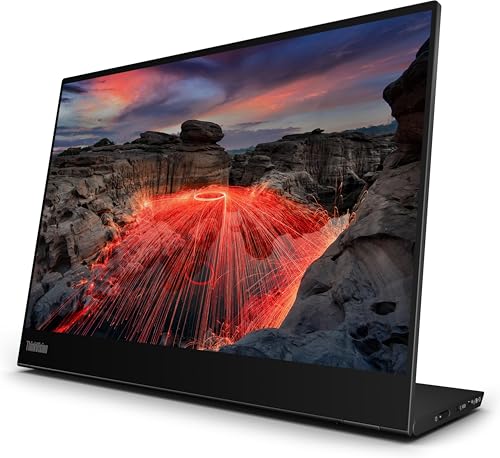
Lenovo ThinkVision M14t Gen2 14-inch 2240x1400 Portable Monitor


As an Amazon Associate we earn from qualifying purchases. Product prices and availability are accurate as of the date/time indicated.
- Size / resolution: 14-inch, 2240 x 1400 (2.2K), 16:10
- Input: multi-touch with stylus support
- Connection: USB-C
- Design: ThinkVision business line with integrated stand
Best for: note-takers, designers and presenters who want to draw or tap on their second screen. Skip if: you only need a passive display; non-touch screens cost less.
Why we picked it: The M14t Gen 2 turns a laptop into a two-screen workstation with a touch-enabled sidekick. Its 14-inch panel runs at 2240 x 1400, which is sharper than 1080p, and the taller 16:10 shape shows more lines of a document or spreadsheet than a standard 16:9 panel. Touch and pen support make it useful for annotating PDFs, sketching ideas, signing documents or controlling a presentation without reaching for the trackpad.
Lenovo’s ThinkVision line is built for business travel, and the 14-inch size keeps it compact and light enough to pair with most work laptops. If your laptop already has a touchscreen, the M14t gives you a consistent experience across both displays. Several 2026 roundups single it out as the touchscreen pick for exactly that reason.
The trade-off is price: you pay a premium for touch and pen compared with the non-touch ThinkVision M14d listed in Also Consider. If you never plan to touch the screen, that model or the Dell P1425 is a better use of money.
Pros
- Sharp 2240 x 1400 resolution in a 16:10 shape
- Touch and stylus support for annotation
- Compact 14-inch business design
Cons
- Upper-mid price for a 14-inch screen
- Touch needs OS support and can vary by laptop
- Not aimed at gaming
5. ViewSonic VX1655-4K-OLED: Best Picture Quality
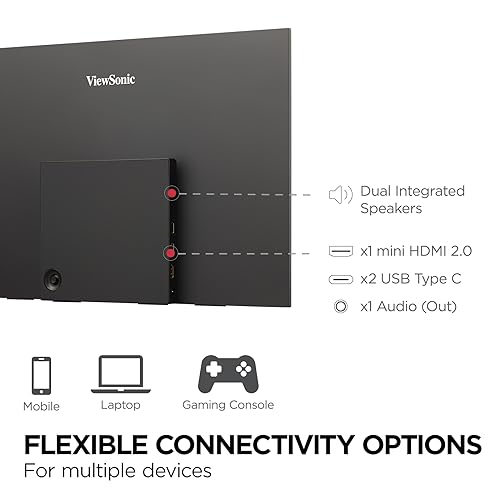
ViewSonic VX1655-4K-OLED 16 Inch 4K UHD OLED Portable Monitor for Laptop | USB C, Mini HDMI, 4K OLED, HDR500, 0.05ms Response, Dual Speakers, Built In Stand, Smart Cover, Laptop, Mac, PC, 60W Charging




As an Amazon Associate we earn from qualifying purchases. Product prices and availability are accurate as of the date/time indicated.
- Size / resolution: 15.6-inch, 3840 x 2160 OLED
- Refresh rate: 60Hz
- Weight: about 1.5 lb
- Connection: USB-C
Best for: photographers, video editors and anyone who watches a lot of content on the road. Skip if: you are on a budget or mainly work in static office apps for long hours.
Why we picked it: A 4K OLED panel is the best image you can carry in a laptop bag. At 15.6 inches, 3840 x 2160 delivers extremely fine detail, and OLED’s per-pixel lighting gives true blacks and very high contrast that no IPS portable can match. Photo edits, color grading previews and movies all look dramatically better than on a typical 1080p portable.
Despite the premium panel, it stays light at about 1.5 lb, lighter than the 16-inch Arzopa and the ASUS MB16ACE. That makes it a realistic choice for creative professionals who travel to shoots and want to review work on a proper screen rather than a laptop panel.
There are trade-offs. It sits in the premium price tier, it runs at 60Hz so it is not a gaming screen, and OLED rewards a bit of care: use dark mode, hide the taskbar and avoid leaving static images on screen for many hours. If you want OLED for less, the ASUS ZenScreen MQ16FC in Also Consider is a lower-cost alternative.
Pros
- 4K resolution and OLED contrast
- Light at about 1.5 lb
- Excellent for photo and video review
Cons
- Premium price tier
- 60Hz only
- OLED needs care with static content
6. ASUS ZenScreen Duo MB14FCD: Best Dual-Screen Travel Monitor
- Panels: two 14-inch 1920 x 1200 (16:10) screens in a foldable design
- Brightness / refresh: 350 nits, 60Hz
- Ports: 2x USB-C with DisplayPort Alt Mode, 1x Mini HDMI
- Weight: 1.2kg (2.65 lb)
- Extras: 1/4-inch tripod socket, auto rotation, Kensington lock
Best for: traders, developers and analysts who want a three-screen setup anywhere. Skip if: weight is your top concern.
Why we picked it: The MB14FCD folds two 14-inch screens into one unit, so your laptop gains two extra displays from a single device. Each panel runs at 1920 x 1200 in the taller 16:10 shape and is rated at 350 nits, brighter than many single-screen portables. You can stack them, set them side by side or rotate them, and auto rotation adjusts the image when you change orientation.
Connectivity is flexible: two USB-C inputs with DisplayPort Alt Mode plus a Mini HDMI port. The tripod socket is a smart touch, letting you mount it on a small stand for better posture or on a tripod for presentations.
The trade-off is weight. At 2.65 lb it is the heaviest pick here, close to the weight of a small laptop, and driving two extra screens asks more of your laptop’s ports and graphics. If you only need one extra screen, the Z3FC or MB16ACE is lighter and simpler.
Pros
- Two 14-inch 1200p screens in one foldable unit
- 350 nits brightness
- USB-C and Mini HDMI inputs
- Tripod socket for flexible mounting
Cons
- Heaviest pick at 2.65 lb
- Needs a laptop that can drive two extra displays
- 60Hz only
7. ARZOPA Z1C: Best Budget Travel Monitor

ARZOPA 16.1" Portable Monitor, 100% sRGB FHD 1080P Kickstand -Z1C | Portable Laptop Monitor High Color Gamut Display IPS Eye Care Screen for High-end Office & Entertainment


As an Amazon Associate we earn from qualifying purchases. Product prices and availability are accurate as of the date/time indicated.
- Size / resolution: 16.1-inch, 1920 x 1080
- Color: 100% sRGB per the maker
- Stand: built-in kickstand
- Connection: USB-C video input
Best for: students and first-time buyers who want a second screen for the lowest outlay. Skip if: you need high refresh, high resolution or a bright panel.
Why we picked it: The Z1C covers the essentials at the bottom of the price range. You get a 16.1-inch 1080p screen, which is slightly larger than a 15.6-inch laptop panel, plus a built-in kickstand so there is no floppy folio cover to balance. The maker rates color coverage at 100% sRGB, which is respectable at this tier.
For spreadsheets, video calls, reference documents and streaming, that is plenty. It also gives you a simple step up from the budget floor of no-name 15.6-inch screens, with a brand that offers a range of sizes if you later want to upgrade. If you want to spend a little more, the Z3FC is the obvious next step: same family, much sharper and smoother.
Pros
- Lowest price tier in this guide
- 16.1-inch screen with built-in kickstand
- Good color coverage for the money
Cons
- Only 1080p
- Basic brightness
- Not suited to fast gaming
Also Consider
Lenovo ThinkVision M14d

Lenovo ThinkVision M14d 14" Class LCD Monitor - 16:10 - Raven Black


As an Amazon Associate we earn from qualifying purchases. Product prices and availability are accurate as of the date/time indicated.
Best for: ultralight travelers who want sharp text without paying for touch. It uses a 14-inch 2240 x 1400 16:10 panel and weighs around 600g. Trade-off: no touch or pen input, and the price is close to the Dell P1425.
ASUS ZenScreen MQ16FC
Best for: OLED contrast at a lower tier than the ViewSonic 4K model. It is a 15.6-inch 16:10 OLED portable that connects over USB-C. Trade-off: lower resolution than the 4K ViewSonic, and the same static-content care applies to any OLED.
Vixtan 14-Inch Triple Laptop Screen Extender

Vixtan 14" Triple Laptop Screen Extender, 3.0 lbs Lightweight FHD IPS Portable Monitor for Laptop, USB-C Plug & Play Multi Screen Attachment for 13-17.3" laptops with Windows/Mac/Chrome


As an Amazon Associate we earn from qualifying purchases. Product prices and availability are accurate as of the date/time indicated.
Best for: people who want two extra screens that attach directly to the laptop lid. It adds two 14-inch FHD IPS panels, weighs about 3.0 lb and fits 13- to 17.3-inch laptops over USB-C. Trade-off: it adds weight to the lid and can unbalance lighter laptops.
ViewSonic VG1457 Dual Screen

ViewSonic VG1457 Dual Screen 14 Inch 1200p Portable Monitor, Foldable IPS | Laptop Extender, USB C, 65W Power Delivery, G Sensor Rotation, Macs, PC, Anti Glare, Travel Work, 2W Speakers, AC Adapter Kit


As an Amazon Associate we earn from qualifying purchases. Product prices and availability are accurate as of the date/time indicated.
Best for: an alternative to the ASUS Duo with two foldable 14-inch 1200p IPS panels. Trade-off: like any dual unit, it is heavier and needs a laptop that can drive two extra displays.
How We Chose
This guide is based on research rather than physical evaluation of each unit. We started with current portable monitors sold in the US and narrowed the list using:
- Weight and size: how easily the screen fits a typical laptop bag and how much it adds to your load.
- Connection: single-cable USB-C support first, HDMI as a bonus for consoles and older laptops.
- Screen quality: resolution, panel type, refresh rate, brightness and color coverage from maker specifications.
- Stand design: integrated stand, kickstand or folio case, and how stable each is on small tables.
- Use case coverage: at least one pick for business, creative work, gaming, touch input, dual screens and tight budgets.
We used manufacturer spec sheets and listing specs and cross-checked them with independent reviews from established technology publications. Where a spec could not be verified, we left it out rather than guess.
Travel Monitor Buying Guide
Size: 14-inch or 15.6 to 16-inch?
Match the monitor to your laptop and your bag. A 14-inch screen weighs roughly 1.3 to 1.5 lb and pairs neatly with 13- and 14-inch laptops. A 15.6- to 16.1-inch screen adds workspace and suits 15- and 16-inch laptops but usually weighs 1.5 to 1.8 lb and needs a larger sleeve. If you fly often and work on tray tables, go 14-inch. If you mainly work in hotel rooms or coworking spaces, the bigger screen pays off.
Resolution and aspect ratio
1080p is fine at 14 inches but starts to look soft at 16 inches. For crisp text on a 15.6- or 16-inch portable, look for 1440p or higher; 4K is excellent for photo and video work but uses more power. A 16:10 aspect ratio (1920 x 1200, 2240 x 1400) gives extra vertical space for documents and code compared with 16:9.
Connection: USB-C, HDMI and power
The ideal is a laptop USB-C port that supports DisplayPort Alt Mode (often marked with a DisplayPort or Thunderbolt logo). Then one cable carries both video and power. If your laptop’s USB-C port is data-only, you will need HDMI plus a separate power source, or a monitor that supports DisplayLink drivers. For consoles and handhelds, a monitor with HDMI or a full-function USB-C input is essential. Some portables also have a second USB-C port so you can pass power through from a charger.
Brightness
Many budget portables are rated around 250 nits, which is fine indoors under normal lighting. For bright lounges, cafes with big windows or outdoor use, aim for 300 to 400 nits or more. OLED panels look punchier at the same brightness thanks to their deep blacks.
Refresh rate for gaming
60Hz is fine for office work. If you game on a laptop with a dedicated GPU or travel with a handheld PC, a 120Hz to 180Hz portable makes motion far smoother. Consoles like the PS5 and Xbox Series X need HDMI or a compatible USB-C connection, and most portables will run them at 60Hz or 120Hz depending on resolution.
Stand and protection
Folio cases protect the screen in your bag but can be wobbly on soft surfaces. Built-in kickstands are steadier and quicker to set up. Integrated adjustable stands are the most stable but add a little weight. Whatever you choose, carry the screen in a padded sleeve; portable panels are thin and can crack under pressure.
Single Screen vs Dual-Screen Travel Setup
A single portable monitor is the right choice for most travelers. It doubles your workspace, adds only 1.3 to 1.8 lb, and runs from one port on almost any modern laptop. Setup takes seconds, and you can use it with a phone, handheld PC or console as well.
Dual-screen units such as the ASUS ZenScreen Duo, ViewSonic VG1457 and lid-mounted triple extenders appeal to traders, developers and analysts who truly need three screens. The trade-offs are weight (2.5 to 3.0 lb or more), the need for a laptop that can drive two extra displays, and more cable management. Lid-mounted extenders can also strain lighter laptop hinges.
A simple rule: if you regularly have more than four windows open and switch between them constantly, a dual unit can be worth the extra weight. Otherwise, a single high-resolution portable like the Z3FC delivers most of the benefit with half the bulk.
FAQ
What is the best travel monitor for a laptop?
The ARZOPA Z3FC is the best travel monitor for most laptop users in 2026. It combines a 16.1-inch 1440p screen, a 180Hz refresh rate and a weight of about 1.72 lb. For the lightest option, the Dell Pro 14 Plus P1425 weighs about 1.36 lb with its stand.
Can a portable monitor run off one USB-C cable?
Yes, if your laptop’s USB-C port supports DisplayPort Alt Mode and supplies enough power. One cable then carries video and power. If the port is data-only, you will need HDMI and separate power, or a monitor that supports DisplayLink drivers.
Do portable monitors work with MacBooks?
Yes. MacBooks with USB-C or Thunderbolt ports can drive portable monitors over a single cable. Base M-series MacBook Air and MacBook Pro models have limits on how many external displays they support, so check your model before buying a dual-screen unit.
What size travel monitor should I get?
Get a 14-inch monitor if you value low weight and use a 13- or 14-inch laptop. Choose 15.6 to 16 inches if you want more workspace and have room in your bag. Matching your laptop’s screen size makes the setup look and feel balanced.
Are portable monitors good for gaming?
Many are. Look for 120Hz or higher, such as the 180Hz ARZOPA Z3FC, plus HDMI or full-function USB-C for consoles and handheld PCs. Budget 60Hz portables are fine for slower games and streaming but feel less responsive in shooters.
Can I take a portable monitor on a plane?
Yes. Portable monitors without built-in batteries carry no special restrictions and can go in carry-on bags. Keep the screen in a padded sleeve or its case, and pack it in your carry-on rather than checked luggage to avoid pressure damage.
How bright should a travel monitor be?
About 250 nits is enough indoors, but 300 to 400 nits or more is better for bright rooms and near windows. OLED portables look more vivid at similar brightness because of their perfect blacks.
Do portable monitors drain laptop battery?
Yes. When powered over USB-C, a portable monitor draws power from your laptop, which shortens battery life. Lower brightness helps, and monitors with a second USB-C port can take power from a wall charger instead.
Which Travel Monitor Should You Buy?
- You want one screen for work and gaming: ARZOPA Z3FC.
- You fly constantly and every ounce counts: Dell Pro 14 Plus P1425.
- You want the simplest single-cable setup: ASUS ZenScreen MB16ACE.
- You annotate, sketch or present: Lenovo ThinkVision M14t Gen 2.
- You edit photos or video on the road: ViewSonic VX1655-4K-OLED.
- You need three screens anywhere: ASUS ZenScreen Duo MB14FCD.
- You want the lowest price: ARZOPA Z1C.
Check your laptop’s USB-C port first. If it supports video output and power delivery, any of these picks will turn your laptop into a two-screen workstation with a single cable.
Sources
- ASUS ZenScreen MB16ACE and ZenScreen Duo MB14FCD official specifications
- Dell Pro 14 Plus Portable Monitor P1425 product listing
- Lenovo ThinkVision M14t Gen 2 and M14d product listings
- ViewSonic VX1655-4K-OLED and ARZOPA Z-series product listings
- Independent 2026 portable monitor reviews from established technology publications
Last updated: October 10, 2026