
As an Amazon Associate we earn from qualifying purchases at no extra cost to you.


Our Top Picks


Top 3 picks at a glance
The Short Answer
For most sim racers, a 27 to 32 inch single monitor is the sweet spot. A 27 inch, 1440p display sits about 24 to 30 inches (60 to 76 cm) from your eyes and fills your field of view nicely without requiring a massive rig. If you have the budget and the depth — a single 32 to 34 inch ultrawide curved monitor mounted 20 to 28 inches (50 to 71 cm) away delivers a more immersive experience than a flat panel of the same size. For serious immersion, a triple-monitor setup of three 27 or 32 inch panels angled at roughly 60 to 90 degrees total gives you proper side vision for wheel-to-wheel racing, but it demands a dedicated stand, roughly 55 to 65 inches (140 to 165 cm) of wall width, and a GPU that can push three screens.
Money matters too: a good 27 inch 1440p panel runs $200 to $350, a 34 inch ultrawide $350 to $650, and a triple setup with stands typically starts around $700 to $1,200 all-in before you factor in your rig.
Standard Sizes
Monitor sizes refer to the diagonal of the screen, but you buy with your room and rig in mind — so width, height, and depth are what actually count. Here are the real-world dimensions of common sim racing monitor sizes (dimensions vary slightly by model; check the spec sheet before ordering):
| Size | Width (in / cm) | Height (in / cm) | Typical 16:9 Resolution | Best Use |
|---|---|---|---|---|
| 24 inch | 21.2 / 53.8 | 12.6 / 32.1 | 1920 x 1080 | Tight spaces, budget triple setups |
| 27 inch | 23.8 / 60.5 | 13.7 / 34.7 | 2560 x 1440 | The all-around sweet spot |
| 32 inch | 27.9 / 70.8 | 16.2 / 41.0 | 2560 x 1440 or 3840 x 2160 | Single-screen immersion, triples |
| 34 inch ultrawide | 31.9 / 81.0 | 14.3 / 36.3 | 3440 x 1440 | Curved single-screen immersion |
| 49 inch super ultrawide | 47.4 / 120.3 | 14.5 / 36.7 | 5120 x 1440 | Triple-beater in one panel |
Curved panels (1000R to 1800R radius) are worth prioritizing above 27 inches — the wrap brings the screen edges into your peripheral vision and lets you mount the display closer without the corners looking stretched.
Weight matters for mounting: most 27 to 32 inch monitors weigh 12 to 18 lbs (5.5 to 8 kg), while a 49 inch super ultrawide can hit 30 to 38 lbs (13.5 to 17 kg). Verify your stand or cockpit mount is rated for the load — most sim racing monitor stands handle 15 to 26 lbs per arm.
How to Measure Your Space
- Measure your viewing distance. Sit in your seat as you would while racing, then measure from your eyes to the monitor mounting plane. Aim for roughly 0.9 to 1.2 times the screen diagonal in inches — about 24 to 32 inches (61 to 81 cm) for a 27 inch panel.
- Measure wall-to-rig depth. Add your monitor’s panel depth (2 to 4 inches), the stand depth (8 to 20 inches), and your seat’s length (44 to 58 inches for most cockpits). You want at least 72 to 84 inches (183 to 213 cm) total for a comfortable single-screen setup.
- Check width clearance. Allow 4 to 6 inches (10 to 15 cm) beyond each side of the screen. A triple 27 inch setup needs roughly 55 to 65 inches (140 to 165 cm) of free width once the side panels angle inward.
- Measure ceiling height and eye level. The top of the screen should sit at or just below eye level while seated. Most seated racers’ eyes land 34 to 42 inches (86 to 107 cm) off the floor, so pick a stand with an adjustable height range that covers that.
- Confirm VESA compatibility. Nearly all sim mounts use 75 x 75 mm or 100 x 100 mm VESA patterns. Measure the hole spacing on your monitor or check its spec sheet before buying any stand.
- Plan cable and power runs. Leave 12 to 18 inches (30 to 46 cm) behind the mount for cable slack, especially on a wheel-and-pedal rig you might slide away after a session.
By Room or Use Case
Small Bedroom or Dorm (under 80 square feet)
Go with a single 24 or 27 inch monitor. Both fit on a desk clamp mount or a compact wheel stand, and you can mount a 24 inch screen 22 to 28 inches (56 to 71 cm) away and still get a convincing sense of speed. Keep total depth under 60 inches (152 cm) so the rig fits against a wall. A 24 inch 1080p panel costs $120 to $200, leaving budget for a wheel and pedals.
Dedicated Home Office / Spare Room (100 to 150 square feet)
A 32 inch 1440p monitor or a 34 inch curved ultrawide is the move. Either fills your view at 24 to 30 inches (61 to 76 cm) without overwhelming a standard 10 x 12 room. A freestanding mount such as the GTPLAYER mobile monitor stand (around $120) supports 32 to 65 inch displays and lets you park the screen next to your cockpit and roll it into position — handy if the room doubles as a guest room.
Dedicated Sim Racing Room (150+ square feet)
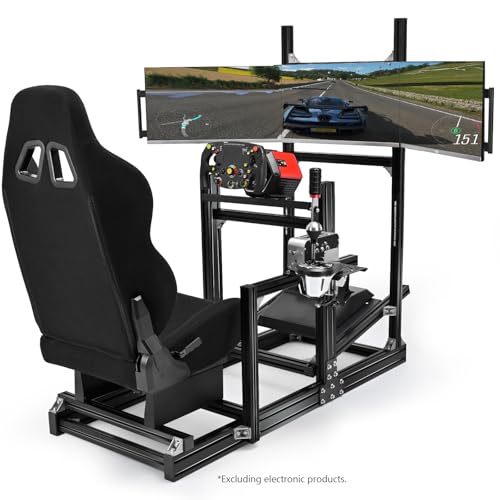
This is where triples shine. Three 27 or 32 inch panels on a dedicated triple stand, angled so the side screens sit 55 to 75 degrees off center, gives genuine peripheral vision for overtaking and corner entry. Stands like the Marada triple monitor stand with wheels ($128) hold three 24 to 32 inch displays and roll into place, while full aluminum profile cockpits with integrated triple TV mounts — such as the Anman package at around $600 — handle the whole rig in one welded frame. Budget 65 to 70 inches (165 to 178 cm) of width and a GPU capable of 1440p across three panels.
Console Racers (PlayStation / Xbox)
Consoles output one screen only, so a single 27 or 32 inch 4K or 1440p display at 24 to 32 inches (61 to 81 cm) is ideal. Skip ultrawides — consoles don’t support 21:9 output, so you’ll get black bars. A 32 inch 4K panel at $300 to $500 is plenty.
VR Alternative
If floor space is tight, a VR headset replaces the monitor entirely — no stand, no width requirement, and an effective field of view no flat panel can match. Keep a small 24 inch monitor nearby for menus and setup; total footprint drops to roughly the cockpit alone.
Common Sizing Mistakes
- Buying too big for the viewing distance. A 49 inch panel mounted 20 inches (51 cm) from your eyes means you can’t see the whole screen; edges become unusable and your neck does the work.
- Ignoring total rig depth. A wheel stand plus seat plus monitor stand regularly exceeds 70 inches (178 cm). Measure before buying, not after.
- Forgetting mount weight ratings. Triple stands typically support 15 to 26 lbs (7 to 12 kg) per arm. A 32 inch 4K monitor at 18 lbs can overload older arms.
- Mixing mismatched panels in triples. Different bezel widths, heights, or color temperatures on side monitors wreck the wraparound effect. Buy three identical units.
- Mounting too high. Screens mounted above eye level force you to look up through every braking zone. Top of screen at eye level, period.
- Choosing resolution by size alone. A 32 inch at 1080p looks soft at 24 inches away. Match 27 inch to 1440p and 32 inch to 1440p or 4K.
- Skipping VESA checks. Some slim office monitors only accept proprietary brackets. Verify 75 x 75 or 100 x 100 mm VESA support before checkout.
FAQ
Is 27 or 32 inch better for sim racing?
Both work well; distance decides. A 27 inch sits best 24 to 30 inches (61 to 76 cm) away, while a 32 inch wants 28 to 36 inches (71 to 91 cm). If your rig locks your eyes at roughly 26 inches from the mount, choose 27 inch; if you have 30-plus inches of depth, the 32 inch delivers more immersion. Prices overlap: expect $200 to $350 for a quality 27 inch 1440p and $280 to $450 for a 32 inch.
Are triple monitors better than an ultrawide?
Triples offer more total width (roughly 71 to 84 inches of screen versus 32 to 49 inches) and true side vision, but cost more, require a stronger GPU, and take longer to align. A 34 or 49 inch curved ultrawide is simpler, cheaper, and adequate for 90 percent of racers. Choose triples if you race competitively in open-wheel or endurance cars where mirrors and side awareness matter.
How far should my monitor be from the wheel?
Target roughly 24 to 30 inches (61 to 76 cm) from your eyes to the screen for a 27 inch panel, adjusting proportionally by size. The practical test: with your arms in driving position, your hands should land about two-thirds of the way between your chest and the screen plane. If the screen dominates your vision comfortably without eye strain after 30 minutes, the distance is right.
Do I need a special stand for a sim racing monitor?
Yes, in most cases. Desk stands work for desk setups, but dedicated rigs need a freestanding or cockpit-mounted bracket rated for your panel’s weight and VESA pattern. Options range from the Marada triple stand with wheels ($128) for 24 to 32 inch displays, to the GTPLAYER mobile stand (around $120) for single 32 to 65 inch screens, to fully integrated cockpits like the CAMMOO sim racing cockpit with monitor mount (around $320) or the Anman aluminum profile package with triple TV mount (around $600). Expect to spend $120 to $600 on the mounting side depending on how many screens you run — a cost worth planning for before upgrades through 2026 and beyond.









