The best triple monitor stand is the one that matches your screen size, your monitor weight and your desk: a clamp or grommet mount for solid desks, a free-standing base when you cannot drill, and an arm rating comfortably above each screen’s weight. This roundup compares ten listings, with three WALI models, two MOUNTUP, two VIVO, plus HUANUO, PUTORSEN and ErGear. Our weight check later in the guide helps you see whether your monitors fit, and the mount type section explains when a clamp is a bad idea. Specifications below are the sellers’ own claims. If you are still choosing the monitors, our multi-console battlestation monitor guide may help.
Our Top Picks
Top 3 picks at a glance
Quick picks
As an Amazon Associate we earn from qualifying purchases at no extra cost to you.




- VIVO Triple Pneumatic STAND-V300G – best for easy height changes with gas-spring arms
- ErGear Triple Monitor Mount – best for dual C-clamp stability and one-hand adjustment
- WALI GSDM003 – best mid-range clamp mount for screens up to 32 inches
- MOUNTUP 17-32 inch – best for larger screens with clamp and grommet choices
- HUANUO Triple Monitor Mount – best for 17 to 32 inch gaming setups with a grommet kit
- WALI M003S – best budget clamp mount with a 22 lb per arm rating
- PUTORSEN free-standing stand – best for no-clamp setups with cable management
- WALI MF003 free-standing – best free-standing pick for lighter screens
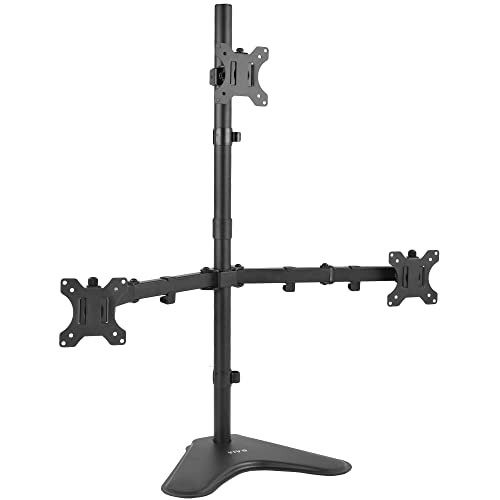
- VIVO STAND-V003E – best free-standing option for screens up to 30 inches
- MOUNTUP up-to-27-inch stand – best for small screens on a tight budget
Comparison table
| Model | Mount type (as titled) | Screen size and load as stated | VESA stated | Best for |
|---|---|---|---|---|
| VIVO STAND-V300G | Pneumatic, C-clamp | Up to 32 in, fully adjustable | Check the listing | Easy height changes |
| ErGear Triple Mount | Dual C-clamp, full motion | 13-32 in, 19.8 lb per arm | Check the listing | Stability |
| WALI GSDM003 | Desk mount | 13-32 in, 19.8 lb per arm | 75/100 mm | Mid-range clamp |
| MOUNTUP 17-32 | Clamp and grommet | 17-32 in, 4.4-19.8 lb each | Check the listing | Larger screens |
| HUANUO Triple | Clamp and grommet kit | 17-32 in | Check the listing | Gaming desks |
| WALI M003S | C-clamp and grommet | 13-27 in, 22 lb per arm | 75/100 mm | Budget clamp |
| PUTORSEN stand | Free-standing, full motion | Up to 27 in, 22 lb per arm | 75/100 mm | No clamp, tidy cables |
| WALI MF003 | Free-standing, grommet base | 13-27 in, up to 22 lb | 75/100 mm | Light screens |
| VIVO STAND-V003E | Free-standing | Up to 30 in | Check the listing | Heavy-duty free-standing |
| MOUNTUP up to 27 in | Triple stand mount | Up to 27 in, 4.4-19.8 lb each | Check the listing | Small screens |
The ten stands
VIVO Triple Pneumatic Monitor Mount STAND-V300G
This VIVO model is the only pneumatic design in the group. The title lists three screens up to 32 inches, a fully adjustable heavy-duty desk stand and a C-clamp. Gas-spring arms let you raise or lower a screen with a light push, which suits people who sit and stand through the day. The title gives no per-arm weight or VESA pattern, so confirm both on the listing before you order. Gas-spring arms are tuned to a weight range, so match your monitors to the range on the listing rather than assuming any screen works.
Pros
- Pneumatic arms for smooth height changes
- Handles screens up to 32 inches
Cons
- Per-arm weight limit not in the title
- Gas springs need the right monitor weight to hold position
Who it’s for: people who adjust screens often. Who should skip it: those with very light or very heavy monitors.
ErGear Triple Monitor Mount
ErGear lists a mount for 13 to 32 inch screens, 19.8 lbs per arm, dual C-clamp stability, full-motion arms with tilt, swivel and rotation, one-hand adjustment, and two setup options. The dual clamp spreads load across the desk edge, which helps with larger screens. The title does not say which VESA patterns it supports, so check that your monitors use 75×75 or 100×100. The two setup options probably refer to different ways of attaching or arranging the arms, but the title does not explain them, so read the listing images before buying.
Pros
- Dual C-clamp design for stability
- Two setup options and one-hand adjustment
Cons
- VESA pattern not stated in the title
- Clamp needs a solid desk edge
Who it’s for: buyers with large screens and a firm desk. Who should skip it: glass-desk owners.
WALI Triple Monitor Mount GSDM003
One of three WALI listings. This one covers 13 to 32 inch screens at up to 19.8 lbs per arm, with swivel, tilt, rotation, VESA 75/100 mm and a black finish. The listing is called a monitor mount for a desk, and the title does not give the clamp type. The 19.8 lb limit is the same as the ErGear and MOUNTUP listings. Because three WALI listings sit in this list, the practical difference is the size range and weight rating: this one trades a lower arm rating for 32-inch coverage.
Pros
- VESA 75/100 stated, with screens up to 32 inches
- Rotation allows portrait use
Cons
- Attachment method is not clear in the title
- Lower per-arm rating than the M003S
Who it’s for: mid-range clamp buyers. Who should skip it: people with 22 lb monitors.
MOUNTUP Triple Monitor Mount for 17-32 Inch Screens
MOUNTUP’s larger model lists 17 to 32 inch screens, full motion, 4.4 to 19.8 lbs per arm, and both clamp and grommet mounting in black. The minimum weight of 4.4 lbs matters, because very light screens can drift on arms tuned for heavier loads. It is a good fit for typical 24 to 27 inch monitors. If your monitors are all the same model, the clamp and grommet choice makes it easy to pick whichever suits your desk edge, and the stated range gives some room for a later upgrade.
Pros
- Clamp or grommet options
- Stated weight range, 4.4 to 19.8 lbs
Cons
- VESA pattern not in the title
- Very light monitors may not suit the minimum
Who it’s for: 24 to 32 inch monitor owners. Who should skip it: people with tiny, light screens.
HUANUO Triple Monitor Mount
HUANUO describes a gaming triple monitor stand for 17 to 32 inch screens with swivel, tilt, rotation, clamp and a grommet kit. The title says nothing about weight per arm or VESA patterns, which are the two checks you most need. It is a straightforward desk mount, and you should read the listing carefully for load figures. Because the listing is thin on numbers, compare it with the MOUNTUP 17-32 inch model, which covers the same screen range and states its per-arm weights.
Pros
- Clamp and grommet kit included
- Screens up to 32 inches
Cons
- No weight rating in the title
- VESA not stated
Who it’s for: gaming desks. Who should skip it: buyers who want numbers up front.
WALI Adjustable Triple Monitor Mount M003S
The M003S supports 13 to 27 inch screens at 22 lbs per arm, with full motion, tilt, swivel, rotation, C-clamp and grommet base, and VESA 75/100 mm. It has the highest stated per-arm rating among the clamp mounts, though it gives up the 32-inch coverage of the other WALI mount. It is a plain, strong, low-cost mount. It overlaps with the WALI MF003 in size range, so the choice between them comes down to clamp versus free-standing and how the 22 lb figure is defined.
Pros
- 22 lbs per arm, higher than most here
- Both clamp and grommet options
Cons
- 27-inch maximum
- Tilt and swivel ranges are not given in the title
Who it’s for: 24 to 27 inch monitors. Who should skip it: 32-inch buyers.
PUTORSEN Triple Monitor Stand
The listing lists a free-standing, full-motion stand for screens up to 27 inches, with cable management, 22 lbs per arm and 75/100 mm VESA. The brand is not in the title, so verify the seller. Free-standing means you do not clamp the desk, though you should check the base footprint and how it holds three arms. Cable management is mentioned in the title, which is useful because three screens create a lot of cable to hide. It uses a plain generic title, so look for the brand name on the product page.
Pros
- No clamp needed, good for thin or glass desks
- Cable management and 22 lb rating
Cons
- 27-inch maximum
- Base takes desk space
Who it’s for: desks that cannot take a clamp. Who should skip it: small desks.
WALI Triple Monitor Stand MF003 (Free Standing)
This free-standing WALI covers 13 to 27 inch screens at up to 22 lbs, with adjustment, full motion, tilt, swivel, rotation, grommet base and VESA 75/100 mm. The “up to 22lbs” wording is ambiguous: it may mean per arm or in total, so read the listing. If the limit is per arm, it matches the M003S. Despite the free-standing label, the title also lists a grommet base, so check whether the stand sits on the desk or passes through it before buying.
Pros
- Free-standing with VESA 75/100 stated
- Rotation for portrait mode
Cons
- Weight limit wording is unclear
- 27-inch maximum
Who it’s for: lighter monitors. Who should skip it: heavy monitor owners.
VIVO Triple LCD Monitor Desk Stand STAND-V003E
VIVO’s free-standing heavy-duty stand fits three screens up to 30 inches and is described as fully adjustable. The title does not give weight or VESA, so confirm both. Its main appeal is a stand that sits on the desk without clamping, for people who dislike drilling or using clamps. The LCD LED wording in the title is a naming style, not a specification, and it does not tell you the weight limit.
Pros
- Free-standing, with screens up to 30 inches
- Heavy-duty description in the title
Cons
- No weight rating or VESA in the title
- Free-standing bases need desk depth
Who it’s for: buyers who cannot clamp. Who should skip it: those who need exact specs.
MOUNTUP Triple Monitor Stand Mount (Up to 27 Inch)
The smaller MOUNTUP lists a desk mount for screens up to 27 inches, with each arm holding 4.4 to 19.8 lbs, a heavy-duty description and a black finish. Compared with the 17-32 inch model above, it is suited to 24 to 27 inch monitors. Check the listing for the clamp type. It shares a maker and a weight range with the 17-32 inch model, so the main decision is whether you will ever own screens larger than 27 inches.
Pros
- Stated weight range for each arm
- Good match for common 24 to 27 inch screens
Cons
- 27-inch maximum
- Mounting method not described in the title
Who it’s for: everyday dual-to-triple upgrades. Who should skip it: those with 32-inch screens.
How we picked these
We compared the ten listings on supported screen sizes, stated weight per arm, VESA patterns, mounting method and cable management, using published specifications, manufacturer documentation and buyer reviews. Specific details come only from each listing title, and anything unstated is marked “check the listing”. Nobody on the team used or measured these units. Where several listings look like variants from one maker, we said so rather than treating them as unrelated.
What to look for in a triple monitor stand
Mount type: clamp, grommet or free-standing
Clamp mounts grip the desk edge and take little surface space but need a solid, thick-enough edge. Grommet mounts go through a hole and are very stable, but need a hole. Free-standing stands sit on the desk with a base plate, so they avoid damaging the desk but use space. Choose by desk construction first, because a glass top, a thin top or a curved edge can rule out a clamp.
Screen size range and weight per arm
Each title gives a diagonal range, such as 13 to 27 inches or 17 to 32 inches, and often a per-arm weight limit such as 19.8 or 22 lbs. Both must fit your monitors. Some arms also state a minimum weight, like 4.4 lbs, below which the arm may sag or rise. The table below is a rough check, so confirm your own monitor weights from the manual.
| Monitor size | Typical weight (rough) | Fits a 19.8 lb arm? |
|---|---|---|
| 24 in | About 8 to 12 lb | Yes, with margin |
| 27 in | About 10 to 15 lb | Usually yes |
| 32 in | About 14 to 22 lb | Check carefully |
VESA pattern
Most monitors up to 27 inches use 75×75 or 100×100 mm, and several titles state 75/100 mm. Many others do not, so verify. Some monitors have curved backs, recessed holes or no holes, which may need a spacer or adapter. Also check that screws are included.
Adjustment: tilt, swivel, rotation and height
Full-motion arms let you angle the side screens inward, rotate one into portrait and raise the center screen. Pneumatic arms add easier height changes. Check the arm layout, since three arms on one pole share load and can sag under heavy screens, while bar designs spread it.
Layout: flat row, angled wings or one in portrait
A flat row is simplest for equal screens, while angling the side screens inward keeps the edges at the same distance from your eyes. Rotating one side screen into portrait suits code or chat, as covered in our monitors for programming guide. Leave a few inches between screens so adjusting one arm does not knock the next.
Cable management and desk depth
Cable clips along the arms keep wires tidy. A three-screen setup also needs depth: sit about an arm’s length from the center screen, and leave room for the base of a free-standing stand.
A worked example: a three-monitor weight check
Imagine three 27-inch monitors at roughly 12 lb each. A stand rated at 19.8 lbs per arm leaves about 8 lb of margin per arm, enough for cable pull and flex. Now imagine two 32-inch screens at roughly 18 lb: they sit close to the limit, and a stand with a 22 lb rating or a pneumatic range that covers them is safer. If you are unsure, weigh the monitor without its stand, because the arm only carries the panel.
Before you order, check
- Largest monitor diagonal against the stand’s range
- Monitor weight without its stand against the per-arm rating and any stated minimum
- VESA pattern on the back of each monitor
- Desk thickness and material against the mount type
- Free desk depth for the base and for comfortable viewing
Mistakes buyers make
The top mistake is ignoring weight: a 32-inch screen can be near or above a 19.8 lb limit. Another is skipping the VESA check, then finding the monitor has no holes. Some buyers clamp a stand to a thin or glass desk, which can crack or crush it. Others buy a stand rated for 27 inches and put 32-inch screens on it, or forget that curved and ultrawide monitors need extra clearance. Another is buying three different monitor models and then struggling to line up their heights, since each has a different bezel and VESA position. Finally, assembly takes time, so expect to tighten parts and rebalance arms after a few weeks.
Verdict
For most buyers, the WALI M003S offers one of the highest stated loads for 27-inch screens, and the ErGear or MOUNTUP 17-32 inch models suit larger ones. The VIVO V300G is the pick for easy height changes. If you cannot clamp, choose the PUTORSEN or VIVO V003E free-standing designs, and always check weight, VESA and desk thickness first. Those who want certainty about specs should lean on the listings that state the most numbers, such as the WALI and MOUNTUP ones, and treat the thinner HUANUO and VIVO titles as items to verify on the product page.
Related guides
- Low Latency 1080P High Refresh Monitors
- Gaming Monitor For Competitive Shooters
- Monitor Refresh Rate Vs Frame Rate Explained
Frequently asked questions
What size monitors fit a triple monitor stand?
It depends on the model. The listings here range from 13 to 27 inches up to 17 to 32 inches, and one VIVO stand states up to 30 inches. Pick a stand whose range covers your largest screen with some margin, and confirm that each arm can hold the weight of your specific monitor. Ultrawide and curved screens often need a separate check, so read the product page.
What does VESA 75×75 and 100×100 mean?
VESA is the standard hole pattern on the back of a monitor for mounting. The numbers are the distance in millimeters between holes, so 75×75 means a square 75 millimeters on each side, and 100×100 means 100 millimeters. Most monitors up to 27 inches use one of these. Check your monitor’s manual or back panel before ordering, and if the monitor has no holes, you will need an adapter.
Is a clamp mount safe for a thin or glass desk?
Not always. Clamps need a solid edge and a desk thick enough for the clamp’s stated range, and glass desks, hollow panels and very thin tops can crack or crush. Many stands also offer a grommet-hole base, which needs a hole in the desk. A free-standing stand avoids drilling or clamping. Read the maximum desk thickness and always spread the load.
Will a triple monitor stand hold ultrawide or curved monitors?
Sometimes, but these listings talk about regular screens by diagonal size and weight per arm. Ultrawide and curved monitors are wider and heavier, so they may exceed the arm rating, hit a neighboring screen, or fail to tilt cleanly. If you own ultrawide screens, look for stands that explicitly mention ultrawide support, and check weight and VESA compatibility first.
Do you need a pneumatic arm?
It depends on how often you move your screens. Pneumatic or gas-spring arms adjust height with a light push and hold their position, which suits people who change posture. Mechanical arms with fixed joints are simpler and often cheaper, but you adjust them with tools or by loosening knobs. If you set up once and rarely move, a mechanical stand is usually fine.