The best studio microphones depend on what you record, how quiet your room is, what connection your setup supports, and how much gain your interface can provide: choose a condenser for detailed vocals and instruments in a controlled room, or a dynamic microphone for louder sources and untreated spaces.
As an Amazon Associate we earn from qualifying purchases at no extra cost to you.




Our Top Picks
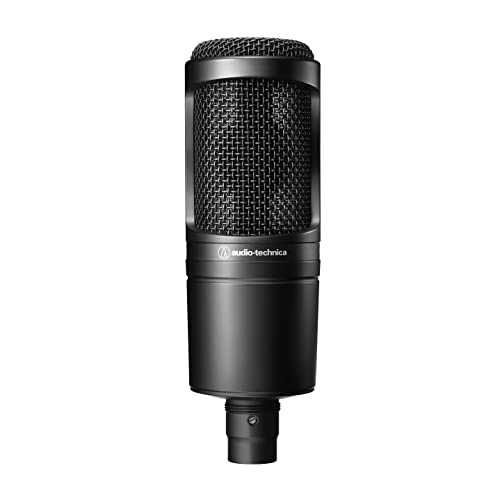 Audio-Technica AT2020 Cardioid Condenser Studio XLR Microphone09.6 x 9.6 x 2.6 inches1.3 poundsCheck on Amazon
 Logitech Creators Blue Yeti USB Microphone for PC1 Count (Pack of 1)4.92 x 4.72 x 11.61 inches3.51 PoundsCheck on Amazon
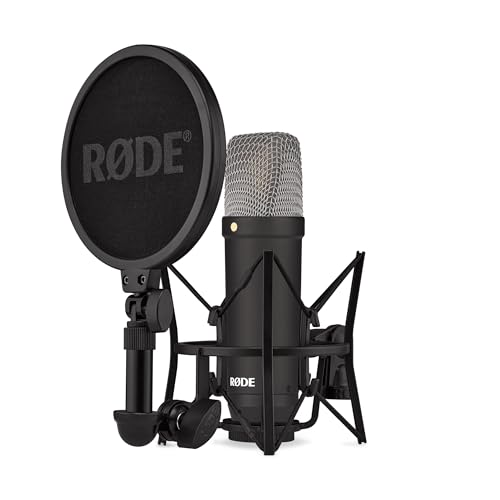

Top 3 picks at a glance
Best Studio Microphones by Recording Situation
| Situation | Best microphone type | Strong choices | Typical budget |
|---|---|---|---|
| First vocal microphone in a quiet room | Large-diaphragm condenser | Audio-Technica AT2020, Rode NT1 5th Generation | $100–$250 |
| Untreated bedroom or noisy home office | Dynamic cardioid | Shure SM58, sE V7, Sennheiser e835 | $90–$150 |
| Broadcasting, streaming, and spoken voice | Close-position dynamic | Shure MV7+, Shure SM7B | $250–$450 |
| Acoustic guitar and detailed vocal recording | Condenser with extended detail | Audio-Technica AT2035, Lewitt LCT 440 Pure, Rode NT1 | $150–$300 |
| High-end vocal production | Large-diaphragm condenser | Neumann TLM 103 | Usually $1,000–$1,500 |
| Recording directly into a computer or tablet | USB condenser or USB/XLR hybrid | Rode NT-USB+, Shure MV7+ | $150–$400 |
Condenser vs. Dynamic: Which One Fits Your Room?
Choose a condenser for detail
Condenser microphones are usually the better choice for controlled vocal booths, acoustic guitar, piano, strings, and detailed voiceover. Their sensitivity and extended high-frequency response can capture breath, consonants, pick noise, and room ambience more clearly than many dynamics.
The trade-off is that a condenser hears more of everything: computer fans, traffic, reflective walls, keyboard noise, and room echo. A reflective bedroom can make an inexpensive condenser sound harsher or more distant than a less sensitive dynamic used close to the mouth.
The Audio-Technica AT2020 is a sensible entry-level XLR condenser. The AT2035 adds a low-cut filter and pad, which are useful when recording loud sources or reducing low-frequency rumble. The Rode NT1 5th Generation is a more advanced option with both XLR and USB connectivity, making it flexible if your recording hardware changes later.
Choose a dynamic for rejection and control
Dynamic microphones are often easier to use in untreated rooms because they are commonly used close to the source and tend to capture less surrounding ambience. They work especially well for streaming, podcasts, aggressive vocals, guitar cabinets, snare drums, and loud singers.
The Shure SM58 remains a dependable vocal and speech microphone, while the sE V7 offers a focused cardioid pattern and a pronounced vocal presence. The Shure SM7B is designed for close-miked broadcast and vocal work, but it needs a clean, high-gain preamp. The Shure MV7+ is a practical alternative when you want both USB and XLR connections, built-in processing, and simpler computer recording.
Match the Microphone to Your Interface
Most XLR condenser microphones need 48-volt phantom power. Confirm that your audio interface provides phantom power before buying one. Phantom power is normally safe for balanced modern microphones, but turn it off when connecting equipment that specifically warns against it.
Dynamic microphones do not require phantom power, but some low-output models need substantially more preamp gain than a condenser. If your interface becomes noisy near maximum gain, an inline active gain booster can add approximately 20–28 dB before the interface preamp. It does not replace a suitable preamp; it simply reduces how hard you need to push a weak input.
As a practical example, suppose a dynamic microphone needs 60 dB of usable gain for your speaking distance, while your interface is clean up to 45 dB. A 20 dB inline booster gives the interface a much easier target: 60 dB required minus 20 dB added equals about 40 dB of interface gain. That leaves roughly 5 dB of gain headroom instead of forcing the preamp to its limit.
USB microphones avoid the separate interface and XLR cable, but they tie the microphone’s converter, headphone monitoring, and software controls to the unit. They are convenient for one-person setups; XLR is more adaptable for mixers, multi-microphone recording, and future upgrades.
Choose by Recording Budget
Under $150: start with the room and the source
For vocals or acoustic instruments in a reasonably quiet room, the Audio-Technica AT2020 is a strong starting point. For speech in a reflective room, a Shure SM58, sE V7, or Sennheiser e835 may produce a cleaner result because you can work close to the capsule and reduce room sound.
Budget for a stand, pop filter, and cable. A microphone placed on a desk without isolation can pick up typing, bumps, and fan vibration, so accessories can improve recordings more than moving from one entry-level model to another.
$150–$400: buy flexibility
This is the most useful range for many home studios. Consider the Rode NT1 5th Generation if you want XLR and USB options, the Audio-Technica AT2035 if you want a versatile condenser with a pad and low-cut filter, or the Shure MV7+ for speech, streaming, and close vocal work.
A hybrid microphone is particularly useful if you are starting with a computer and may later add an interface. You can begin over USB, then switch to XLR without replacing the microphone.
$400 and above: solve a specific production need
More expensive microphones can offer a particular tonal character, lower self-noise, more consistent manufacturing, or multiple polar patterns. They do not automatically fix poor acoustics or bad microphone technique. The Neumann TLM 103, for example, is a high-end large-diaphragm condenser suited to detailed vocals, voiceover, and instruments in a controlled room, but its sensitivity makes room treatment even more important.
Use This Setup Process Before Judging a Microphone
- Position the source correctly. Start with the capsule 10–15 cm from a vocalist for a dynamic and 15–25 cm for a condenser, using a pop filter. Move farther away if the voice is boomy; move closer if the room is too prominent.
- Point the microphone at the intended sound. Aim the capsule toward the mouth, guitar’s 12th fret, or the center of a guitar speaker. For a bright source, angle the microphone 20–45 degrees off-axis to soften excessive treble.
- Set the input level conservatively. Aim for peaks around -12 to -6 dBFS in your recording software. This leaves headroom for unexpected loud notes and avoids digital clipping.
- Listen with headphones before applying effects. Check for room echo, plosives, electrical hum, and handling noise. Equalization cannot fully remove a strong reflection or clipped recording.
- Compare at the same loudness. A louder microphone often seems better. Match the levels before deciding between models.
Connection and Compatibility Checklist
- XLR condenser: requires an interface or mixer, an XLR cable, and usually 48-volt phantom power.
- XLR dynamic: requires an interface or mixer; check that its preamp has enough clean gain.
- USB microphone: connects directly to a computer or compatible device, but check operating-system support and available USB ports.
- USB/XLR hybrid: offers the easiest upgrade path from direct recording to interface-based recording.
- Condenser for loud sources: a -10 dB or -20 dB pad can prevent the microphone’s internal electronics from overloading.
- Low-frequency noise: a 75–100 Hz high-pass filter can reduce traffic, desk vibration, and air-conditioning rumble, but do not use it automatically on bass-heavy instruments.
Room Treatment Often Matters More Than a Microphone Upgrade
In an untreated room, place the performer away from bare parallel walls and large reflective surfaces. Thick curtains, a rug, bookshelves, and strategically placed acoustic panels can reduce reflections. Do not rely on a thin foam square directly behind the microphone; the strongest improvement usually comes from treating the surfaces around the performer and microphone.
If you hear a hollow or “bathroom” quality, test a dynamic microphone close to the source before spending more on a condenser. If the recording sounds dull but clean, try a condenser or move the dynamic slightly off-axis rather than immediately boosting treble.
Frequently asked questions
What accessories should I buy with a studio microphone?
A stand, pop filter, and cable are useful starting accessories. A pop filter helps when positioning the microphone close to a vocalist, while a stand prevents desk placement from picking up typing, bumps, and fan vibration. Depending on the microphone and setup, you may also need an audio interface or mixer, an XLR cable, and an inline active gain booster.
How close should I place the microphone when recording vocals?
Start with the capsule 10–15 cm from a vocalist for a dynamic microphone and 15–25 cm for a condenser, using a pop filter. Move farther away if the voice sounds boomy, or closer if the room is too prominent. Compare recordings at the same loudness, because a louder microphone can seem better even when the difference is only volume.
How can I tell whether a microphone or my room is causing the problem?
Listen for room echo, plosives, electrical hum, and handling noise before applying effects. A hollow or “bathroom” quality points to reflections, so try a dynamic microphone close to the source before spending more on a condenser. If the recording sounds dull but clean, try a condenser or move the dynamic slightly off-axis rather than immediately boosting treble.
What recording level should I use for a new microphone?
Set the input level conservatively and aim for peaks around -12 to -6 dBFS in your recording software. This leaves headroom for unexpected loud notes and helps avoid digital clipping. Listen with headphones before applying effects, and compare microphones at the same loudness. Equalization cannot fully remove a strong reflection or repair a clipped recording.
Can I use a USB microphone with a tablet?
A USB microphone can connect directly to a computer or compatible device, and the article specifically lists recording into a computer or tablet as a suitable use. Check operating-system support and available USB ports before buying. USB microphones avoid a separate interface and XLR cable, but their converter, headphone monitoring, and software controls remain tied to the microphone.
Final Recommendations
The best studio microphones for most beginners are the Audio-Technica AT2020 for quiet-room condenser recording, the Shure SM58 or sE V7 for untreated-room vocals and speech, and the Shure MV7+ for a flexible USB/XLR setup. Choose the Rode NT1 5th Generation when you want detailed condenser sound with a future-proof connection path, and consider the Neumann TLM 103 only when your room, preamp, and recording goals justify a premium condenser.
Whichever model you choose, prioritize microphone placement, room control, correct gain staging, and a stable stand. Those decisions usually determine whether a recording sounds professional long before the difference between two similarly priced microphones becomes important.