
The best smart lockbox for most Airbnb and rental hosts is the igloohome Waterproof Smart Lockbox with offline PIN codes and Bluetooth app control. It suits hosts with frequent guest turnover because the app generates a code with a start and end time that works at the box even when the box has never been online — no Wi-Fi at the property, no gateway, no phone call at midnight. If you need to open the box, issue a code or revoke one from another city, the Populife WiFi Lock Box with Gateway is the better fit, because its mains-powered gateway is what puts the lockbox on the internet. If budget is the deciding factor, the Gravless Smart Key Lock Box with Fingerprint and the HUANLANG Smart Key Lock Box cover the essentials for a fraction of the cost, the Populife Smart Fingerprint Lock Box is the pick when cleaners and dog walkers do not want to install an app, and the Prohomchoic Smart Key Lock Box is the natural choice if the rest of your rental already lives in the Tuya / Smart Life ecosystem.
Everything below is compared on the six things that actually decide whether a lockbox survives a season of turnover: how temporary codes behave, how much app control you get, the battery budget, weather resistance, audit logging, and how the thing attaches to your property.
Our Top Picks


Top 3 picks at a glance
Quick Comparison
The table below covers all seven lockboxes in this roundup. “Access methods” counts the ways a guest can get in — a numeric code, a fingerprint, or a phone — because that number matters more than any single spec when you are handing a key to a stranger at 11 p.m. “Online” describes whether the box itself talks to the internet, which is the single biggest driver of both price and battery life in this category.
| Product | Best for | Key specs | Online? | Price tier |
|---|---|---|---|---|
| Gravless Smart Key Lock Box with Fingerprint | Single-unit hosts who want fingerprint entry at the lowest cost | Fingerprint reader + numeric keypad; typically 4–8 digit codes; mechanical override; user-replaceable AA/AAA-class cells; weather-resistant shell; hangs on a shackle | No — no app, no radio | Budget |
| Prohomchoic Smart Key Lock Box (Bluetooth & PIN, Tuya app) | Hosts already running Tuya / Smart Life devices | Bluetooth unlock + PIN entry; Tuya Smart / Smart Life app; shareable user codes; door-knob and handle shackle; battery powered | Bluetooth only (remote features depend on a bridge) | Budget |
| Populife Smart Key Lock Box for Outside | App-first hosts who want better build than the cheapest tier | Bluetooth app control + keypad; multi-user code sharing; wireless operation; outdoor-rated housing; battery powered | Bluetooth only | Mid-range |
| igloohome Waterproof Smart Lockbox | Overall pick for high-turnover Airbnb and rental use | Offline PIN codes generated in the app with start/end times; Bluetooth unlock; eKeys for repeat users; IP65–IP66-class sealed housing; activity log that syncs on Bluetooth | No — offline codes are the point | Mid-range |
| HUANLANG Smart Key Lock Box | Hosts who want the box bolted to a wall, not hung on a handle | Bluetooth + app control; numeric keypad backup; wall-mount plate and fixing screws; key compartment; battery powered | Bluetooth only | Budget |
| Populife Smart Fingerprint Lock Box | Cleaners, dog walkers and guests who will not install an app | Fingerprint entry + code entry; wireless remote access where enabled; outdoor weather-resistant housing; battery powered | Bluetooth only | Budget |
| Populife WiFi Lock Box with Gateway | Hosts managing remotely, or running more than one property | Lockbox plus mains-powered Wi-Fi gateway; remote code issue and revoke from anywhere; event notifications; premium sealing and hardware | Yes — via the gateway | Premium |
On pricing: budget-tier lockboxes in this category generally sell in the low tens of dollars, mid-range models usually land in the mid double digits to low hundreds, and gateway bundles sit above that. Treat those as market ranges rather than fixed numbers, because listings in this category move constantly and a mid-range box on a clearance week can undercut a budget one.
How We Chose
This roundup is built from published specifications, the product names and feature descriptions in each listing, brand documentation for the wider product families, and the well-established behaviour of the categories involved — offline code locks, Bluetooth-only locks, fingerprint readers and gateway-bridged locks. It is a research comparison, not a testing report.
The selection criteria were narrow on purpose. First, category fit: does the box solve the specific problem a rental host has, which is giving a key to someone who should not keep it? A lockbox that stores a key but gives you no way to change who can open it is a different product from one that issues expiring codes. Second, access-method breadth, because a single guest who cannot get in generates more cost in one night than the price difference between two boxes. Third, offline capability, since a large share of short-term rentals have no Wi-Fi, or have Wi-Fi the guest cannot be trusted with. Fourth, power architecture — whether the radio inside the box is Bluetooth Low Energy or full Wi-Fi, because that decision determines whether you are changing batteries every six weeks or every year. Fifth, weather class, because an outdoor lockbox that corrodes in a season is worse than no lockbox. Sixth, audit depth, because knowing who opened the box and when is the difference between a security system and a hiding place. Finally, upgrade path: whether the box you buy today still fits your workflow when you add a second property, a cleaner and a co-host.
1. Gravless Smart Key Lock Box with Fingerprint – Best for Budget Fingerprint Entry
As an Amazon Associate we earn from qualifying purchases at no extra cost to you.

This is the box to buy when you run one unit, you live close enough to drive over if something goes wrong, and the nightly rate does not justify spending the price of a night’s stay on a lockbox. The listing describes a key lock box with a fingerprint reader and a code, built for outdoor use, with a combination lockbox mechanism and a physical key compartment. It is a standalone device: there is no app, no Bluetooth radio and no cloud account to manage, which means there is nothing to configure, nothing to break and nothing to charge a subscription for.
That simplicity is the whole appeal. A fingerprint reader on a lockbox gives you something a keypad cannot: the person opening the box does not have to be told anything. You enrol the guest’s print at check-in, they press their finger on the reader, and the box opens. There is no code to text, no code to forget, and no code that gets forwarded to a friend who arrives a day early.
Key specs and what they mean in practice
- Access methods: fingerprint reader plus numeric keypad, with a mechanical override in the class. That gives you two independent ways in, so a dead battery or a smudged reader does not strand a guest.
- Code length: typically 4–8 digits depending on the keypad. On a box with no brute-force lockout, choose the longest code the keypad allows; on one that locks out after a handful of wrong attempts, four digits is acceptable.
- Fingerprint capacity: budget fingerprint boxes usually hold anywhere from a handful to a few dozen prints. Check the listing if you plan to enrol every cleaner and every repeat guest.
- Power: user-replaceable alkaline cells, almost always AA or AAA. No charging cable, no proprietary battery pack, no dock.
- Housing: a metal or zinc-alloy shell with a sliding or hinged cover protecting the reader and keypad. That cover is doing real work — it keeps rain, grit and sunscreen off the sensor.
- Mounting: a shackle that hangs over a door handle, gate latch, railing or hasp. Check your handle diameter before buying; the shackle on this class is usually sized for standard residential hardware.
- Connectivity: none. No Bluetooth, no Wi-Fi, no app, no log.
Where this box earns its place is in the failure modes it removes. There is no app that can log you out, no cloud service that can go down, no firmware update that bricks the box on a Saturday, and no dependency on the property’s internet. If your rental is a cabin with a satellite link that drops in bad weather, or a basement unit where the Wi-Fi does not reach the front door, a purely offline box is not a compromise — it is the correct engineering choice.
Pros
- Fingerprint entry means no code to text, forward or forget.
- Two independent access paths plus a mechanical override on the class.
- No app, no account, no subscription, no internet dependency.
- Cheapest way to add key handover to a single rental.
- If it is lost, damaged or stolen, replacement cost is low enough to absorb.
Cons
- No audit log at all. You will never know who opened it or when.
- Changing access means physically visiting the box to delete a fingerprint or change the code.
- No scheduled or expiring codes — a code you hand out is valid until you change it.
- Fingerprint readers in this price band struggle with wet, cold or very dry fingers, and with prints worn smooth by manual work.
- Enrolling a fingerprint requires the person to be standing at the box.
- Weather resistance on budget boxes is usually splash-level, not immersion-level. Under a porch it is fine; on an exposed gatepost it is a gamble.
Compared with the nearest alternative: the HUANLANG Smart Key Lock Box costs about the same and adds Bluetooth app control plus a wall-mount plate. If you want the box fixed to a wall and you want to change access without driving over, the HUANLANG is the better buy. If you want the person at the door to be able to open it with a finger and nothing else, the Gravless is the better buy, because that is the one thing the HUANLANG does not do. Between the two, the deciding question is simple: do you want to manage access remotely, or do you want to manage it with a finger?
2. Prohomchoic Smart Key Lock Box – Best for Tuya and Smart Life Households

If your rental already runs on Tuya — smart plugs, a smart bulb, a robot vacuum, a camera — this is the lockbox that disappears into the app you already open every day. The listing describes a smart key lock box with Bluetooth and PIN code unlock, controlled through the Tuya app, in a digital lockbox form factor designed to hang from a door knob or handle. It is a budget-tier device, but the ecosystem is the feature you are actually paying for.
The practical advantage is account-level convenience. Instead of a seventh vendor app with a seventh password, the lockbox sits alongside your other devices under one login, and anyone you have already shared that home with — a co-host, a partner, a property manager — can see it without being set up again. For hosts running two or three units, that consolidation is worth more than a spec-sheet advantage somewhere else.
Key specs and what they mean in practice
- Access methods: Bluetooth unlock from the app when you are standing at the box, plus PIN entry on the keypad for anyone who does not have the app.
- App: Tuya Smart / Smart Life. Adding a device is the same pairing flow as any other Tuya product — scan, join, name it, assign it to a home.
- Code sharing: the app generates user codes you can hand to guests or staff, so you are not sharing your own master credential.
- Connectivity: Bluetooth Low Energy. That is good news for battery life and bad news for remote control — Bluetooth has a working range measured in metres, not miles.
- Power: user-replaceable alkaline cells, no wiring.
- Mounting: the listing name specifies door knob and handle mounting, which tells you the shackle is sized for residential hardware rather than for a bolted wall plate.
The honest limitation of every Bluetooth-only lockbox is the same, and it is worth understanding before you buy rather than after. Bluetooth is a short-range radio. When you are standing at the door with your phone, the box and the phone talk directly, and no internet is involved — that part works in a dead zone. But when you are 200 miles away, your phone has nothing to talk to. Any “remote” function on a Bluetooth-only box depends on something else being present at the property: either a Tuya gateway or bridge within radio range, or a person on site. Some Tuya lockboxes can be paired through a Tuya gateway to gain remote control; whether that works for your specific model depends on the firmware and the gateway, so treat remote access on this class as a maybe rather than a yes.
That said, for a lot of hosts a Bluetooth-only box is exactly right. If you live nearby, if you do turnovers yourself, or if your workflow is “drive over, open the app, issue a code”, the radio range never comes up. And because the box is not maintaining a Wi-Fi association, the batteries last months rather than weeks — see the battery budget section below for the arithmetic.
Pros
- Lives in the Tuya / Smart Life app you may already use for other devices.
- Bluetooth unlock for the owner plus keypad entry for everyone else.
- Guest codes are generated in the app rather than being a single fixed combination.
- Budget-tier price with no hub required for the core function.
- No wiring, no electrician, no permanent modification to the property.
Cons
- Bluetooth range is the ceiling on remote control. Real remote access needs a gateway or a person on site.
- Cloud-dependent features mean an outage or an account problem can interrupt app access, even though the keypad keeps working.
- One more device in a cloud ecosystem raises the same privacy questions as any other Tuya product.
- No wall-mount plate in the listed configuration; it hangs from a knob or handle.
- Audit depth varies by firmware and is generally lighter than what purpose-built rental lockboxes provide.
Compared with the nearest alternative: the igloohome Waterproof Smart Lockbox is the other mid-tier answer to the same question, and the split is philosophical. igloohome solves remote access by removing the need for it — you generate a time-limited code on your phone, and the box validates it offline, so a code you created in another state works at a box with no internet. Prohomchoic solves it by keeping you in an ecosystem and accepting that “remote” means “within Bluetooth range unless you add a bridge”. If you already run Tuya gear and you are usually nearby, take the Prohomchoic. If your guests check in when you are asleep in another time zone, take the igloohome.
3. Populife Smart Key Lock Box for Outside – Best for App-First Hosts Who Want Mid-Range Build

The listing describes a smart key lock box for outside, a wireless lock box for house keys, an outdoor electronic digital lockbox — and the “for outside” part is doing more work than it looks. This is the mid-range step up: the same app-controlled, code-sharing workflow as the budget tier, but with a housing, seal and hardware package intended to live in the weather rather than under an awning.
It suits a specific host: someone who wants to run access from a phone, who has a property where the box will be genuinely exposed — a gatepost, a fence rail, a wall beside a front door with no porch — and who has already decided that a $30 box is a false economy because they will be replacing it in eighteen months. It also suits hosts who are not ready to commit to a gateway-based system and want a middle rung on the ladder.
Key specs and what they mean in practice
- Access methods: Bluetooth app control for the owner plus keypad entry for guests, so a guest never needs an account.
- Code management: multi-user codes issued and shared from the app, which is the minimum for turnover — a single fixed combination is not enough when guests change every few nights.
- Connectivity: Bluetooth, no gateway required. Works in a Wi-Fi dead zone for on-site use.
- Weather package: this is where the extra money goes. Expect a better-sealed keypad cover, corrosion-resistant hardware and a housing designed to shed water rather than collect it in the hinge.
- Power: user-replaceable cells; no mains wiring.
- Mounting: wireless and self-contained, so it can hang or be placed without an electrician.
The mid-range premium in this category buys you three things, and it is worth knowing which one you are paying for. The first is the seal. A gasket, a drainage path and a cover that overlaps the keypad are cheap to design and expensive to skip, and they are the difference between a box that still works in year three and one whose buttons have gone mushy. The second is the mechanism. Shackles, latches and the internal key compartment on better boxes use thicker material and tighter tolerances, which matters because a lockbox is attacked at its weakest point, and on cheap boxes the weakest point is usually the latch, not the code. The third is the app. Mid-range boxes tend to have better user management — named users, clearer code lists, sometimes a basic event history — which is what turns a box from a shared secret into something you can actually administer.
What it does not buy you is remote control. This is still a Bluetooth box. If you want to revoke a code from a different state, this is not the product; that is what the gateway model further down this list is for. If your workflow is “I am here, I am handing over a key, I want to change the code tomorrow without a screwdriver”, this is the sweet spot.
Pros
- Genuinely outdoor-oriented housing at a price below the premium tier.
- App-based multi-user codes without needing a gateway.
- Bluetooth keeps battery drain low compared with a Wi-Fi-on-board box.
- Guests use a keypad, not an app, so nothing needs installing on their phone.
- Self-contained — no wiring, no hub, no permanent electrical work.
Cons
- No true remote access. Bluetooth range is the limit unless you add a bridge.
- Weather ratings on this tier are usually stated loosely; look for an IP number rather than the word “waterproof”.
- Audit logging is typically basic — enough to see recent activity, not enough for a dispute months later.
- More expensive than budget boxes that do the same job under a covered porch.
- Battery life still depends on how often guests fumble the keypad.
Compared with the nearest alternative: the igloohome Waterproof Smart Lockbox is the direct competitor, and the difference is what each one optimises. igloohome optimises for the code itself — offline, time-limited, works with no connectivity anywhere in the chain. This Populife model optimises for the day-to-day app experience and a solid outdoor housing at a mid-range price. If your problem is “guests arrive when I am asleep”, igloohome’s offline codes solve it and this one does not. If your problem is “the cheap box on my gate rusted out and I want something better that still runs from an app”, this is the more direct answer. Compared with the budget Populife fingerprint box, you are trading fingerprint entry for app-managed codes and better weather hardware — a fair trade for a rental, less fair for a family home.
4. igloohome Waterproof Smart Lockbox – Best Overall for Airbnb Turnover
This is the lockbox that most rental hosts should buy, and the reason is a single design decision: the codes are generated offline. The listing describes a waterproof smart lockbox with offline PIN codes and Bluetooth app control for iOS and Android, aimed explicitly at Airbnb and rental use. What that means concretely is that you open the app wherever you are, create a code with a start time and an end time, and send it to the guest. The code is validated mathematically by the box itself. The box never needs to be online, never needs to be told about the guest, and never needs to be within Bluetooth range of your phone for the code to work.
For a host with frequent turnover, that single property removes almost every failure mode in short-term rental access. No Wi-Fi at the property: fine. Wi-Fi drops during a storm: fine. Guest arrives at 2 a.m. while you are asleep: fine. You are on a flight when the cleaner’s code needs changing: fine, you generate it before takeoff. The guest’s code expires on its own, so you are not relying on remembering to change the combination after checkout.
Key specs and what they mean in practice
- Offline PIN codes: generated in the app with validity windows. This is the feature that separates it from every Bluetooth-only box on this list.
- Bluetooth unlock: when you or a co-host are standing at the box, the app opens it directly — useful for maintenance and for enrolling changes on site.
- eKeys: recurring digital keys for people who come back — a regular cleaner, a dog walker, a co-host — so you are not regenerating codes for the same person every week.
- Weather sealing: the brand’s lockbox family is built for outdoor installation, with sealed housings commonly rated in the IP65–IP66 class — dust-tight and resistant to water jets. That is a meaningful step above “weather resistant”.
- Audit log: the box records access events and syncs them to the app over Bluetooth, so the history is available the next time someone is within range.
- Power: user-replaceable cells with the battery life you would expect from a Bluetooth-only device — months, not weeks, because there is no Wi-Fi radio maintaining an association.
- Ecosystem: the brand is built around short-term rental workflows, with integrations and tooling aimed at hosts rather than at general consumers.
It is worth being clear about the one trade-off this design makes. Because the box is offline, the activity log is not real-time. Events are stored on the box and pushed to the app when a phone connects over Bluetooth. If you want a notification the moment a code is used, that is a gateway-based product, and it is listed further down. If you want a code that works no matter what the internet is doing, that is this one. Most hosts discover they want the second thing far more often than the first.
The second thing to understand is how the code handover actually feels for a guest. They receive a code, walk up to the box, tap it in, and the compartment opens. There is no app to download, no account to create, no acceptance of terms, no pairing. For a guest who has just driven six hours, that is the difference between a smooth arrival and a support call — and support calls are the hidden cost of cheap access systems. Every host who has talked a tired guest through a lockbox over the phone at midnight knows what an hour of that is worth.
Pros
- Offline, time-limited PIN codes that work with no Wi-Fi anywhere in the chain.
- Codes expire on their own — no post-checkout scramble to change a combination.
- Proper outdoor sealing in the IP65–IP66 class rather than vague “weather resistant” language.
- Bluetooth unlock and eKeys for repeat visitors and co-hosts.
- Access history stored on the box and synced to the app.
- Battery life in months because there is no Wi-Fi radio on board.
Cons
- Log sync needs someone within Bluetooth range — you will not get real-time alerts.
- Mid-range pricing, comfortably above the budget tier.
- Generating a code requires your phone and your account; there is no browser fallback.
- Bluetooth-only remote functions mean you cannot open the box from another city.
- Overkill for a family home that just needs a spare key hidden outside.
Compared with the nearest alternative: the Populife WiFi Lock Box with Gateway is the other way to solve the same problem, and the trade is precise. The gateway model gives you real-time events, remote unlock and remote revocation, at the cost of a mains-powered gateway that must sit within radio range of the box and a higher price. The igloohome gives you codes that work anywhere and batteries that last, at the cost of real-time visibility. If you have a reliable power outlet near the door and you genuinely manage from a distance, the gateway model earns its premium. If your priority is that the guest always gets in, the offline model wins. Compared with the mid-range Populife outdoor box, the difference is straightforward: same rough price band, but only one of the two can issue a code that works without the box ever being online.
5. HUANLANG Smart Key Lock Box – Best for Wall-Mounted Budget Installs

The listing describes a smart key lock box with Bluetooth electronic operation, wall-mount digital key storage, and app control. The distinguishing feature is in the middle of that name: wall mount. Most lockboxes in this category hang from a door handle on a shackle, which is convenient and also means the box can be lifted off and carried away by anyone with a bolt cutter and thirty seconds. A box that is screwed to a wall changes that equation.
It suits a specific kind of property. A gate with no handle. A brick wall beside a front door where a hanging box would look untidy or be in the way. A communal entrance hall where you want the box fixed and unobtrusive. A building where the door hardware is decorative or non-standard and a shackle will not fit. It also suits hosts who have had a hanging box disappear and have decided they are not doing that again.
Key specs and what they mean in practice
- Mounting: wall plate with fixing screws, which means the box becomes part of the property rather than an accessory on it.
- Access methods: Bluetooth app unlock plus a numeric keypad, so guests without the app still get in.
- Connectivity: Bluetooth Low Energy — no gateway, no Wi-Fi, no wiring.
- Power: user-replaceable alkaline cells. Budget-tier Bluetooth boxes are typically good for many months of normal use.
- Key compartment: sized for standard house keys on a ring. Check the internal dimensions against anything unusual — a large car fob, a chunky electronic key or a big bunch of keys may not fit.
- Housing: metal shell with a covered keypad, in the budget tier’s usual weather-resistant class rather than a sealed outdoor rating.
The installation detail that catches people out is what is behind the wall. A wall-mounted lockbox is only as secure as the material you screw it into. Into a stud, a brick or a concrete block, it is solid. Into plasterboard or a hollow door, it is decoration — the screws will pull straight out under any real load, and you have spent an afternoon drilling holes in your property for nothing. Before you buy, check what is behind the mounting point. If there is nothing solid, a hanging box with a hardened shackle is the more honest choice, or you fit a backing plate first.
The second thing worth thinking about is that a fixed box cannot be moved. A hanging box can be relocated from the front door to the back gate in a season when your entry routine changes. A wall-mounted box is where you put it. Choose the location deliberately: close enough to the door that a guest finds it in the dark, but not so close that it advertises “the key to this house is in here”. Beside a gate or a porch column usually beats beside the front door itself.
Pros
- Wall mounting makes the box far harder to walk off with than a hanging model.
- Bluetooth app control and keypad entry at a budget price.
- No wiring, no hub, no electrician.
- Tidy on a gatepost or brick wall where a hanging box looks out of place.
- Good fit for properties where door hardware will not take a shackle.
Cons
- Requires a solid substrate. Into plasterboard it provides almost no security.
- Permanent — you cannot relocate it without filling holes.
- No true remote access; Bluetooth range only.
- Weather rating is not stated as a sealed IP class, so an exposed install is a risk.
- No scheduled or expiring codes; codes are managed in the app but the box still needs to be in range to change them.
- Audit history is limited compared with purpose-built rental lockboxes.
Compared with the nearest alternative: the Gravless Smart Key Lock Box with Fingerprint is the closest budget rival, and the choice comes down to two questions. Do you need the box fixed to a wall, and do you want to manage access from a phone? The HUANLANG answers yes to both and no to fingerprint entry. The Gravless answers no to both and yes to fingerprints. If your guests are one-off and you want them to open the box with a finger and nothing else, the Gravless is simpler. If you want the box bolted down and you want to change codes without visiting, the HUANLANG is the better fit. Compared with the mid-range Populife outdoor box, you are giving up weather sealing and app polish for a fixed mount and a lower price.
6. Populife Smart Fingerprint Lock Box – Best for Guests Who Will Not Use an App
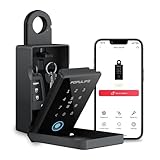
The listing describes a smart fingerprint lock box for keys with a code, wireless remote access, and outdoor use. The pitch is the combination of fingerprint entry and keypad entry in a budget-tier box, and the person this is really for is not the host — it is the cleaner, the dog walker, the contractor and the elderly relative who has no interest in installing another app.
That matters more than it sounds. A large share of access failures in short-term rentals happen with people who are not the guest: the turnover cleaner at 10 a.m., the plumber who arrives before the guest leaves, the neighbour who waters the plants. These people often do not have your app, do not want your app, and cannot be relied upon to remember a code you texted them last month. A fingerprint solves that permanently. Once a print is enrolled, that person opens the box by touching it, every time, with no code and no phone.
Key specs and what they mean in practice
- Access methods: fingerprint reader plus numeric keypad, giving two independent ways in.
- Fingerprint enrolment: done at the box. This is the key limitation — you cannot enrol a print remotely, so plan for a five-minute setup the first time each person visits.
- Wireless operation: no wiring, no gateway, no permanent installation.
- Remote access: the listing describes wireless remote access, which in this class generally means app-mediated code
Related guides









