The best studio monitor subwoofer for music production for most project studios is the PreSonus Eris Sub 8 Bluetooth. It pairs an 8-inch front-firing woofer and 50 W of Class AB amplification with a variable low-pass crossover, a 0°/180° phase switch, balanced TRS and unbalanced RCA inputs, and Bluetooth for reference listening — the exact feature set a small or mid-sized room needs to hear the 40–80 Hz octave that 3.5-inch and 4.5-inch desktop monitors simply cannot reproduce. It suits producers working within roughly 2 m of their speakers in rooms up to about 1,500 cubic feet.
If you have a larger, treated room and want genuine sub-30 Hz extension, the KRK S10.4 is the step up: a 10-inch driver with 160 W of Class D power as stated in its listing. If you already own Mackie CR-series monitors or want one matched purchase, the Mackie CR8SBT — or the Audiosavings CR3.5BT + CR8SBT bundle — is the simplest path to a coherent 2.1 system. Everything below is judged on low-frequency extension, crossover control, room-size suitability, cabinet noise, connection options and placement demands.
Our Top Picks
 PreSonus Eris Sub 8 Bluetooth Powered Desktop Studio8" Bluetooth Subwoofer9.8 x 12.7 x 11.7 inches17.6 poundsCheck on Amazon
 PreSonus Eris E4.5-2-Way 4.5" Near Field Studio Monitor4.5"7.1 x 6.4 x 9.5 inches2 PoundsCheck on Amazon


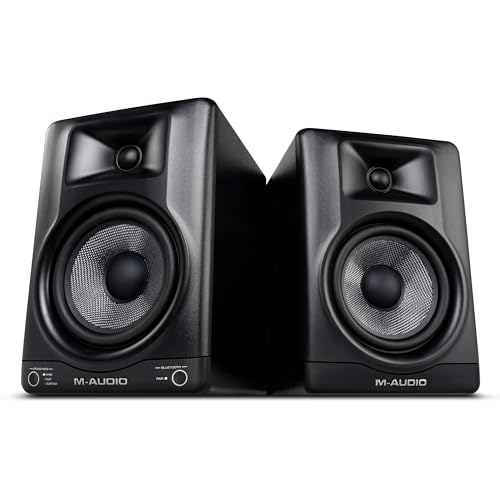
Top 3 picks at a glance


Quick Comparison
| Product | Best for | Key specs | Price tier |
|---|---|---|---|
| PreSonus Eris Sub 8 Bluetooth | Most project studios; first subwoofer | 8″ front-firing woofer, 50 W Class AB, variable low-pass crossover, phase switch, TRS + RCA + Bluetooth | Mid-range |
| PreSonus Eris E4.5 (pair) | Satellites for a compact 2.1 rig | 4.5″ Kevlar woofer, 1″ silk dome, Class AB bi-amping, front-firing port, TRS + RCA, rear tuning controls | Mid-range |
| Ortizan C7 (pair) | Budget desk setup with wireless | Compact powered pair, Bluetooth 5.3, desktop cabinet size, consumer-style input set | Budget |
| PreSonus Eris 3.5 (pair) | Tiny rooms, entry-level mixing | 3.5″ woofer, front-firing port, TRS + RCA inputs, low end rolling off around 80 Hz | Budget |
| Edifier MR3 | Hybrid production and daily listening | 3.5″ class driver, Hi-Res certified, Bluetooth, balanced TRS plus RCA, front tone controls | Mid-range |
| M-AUDIO BX5BT (pair) | Mid-sized rooms with wireless convenience | 5″ woofer, 1″ dome tweeter, bi-amped Class D, Bluetooth, balanced XLR/TRS inputs | Premium |
| Mackie CR8SBT | Owners of CR-series monitors | 8″ powered sub, adjustable crossover, Bluetooth, remote control, line-level inputs | Mid-range |
| Yamaha HS4 (pair) | Flat, translation-first monitoring | 4.5″ cone woofer, 1″ dome, bi-amped, ROOM CONTROL and HIGH TRIM switches, XLR/TRS combo inputs | Premium |
| Mackie CR3.5 (pair) | Very small desks on a tight budget | 3.5″ woofers, front tone knob, compact black cabinets, RCA and 1/4″ class inputs | Budget |
| JBL 305PMkII | Value 5-inch near-field for untreated rooms | 5″ woofer, 1″ soft dome, bi-amped Class D, rated to roughly 49 Hz, XLR + TRS, boundary EQ | Budget |
| Audiosavings Mackie CR3.5BT + CR8SBT bundle | One-purchase matched 2.1 system | 3.5″ Bluetooth monitors plus 8″ Bluetooth subwoofer, matched voicing, single order | Premium |
| KRK S10.4 | Deep extension in treated, larger rooms | 10″ front-firing driver, 160 W Class D, variable crossover, phase and polarity controls, XLR/TRS/RCA | Premium |
How We Chose
This roundup is built from published manufacturer specifications, brand documentation and the well-established behaviour of each product category — not from bench measurements or time with the units. Selection came down to four filters. First, spec fit: does the product’s stated driver size, amplifier power and rated low-frequency limit actually solve a problem a music producer has? A subwoofer that stops at 50 Hz is not worth the floor space, and a 3.5-inch monitor that claims 45 Hz is marketing rather than physics.
Second, category fit: the list deliberately mixes subwoofers with the monitors most likely to sit above them. A subwoofer is only as good as the crossover point it has to meet, so pairing advice matters more than raw specs. Third, use case: bedroom desks, untreated spare rooms, converted garages and treated project studios all load a subwoofer differently, so room-size suitability is weighted heavily.
Fourth, upgrade path: a good first sub should survive your next monitor upgrade. Models with a genuinely variable crossover, a phase switch and balanced inputs can be re-tuned to a bigger pair later; models with a fixed crossover and RCA-only inputs usually cannot. Cabinet noise, port behaviour and placement flexibility were treated as tie-breakers throughout.
1. PreSonus Eris Sub 8 Bluetooth – Best for Small and Mid-Sized Project Studios
As an Amazon Associate we earn from qualifying purchases at no extra cost to you.

The Eris Sub 8 Bluetooth is the subwoofer most home producers should buy first. It is an 8-inch front-firing powered subwoofer with 50 W of Class AB amplification as stated in its listing, and it exists to extend a near-field system that rolls off somewhere in the 50–80 Hz region — which describes nearly every 3.5-inch and 4.5-inch desktop monitor on this page. If your mixes translate badly in cars and on club systems, the missing octave between roughly 35 Hz and 80 Hz is usually the culprit.
Key specs
- 8-inch front-firing woofer, 50 W Class AB amplifier (per listing)
- Variable low-pass crossover, typically adjustable across roughly 50–130 Hz on this series
- Phase switch (0°/180°) for alignment with satellite monitors
- Balanced 1/4-inch TRS and unbalanced RCA inputs
- Bluetooth input for casual reference listening from a phone or laptop
- Black cabinet sized to sit under or beside a desk
Where this sub earns its place is control layout. A variable crossover lets you match the sub to the actual roll-off of your monitors instead of forcing a fixed handover — critical when you move from a 3.5-inch pair to a 5-inch pair and need to drop the crossover from around 100 Hz to around 70 Hz. The phase switch is the other half of the alignment puzzle: after you place the sub, flipping phase and listening to a 60–80 Hz sine tone tells you which setting produces more low-end energy at the mix position, and that setting is the one in phase with your satellites.
The front-firing driver is a placement advantage in small rooms. A front-loaded woofer can sit closer to a wall than a rear-loaded one without the port chuffing against the boundary, which matters when your desk is jammed into a corner. The trade-off is that a 50 W amplifier is honest about its limits: at 2 m listening distance with a typical 8-inch subwoofer sensitivity around 90 dB SPL at 1 W/1 m, you get roughly 101 dB of peak output, which is plenty for mixing at sane levels but will not fill a large room at 100 dB average. Class AB also means the cabinet gets warm, so leave a few centimetres of air around the rear panel.
Bluetooth on a studio subwoofer is a convenience feature, not a monitoring path. It is useful for checking a rough mix from a phone or letting a collaborator play a reference track, but codec latency and lossy compression make it unsuitable for critical work. Use the TRS or RCA inputs for anything you intend to mix on.
Pros
- Genuinely variable crossover, so it adapts when you upgrade monitors
- Front-firing driver tolerates near-wall and under-desk placement
- Balanced TRS inputs plus RCA and Bluetooth covers every realistic source
- Phase switch makes satellite alignment achievable without measurement gear
- Compact enough for a bedroom studio or a shared room
Cons
- 50 W of Class AB power limits maximum output in larger rooms
- Will not reach the sub-30 Hz content in cinematic or heavy electronic material
- Class AB runs warmer than a Class D design
- Bluetooth is fine for reference listening only
Against the Mackie CR8SBT, the Eris Sub 8 Bluetooth wins on crossover flexibility and balanced connectivity, and loses on remote control convenience and Bluetooth-first ergonomics. Against the KRK S10.4, it is a smaller-room tool: the KRK goes deeper and louder, but it is overkill — and physically oversized — for a desk in a 10 x 11 ft bedroom. If you have a small room and monitors that roll off above 60 Hz, this is the pick.
2. PreSonus Eris E4.5 – Best for Pairing With a Sub in a Compact Near-Field Rig
The Eris E4.5 is a pair of 4.5-inch near-field monitors that makes the most sense as the top half of a 2.1 system. On their own they are competent desktop speakers; crossed over to an 8-inch subwoofer at 80–90 Hz, they stop straining to reproduce bass they were never designed for, and the midrange cleans up noticeably. That is the real argument for this pairing: the sub does not just add low end, it removes distortion from the monitors.
Key specs
- 4.5-inch Kevlar woofer with a 1-inch silk-dome tweeter
- Class AB bi-amplification, one amplifier per driver
- Front-firing acoustic port for flexible desk placement
- Balanced 1/4-inch TRS and unbalanced RCA inputs
- Rear-panel acoustic tuning controls for high and mid frequencies
- Published low-end limit in the 70 Hz region, which is precisely why a sub is needed
The front-firing port is the detail that matters for small rooms. Rear-ported monitors need 15–30 cm of clearance from the wall behind them or the port loading changes the bass response; a front-ported cabinet can sit within 10 cm of a wall without the same problem. In a bedroom studio where the desk is against the wall, that is the difference between a usable low-mid response and a boomy one.
The rear tuning controls let you pull down the high frequencies if the room is bright and reflective, or trim the mids if the desk surface is creating a harsh reflection. Combined with a subwoofer crossover around 80 Hz, you get a system that behaves more like a three-way speaker than a small two-way plus a box on the floor. Just remember that a 4.5-inch driver crossed at 80 Hz is doing very little work below 100 Hz, which is exactly the point.
Where it falls short is headroom. These are near-field monitors designed for a listening distance of roughly 1–1.5 m. Push them to 3 m in a larger room and they compress early. They are also not the flattest option at this price — the Yamaha HS4 is more analytical and the JBL 305PMkII goes lower on its own — but as satellites above a subwoofer, the E4.5’s slightly forgiving top end is easier to work with for long sessions.
Pros
- Front-firing port allows close-to-wall placement
- Balanced TRS inputs suit longer cable runs to a subwoofer
- Rear tuning controls compensate for bright or reflective rooms
- Crossing over at 80 Hz dramatically reduces woofer distortion
- Well-matched voicing with the Eris Sub 8 Bluetooth
Cons
- Very limited output below 70 Hz without a subwoofer
- Not intended for listening distances beyond about 1.5–2 m
- Class AB amplification, so they run warm
- Less clinical than the Yamaha HS4 for pure translation checking
Compared with the Eris 3.5, the E4.5 buys you roughly 10 Hz of extra extension and noticeably more midrange body for a modest step up in price. Compared with the JBL 305PMkII, it gives up low-end reach but gains a front port and a more forgiving top end. If you already plan to buy a subwoofer, the E4.5 is the smarter satellite; if you do not, buy the JBL instead.
3. Ortizan C7 – Best Budget Bluetooth Pair for Desk-Based Beginners
The Ortizan C7 is a budget powered monitor pair with Bluetooth 5.3, aimed at the very first rung of music production: a laptop, a small desk and a pair of speakers that cost less than a plugin bundle. It suits someone learning arrangement and sound design who needs to hear their DAW output clearly, and who is not yet making decisions that depend on a flat response down to 40 Hz.
Key specs
- Powered monitor pair in black, sold as a stereo set
- Bluetooth 5.3 wireless input
- Compact desktop cabinets sized for a laptop-adjacent setup
- Consumer-style wired inputs alongside wireless
- Budget tier pricing, typically well under the price of a single mid-range monitor
Bluetooth 5.3 is the headline feature, and it is worth being clear about what it is for. It lets you stream references from a phone without unplugging anything, which is genuinely useful when you are sketching ideas or checking how a track feels on a casual playback system. It is not a monitoring path: wireless codecs introduce latency that desynchronises against your DAW timeline, and lossy compression changes the top end. For actual mixing, use the wired input.
What the C7 does well is remove friction. There is no interface, no balanced cabling, no crossover to configure — you plug in and hear sound. For a first setup that is a legitimate advantage, because the biggest risk for a new producer is not a slightly coloured midrange, it is never finishing anything. The C7’s job is to get you to the point where you know you need better monitors.
Its limitations are the mirror image of its strengths. There is no published low-frequency extension figure that suggests meaningful output below 60 Hz, so kick drums and basslines will be felt rather than heard. There is no subwoofer output, so adding a sub later means routing through your audio interface instead — which is perfectly workable but worth planning for. Cabinet construction in this tier is also lighter, so at higher volumes you may hear resonance from the enclosure itself rather than the driver.
Pros
- Extremely low entry cost for a complete stereo pair
- Bluetooth 5.3 makes reference listening effortless
- No interface or extra cabling required to get started
- Small footprint suits cramped desks and dorm rooms
Cons
- No meaningful sub-bass; expect output to fall away below 60 Hz
- No subwoofer output or crossover management
- Lighter cabinets are more prone to resonance at high volume
- Wireless input is unsuitable for critical mixing due to latency
Against the Mackie CR3.5, the C7 competes on price and wireless convenience but loses on brand documentation and resale. Against the Eris 3.5, it loses on input flexibility and on the published tuning controls that make the PreSonus pair easier to adapt to a room. If your budget is genuinely at the floor, the C7 is a reasonable starting point; if you can stretch, the Eris 3.5 or CR3.5 will serve you longer before you outgrow them.
4. PreSonus Eris 3.5 – Best Budget Starter Pair for Tiny Rooms

The Eris 3.5 is the classic entry point into near-field monitoring. It is a pair of 3.5-inch powered monitors with front-firing ports, balanced and unbalanced inputs, and a low end that rolls off in the 80 Hz region — which is honest, predictable and easy to work around. It suits a bedroom or small office setup where the desk is against a wall and the listening distance is under 1.5 m.
Key specs
- 3.5-inch woofer with a silk-dome tweeter in a compact cabinet
- Front-firing acoustic port for close-to-wall placement
- Balanced 1/4-inch TRS and unbalanced RCA inputs
- Published low-frequency limit around 80 Hz
- Compact enough for a shelf, a riser or a small desk
The reason this pair belongs in a subwoofer roundup is that 80 Hz roll-off. Everything below that line is missing, and that is the octave where kick fundamentals, bass guitar fundamentals and the bottom of a piano live. Adding even a modest 8-inch subwoofer and crossing over at 90–100 Hz turns the Eris 3.5 from a pair of speakers that flatter mid-heavy music into a system that can tell you whether your low end is balanced.
Placement is unusually forgiving because of the front port. Put them on foam isolation pads, angle them toward your ears so the tweeters are at ear height, and form an equilateral triangle with your head — for a 3.5-inch monitor that usually means 80–120 cm per side. That geometry matters more than any spec on this list: a 3.5-inch monitor at the wrong angle will image worse than a 5-inch monitor at the right one.
The honest limitations: headroom is modest, so these will not play loudly in a large room; the low midrange is a little thick; and there is no digital input or DSP room correction. But they are well documented, widely used, and predictable — which is exactly what a beginner needs, because predictable problems are easier to learn from than unpredictable ones.
Pros
- Genuinely affordable entry into proper near-field monitoring
- Front-firing port tolerates wall-adjacent placement
- Balanced TRS inputs allow clean cable runs to an interface or subwoofer
- Small enough for desks where nothing else fits
- Predictable 80 Hz roll-off makes crossover setting straightforward
Cons
- No usable output below roughly 80 Hz
- Limited maximum SPL for larger rooms
- Slightly thick low-midrange character
- Requires a subwoofer to judge bass balance at all
Compared with the Eris E4.5, the 3.5 gives up about 10 Hz of extension and some midrange body but costs less and fits smaller desks. Compared with the Mackie CR3.5, it offers a more established tuning and a cleaner input set. If you plan to add the Eris Sub 8 Bluetooth later, the Eris 3.5 is a logical first step — and the crossover point at 90–100 Hz is easy to dial in.
5. Edifier MR3 – Best for Hybrid Production and Everyday Listening

The Edifier MR3 is a 3.5-inch class powered monitor with Hi-Res Audio certification, Bluetooth and balanced TRS inputs — a rare combination of studio connectivity and living-room manners. It suits the producer who works at a desk that is also the room’s music system: you mix through TRS during the day and stream from your phone in the evening without swapping cables.
Key specs
- 3.5-inch class woofer with a Hi-Res Audio certified signal path
- Bluetooth wireless input
- Balanced TRS plus RCA wired inputs
- Front-mounted controls for quick level and tone changes
- Compact desktop cabinet with a consumer-friendly finish
Hi-Res certification tells you the digital path can accept high-sample-rate material; it does not tell you the speaker is flat. Treat it as a marker of input flexibility rather than a monitoring guarantee. The genuinely useful part of the MR3’s spec sheet is the balanced TRS input sitting next to Bluetooth and RCA — that means the same speaker can hang off an audio interface with clean cabling and off a phone with no cabling at all.
Sonically, a 3.5-inch driver means the same physics as every other 3.5-inch monitor here: output falls away below roughly 70–80 Hz. The MR3 is tuned for pleasant listening rather than forensic accuracy, which makes long sessions less fatiguing but also means you should not trust it to reveal a 2 dB problem at 300 Hz. Pair it with an 8-inch subwoofer crossed at 90 Hz and the low end problem disappears; the midrange question remains.
The front-mounted controls are a real ergonomic win in a hybrid setup — you can trim the volume when you switch from mixing to casual listening without reaching behind the cabinet. The trade-off is that front controls usually mean simpler tone shaping than the multi-band rear tuning on the PreSonus Eris series, so room correction is limited.
Pros
- Balanced TRS and Bluetooth in the same cabinet
- Hi-Res certified digital path handles high-resolution source files
- Front controls make switching between work and leisure easy
- Pleasant, non-fatiguing voicing for long sessions
- Good fit for a dual-purpose room
Cons
- Limited low-frequency output; a subwoofer is required for bass judgment
- Voiced for enjoyment rather than flat translation
- Fewer rear-panel room-tuning options than studio-first rivals
- Bluetooth adds latency and is unsuitable for critical mixing
Against the Eris 3.5, the MR3 wins on wireless convenience and Hi-Res input handling, and loses on studio-first tuning controls. Against the M-AUDIO BX5BT, it gives up a full inch of driver and the associated low-end reach, but costs less and takes up less desk space. If your speakers need to double as a home audio system, the MR3 is the more livable choice.
6. M-AUDIO BX5BT – Best Mid-Sized-Room Pair With Wireless Convenience

The M-AUDIO BX5BT is a 5-inch two-way near-field monitor with Bluetooth, bi-amplified Class D power and balanced inputs. It suits a producer in a mid-sized room — roughly 12 x 14 ft or larger — who wants a 5-inch monitor that reaches low enough to make a subwoofer optional rather than mandatory, but who still wants wireless playback for references.
Key specs
- 5-inch woofer with a 1-inch dome tweeter
- Bi-amplified Class D power, one amplifier channel per driver
- Bluetooth input for wireless reference playback
- Balanced XLR and 1/4-inch TRS inputs
- Ported cabinet; expect output to reach the low-to-mid 50s Hz region
Class D amplification is the practical advantage here. It runs cool, it is efficient, and it packs more usable output into a smaller cabinet than Class AB at the same price — which matters when you are asking a 5-inch driver to cover down to 55 Hz at a 2 m listening distance. If you are weighing amplifier classes, the short version is that Class D buys headroom and heat management, while Class AB is often chosen for its behaviour near the crossover point.
With low-end output reaching the mid-50s Hz, the BX5BT sits in an interesting middle ground. It does not need a subwoofer to be usable, but it does need one to be complete: the 40–55 Hz octave is still missing, and that is where a lot of modern electronic and hip-hop production lives. Crossed over at 70–80 Hz with an 8-inch sub, the BX5BT’s own woofer stops working hard and the system gains a full octave.
Balanced XLR inputs are the other reason to consider this pair over budget options. XLR is the standard for interface outputs and for long cable runs; TRS is nearly as good, RCA is fine under 2 m but picks up noise on longer runs. In a mid-sized room where your interface may sit several metres from the speakers, that matters.
Pros
- 5-inch driver delivers usable low end without a subwoofer
- Class D amplification runs cool and offers good headroom per watt
- Balanced XLR and TRS inputs suit longer cable runs
- Bluetooth adds convenient wireless reference playback
- Enough output for a mid-sized, lightly treated room
Cons
- Premium tier pricing for a 5-inch near-field
- Still missing the 40–55 Hz octave, so a sub remains the logical upgrade
- Ported cabinet needs some wall clearance to avoid boom
- Wireless input is not a monitoring path
Against the JBL 305PMkII, the BX5BT offers Bluetooth and XLR inputs but costs considerably more for broadly similar driver size. Against the Yamaha HS4, it trades some midrange neutrality for a larger woofer and more low-end reach. If wireless playback and XLR connectivity are both requirements, it is a clean answer; if not, the JBL is the better value and the Yamaha is the more revealing monitor.
7. Mackie CR8SBT – Best Subwoofer for CR-Series Monitor Owners

The Mackie CR8SBT is an 8-inch powered studio subwoofer built to sit under CR-series monitors, with Bluetooth streaming and a remote control. It suits two people: the CR-series owner who wants a matched low-end upgrade, and the producer who wants a subwoofer they can control from the mix position without reaching behind a cabinet.
Key specs
- 8-inch powered subwoofer with an adjustable crossover
- Bluetooth input for wireless reference playback
- Included remote control for volume and input switching
- Line-level inputs for connection to monitors or an interface
- Black cabinet designed for floor or under-desk placement
The remote control is the differentiating feature, and it is more useful than it sounds. Subwoofer level is the single most commonly mis-set parameter in a home studio: producers either leave the sub too loud, which makes every mix bass-light when played elsewhere, or too quiet, which defeats the purpose. Being able to adjust level from the listening position while a loop plays is the fastest way to get it right — the correct setting is the one where a 60 Hz sine tone sounds the same loudness as a 200 Hz tone at your ears.
An 8-inch driver in this class typically delivers useful output down into the 35–45 Hz region, which is enough to hear kick drum weight, bass guitar fundamentals and the sub layer of most electronic genres. It is not enough for cinematic sound design or for the sub-30 Hz content in some modern trap and dub productions — for that you need a 10-inch or larger driver, which is exactly where the KRK S10.4 comes in.
Bluetooth on a subwoofer is a convenience, and the same caveats apply as everywhere else: fine for streaming a reference track from a phone, not fine for mixing due to latency and lossy compression. The adjustable crossover is the more important control, because it lets you set the handover point to match your monitors — around 90–100 Hz with CR3.5-class speakers, lower with larger ones.
Pros
- Remote control makes subwoofer level adjustment practical from the mix position
- Adjustable crossover matches a range of monitor sizes
- Bluetooth adds easy wireless reference playback
- Matched voicing with Mackie CR-series monitors
- 8-inch driver provides meaningful output into the 35–45 Hz region
Cons
- Not deep enough for sub-30 Hz cinematic or heavy electronic content
- Bluetooth is unsuitable for critical monitoring
- Less flexible connectivity than subwoofers with balanced XLR inputs
- Remote is a convenience, not a substitute for proper calibration
Against the PreSonus Eris Sub 8 Bluetooth, the CR8SBT wins on remote control and loses on balanced connectivity and crossover range. Against the KRK S10.4, it is a smaller-room, lower-output tool. If you own Mackie CR monitors, the CR8SBT is the obvious matched upgrade; if you own anything else with balanced outputs, the Eris Sub 8 Bluetooth is usually the more adaptable purchase.
8. Yamaha HS4 – Best for Flat, Translation-First Monitoring

The Yamaha HS4 is a 4.5-inch bi-amplified near-field monitor in black, descended from the HS series that became a studio standard for one reason: a deliberately flat, sometimes unforgiving midrange that exposes problems rather than hiding them. It suits a producer who would rather hear a bad mix clearly than hear a pleasant one inaccurately.
Key specs
- 4.5-inch cone woofer with a 1-inch dome tweeter
- Bi-amplified design with separate woofer and tweeter amplification
- ROOM CONTROL and HIGH TRIM response switches on the rear panel
- Balanced XLR and 1/4-inch TRS combo inputs
- Low-frequency output rated down into the 60 Hz region
The ROOM CONTROL switch is the practical detail most buyers overlook. It applies a low-frequency shelf cut to compensate for the bass boost you get when a monitor sits close to a wall or on a desk. In a small untreated room, a 2–4 dB cut in that region often does more for accuracy than any acoustic panel you can hang. The HIGH TRIM switch does the same job at the top end for bright, reflective rooms.
With a published low end in the 60 Hz region, the HS4 is a textbook candidate for a subwoofer. Crossed over at 70–80 Hz, the HS4’s woofer is relieved of its hardest work, the midrange becomes cleaner, and you gain the 35–60 Hz octave you could not previously hear. This is the pairing where a subwoofer makes the most measurable difference to mix decisions, because the HS4’s whole design philosophy is about telling you the truth.
The cost of that honesty is that the HS4 is not a fun speaker. Sparse or poorly recorded material sounds thin and exposed, and the top end can feel sharp on long sessions. That is the point, but it is worth knowing before you buy. It is also a premium-tier purchase, so budget accordingly — and note that it has less low-end output than the similarly priced M-AUDIO BX5BT, because it trades extension for midrange accuracy.
Pros
- Flat, translation-focused voicing trusted across the industry
- ROOM CONTROL and HIGH TRIM switches provide real room compensation
- Balanced XLR and TRS combo inputs
- Excellent candidate for a 70–80 Hz subwoofer crossover
- Clean midrange that exposes arrangement and balance problems
Cons
- Unforgiving presentation is fatiguing for casual listening
- Premium pricing for a 4.5-inch monitor
- Less low-end output than larger, cheaper 5-inch rivals
- Requires a subwoofer to judge anything below roughly 60 Hz
Against the Eris E4.5, the HS4 is more analytical and more expensive, with better room compensation and less low-end reach. Against the JBL 305PMkII, it is the more clinical monitor but gives up a full inch of driver and roughly 10 Hz of extension. Choose the HS4 if accurate midrange matters more to you than low-end reach; pair it with the Eris Sub 8 Bluetooth or the KRK S10.4 and you have a system that covers both.
9. Mackie CR3.5 – Best Ultra-Compact Budget Pair for Small Desks

The Mackie CR3.5 is a pair of 3.5-inch powered studio monitors with a front-mounted tone knob, built for the smallest possible desk. It suits a producer working on a laptop in a bedroom, a dorm or a shared space where the speakers have to disappear when not in use — and where the budget is firmly in the entry tier.
Key specs
- 3.5-inch woofers in compact black cabinets
- Front-mounted tone knob for quick tonal adjustment
- Class D amplification in the budget tier
- RCA and 1/4-inch class inputs
- Small footprint that fits on a shelf or under a monitor
The front tone knob is