
Our Top Picks


Top 3 picks at a glance


![Furman Power Conditioner SS6B [New Improved Version]](https://m.media-amazon.com/images/I/41sesNBK6DL._SL160_.jpg)
Best Power Conditioners for Recording Studios
The best power conditioner for a recording studio is a properly sized, low-noise unit that combines surge protection with EMI/RFI filtering; add voltage regulation only when your incoming power regularly runs high or low, and choose a balanced-power system only when hum remains after grounding and cabling problems are ruled out.
For most project studios, a Furman P-8 Pro C or Furman PL-PLUS C is the sensible starting point. Studios with unstable mains should consider a Furman AR-15 II or another true automatic voltage regulator. A UPS is useful for protecting computers and allowing an orderly shutdown, but it is not automatically a better conditioner for microphones, preamps, monitors, and amplifiers.
As an Amazon Associate we earn from qualifying purchases at no extra cost to you.

What a studio power conditioner actually does
A power conditioner can perform several different jobs, and the word “conditioner” does not guarantee that every function is included.
- Surge protection: Diverts short, high-voltage events caused by utility faults, motors, or nearby lightning. It protects equipment from transient energy but cannot make an unsafe electrical installation safe.
- EMI/RFI filtration: Attenuates high-frequency interference that can enter through the AC line. This may help with noise from dimmers, switching power supplies, LED lighting, and chargers.
- Voltage regulation: Raises or reduces the output voltage when the input drifts outside a target range. This is valuable in buildings with long cable runs, overloaded circuits, or visibly flickering lights.
- Power sequencing: Turns connected equipment on and off in a controlled order, reducing the loud thump that can occur when monitors or amplifiers start before the mixer or interface.
- Balanced power: Uses a specialized transformer to provide equal and opposite line voltages relative to ground. It can reduce certain types of common-mode noise, but it is expensive, heavy, and not a substitute for correcting a ground loop.
Filtering and regulation involve trade-offs. A filter can reduce interference but cannot repair a reversed neutral or missing earth. A regulator can stabilize voltage but may be heavy, generate fan or transformer noise, and draw more current under difficult conditions. A large surge rating alone does not tell you how quiet the unit will be or whether it can support your studio’s peak load.
Best choices by studio situation
| Studio situation | Most suitable class | Example models | Typical budget | Why |
|---|---|---|---|---|
| Normal mains, rack-mounted setup | Filtered surge protector with sequencing | Furman P-8 Pro C | Usually $200–$350 | Good rack integration, filtration, protection, and controlled startup |
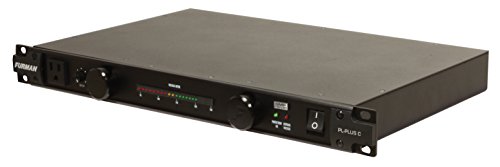
| Project studio needing front-panel monitoring | Filtered conditioner with voltage display | Furman PL-PLUS C | Usually $250–$450 | Shows incoming voltage and provides practical rack power management |
| Regular voltage swings or brownouts | Automatic voltage regulator | Furman AR-15 II | Usually $500–$800 | Corrects sustained over- and under-voltage rather than merely filtering it |
| Computer and interface need shutdown time | Pure-sine-wave UPS | CyberPower CP1500PFCLCD or equivalent | Usually $180–$300 | Maintains power briefly and avoids abrupt computer shutdowns |
| Persistent hum after grounding checks | Balanced-power transformer system | Professional balanced-power unit | Often $1,000–$3,000+ | Can reduce common-mode interference in demanding installations |
Prices are broad market ranges and vary by voltage standard, region, and availability. Confirm the model’s input voltage, plug type, current rating, and certifications before buying.
How to choose the right power rating
Do not choose a conditioner based only on the number of outlets. First estimate the real load, then leave headroom for startup current and future equipment.
Suppose a rack contains an audio interface rated at 35 watts, eight-channel preamp at 40 watts, monitor controller at 15 watts, two monitor speakers at 80 watts each, a headphone amplifier at 25 watts, and a computer at 250 watts:
35 + 40 + 15 + 160 + 25 + 250 = 525 watts.
At 120 volts, the estimated running current is:
525 watts ÷ 120 volts = 4.4 amps.
A 15-amp conditioner has enough continuous capacity for this example, but the computer and monitor amplifiers can draw short startup peaks. Keeping the normal load below roughly 70–80% of the conditioner’s continuous rating provides useful margin. A 15-amp, 120-volt unit has a nominal 1,800-watt capacity; an 80% planning limit is about 1,440 watts. The example uses only 525 watts, so a 15-amp model is appropriate. A large live-room setup with several power amplifiers may require a dedicated 20-amp circuit and a higher-capacity distribution system.
Use the manufacturer’s input rating rather than adding the wattage printed on every device when that information is available. Some labels show maximum consumption, while others show typical consumption. For powered speakers and amplifiers, allow extra room for peaks.
Filtration versus regulation
When filtration is enough
Choose a filtered conditioner when the voltage is stable but the studio shares power with computers, lighting controls, refrigerators, HVAC equipment, or inexpensive switching supplies. A good filter can reduce radio-frequency interference and prevent some connected devices from polluting the same circuit.
Filtration is most useful when the noise is actually entering through the AC line. If the noise is a 50 or 60 Hz hum caused by two devices connected to different ground paths, adding more filtering may produce little improvement. In that case, the solution is usually balanced audio cabling, a single properly grounded circuit, equipment placement, or an electrician’s inspection.
When regulation is worth paying for
Voltage regulation makes sense when a meter shows sustained deviations, not just occasional one-second fluctuations. Symptoms can include monitor protection circuits repeatedly engaging, lights dimming when an air conditioner starts, computers rebooting, or equipment behaving differently at busy times of day.
An automatic regulator such as the Furman AR-15 II is designed for this problem. It is not a magic noise eliminator: regulation stabilizes voltage, while filtering addresses high-frequency interference. Regulation units can also be heavier and more expensive than basic conditioners, so buying one solely because it has a larger surge number is poor value.
Power conditioners versus UPS units
A UPS is primarily a continuity device. It uses a battery to keep selected equipment running during an outage and gives you time to save a session. For a studio computer, storage drives, interface, and network hardware, a pure-sine-wave UPS is generally the safer choice, particularly with active power-factor-correction power supplies.
Do not place every device on the battery-backed outlets. Powered monitors and large amplifiers can drain a UPS quickly or trigger overload protection. Put the computer, interface, monitor, and external drives on the battery-backed side, and use surge-only outlets for nonessential loads if the UPS manufacturer permits it.
For a 900-watt studio load on a UPS rated around 900 watts, runtime may be only a few minutes. A 300-watt computer-and-interface load may receive substantially longer runtime, but exact figures depend on battery age, waveform, and the manufacturer’s runtime chart. Treat the UPS as a shutdown buffer, not as a generator for a full recording session.
Installation steps that prevent more noise
- Measure first. Use a suitable outlet tester and, where appropriate, a true-RMS voltage meter. Check the outlet with no large appliances switching on, then observe it when HVAC or lighting loads start.
- Use one grounding strategy. Connect the audio system to the same properly grounded branch circuit when possible. Never defeat the earth pin to silence hum.
- Separate noisy supplies. Keep dimmers, phone chargers, laptop bricks, LED drivers, and motorized equipment away from the audio rack. A conditioner cannot always compensate for a noisy device connected beside the console.
- Connect in signal order. Put source equipment, interface, and mixer on before powered monitors or amplifiers. Use sequencing if available, and reverse the order when shutting down.
- Observe the voltage display. A reading that remains close to the local nominal voltage is reassuring. Repeated low readings or large swings justify an electrician’s inspection and possibly regulation.
- Test one change at a time. Record the noise floor with the conditioner bypassed or removed, then reconnect equipment individually. This identifies the offending device instead of masking the cause.
Frequently asked questions
Can a power conditioner fix a ground loop?
No, filtering is unlikely to fix a 50 or 60 Hz hum caused by devices connected to different ground paths. Check balanced audio cabling, whether the equipment can use the same properly grounded circuit, and equipment placement. Never defeat the earth pin to silence hum; if grounding may be faulty, have an electrician inspect it.
Should I plug powered monitors into a UPS?
Usually, prioritize the computer, interface, monitor, and external drives on the UPS battery-backed outlets. Powered monitors and large amplifiers can drain the battery quickly or trigger overload protection. Use surge-only outlets for nonessential loads if the UPS manufacturer permits it, and treat the UPS as time to save and shut down rather than as session-long backup power.
What should I do if my outlet voltage keeps dropping?
Repeated low readings or sustained voltage swings call for an electrician’s inspection and may justify an automatic voltage regulator. Check voltage when large loads such as HVAC or lighting start, as well as when they are off. Filtration addresses high-frequency interference; it does not stabilize sustained over- or under-voltage.
How can I tell whether noise is coming through the AC line?
Test one change at a time: record the noise floor with the conditioner bypassed or removed, then reconnect equipment individually. A filter may help when interference is entering through the AC line, including noise associated with dimmers, switching power supplies, LED lighting, or chargers. If the hum comes from different ground paths, more filtering may do little.
How should I turn studio equipment on and off to avoid a thump?
Turn source equipment, the interface, and the mixer on before powered monitors or amplifiers, then reverse that order when shutting down. A conditioner with power sequencing can control startup order and reduce the loud thump that can occur when monitors or amplifiers start first.
Bottom line
For the best power conditioners for recording studios, start with the problem rather than the marketing label. Choose the Furman P-8 Pro C for practical rack protection and sequencing, the Furman PL-PLUS C when front-panel monitoring is useful, and a Furman AR-15 II or equivalent regulator when measured voltage instability is the concern. Add a pure-sine-wave UPS for the computer and session-critical storage, not as a universal replacement for studio power distribution. Reserve balanced power for professionally diagnosed noise problems after grounding, cabling, and circuit layout have been checked.









