
Our Top Picks


Top 3 picks at a glance

Best Phone Stands for Desks, Cars, and Beds
The best phone stand depends on where you’ll use it: choose a weighted, adjustable stand for a desk, a vehicle-specific mount for a car, or a low, stable holder with a long reach for a bed. Before buying, check the stand’s usable height and angle, how it supports your phone and case, whether it leaves the charging port accessible, and how securely it stays put when you tap the screen.
Choose by where the phone will sit
| Use | Useful dimensions or fit | Stability to look for | Best match |
|---|---|---|---|
| Desk, video calls | Screen center near eye level; adjustable height of about 15–30 cm | Weighted base or broad, grippy base | Height-adjustable desktop stand |
| Desk, typing or charging | Low-to-mid height; open space beneath the charging port | Wide base that resists sideways nudges | Folding stand with a cable channel |
| Car dashboard or windshield | Clamp or cradle must fit the phone’s width with its case on | Vehicle-compatible suction cup, adhesive base, or vent clip | Adjustable car mount suited to the attachment surface |
| Bed or bedside table | Long reach from the base; enough tilt to avoid looking down sharply | Heavy base, secure clamp, or firm mattress-edge grip | Gooseneck holder or stable bedside stand |
Desk stands: prioritize height and a steady base
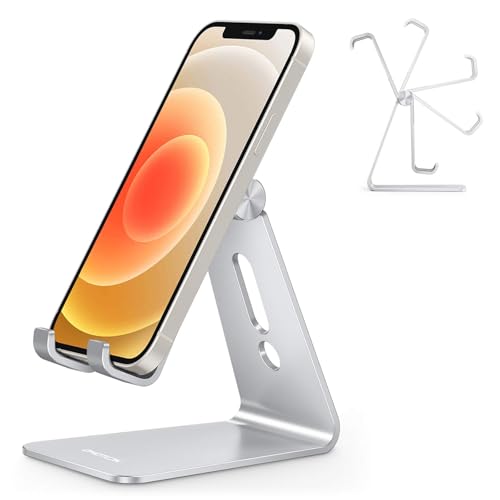
For desk use, screen height matters more than the number of adjustment joints. If you use the phone for calls or follow-along instructions, position the screen closer to eye level to reduce repeated neck bending. A stand that raises the phone 15–30 cm can suit many desks, but check the height range against your chair, desk, and whether the phone is mounted vertically or horizontally.
As an Amazon Associate we earn from qualifying purchases at no extra cost to you.

![Lamicall Cell Phone Stand for Desk - [Height Angle] Adjustable Phone Holder](https://m.media-amazon.com/images/I/41B6xLJiVNL._SL160_.jpg)

Stability is easy to underestimate. A tall stand with a narrow, lightweight base can wobble when you tap the screen. Look for a broad, non-slip base or a heavier base, and check whether the phone cradle has padded supports. A hinged desktop stand folds away more easily, while an articulated arm offers more positioning options but can transmit movement through its joints.
For charging, inspect the lower support: a solid ledge across the entire bottom edge may block the port or force the cable into a sharp bend. A split support or open-center cradle is usually more practical. If you use a thick case, confirm that the stand’s lip can hold the phone securely without pressing its buttons.
Car mounts: match the mount to the vehicle, not just the phone
A car mount needs to stay attached through vibration and temperature changes while keeping the display within a safe glance. The main choices are a vent clip, a suction-cup mount for an appropriate flat surface, or an adhesive-mounted base. Each depends on the vehicle: vent blades vary in shape and strength, dashboards may be textured or curved, and a suction cup may not seal on every surface.
Measure your phone with its case on, then compare that width with the mount’s stated clamp range. Don’t assume a mount that fits the bare phone will also fit a rugged case or a wallet case. For a magnetic mount, check that your phone or case supports the required magnetic attachment; a plain case may need a compatible ring or adapter. Keep the mount and phone clear of airbags and avoid placing them where they obstruct the road view.
Charging access also matters on longer drives. A cradle that grips the sides can leave the bottom port clear, while a mount with a built-in charging pad requires compatible wireless charging and correct coil alignment. Wireless charging may run warm or charge more slowly in a hot cabin, so a wired connection can be the more dependable choice for navigation.
Bedside holders: reach and sag resistance are the trade-off
A gooseneck holder can bring a phone over a bed, but its reach is only useful if the arm stays in position. Long arms create more leverage: a phone at the end can make the clamp slip or the arm droop. Check the stated clamp thickness against the bedside table, shelf, or bed frame, and look for a padded clamp that tightens securely without damaging the surface.
For a bedside table, a short desktop stand is simpler and less likely to sag. For use while lying down, aim the screen toward your face rather than directly overhead, and keep the holder outside the area where it could fall onto you. If you plan to tap or type, a rigid arm and firm clamp are more important than maximum reach.
Fit check: use your phone and case dimensions
Phone compatibility is about actual dimensions, not just a model name or screen size. Before ordering, measure the phone’s width and thickness with the case installed. Then compare those measurements with the stand’s maximum clamp width, cradle depth, and lip height. Cases with a ring, kickstand, camera bump, or wallet flap can change how the phone sits.
- Small or slim phone: Check that the cradle’s side grips can narrow enough to hold it without play.
- Large phone: Favor a wider cradle and a base that resists tipping when the screen is tapped.
- Thick or rugged case: Verify both clamp width and cradle depth; width alone does not guarantee a secure fit.
- Portrait and landscape use: Check that the phone can rotate without covering the charging port or slipping off the lower supports.
- Wireless charging: Confirm that the holder does not obstruct the charging coil or require removing a magnetic accessory.
A practical stability check before you buy
Use the phone’s dimensions and the stand’s footprint to judge whether a desk model is likely to tip. For example, suppose a phone is 8 cm wide and the stand has a 12 cm-wide base. That leaves only 2 cm of base beyond each side when the phone is centered. The stand may still work, but a heavy phone held high can make it less resistant to a sideways push. A wider or heavier base is a safer choice if you regularly tap the screen.
For an arm or clamp, use reach as a warning sign rather than treating it as an automatic benefit. Extending a phone 40 cm from a clamp creates roughly twice the leverage of a 20 cm extension under the same load. If you need a long reach, prioritize a firm clamp and a stiff arm, and avoid relying on a lightly tightened joint to hold the phone in place.
Which type should you choose?
- Choose an adjustable desktop stand for calls, recipes, or a desk where you want to vary viewing height and angle.
- Choose a folding stand if portability and quick storage matter more than a tall viewing position.
- Choose a car-specific mount after checking your vent, dashboard, or windshield surface and your cased phone’s dimensions.
- Choose a bedside gooseneck holder for a long reach, but only if the clamp and arm are rated to hold your phone without sagging.
- Choose a charging stand or mount only after confirming charger compatibility, cable clearance, and a secure fit with your case.
What to spend
Basic folding or fixed desktop stands are commonly in the roughly $10–$25 range. More adjustable desk stands and sturdier bedside holders often fall around $20–$50, while car mounts with more robust attachment hardware or wireless charging commonly cost about $25–$70. These are broad market ranges, not guarantees; prioritize a compatible fit and stable attachment over extra joints or decorative features.
The best phone stand is the one that fits your case, holds the screen at a useful angle, and stays put in its intended location. For a desk, start with height and base stability; for a car, start with vehicle attachment and clamp fit; for a bed, start with reach and resistance to sag. Then check charging access and foldability to make the final choice.
Frequently asked questions
Can I use a phone stand with a thick or rugged case?
Yes, but you should check the case-installed phone’s width and thickness against the stand’s clamp range, cradle depth, and lip height. A rugged case, wallet flap, ring, kickstand, or camera bump can change how the phone sits. Make sure the supports hold the phone securely without pressing its buttons or leaving excessive movement.
How can I keep a phone stand from blocking charging?
Choose a stand with a split support or open-center cradle, and check that the lower ledge does not cover the charging port or force the cable into a sharp bend. For a charging mount, also confirm cable clearance, compatible wireless charging, and correct coil alignment. Portrait and landscape positions may affect access to the port.
Where should a car phone mount be placed?
Place it where the phone remains within a safe glance without obstructing the road view or airbags. The best attachment point depends on the vehicle: vent blades vary, dashboards may be textured or curved, and suction cups may not seal on every surface. Check the cased phone’s width against the mount’s stated clamp range before installing it.
How can I stop a bedside phone holder from drooping?
Use a firm clamp and a stiff arm, especially when the holder has a long reach. A phone at the end of a long arm creates more leverage, which can make the clamp slip or the arm droop. Tighten a padded clamp securely, check its thickness range, and avoid relying on a lightly tightened joint.
Is a phone stand suitable for tapping or typing?
It can be, but tapping and typing require more stability than simply viewing the screen. For a desk, favor a broad, non-slip or heavier base that resists sideways nudges. For a bedside holder, choose a rigid arm and firm clamp. A tall, narrow, lightweight base or extended arm may transmit movement or become less stable.









