The best gaming desk is the one whose top is wide and deep enough for your monitors, and everything else is a bonus. For a big multi-monitor room, the 72 inch EUREKA ERGONOMIC is the widest. For a sit-stand ultrawide setup, the Grandder 55×32 offers the deepest top. Small rooms are better served by the 47 inch HLDIRECT or the 28.6 inch Furinno. This guide covers eight desks using titles and published specifications only, and it includes a desk-size calculation you can run before buying.
Our Top Picks
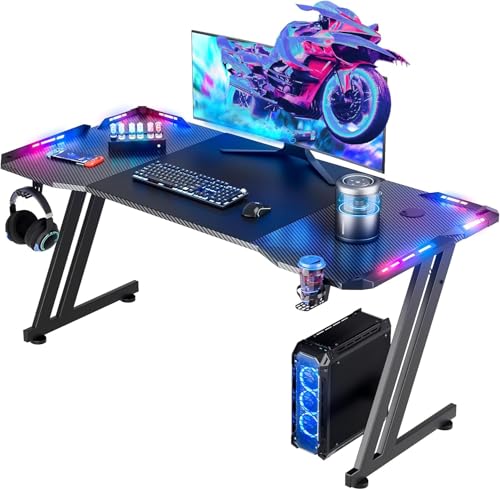 HLDIRECT 47 Inch Gaming Desk with App-Controlled RGB47 INCH BLACK23.6 x 47 x 29 Inches29 PoundsCheck on Amazon
 EUREKA ERGONOMIC Gaming Desk Wing Shaped Keyboard Tray72"W x 35"H-Fixed height24 x 72 x 24 inches66.1 poundsCheck on Amazon
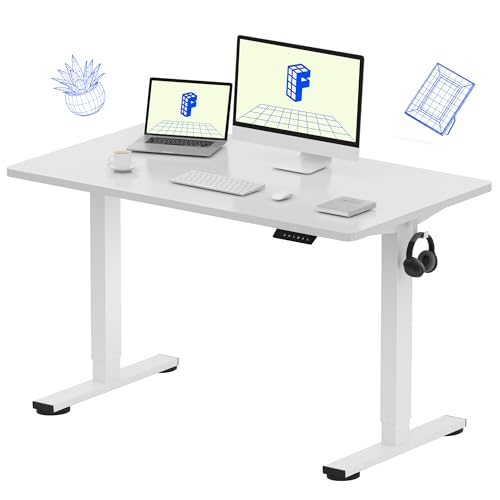 FLEXISPOT EN1 48"x24" One-Piece Standing Desk47.2 x 23.6 in48 x 24 x 28 inches44.1 poundsCheck on Amazon
Top 3 picks at a glance
Desk comparison at a glance
As an Amazon Associate we earn from qualifying purchases at no extra cost to you.




| Model | Key point from title | Price tier | Best for |
|---|---|---|---|
| HLDIRECT 47 in | 47 in wide, app-controlled RGB, Z-frame, cup holder, headphone hook | Mid-range | Compact RGB setups |
| EUREKA 72 in | 72 in wing shape, keyboard tray, LED monitor stand, walnut | Premium | Large multi-monitor battlestations |
| Grandder 55×32 | 55×32 in top, electric height, 176 lb, 2 memory presets, anti-collision | Premium | Ultrawide and dual-screen standing setups |
| FLEXISPOT EN1 | 48×24 in one-piece top, 4 memory presets, 176 lb, anti-collision | Premium | Small sit-stand setups |
| Furinno EFFICIENT | 28.6 in wide, 3 open side shelves, French oak | Budget | Dorms and tight corners |
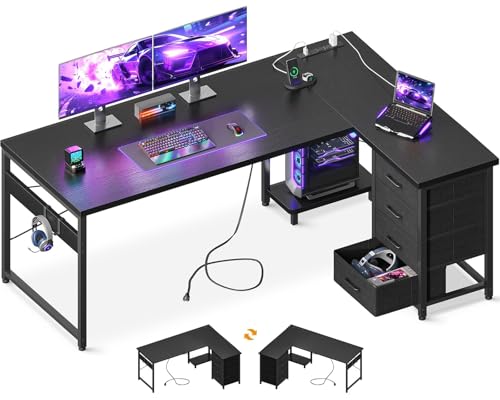
| AODK 61 in L | 61 in L-shape, 4 drawers, power outlets, USB ports, PC tower stand | Mid-range | Storage-heavy home offices |
| AODK 53 in L | 53 in L-shape, LED light, power outlet, shelf, reversible | Budget | Smaller corner setups |
| SEDETA 67 in L | 67 in L-shape, pegboard, LED lights, keyboard tray, hutch | Mid-range | Accessory-loving gamers |
The eight desks in detail
HLDIRECT 47 Inch RGB Gaming Desk
At 47 inches wide this is a compact fixed desk with the full gaming kit named in the title: app-controlled RGB lights, a Z-shaped frame, a cup holder, a headphone hook, cable management and a mouse pad. The title says it suits dual-monitor use, but two 24-inch screens leave little spare width, so measure first. Check the listing for depth and weight limits, and for the maximum screen size the monitor stand accepts. The Z-shaped frame is meant to add stability, though the title gives no load rating. Treat it as a good fit for a single PC and two modest screens.
Pros
- Gaming extras built in
- Compact footprint for small rooms
- App-controlled lighting
Cons
- 47 inches is tight for dual 27-inch monitors
- Weight capacity not in the title
Who it’s for: Players with a small room who want the gaming look without a large desk.
EUREKA ERGONOMIC 72 Inch Wing-Shaped Desk
The widest desk here at 72 inches, with a wing-shaped top, a keyboard tray, an LED monitor stand, dual headphone hooks and a cup holder. The title also pitches it for streaming and studio use. At that width it needs a big room and a firm floor, so measure doors and walls before ordering. Assembly will take a while, so check the listing for parts and time, and plan for a second person to help lift the top. The keyboard tray frees the main surface, but confirm that it suits your chair height.
Pros
- Very wide work surface
- Keyboard tray and monitor shelf included
- Walnut finish stands out
Cons
- Needs a large room
- Heavy and slower to assemble
Who it’s for: Streamers and multi-monitor users who have the floor space.
Grandder 55×32 Extra-Deep Electric Standing Desk
The extra-deep 32-inch top is the key spec: the title says it fits a 49-inch ultrawide plus dual screens. It is electric with two memory presets and anti-collision, rated for 176 lbs in the title. Pair a very wide display with enough graphics power; our guide on GPU power for 3440×1440 ultrawide gaming covers that side.
Pros
- Deep top suits large monitors
- Two memory presets
- Anti-collision feature listed
Cons
- Needs a wall outlet and cable planning
- Fewer gaming extras than fixed desks
Who it’s for: Players who want sit-stand flexibility with an ultrawide or two big screens.
FLEXISPOT EN1 48×24 Standing Desk
A one-piece 48 by 24 inch electric desk with four memory presets, a 176 lb capacity and anti-collision, per the title. The seamless top has no joins to crumb-trap. At 24 inches deep it is shallow for a big monitor, so check that your screen’s stand and your eye distance still fit. White finish only in this listing, so check that it matches your room before ordering. It is also the least decorated model here, which suits a minimal setup.
Pros
- Four memory presets
- Seamless one-piece top
Cons
- 24 inch depth is shallow for large monitors
- Few gaming accessories
Who it’s for: People wanting a clean sit-stand desk for one or two smaller monitors.
Furinno EFFICIENT 28.6 Inch Desk
This is a small desk, not a full gaming battlestation. At 28.6 inches wide with three open side shelves, it fits a laptop and a single monitor at most, so the gaming label is generous. The title mentions dorm, bedroom and study use, which is the honest match. Check dimensions against any tower you want to house, and do not expect it to carry heavy equipment. It is a sensible small-room pick if the gaming label is not important to you.
Pros
- Very small footprint
- Open shelves for storage
Cons
- No room for a dual-monitor setup
- Gaming label is generous
Who it’s for: Students or console and laptop players with very little floor space.
AODK 61 Inch L-Shaped Desk with Drawers
A 61 inch L-shaped desk with four drawers, power outlets, USB ports, a PC tower stand and hooks. The corner layout is reversible, so it can fit left or right. Power outlets built into a desk are handy, but check the listing for the surge protection and the load rating before plugging in a full gaming PC.
Pros
- Drawers and tower stand add storage
- Built-in power and USB ports
- Reversible corner
Cons
- Large footprint in a corner
- Outlet load limits are not in the title
Who it’s for: Buyers who want a corner desk that hides cables, peripherals and a tower.
AODK 53 Inch L-Shaped Desk with LED
A shorter sibling of the 61 inch AODK model: 53 inches, LED lighting, a power outlet, a shelf, a hook and a storage bag, with a reversible L layout. It has no drawers, so it stores less than the larger model. The two AODK listings overlap, so pick on size and drawers rather than expecting a big difference in style.
Pros
- Smaller footprint than the 61 inch model
- LED and power outlet included
Cons
- No drawers listed
- Near-duplicate of the 61 inch AODK
Who it’s for: Buyers who like the L-shape but need to save space.
SEDETA 67 Inch L-Shaped Desk with Pegboard
The 67 inch SEDETA adds a pegboard, LED lights, a power outlet, a keyboard tray and a hutch to the L-shaped layout, with a reversible corner and a storage bag. The pegboard and hutch put gear off the desktop, but they raise the visual weight. Assembly is likely to be long, so check the listing for part counts.
Pros
- Pegboard and hutch for accessories
- Keyboard tray included
- Reversible layout
Cons
- Many parts and a long build
- Bulky look in small rooms
Who it’s for: Gamers who collect headsets, controllers and gadgets and want them on the wall.
How we picked these
We compared product titles, published specifications, manufacturer documentation and buyer reviews, then sorted the desks by shape, width, whether the height adjusts and which gaming extras the title names. Nobody on the team used or measured these units. Dimensions and load figures come from the titles, so anything missing needs a check on the live listing. Price tiers are relative inside this set. Electric standing desks sit higher than fixed desks, and large L-shapes sit in the middle.
What to look for in a gaming desk
Do the desk maths first
A 27-inch 16:9 monitor is roughly 24 inches wide, and a 49-inch super-ultrawide is nearly 46 inches (estimates from typical screen geometry; check your own panel). Two 27-inch screens side by side need about 48 inches plus a little room for elbows. That is why the 47 inch HLDIRECT works better for two 24-inch screens, while the 55×32 Grandder and 72 inch EUREKA suit bigger ones. For depth, add monitor stand depth and a comfortable 20 to 30 inch viewing distance.
Fixed or electric height
A fixed desk is cheaper and wobbles less. An electric standing desk lets you alternate sitting and standing, and memory presets recall your heights. Look for the capacity in the title: 176 lbs on the Grandder and FLEXISPOT is enough for monitors and a laptop, but check it against a heavy tower and several displays. Keep fingers and cables clear when it moves, even with anti-collision, because a title claim is not a substitute for care around moving parts.
Stability and weight
Wider tops and L-shapes with thin legs can sway during intense mouse movement. Look for cross-braces, adjustable feet and an honest weight limit. Place heavy items near the legs, not the unsupported edge.
Built-in extras
Cup holders, hooks and RGB strips are cheap to add later, and a poor surface is hard to fix. Use extras as tie-breakers only. Power outlets and USB ports in a desk are handy but check their rating.
Cables, power and heat
A gaming PC, two monitors and a charger can need six or more sockets. Count your plugs before relying on a built-in outlet strip, and keep the tower where air can reach its vents. A desk shelf or tower stand that boxes the PC in can raise internal temperatures. Cable trays and grommets keep cords out of the way of a moving standing desk.
Assembly and space
A 72 inch or 67 inch desk can take two people and several hours. Measure doorways, stairwells and the wall space where it will sit, and leave about 30 inches behind the chair.
Mistakes buyers make with gaming desks
The most common error is judging a desk by width alone and ignoring depth, which decides how far your eyes sit from the monitors. The second is trusting the gaming label: the Furinno is a small study desk, so match the dimensions to your gear. Third, buyers choose an electric desk without checking outlet distance and cable slack. Fourth, people forget the keyboard tray and monitor shelf change the usable height. Fifth, L-shaped desks are chosen without checking the corner side, so confirm the reversible layout fits your room. Finally, many shoppers ignore weight limits and stack a tower, monitors and speakers on one edge. A last one is forgetting the chair: a desk with a keyboard tray or drawers can leave too little knee room for tall users, so check the clearance under the top.
Which desk to choose
For a large setup with several monitors, choose the 72 inch EUREKA ERGONOMIC. For sit-stand with an ultrawide, pick the Grandder 55×32. For small rooms, the 47 inch HLDIRECT balances size and features, and the FLEXISPOT EN1 is the tidy sit-stand pick. For storage, choose an AODK or the SEDETA, with the 61 inch AODK offering drawers and the SEDETA offering a pegboard. The Furinno is for tight spaces only. Check dimensions, load limits and assembly on the live listing before ordering. A short pre-purchase checklist helps: measure the wall, count your plugs, add up your monitor widths, and note the heaviest item that will sit on the top.
Related guides
- 24 Inch 240Hz Gaming Monitor For Esports
- Monitor Refresh Rate Vs Frame Rate Explained
- Low Latency 1080P High Refresh Monitors
Frequently asked questions
How wide should a gaming desk be for two monitors?
For two 27-inch monitors, plan on at least 48 inches, since each screen is roughly 24 inches wide (an estimate). The 47 inch HLDIRECT suits two smaller screens, while wider options such as the 55 inch Grandder or 72 inch EUREKA give comfortable room for both monitors plus a keyboard, mouse and speakers.
Is an electric standing desk worth it for gaming?
It is worth considering if you play or work for long hours, because switching posture can reduce stiffness. Fixed desks are cheaper and sturdier. The Grandder 55×32 and FLEXISPOT EN1 list memory presets, which make changing height quick. Check the weight limit, keep cables loose enough to move, and make sure there is clear space above and below the desk when it travels.
Are L-shaped gaming desks a good idea?
They suit corner rooms and give separate zones for PC, paperwork and peripherals. The AODK and SEDETA models list a reversible layout, so you can pick the orientation. They take more floor space than straight desks, so measure the room, mark the footprint on the floor with tape, and allow clearance behind your chair first.
Do I need a desk with RGB lighting?
No, lighting is cosmetic, and strips can be added later. The HLDIRECT lists app-controlled RGB, and several AODK and SEDETA models list LEDs. Choose on size, stability, layout and storage first, and treat lights as a tie-breaker between otherwise similar desks. Many buyers switch them off after the first week or two.
What desk depth is best for a large monitor?
A depth of 30 inches or more is comfortable for 27 to 32 inch monitors and ultrawides, because it keeps your eyes farther from the panel. The Grandder lists 32 inches. A 24 inch depth like the FLEXISPOT EN1 can work with smaller screens, but check your monitor stand’s footprint.