
A full tower PC case is worth buying only if you will use the space: an E-ATX board, a thick radiator stack, a very long graphics card or a pile of storage drives. Among the eight listings below, six are sold as full towers, and two (the Lian Li V100-ATX and the MUSETEX K2) are titled mid-tower, so they are weaker matches for this keyword and we say so in their entries. Measurements and capacities come only from titles, and several listings leave out key figures. Nobody on the team has built in these cases, so use the notes to narrow a shortlist, then check dimensions and desk space before ordering.
Our Top Picks
Top 3 picks at a glance
Eight chassis compared
As an Amazon Associate we earn from qualifying purchases at no extra cost to you.




| Model | Key point from title | Price tier | Best for |
|---|---|---|---|
| Antec Flux Pro Full-Tower E-ATX | E-ATX, six PWM fans, walnut front, 420mm radiator, CPU and GPU temp display | Premium | Airflow-first big builds with fans included |
| Antec C8 Full-Tower E-ATX, Dual-Chamber, No Fans | E-ATX, dual chamber, tempered glass, 360mm radiator, no fans | Mid-range | Show builds that start fan-free |
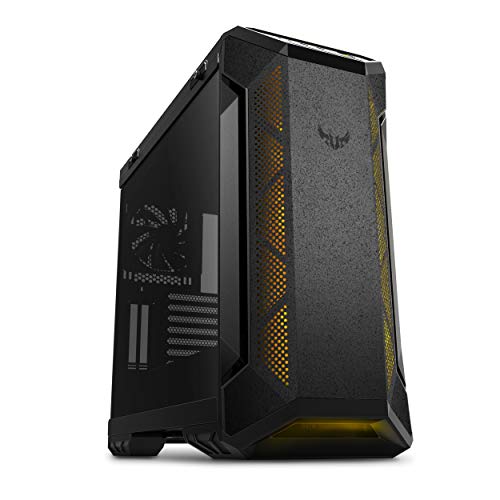
| ASUS TUF Gaming GT501 E-ATX Full-Tower | Three front 120mm RGB fans, rear 140mm PWM fan, dual 360mm radiators, 420mm GPUs | Premium | Large water-cooled builds |
| darkFlash DY460 ATX Full Tower | ATX, four ARGB PWM fans, 330-degree glass, USB-C 10Gbps, 400mm GPU | Mid-range | Glass-forward ATX builds |
| CORSAIR 7000D Airflow Full-Tower ATX | ATX, high-airflow front, three 140mm AirGuide fans with PWM repeater | Premium | Spacious airflow-focused builds |
| MUSETEX ATX PC Case (K2), 7 PWM ARGB Fans | Titled mid tower, seven PWM ARGB fans, dual tempered glass, Type-C | Budget | Fan-heavy ATX builds that do not need full-tower size |
| Lian Li V100-ATX Mid-Tower (V100RX) | Titled mid tower, side USB-C, 420mm GPUs, 360mm radiator, GPU bracket | Mid-range | Compact long-GPU builds |
| DARKROCK Classico Max Storage Master E-ATX | E-ATX, four 120mm fans, ten 3.5-inch HDD and three 2.5-inch SSD bays, vertical GPU slots | Budget | Storage-heavy and NAS-style builds |
The cases one by one
Antec Flux Pro Full-Tower E-ATX
The title lists six PWM fans, a walnut wood front panel, a 90-degree rotated PSU mount, 420mm radiator support and a CPU and GPU temperature display. Six fans in the box is a strong value point because many full towers ship with fewer. It is a high-airflow design, so expect less sound isolation than a closed case.
Pros
- Six PWM fans included
- 420mm radiator support and E-ATX board support
Cons
- Airflow-focused design lets more sound escape
- Temperature display details are limited to the title
Who it’s for: Buyers who want a ready-cooled E-ATX case with a wood accent.
Antec C8 Full-Tower E-ATX, Dual-Chamber, No Fans
A dual-chamber design with tempered glass at the front and side, E-ATX support, RTX 40 Series GPU support and 360mm radiator support. The title states no fans are included, so factor fans into the budget. The dual-chamber layout keeps the PSU and cables apart from the main compartment.
Pros
- Dual-chamber layout separates PSU and cabling
- Glass front and side for a clean display
Cons
- No fans included
- Glass front can limit intake without added fans
Who it’s for: Showcase builders who plan their own fans and an AIO.
ASUS TUF Gaming GT501 E-ATX Full-Tower
The title lists three front 120mm RGB fans and a rear 140mm PWM fan, plus room for dual 360mm radiators and 420mm graphics cards. The dual-radiator room is the standout feature for custom or dual-AIO builds. The title says nothing about weight or dimensions, so check the listing.
Pros
- Dual 360mm radiator room
- 420mm GPU limit and four fans included
Cons
- Size and weight are not in the title
- Likely big for most desks
Who it’s for: Water-cooling enthusiasts who want both radiator room and long cards.
darkFlash DY460 ATX Full Tower
The title shows four ARGB PWM fans, a 330-degree panoramic glass design, USB-C 10Gbps, 360mm radiator support, 400mm GPU clearance, a 10-fan capacity and a PSU chamber. It is sold as an ATX full tower, not E-ATX, so check board support if you own a larger board.
Pros
- 400mm GPU limit and 10-fan capacity
- Four fans included plus a PSU chamber
Cons
- ATX only per the title, so no mention of E-ATX
- Panoramic glass can limit intake
Who it’s for: ATX board owners who want a bright glass showcase with fan room.
CORSAIR 7000D Airflow Full-Tower ATX
The title describes a high-airflow front panel, a spacious interior, easy cable management and three 140mm AirGuide fans with a PWM repeater. The title lists ATX rather than E-ATX, and gives no radiator or GPU figures, so verify those before committing. The roomy interior is the main draw.
Pros
- Three 140mm fans and a PWM repeater included
- Spacious interior and cable-management focus
Cons
- Title omits radiator and GPU limits
- ATX listing, not E-ATX, per the title
Who it’s for: ATX builders who want a roomy, airflow-led case.
MUSETEX ATX PC Case (K2), 7 PWM ARGB Fans
This is a mid-tower per its own title, so it is off-class for a full tower search. It lists seven PWM ARGB fans, full-view dual tempered glass and a Type-C port. If you want fans and glass in a smaller footprint it may be worth a look, but it does not provide full-tower room.
Pros
- Seven fans included in the title
- Smaller footprint than a true full tower
Cons
- Mid tower, not a full tower
- No radiator or GPU limits in the title
Who it’s for: Budget builders who find a full tower too big and just want many fans.
Lian Li V100-ATX Mid-Tower (V100RX)
Another mid-tower by its title, so it is off-class here. It lists side USB-C I/O, a dust filter, support for 420mm GPUs and a 360mm radiator, an included GPU bracket and an LED display platform. Its 420mm GPU limit is noteworthy for the size, but it is not a full tower.
Pros
- Supports 420mm GPUs and a 360mm radiator
- Included GPU bracket
Cons
- Mid tower, not a full tower
- Title omits fan count and E-ATX support
Who it’s for: Builders who want long-GPU room without the bulk of a full tower.
DARKROCK Classico Max Storage Master E-ATX
The title lists E-ATX support, four 120mm fans, ten 3.5-inch HDD and three 2.5-inch SSD bays, USB 3.0, 360mm radiator support and vertical GPU slots. The ten HDD bays stand out. Check the listing for build detail, because the title says little about materials.
Pros
- Ten 3.5-inch bays for storage-heavy builds
- E-ATX and 360mm radiator support
Cons
- Limited detail in the title on construction
- Older USB 3.0 front I/O only
Who it’s for: Anyone building around lots of hard drives.
How the list was put together
This page was prepared by the editorial team using published specifications, manufacturer documentation and buyer reviews. Nobody on the team used or measured these units. We compared what each title states about board support, radiator room, GPU limit, fans and drive bays. We also called out the two mid-tower listings, because a shopper searching for a full tower is better served knowing the difference. Where titles omit measurements, treat the gap as a reason to check the listing.
Deciding whether you need a full tower
Who actually needs a full tower
Choose one if you plan an E-ATX board, two radiators, many drives, or a custom loop. For a single-GPU gaming build with one AIO, a mid-tower often does the job and costs less desk and floor space. The Lian Li V100-ATX and MUSETEX K2 titles show how much capability a mid-tower can still hold.
Desk and weight fit worksheet
Measure before ordering. Take the case depth from the listing and add roughly 100mm behind it for cable bends and airflow; add 50mm on top if the case has top fans. Then compare to your desk depth or under-desk opening. If the listing gives no dimensions, look for a spec table. For weight, plan on a heavy shipped box and a second person for lifting.
Radiators and fans
Check radiator size and position: front, top and side mounts differ. Dual 360mm room (ASUS GT501) means two radiators, but you still need clearance for tall memory. Count included fans: Antec Flux Pro lists six, the Corsair 7000D lists three 140mm, and the Antec C8 lists none. Our PC case fan guide helps with the empty slots.
Drive bays and storage
Modern builds use M.2 on the motherboard and need few bays. If you want a file-server style setup, the DARKROCK lists ten 3.5-inch bays. Most others don’t state bays at all.
Fan quantity planning
A simple way to plan: count the fan positions you want filled, subtract the fans included, and buy the difference in matching 120mm or 140mm units. For example, if you want three front intake, one rear and three top exhaust (seven), the Antec Flux Pro covers six, the darkFlash covers four and the Antec C8 covers none. Then check header count on the board and add a hub if needed. These figures are title claims, so confirm pack contents on the listing.
PSU and cable room
Dual-chamber and PSU-chamber designs, such as the Antec C8 and the darkFlash DY460, hide the power supply and cables behind a shroud or a separate section. Check PSU length support on the listing, because long modular units and thick cable bundles need space. Rotating the PSU mount, as the Flux Pro title describes, changes where cables exit, so plan your cable lengths too.
Safety when building
Large steel cases have sharp edges and heavy glass. Wear gloves if the edges are rough, support glass panels with two hands, and never lift the case by a glass or plastic front panel.
Looks and layout
Dual-chamber designs hide the PSU and cabling; panoramic glass shows everything. For other styles, browse cool PC case designs before settling.
Costly full tower mistakes
Buying a full tower you cannot lift or place. Measure desk and floor space first.
Assuming full tower means E-ATX. The darkFlash and Corsair titles say ATX. Confirm board support on the listing.
Forgetting fans are not free. The Antec C8 ships none, while the Flux Pro ships six. Compare the total, not the case alone.
Overlooking glass and airflow. Panoramic glass looks great but can starve intake, so fan placement matters.
Ignoring safety when moving it. Big cases with glass panels are heavy and fragile. Remove panels before carrying and lift with care.
Final recommendation
The Antec Flux Pro is the best fit for an airflow-led E-ATX build because six fans come included. The ASUS TUF Gaming GT501 is the pick for dual-radiator water cooling. The darkFlash DY460 is the glass-and-value choice for ATX boards. The DARKROCK suits storage-heavy builds, and the Antec C8 suits those who want a dual-chamber layout and will buy their own fans. Treat the MUSETEX and Lian Li V100 as mid-tower alternatives, not full towers.
Full tower case FAQ
What size motherboard fits a full tower case?
Most full towers take ATX, micro ATX and ITX, and many take E-ATX too. The Antec and ASUS titles name E-ATX, while the darkFlash and Corsair titles name ATX only. Always check the supported board list on the listing before buying a larger board, since the title wording can be vague.
Is a full tower better for cooling?
Not automatically. More space helps radiator room and airflow, but fan count and panel design matter just as much. A mesh-front full tower with fans often cools well, while a closed glass design can trap heat. Compare fans included and intake design, and look at how much of the front is open mesh.
How much desk space does a full tower need?
It depends on the model, and many titles omit dimensions. Take the listed depth, add around 100mm behind for cable bends and airflow, and compare it against your desk or cabinet. For floor placement, make sure the case stays stable and ventilated, with space around the intake and exhaust sides.
Do I need a full tower for a single graphics card?
Usually no. Many mid-towers handle long cards and a 360mm radiator, as the Lian Li V100 title shows. A full tower is for E-ATX boards, dual radiators, many drives or extra airflow. If you want none of those, mid-tower is cheaper and smaller, and easier to place on a desk.
Are full tower cases hard to move?
They are large and often heavy, particularly with glass panels and a built PC inside. Take off glass panels before moving, lift from the base with a second person, and avoid carrying by the top panel. Check the listing for weight before you buy, and arrange help for the first lift into position.
Related guides
- Can You Power A Portable Monitor With A Power Bank
- Monitors For Digital Signage And Video Walls
- Can A Portable Monitor Work With One Usb C Cable


