
Transforming a dedicated desk or media console into a sleek, high-performance gaming station requires balancing aesthetics, cable management, and technical bandwidth. When connecting a handheld gaming device to an ultra-fast 4K 144Hz display, physical organization becomes just as critical as video output capabilities. Stiff cables, underpowered hubs, and awkwardly positioned ports can create unsightly desktop clutter and place unnecessary strain on your console’s top-mounted USB-C port. Designing an intentional workspace means selecting docking hardware that seamlessly drives your display while matching your home furniture and decor.
Finding the optimal docking station setup for a docked handheld on a high-refresh monitor comes down to signal passthrough, power stability, and overall desktop footprint. Whether you are outfitting a minimalist floating desk in 2026 or building an expansive multi-monitor workstation, the right dock ensures your 4K screen receives a stable signal alongside consistent 100W Power Delivery. Below, we review and rank the top eight docking stations engineered to bridge handheld consoles with premium high-refresh displays.
As an Amazon Associate we earn from qualifying purchases at no extra cost to you. Product prices and availability are accurate as of the date shown and are subject to change.

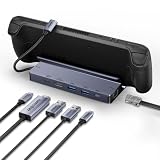


Top 3 picks at a glance
Quick Picks
| Product | Best for | Price |
|---|---|---|
| WAVLINK Gaming Dock | Best Overall High Refresh Output | $29.99 |
| BENFEI 4K@144Hz Docking Station | Best High-Bandwidth Value | $27.99 |
| QUUGE 7 in 1 Steam Deck Dock | Best for Dual-Display Desks | $28.99 |
| Maxonar Docking Station 4K@120Hz | Best Budget High-Speed Dock | $17.99 |
| BENFEI 6-in-1 4K@60Hz Dock | Best Streamlined Desktop Standard | $22.99 |
| JSAUX Steam Deck Dock with Charger | Best Complete Power Bundle | $79.99 |
| JSAUX 12-in-1 RGB Docking Station | Best for RGB Desktop Themes | $79.99 |
| Hagibis Steam Deck Docking Station | Best Portable Kickstand Design | $36.99 |
How We Picked
To identify the best docking hardware for high-speed 4K monitors, we evaluated each product based on physical build quality, display protocol capabilities, port arrangement, and desk ergonomics. We prioritized docks offering HDMI 2.1 or DisplayPort 1.4 passthrough needed for high frame rates, robust 100W Power Delivery (PD) inputs, and steady gigabit network connectivity. Docks were also assessed on how naturally they sit on wood, composite, or glass desk surfaces without slipping, and how efficiently their rear port layouts conceal dangling power and display cords from line of sight.
The 8 Best Picks
1. WAVLINK Gaming Dock
The WAVLINK Gaming Dock is engineered specifically for users who demand uncompromised display bandwidth on high-end gaming monitors. Its compact, low-profile body rests flat against desk surfaces, keeping connected HDMI and power cables running smoothly along the back of your furniture.
- Native HDMI 2.1 supports up to single 4K@144Hz video output.
- 100W PD input provides robust pass-through power stability.
- Lacks extra USB-A ports for extensive desktop accessories.
Skip this pick if your setup relies heavily on multiple wired USB peripherals like keyboards, mice, and external drives.
2. BENFEI 4K@144Hz Steam Deck Dock
The BENFEI 4K@144Hz Docking Station offers an exceptional balance of high-speed video routing and desktop utility. Tailored for modern gaming handhelds, its 6-in-1 footprint includes a high-bandwidth video output capable of 8K@30Hz or 4K@144Hz, making it ideal for clean desk setups.
- Supports high-bandwidth video protocols alongside 1Gbps Ethernet.
- Includes two USB 3.0 ports and a dedicated USB-C data interface.
- Lightweight aluminum casing can slide on slick wood surfaces.
Skip this option if you need a weighted dock base that stays anchored without sticky pads.
3. QUUGE 7 in 1 Steam Deck Docking Station
Designed for multi-screen productivity and home office integration, the QUUGE 7-in-1 Docking Station provides versatile video options. Featuring both HDMI 2.0 and DisplayPort 1.4 outputs rated for 4K60Hz, it caters to dual-monitor arrangements where screen real estate is top priority.
- Dual video ports allow flexible connection to multiple displays.
- 5Gbps USB-A and USB-C ports speed up external storage transfers.
- High-refresh 4K is capped at 60Hz over HDMI 2.0.
Skip this dock if single-cable 4K@144Hz gaming performance is your primary objective.
4. Maxonar Docking Station 4K@120Hz
The Maxonar Docking Station is an remarkably affordable HDMI 2.1 hub designed for high-frame-rate display setups. Delivering smooth 4K@120Hz throughput, this sleek dock offers three USB-A 3.0 ports and gigabit networking, making it an incredible value for minimalist gaming furniture builds.
- HDMI 2.1 passthrough delivers fluid 4K performance up to 120Hz.
- Generous three-port USB-A 3.0 layout for desktop peripherals.
- Integrated USB-C cable is somewhat short for taller stands.
Skip this pick if your handheld rests in an elevated third-party ergonomic stand.
5. BENFEI Steam Deck Dock 4K@60Hz
The BENFEI 6-in-1 4K@60Hz Dock is a clean, understated hub crafted for standard desktop setups. Providing reliable 4K video at 60Hz alongside 100W charging and fast network connectivity, its minimalist dark gray finish blends easily into modern executive desks and gaming stations alike.
- Clean 6-in-1 port arrangement keeps desktop cabling organized.
- Dependable 1Gbps Ethernet guarantees low-latency online gaming.
- Does not support 120Hz or 144Hz refresh rates at 4K resolution.
Skip this model if you want to unlock maximum refresh rate potential on 144Hz monitors.
6. JSAUX Steam Deck Dock with 100W Charger
The JSAUX Docking Station with included 100W charger is a comprehensive, out-of-the-box solution for desktop gaming setups. Eliminating the need to source a separate high-wattage power adapter, this weighted stand securely cradles your device while neatly routing power and video behind your desk.
- Includes a matched 100W wall charger and heavy-duty cable in box.
- Sturdy cradle design fits thicker protective handheld cases.
- Higher price point compared to standalone docking hubs.
Skip this bundle if you already own a reliable high-wattage USB-C PD power supply.
7. JSAUX 12-in-1 RGB Docking Station
For gamers crafting an immersive ambient desktop experience, the JSAUX 12-in-1 RGB Docking Station serves as an impressive centerpiece. Featuring customizable RGB lighting trim along its base and an expansive array of connectivity options, it organizes complex cable setups into one stylish unit.
- 12 connectivity ports handle extensive desktop accessory suites.
- Integrated RGB base lighting enhances ambient desk aesthetics.
- Larger physical footprint occupies more desktop surface area.
Skip this pick if you prefer an invisible, ultralight dock hidden behind your display.
8. Hagibis Steam Deck Docking Station
The Hagibis 6-in-1 Kickstand Dock introduces an innovative portable design to desktop organization. Featuring a built-in kickstand stand and an integrated Micro SD card reader, this compact hub transitions effortlessly from an organized desk monitor dock to an on-the-go travel companion.
- Unique foldable kickstand mechanism offers exceptional portability.
- Includes Micro SD reader for quick memory card expansion.
- HDMI output maxes out at standard 4K@60Hz throughput.
Skip this unit if you require HDMI 2.1 protocols for high-frame-rate 144Hz gaming.
Buying Guide
Understanding Video Bandwidth: HDMI 2.1 vs DisplayPort 1.4
Driving a 4K resolution screen at 144Hz requires tremendous data throughput—roughly 42.6 Gbps uncompressed. HDMI 2.1 supports up to 48 Gbps bandwidth, allowing uncompressed 4K@120Hz or 4K@144Hz with display stream compression (DSC). When shopping across the $18 to $80 price range, ensure the docking station explicitly lists HDMI 2.1 or DisplayPort 1.4. Older HDMI 2.0 standards cap out at 4K@60Hz, which will limit your display’s capabilities despite having a fast monitor.
Power Delivery (100W PD) and Workspace Safety
High-refresh monitors and connected USB accessories draw steady power. A dock equipped with 100W Power Delivery (PD) input ensures that after the dock consumes 10W-15W to power its internal chipsets, Ethernet controller, and USB ports, full wattage remains available to rapidly charge your handheld device. Using adequate pass-through power prevents unexpected screen blackouts during intense display sequences and preserves long-term battery health.
Desk Ergonomics and Cable Management
A cluttered desk degrades both productivity and room aesthetics. Look for docks that feature rear-facing ports, angled USB-C host connectors, and rubberized anti-slip bases. Heavy HDMI 2.1 cables can pull lightweight plastic docks across polished wood or composite furniture. Choosing a dock with rear cable routing or adding subtle adhesive cable clips keeps your setup tidy, stress-free, and visually appealing.
Our Verdict
For users who want pure speed and high-refresh 4K performance, the WAVLINK Gaming Dock ($29.99) and BENFEI 4K@144Hz Dock ($27.99) stand out as top recommendations due to their high-bandwidth video passthrough. If you prefer a complete out-of-the-box power solution, the JSAUX Dock with 100W Charger ($79.99) provides exceptional convenience, while the JSAUX 12-in-1 RGB Dock ($79.99) delivers unrivaled desk customization and port expansion.
FAQ
Can a docked handheld console natively render demanding AAA games at 4K 144Hz?
While portable handheld hardware generally lacks the GPU horsepower to render modern 3D titles natively at 4K 144fps, docking to a 4K 144Hz monitor provides major benefits. It allows desktop UI navigation at crisp 4K, smooth 120Hz/144Hz output for lighter indie titles, and support for upscaling technologies like FSR without input lag.
Why is a 100W PD input rating standard on dock spec sheets?
A 100W Power Delivery rating guarantees that the docking station has sufficient headroom to distribute power to connected external hard drives, RGB lighting, keyboard peripherals, and gigabit Ethernet controllers while still delivering maximum charging wattage to the handheld unit itself.
How do I prevent heavy HDMI 2.1 cables from dragging my dock across the desk?
To keep your desk clean and stable, select a dock with rubber feet or a weighted metallic housing. Additionally, route heavy display cables through desk grommets or attach under-desk cable management clips to remove pull tension from the dock’s rear ports.
Is an integrated Gigabit Ethernet port necessary for a docked monitor setup?
While Wi-Fi is fine for casual use, an integrated 1Gbps Ethernet port provides ultra-low latency and maximum download speeds. This is essential when downloading large game files to docked storage or playing fast-paced multiplayer games on a high-refresh desktop monitor.


