Case fans are the cheapest part of a PC that people still manage to buy wrong. A fan that looks perfect on a product page can be too loud at idle, too weak against a mesh front panel, or sold in a pack size that leaves the build with the wrong number of intake and exhaust fans. Before choosing any model, decide what job you want the fans to do. A tower full of hot graphics hardware needs steady airflow through a dust-filtered front. A quiet office build needs low noise at a gentle speed. A glass-panel showpiece may need lighting that syncs with the rest of the system.
This guide sorts seven 120mm fan options for 2026 builds into those jobs: value multipacks with lighting, airflow-focused fans from established quiet brands, and a few lighting-heavy kits. Everything below is based on the specs written in each product title, such as pack size, RPM, bearing type, and connector, and nothing is assumed beyond that. Read the choosing and compatibility sections before you order, because pack counts and header types are where most disappointments start.
Our Top Picks
Top 3 picks at a glance
Quick Picks
As an Amazon Associate we earn from qualifying purchases at no extra cost to you.





| Product | Best for | Key spec from the listing |
|---|---|---|
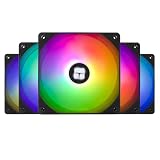
| Thermalright TL-C12C-S (5 pack) | Filling a whole case with lit fans | 120mm ARGB, 4-pin PWM, S-FDB bearing, up to 1550RPM |
| Thermalright TL-C12C (3 pack) | Plain, quiet airflow without lighting | 120mm, 4-pin PWM, S-FDB bearing, up to 1550RPM |
| ARCTIC P12 (5 pack) | Pressure through filters and radiators | 120mm, pressure-optimised, 1800 RPM |
| Noctua NF-P12 redux-1700 PWM | Quiet builds that still need airflow | 120mm, 25mm thick, 1700rpm, 4-pin |
| Corsair RS120 ARGB (3 pack) | Tidy cabling and lit fans | ARGB, PWM, daisy-chain connection, magnetic dome bearing |
| UTLGAMENG ARGB (7 pack) | Large builds and reverse-flow layouts | 4 forward and 3 reverse fans, PWM, 1550 RPM, 28 ARGB LED |
| DARKROCK F120 3in1 | Showpiece builds with mirror lighting | Infinite mirror design, 24 LED, PWM, hydraulic HDB bearing |
The 7 Best Options
Thermalright TL-C12C-S 5 Pack
This is the pick for someone who wants every fan slot in the case filled with matching lighting without paying a premium-brand tier. The title lists a pack of five 120mm ARGB fans with 4-pin PWM control, an S-FDB bearing, and a top speed of up to 1550RPM. Five fans cover the usual layout of three front intakes plus a rear and a top exhaust, so one box can complete a mid-tower. Because the fans share a design, the lighting and the sound at a given speed stay consistent across the case.
- Five fans in one pack suit a full mid-tower layout.
- 4-pin PWM lets the motherboard adjust speed with temperature.
- S-FDB bearing is listed, a design associated with low noise and long service life.
- ARGB lighting needs a compatible motherboard header or controller to look right.
- The listing does not give airflow or static pressure figures, so heavy radiator use is a guess.
For first-time builders, the appeal is predictability. One brand, one connector style, and one set of lighting behavior means fewer surprises during cable routing, and the matching fans make the inside of the case look planned rather than assembled from leftovers. Because the listing is aimed at both case and cooler use, it also leaves the door open to reusing a fan later.
Skip it if your case is crowded with dense filters or a thick radiator and you need a fan known for pressure, or if you do not want lighting at all. Next to the TL-C12C that follows, this is the lit version of the same family, so the choice is mostly about whether you want the colors.
The title also calls it a CPU fan, but at 120mm with PWM control it is built to bolt onto a tower cooler as well as a case. That flexibility is useful if you want the case and the heatsink to match.
Thermalright TL-C12C 3 Pack
The second Thermalright is the stripped-down sibling. Its title describes a 120mm case fan with a 4-pin PWM connector, an S-FDB bearing, and up to 1550RPM, sold in a quantity of three. There is no mention of lighting in the title, which makes it the understated choice for an office build, a workstation, or any machine where glowing fans would be a distraction.
- Three fans cover a simple front-intake plus rear-exhaust layout.
- PWM control and an S-FDB bearing carry over from the lit model.
- No lighting means one less cable and no software to configure.
- Three fans may leave a larger case under-equipped.
- No airflow or noise figures in the listing, so acoustic claims rest on the bearing type alone.
Where it shines is in builds that value calm over color. In a home office or a small studio, a handful of matching fans at low speed can fade into the background, especially when a fan curve keeps them near idle until the processor works hard. Buyers who later decide they want lighting can still add an ARGB strip or a lit pack without touching these.
Skip it if you want lighting or a full five-fan layout. It pairs naturally with a compact tower where three fans are enough, and it leads into the ARCTIC P12, which drops the Thermalright styling for a pressure-focused design with a higher top speed.
ARCTIC P12 5 Pack
The ARCTIC P12 has a reputation as a value staple, and the title explains why. It is a five-pack of 120mm fans described as pressure-optimised, with a quiet motor and a speed of 1800 RPM, in black. Pressure-optimised is the key phrase. Fans built this way aim to push air through resistance such as dust filters, mesh panels, and radiators, instead of only moving air in open space.
- Pressure-optimised design is suited to filtered fronts and radiators.
- Five fans in one pack complete a full case.
- Plain black styling suits builds that skip lighting.
- A top speed of 1800 RPM can be audible if run at full speed.
- No lighting, so it will not match an ARGB theme.
In use, a pack like this is easiest to place with a plan: pressure-focused fans on the filtered front intake, where resistance is highest, and the same fans on the rear or top exhaust for matching color and sound. Black blades and frames also blend into most cases, which suits builders who prefer hardware that disappears. The title does not specify a connector, so confirm the header type on the listing page before ordering a large number.
Skip it if you want lighting or the quietest possible idle without adjusting fan curves. Compared with the Noctua next, the ARCTIC pack gives more fans for a similar budget tier, while the Noctua is a single-fan purchase aimed at people who care about acoustic polish more than quantity.
Noctua NF-P12 redux-1700 PWM
This one is a single fan, which makes it ideal for fixing a specific problem rather than outfitting a whole case. The title calls it a quiet 120mm fan with high airflow and 25mm thickness, running at 1700rpm with a 4-pin PWM connector, in streamlined packaging. It suits a spot where a noisy fan is currently bothering you, such as a rear exhaust or a radiator.
- Brand known for quiet fans, with PWM speed control.
- Standard 25mm thickness fits almost any 120mm mount.
- Sold as a single fan, which is convenient for replacing one noisy unit.
- Outfitting a whole case with single fans costs far more than a multipack.
- Plain styling and no lighting.
It is also a smart way to find out whether a quieter fan is worth the money: swap just the rear exhaust or the fan on a tower cooler and listen. Noise from a PC often comes from one or two units, and fixing the loudest one can change the whole character of the machine. The 25mm depth means no clearance surprises in most cases.
Skip it if you need many fans on a tight budget or want lighting. It sits between the ARCTIC, which buys quantity, and the Corsair next, which buys lighting and tidy cable management in a three-fan kit.
Corsair RS120 ARGB 3 Pack
Corsair’s pitch here is neatness. The title lists a triple pack of 120mm ARGB PWM fans with a daisy-chain connection, a low-noise design, and a magnetic dome bearing, in black. A daisy-chain connection means the fans link together, so only one cable runs to the controller or motherboard instead of three, which keeps the inside of a glass-panel case tidy.
- Daisy-chain wiring cuts cable clutter dramatically.
- Magnetic dome bearing is named in the title and is aimed at quiet running.
- Three fans fit a standard intake row.
- ARGB and daisy-chain connections need a matching header on the board or controller.
- Three fans may need to be supplemented for a larger case.
The kit works best in a case with a clear fan row, such as three front intake positions, where the daisy-chain link lets the fans be wired in one pass. Matching blades and lighting zones give the front of the case a clean, uniform appearance, and the black frames keep the look restrained when the lights are dim. A controller or ARGB header is still needed to set the colors and effects.
Skip it if you are on a strict budget or run an older board with no addressable lighting header. Against the UTLGAMENG pack next, the Corsair is a smaller kit from a name-brand maker, while the UTLGAMENG throws in far more fans for a case that wants them.
UTLGAMENG 7 Pack ARGB
This is the quantity play. The title describes seven 120mm ARGB fans, four forward and three reverse, with PWM control, 1550 RPM, and 28 ARGB LEDs. The forward and reverse blade split is the interesting part. Reverse-blade fans let you place fans on both sides of a case, or on the rear of a radiator, with the lit side facing outward and the airflow still going the right way.
- Seven fans cover a large case or a dual-radiator layout.
- Four forward and three reverse blades make mixed-flow layouts look consistent.
- PWM control and ARGB lighting come in the same pack.
- An unfamiliar brand, so warranty terms and long-term support deserve a close look.
- Seven fans is far more than a typical build needs, so it can waste money in a small case.
Seven fans can also solve an awkward layout: three on the front, two on the top, one on the rear, and one extra on a radiator or a side mount. Having spares in the pack is not wasteful if you keep one for a future replacement, since a matching fan is easy to swap in later. The cost of that convenience is cable management, because seven fans need a hub or several headers.
Skip it if your case holds three or four fans total. It suits builders with large cases or reverse-mounted fans, and it leads into the DARKROCK, which is more about the visual effect than the count.
DARKROCK F120 3in1 Infinite Mirror
The DARKROCK is the showpiece. The title describes black 120mm case fans with an infinite mirror design, 24 LED lights, PWM control, an ARGB effect, and a hydraulic HDB bearing, in a three-in-one pack. The mirror effect gives a tunnel look in the center of the fan, which looks striking behind a tempered glass panel.
- Infinite mirror lighting is a clear visual centerpiece.
- PWM control allows the fans to follow temperature.
- Hydraulic HDB bearing is listed for quieter operation.
- The title says more about looks than airflow, so cooling performance is unspecified.
- Lighting-heavy fans can look busy in a case that already has other lit parts.
These fans are most effective as accents, perhaps two on the front intake where the glass panel shows them off, with quieter plain fans in less visible positions. Doing so keeps total noise lower while the lit positions carry the look of the build. Like the other lit options, they need an addressable lighting header or a controller to reach their full effect.
Skip it if cooling performance is the main goal, since the ARCTIC and Noctua are better documented for that, or if your case has a solid side panel and nobody will see the effect.
Two more Thermalright listings, an ARGB five-pack and an ARGB three-pack, are the same fan as the first pick in different quantities, so they are left out to keep this list to distinct products.
Why Case Fans Matter More Than People Think
A fan upgrade is one of the least expensive ways to change how a PC behaves, and it matters for reasons beyond temperature. Better airflow keeps a graphics card from throttling in a closed case. Quieter fans make a desk pleasant. A tidy fan layout also helps dust control.
Cooler Parts Hold Their Speed Longer
Processors and graphics cards slow themselves down when they get hot. If your case traps heat, the parts run below their potential during long gaming or rendering sessions. A set of case fans that moves fresh air in and hot air out lets the parts hold their boost speeds for longer, which is a free performance gain compared with replacing the hardware itself.
Noise Comes From the Fans You Already Own
Most complaints about PC noise trace back to a few cheap stock fans running too fast. Replacing them with PWM fans that ramp up gently often removes the whistle or buzz without changing temperatures. In many builds, three or four better fans at a lower speed are quieter than one fan screaming at full tilt.
Dust and Longevity
Balanced airflow with filtered intakes keeps dust from building up inside the case. A fan layout that pulls more air in than out, known as positive pressure, sends more air through the filters instead of through random gaps. That keeps components cleaner and extends the interval between cleanings.
How to Choose
Size and Mounting
Every fan in this guide is 120mm, the most common case fan size. Check your case specifications to confirm the number of 120mm mounts, and whether any positions accept 140mm fans instead. Standard thickness is 25mm, and some radiators and tight spaces need slimmer fans. Measure clearance if a fan has to fit near a tall cooler or against a front panel.
Airflow vs Static Pressure
Airflow fans move the most air in open space, while pressure fans keep moving air against resistance. Put airflow-focused fans on exhaust or unrestricted mesh fronts, and choose pressure-focused fans for dense dust filters, radiators, and drive cages. Titles that use words such as pressure-optimised or high airflow are describing that trade-off, even if they do not print the numbers.
PWM vs DC Control
A 4-pin PWM fan can slow down to a very low speed under light load and ramp up only when needed. A 3-pin DC fan adjusts by voltage and generally has a narrower range. If you want a quiet idle, PWM is the better option, and every fan here lists it or a 4-pin connector. Make sure you have enough 4-pin headers or a splitter for the pack you buy. A powered fan hub is the cleaner option for five or seven fans, because it spreads the load and gives you one place to set a speed curve.
Bearing Type and Lifespan
Bearings influence both noise and lifespan. S-FDB, hydraulic HDB, and magnetic dome bearings are all designed to reduce friction compared with a basic sleeve bearing. They are listed on the fans above, and they are worth looking for, though real longevity also depends on dust and operating temperature.
Lighting and Controllers
ARGB lighting uses a three-pin addressable header, which is different from older 12V RGB headers. Plugging one into the other can damage the lights. If your board has no ARGB header, look for a fan kit with its own controller, or choose non-lit fans. Daisy-chain designs like the Corsair kit reduce the number of cables you need.
Noise depends on speed more than on any other factor. A fan spinning at roughly half of its top speed is usually far quieter than the same fan at full speed, and the airflow drops less than you might expect. Set a curve so that fans stay below about half speed until temperatures climb. This is why the top RPM figure alone is a poor guide to what a fan sounds like in daily use.
Pack Size, Warranty, and What to Ignore
Count the slots in your case before choosing a pack size. Ignore the peak RPM when it is the only number given, because top speed says little about noise or airflow. Budget fans most often cut corners on bearings, on documentation of airflow and pressure, and on warranty clarity, so look at the brand’s support terms before buying a large multipack.
Airflow Fans vs Pressure Fans
This is the choice most buyers face once they start comparing fan models. The right answer depends on what the fan will push air through.
| Factor | Airflow-focused fan | Pressure-focused fan |
|---|---|---|
| Best position | Open mesh fronts, rear and top exhaust | Dust filters, radiators, drive cages |
| Strength | Moves a large volume of air with little resistance | Keeps moving air against restriction |
| Typical noise at high speed | Can be low in open space | Can rise when pushing against obstacles |
| Listing clues | High airflow, low noise | Pressure-optimised |
| Example in this guide | Noctua NF-P12 redux-1700 | ARCTIC P12 |
When Airflow Wins
Think of airflow fans as sprinters on an empty track. If your case has an open mesh front, an airflow fan will deliver the most air with the least noise. Rear and top exhaust positions are usually unrestricted too, so a high-airflow fan fits those mounts well.
When Pressure Wins
If your intake has a solid front panel with narrow slits, a dust filter, or a radiator, a pressure fan will do better. The fan has to overcome resistance, and a design built for that will stay quieter than an airflow fan pushed against the same obstacle. In many cases a mix works best: pressure fans at the intake, airflow fans at the exhaust. Lit fans can fill either role, but only the listing text tells you which job they were built for, and most lighting-focused titles do not say.
Setup, Compatibility and Upgrade Tips
What to Check Before Buying
Count your 120mm fan mounts and check the radiator or filter you plan to use. Then count the fan headers on your motherboard. Most boards have between two and six, and a pack of five or seven fans will need a hub or splitter if headers run short. Confirm that your ARGB header is the three-pin 5V addressable type before choosing lit fans.
What to Upgrade First
Start with the front intake, because it feeds every component in the case. Then replace the rear exhaust, and add top exhaust if your case supports it. Set a fan curve in the motherboard firmware so the fans stay slow at idle and ramp up gradually when the processor or graphics card heats up. That change alone often delivers more noise reduction than any new fan.
Common Compatibility Traps
Mixing 12V RGB and 5V ARGB connectors can damage lighting. Splitters that share a single header can overload it if too many fans draw power from it. Reverse-blade fans need their airflow direction checked, since the lit side may face the wrong way. Finally, confirm that cable lengths reach the headers, especially in a tall tower. If you reuse the old fans, keep them as spares, since a failed fan is easier to replace when you have a known good one on hand.
Which One Fits Your Situation
You Are Filling a Mid-Tower on a Budget
The ARCTIC P12 five-pack is the sensible choice. It covers every slot, handles filters well, and leaves money for other parts. If you want lighting at a similar level, the Thermalright TL-C12C-S five-pack is the alternative.
You Want the Quietest Possible Desktop
Start with the Noctua NF-P12 redux-1700 in your most audible position, usually the rear exhaust, then combine it with a fan curve. If you need several fans, the Thermalright TL-C12C three-pack is a quiet, unlit option.
You Own a Glass-Panel Showpiece
The Corsair RS120 ARGB three-pack gives tidy cables and consistent lighting, while the DARKROCK F120 adds a dramatic mirror look for one or two featured positions. Match the lighting to your motherboard’s ARGB header before ordering.
You Have a Large Case or Dual Radiators
The UTLGAMENG seven-pack suits this setup because the mixed forward and reverse blades keep the lighting facing outward on both sides of a radiator. Confirm that your case has enough mounts for seven fans before you buy.
Common Mistakes
- Buying a pack without counting the number of fan mounts in the case.
- Plugging ARGB fans into a 12V RGB header, or the other way around.
- Choosing airflow fans for a dense filter or radiator where pressure matters.
- Running every fan at full speed instead of setting a fan curve.
- Installing fans with the airflow pointing the wrong way, so intake and exhaust fight each other.
- Ignoring header count and powering many fans from one splitter.
Related guides
- Monitors For Digital Signage And Video Walls
- 24 Inch 240Hz Gaming Monitor For Esports
- Gaming Monitor For Competitive Shooters
Frequently Asked Questions
How many case fans does a PC need?
Most mid-tower builds work well with two or three intake fans and one or two exhaust fans. Small cases may do fine with two, while large cases with hot hardware benefit from five or more. Focus on balanced flow rather than a high count.
Are 120mm or 140mm fans better?
A 140mm fan can move similar air at a lower speed, which is often quieter, but only if your case has the mounts. All the fans in this guide are 120mm, which fits nearly every case. Check your case specifications before choosing.
Do I need PWM fans?
PWM fans are strongly preferred for a quiet system because they can slow to a low speed at idle. Most current motherboards support them. If your board only has 3-pin headers, PWM fans still work but in a narrower speed range.
Should I run more intake or more exhaust?
Slightly more intake than exhaust, called positive pressure, is a common choice because it pushes air through filters and reduces dust. Equal numbers also work fine. Avoid a layout that has far more exhaust than intake.
Does ARGB lighting affect cooling?
Lighting does not change airflow, but it does need power and a header. Fans with lighting can cost more than plain ones at the same cooling level, so decide whether you value the look before paying for it.
Can I use one of these fans on a CPU cooler?
Many 120mm fans fit tower coolers using the supplied clips or the cooler’s own mounting. One listing here calls itself a CPU fan, but you should confirm the cooler’s compatibility and clearance before swapping fans.
Final Words
The best case fan is the one that matches your case, not the one with the biggest number on the box. For plain value, the ARCTIC P12 pack covers a whole build, and the Noctua suits the one spot where noise annoys you most. If lighting matters, the Corsair offers tidy wiring, the Thermalright lit pack fills a case economically, and the UTLGAMENG and DARKROCK suit larger or more dramatic builds. Count your mounts, check your headers, and set a gentle fan curve, and the case will run cooler and quieter. Take care with airflow direction as well, since a correct layout makes every fan on this list work better than a random one.