Sim racing rewards a wide, curved screen: it fills your side vision, so corners and apexes are easier to judge than on a standard 16:9 panel. All ten listings here are ultrawide, and eight of them are 34-inch class, so the real choice is mostly between the very wide Samsung Odyssey G9, the OLED Alienware AW3425DW and the cheaper curved 34-inch options. The Sceptre 30-inch at 2560×1080 is the smallest and easiest on a graphics card. Start from your eye distance and your GPU, then pick the refresh rate and curve that suit your seat. Stand height, ports and whether the title states a resolution then separate the near-identical listings.
Our Top Picks
 New! Sceptre Curved 34-inch Prime Gaming Monitor 344034 inches8.5 x 31.8 x 18 inches14 PoundsCheck on Amazon
 Alienware 34 240Hz QD-OLED Curved Gaming Monitor34.2" QD-OLED31.71 x 9.13 x 21.84 inches20.04 poundsCheck on Amazon
Top 3 picks at a glance
The short list
As an Amazon Associate we earn from qualifying purchases at no extra cost to you.



- Alienware AW3425DW: QD-OLED, 240Hz, the premium pick
- Samsung Odyssey G9 49-inch: widest view, 32:9
- Alienware AW3425DWM: 34-inch WQHD, 180Hz, 1500R
- ASUS TUF VG34VQL1B: height adjustable, 165Hz, ELMB Sync
- Samsung Odyssey G5 34: tight 1000R curve, 165Hz
- SANSUI 34: 200Hz with HDMI 2.1 x2
- Sceptre C345B-QU240T: up to 240Hz, four inputs
- Sceptre C345B-QUT168: 180Hz, two DisplayPort
- Gawfolk 34: 165Hz at a lean price tier
- Sceptre 30-inch: 2560×1080, lightest GPU load
Ten sim racing monitors compared
| Model | Size and resolution | Refresh and curve | Best for |
|---|---|---|---|
| Alienware AW3425DW | 34.2in, 3440×1440 QD-OLED | 240Hz, 1800R | Top picture quality |
| Samsung Odyssey G9 G91F | 49in, DQHD 32:9 | 144Hz, curved | Widest field of view |
| Alienware AW3425DWM | 34in, WQHD | 180Hz, 1500R | Mid-premium |
| ASUS TUF VG34VQL1B | 34in, 1440p | 165Hz, 1500R | Height adjustment |
| Samsung Odyssey G5 | 34in, WQHD | 165Hz, 1000R | Tight curve |
| SANSUI 34 | 34in, 3440×1440 | 200Hz, curved | HDMI 2.1 console use |
| Sceptre C345B-QU240T | 34in, 3440×1440 | Up to 240Hz, 1500R | Refresh value |
| Sceptre C345B-QUT168 | 34in, 3440×1440 | 180Hz/165Hz, 1500R | Budget 34-inch |
| Gawfolk 34 | 34in, 3440×1440 | 165Hz, 1500R | Lowest outlay |
| Sceptre C305B-200UN1 | 30in, 2560×1080 | Up to 200Hz, curved | Weaker GPUs |
All ten monitors, one by one
Alienware 34 240Hz QD-OLED Curved Gaming Monitor AW3425DW
The AW3425DW is the premium option: a 34.2-inch 3440×1440 QD-OLED panel at 240Hz with a 0.03ms figure, a 1800R curve, FreeSync Premium Pro, VESA AdaptiveSync and DisplayHDR TrueBlack 400. OLED pixels switch quickly, which means little visible smear behind fast cars, and dark night stages look deeper than on LCD panels. The 0.03ms figure is a seller claim for the best case. OLED screens can show burn-in with static images left on for hours, so check the manufacturer care notes, particularly if a wheel app leaves a fixed HUD on screen. The title does not state ports or stand adjustment, so check the listing. It also asks the most of your graphics card.
Pros
- Fast OLED pixels and deep blacks at 240Hz
- DisplayHDR TrueBlack 400 and a 1800R curve named
Cons
- Highest price tier of the ten
- Burn-in care applies to static HUDs
Who it’s for: Racers who want the best picture and motion and have a strong GPU.
Who should skip it: Buyers on a budget or those leaving static images up all day.
SAMSUNG 49-inch Odyssey G9 G91F
The Odyssey G9 is the widest screen here: 49 inches, DQHD, 32:9, 144Hz, curved, DisplayHDR 600, FreeSync Premium Pro and an ergonomic stand, model LS49FG910ENXZA. DQHD is 5120×1440, which is roughly 3.5 times the pixels of 1080p, so the load on a graphics card is the highest in the list. The very wide view approaches a triple-screen feel from one panel, with no bezel gap, if the game supports 32:9. It needs a deep desk or a wheel stand set back, since the screen is about 120cm wide. The title does not name the curve rating, response time or ports, so check the listing.
Pros
- 32:9 view that comes close to a triple screen
- DisplayHDR 600 and an ergonomic stand named
Cons
- Highest GPU demand and desk width of the group
- Curve, response and ports not in the title
Who it’s for: Racers who want maximum peripheral view and have a strong PC and a wide desk or rig.
Who should skip it: Anyone with a modest GPU, a narrow desk or a game that lacks 32:9 support.
Alienware 34 Curved Gaming Monitor AW3425DWM
The AW3425DWM is a 34-inch WQHD curved monitor at 180Hz with a 1ms figure, a 1500R curve, AMD FreeSync Premium and VESA AdaptiveSync. It sits between the budget Sceptre screens and the OLED model, in the mid-premium tier. A WQHD ultrawide at 34 inches, normally 3440×1440, is about 110 pixels per inch, sharp enough for dash gauges and track-edge detail. A 1500R curve means a circle of 1.5 metres radius, a gentle curve that suits a seat 60 to 90cm from the screen. The title does not name the panel type, HDR support or ports, so check the listing. The stand adjustments are not stated either.
Pros
- Alienware build and 180Hz with FreeSync Premium
- 1500R curve suits typical desk distances
Cons
- Panel type, ports and stand not in the title
- Costs more than the Sceptre and Gawfolk options
Who it’s for: Racers who want a known brand and a balanced 34-inch panel.
Who should skip it: Buyers who need confirmed HDR or want the cheapest route.
ASUS TUF Gaming VG34VQL1B 34 Inch Ultrawide
The TUF Gaming VG34VQL1B lists a 34-inch 1440p 165Hz ultrawide with ELMB Sync, 1ms, FreeSync Premium, DisplayHDR 400, a 1500R curve, eye care and a height adjustable stand, and it names PS5 and Xbox. ELMB Sync is a motion-blur reduction feature that can work with variable refresh, but the details are on the maker page. Height adjustment is useful in a racing seat, where you want the screen centered at eye level. DisplayHDR 400 is an entry HDR tier and rarely looks dramatic on a typical LCD. The title does not name ports, so check the listing. It is one of the few listings with a stated stand adjustment.
Pros
- Height-adjustable stand and ELMB Sync named
- 165Hz with FreeSync Premium and DisplayHDR 400
Cons
- DisplayHDR 400 is a modest HDR tier
- Ports are not stated in the title
Who it’s for: Racers who need to set the screen height and want a trusted brand.
Who should skip it: Anyone after real HDR punch or an OLED look.
Samsung 34 Odyssey G5 Ultra-Wide LC34G55TWWNXZA
The Odyssey G5 lists a 34-inch WQHD ultrawide with a 1000R curve, 165Hz, a 1ms figure, FreeSync Premium, an eye comfort mode and multiple ports. A 1000R curve is the tightest of the group, a circle of 1 metre radius, so it wraps nearer your eyes. Many racers like that for the immersion, while others find the edges distorting for straight lines. The resolution is WQHD, which at 34 inches is 3440×1440, though the title does not spell it out. The stand adjustments are not in the title. It is a mid-tier option with a more aggressive curve than the Alienware and ASUS models.
Pros
- Tight 1000R curve for a wrap-around view
- 165Hz with FreeSync Premium named
Cons
- Strong curve may distort straight lines
- Stand details and port types not stated
Who it’s for: Racers who want a very curved view at a mid price.
Who should skip it: Those who work on straight-edge layouts or prefer a gentle curve.
SANSUI 34-Inch Curved Gaming Monitor UWQHD 200Hz
The SANSUI lists a 34-inch curved 3440×1440 ultrawide at 200Hz with picture-by-picture, OD 1ms, HDR, 300 nits, 130% sRGB, DCI-P3 97%, an AI crosshair, two HDMI 2.1 ports and DisplayPort 1.4. Two HDMI 2.1 inputs are rare among these listings, and they matter if you want a console or a second source on the same screen. The AI crosshair is a shooter feature and does nothing for racing. The 300 nit figure is average for HDR claims, so treat the HDR label cautiously. The curve rating is not given in the title, so check the listing. Color figures are seller claims.
Pros
- 200Hz with two HDMI 2.1 and DisplayPort 1.4 named
- Picture-by-picture mode for a second source
Cons
- 300 nit HDR claim should be read cautiously
- Curve rating and stand not stated
Who it’s for: Racers who also want HDMI 2.1 for a console or a second PC.
Who should skip it: Buyers who want a major brand or a proven HDR panel.
Sceptre Curved 34-inch Prime Gaming Monitor C345B-QU240T
The Sceptre C345B-QU240T lists 3440×1440 at up to 240Hz with a 1500R curve, a 1ms figure, 100% sRGB, two DisplayPort and two HDMI inputs and built-in speakers. The words up to 240Hz mean you should check which input carries the top rate. Four inputs allow a PC and a console on one screen. The title includes the year 2027 and the word New, which is marketing text, so confirm the exact model. Built-in speakers will not match the sound of a rumbling wheelbase, so most racers use headphones. The panel type and stand adjustment are not stated, so check the listing.
Pros
- Up to 240Hz with four inputs
- 3440×1440 stated with a 1500R curve
Cons
- Top rate may depend on the input
- Panel type and stand not stated
Who it’s for: Buyers who want a high refresh figure at a lean price tier.
Who should skip it: Anyone who needs a tilt, height and swivel stand confirmed.
Sceptre 34-inch Curved Ultrawide WQHD Monitor C345B-QUT168
This Sceptre lists a 34-inch curved ultrawide at 3440×1440, a R1500 curve, a rate of up to 180Hz or 165Hz, two DisplayPorts, 99% sRGB, a 1ms figure and built-in speakers. The 180Hz/165Hz wording suggests different top rates on different inputs, so check the listing for which port gives which. With two DisplayPorts but no HDMI named, it suits a PC-only rig. The title carries the model year 2025. It sits next to the QU240T in the same family, and the main difference is the refresh ceiling and the input mix. The panel type and stand are not stated.
Pros
- Two DisplayPort inputs and 99% sRGB claim
- Lower price tier than the QU240T
Cons
- Top refresh rate varies by input
- No HDMI named in the title
Who it’s for: PC-only racers who want a curved 34-inch at a lean price.
Who should skip it: People who need HDMI for a console.
Gawfolk 34-inch Ultrawide Curved Gaming Monitor UWQHD 165Hz
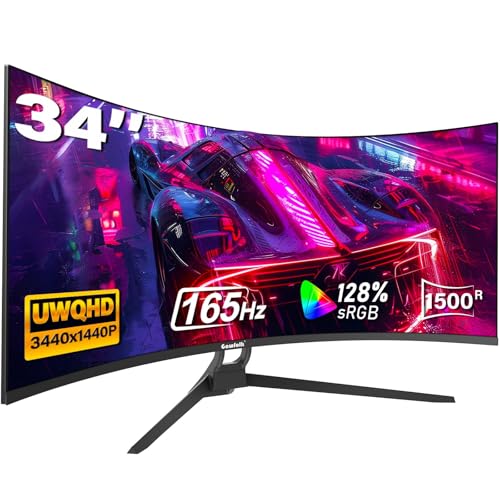
The Gawfolk lists a 34-inch curved UWQHD 3440×1440 monitor at 165Hz with a 1500R curve, PIP and PBP modes, a 1ms MPRT claim, 128% sRGB, HDMI and DisplayPort, a tilt adjustable stand and a 21:9 screen. MPRT describes blur reduction, not gray-to-gray response, so it reads better than it behaves. A tilt-adjustable stand is a drawback in a racing seat, since the title does not mention raising or swiveling the screen; plan on a VESA mount, and confirm the pattern on the listing. The brand is lesser known, so read buyer feedback on panel uniformity and returns. It is the cheapest 3440×1440 route here.
Pros
- 3440×1440 at 165Hz in a lean price tier
- PIP and PBP modes named
Cons
- Only tilt adjustment named in the title
- Lesser-known brand, so check buyer feedback
Who it’s for: Budget racers who plan to use a monitor mount.
Who should skip it: Buyers who want a strong warranty record or a height-adjustable stand.
Sceptre 30-inch Curved Gaming Monitor 21:9 2560×1080
The Sceptre C305B-200UN1 lists a 30-inch curved 21:9 monitor at 2560×1080, up to 200Hz, HDMI, DisplayPort and built-in speakers in a slim body. It has the fewest pixels, about 2.8 million against about 5 million on a 3440×1440 screen, so even a mid-range graphics card can reach high frame rates. The trade is sharpness: stretching 1080 rows over a 30-inch width shows pixels more than 34-inch WQHD does. The words up to 200Hz mean checking which input reaches it. It is a sensible starter ultrawide for a first rig, and the stand details are not in the title.
Pros
- Lightest load on a graphics card
- 21:9 view with up to 200Hz
Cons
- Lower sharpness than the 34-inch WQHD models
- Smaller than the others, so a narrower view
Who it’s for: First-time ultrawide users and rigs with a mid-range GPU.
Who should skip it: Racers who want maximum detail or the widest view.
How we picked these
We read the ten Amazon listings and compared size, resolution, aspect ratio, refresh rate, curve rating, ports and stand details as each title states them. Basis: published specifications, manufacturer documentation and buyer reviews. Nobody on the team used or measured these units. Pixel counts and widths come from arithmetic on the stated resolution and size. Where a title is silent on panel type, response time or stand adjustment, we write check the listing. Two listings carry model years in their names, and we treat those as sales labels. Seller figures like 1ms and 0.03ms are claims.
What matters for a racing screen
Field of view and eye distance
In a sim, field of view is the angle your eyes cover, and it depends on screen width and how close you sit. A 34-inch 21:9 panel is about 80cm wide, and from 70cm it spans roughly 60 degrees, while a 49-inch 32:9 is about 120cm wide and spans about 70 degrees or more from 80cm. These are flat-screen approximations, and the curve helps. Set the in-game field of view to match your real distance and screen width, or distances and speed will look wrong.
| Screen | Resolution | Pixels vs 1080p | GPU load |
|---|---|---|---|
| 30in 21:9 | 2560×1080 | About 1.3x | Light |
| 34in 21:9 | 3440×1440 | About 2.4x | Moderate to heavy |
| 49in 32:9 | 5120×1440 | About 3.6x | Heavy |
Refresh rate, response and sync
Higher refresh helps you see smaller changes in a car’s position and makes the wheel feel more connected. A steady 120 to 165 frames per second is a realistic target on many rigs. A listed top rate only helps if the GPU supplies those frames, as our guide to refresh rate versus frame rate explains. FreeSync, G-Sync and VESA AdaptiveSync keep the screen in step with your frame rate; check what your graphics card supports.
Curve rating: 1000R, 1500R or 1800R
The R number is the radius in millimetres: 1000R is a tighter curve than 1500R or 1800R. A tighter curve wraps nearer your eyes and suits close seating, while a gentler curve is less distorting. In a racing seat you sit close, so 1000R to 1500R often feels natural.
Mounting, height and stand
A race seat puts your eyes lower and nearer the screen than an office chair. A stand that adjusts height, as on the ASUS listing, or a VESA mount, lets you center the horizon on your eyeline. A stand that only tilts, as the Gawfolk title describes, can make that hard. Check the VESA pattern and the stand weight limit before planning a cockpit mount.
HDR, OLED and panel type
HDR labels such as DisplayHDR 400 and 600 vary a lot in practice. OLED, as on the AW3425DW, gives the deepest blacks and the fastest pixel response, with a care note about static images. Our note on Dolby Vision on PC monitors explains why HDR claims need checking. For many racers a high refresh LCD at 1440p is the better value.
Ports and extra devices
A PC-only rig needs one DisplayPort. If you also use a console, look for HDMI 2.1 as on the SANSUI, or several HDMI inputs as on the Sceptre QU240T. For desks with multiple consoles, see our multi-console battlestation guide.
A worked example: matching screen to GPU and seat
Start with the card you own. A mid-range card that handles 1080p at high frame rates will be happiest on the 2560×1080 Sceptre. A strong 1440p card suits any of the eight 34-inch listings. Only a top-tier card should chase the 49-inch Odyssey G9 at high settings. Then check the desk: a 34-inch screen needs about 80cm of width, the 49-inch about 120cm, and both need depth so your eyes sit at a comfortable distance.
| Your hardware | Likely fit |
|---|---|
| Mid-range GPU, small desk | Sceptre 30-inch 2560×1080 |
| Strong 1440p GPU, race seat | ASUS TUF, Alienware AW3425DWM, Samsung G5 |
| Strong GPU, budget | Sceptre QU240T, Gawfolk, SANSUI |
| Top-tier GPU, wide rig | Alienware AW3425DW or Odyssey G9 |
Vibration, cables and wheel interference
A direct-drive wheel can shake a desk, and a shaking desk shakes the screen. A rig-mounted monitor arm that is separate from the wheel base avoids this. Leave cable slack so the screen can be adjusted, and keep power bricks away from the wheel base.
Mistakes racers make
Choosing by size alone. A 49-inch screen is thrilling, but it needs a powerful GPU and a wide desk. Check both first.
Ignoring the stand. A stand that only tilts can leave the screen at the wrong height in a seat. Plan for a VESA mount if the title does not state height adjustment.
Trusting the top refresh figure. Up to 240Hz may apply to only one input, and your GPU must supply the frames.
Forgetting game support. Not every title handles 32:9 or 21:9 properly. Check the sim’s field of view and aspect support before you buy.
Mounting a heavy screen on a weak arm. A 49-inch panel needs a stand or mount rated for its weight, and the VESA pattern must match. Check before you plan a cockpit mount.
Overlooking OLED care. If your wheel software leaves fixed gauges on screen, read the burn-in guidance.
Verdict
The Alienware AW3425DW is the strongest listing here for picture and motion, and the Samsung Odyssey G9 is the choice if you want the widest view and have the GPU for it. The ASUS TUF VG34VQL1B is the practical pick for a racing seat because its title states height adjustment. For budget, the Sceptre C345B-QU240T and the Gawfolk offer 3440×1440 at lower cost, as long as you plan a mount. The Sceptre 30-inch is the gentlest on a graphics card.
Questions racers ask
Is ultrawide better than triple screens for sim racing?
Ultrawide is simpler and cheaper to set up, with no bezel gaps and one cable. Triple screens give a wider field of view and a more realistic peripheral view, but need more space, three matched panels and a stronger GPU. A 49-inch 32:9 panel such as the Odyssey G9 sits between the two.
What refresh rate is enough for racing?
A steady 120 to 165Hz is a good target, since many racing sims run at those frame rates on a capable PC. Higher figures like 200Hz or 240Hz only help if your GPU can produce them. A listed top rate may also apply to only one input, so check the product page.
Is a curved monitor better for sim racing?
Usually, because the sides wrap toward your eyes at the close distance of a race seat. A 1000R to 1500R curve suits most setups. Too tight a curve can distort straight lines for desk work, so choose the rating that suits how you use the screen.
Can a mid-range graphics card handle a 34-inch ultrawide?
A 3440×1440 screen has about 2.4 times the pixels of 1080p, so you need a GPU suited to 1440p. The Sceptre 30-inch at 2560×1080 is lighter, and the 49-inch G9 is heavier at about 3.6 times. Lower the game settings or resolution scale if frames drop.
Is OLED worth it for sim racing?
OLED gives fast pixels and deep blacks, which helps with night stages and motion smear. The AW3425DW names a 240Hz QD-OLED panel. The trade-offs are higher cost and burn-in care for static HUD elements, so read the maker’s guidance before you decide.
Related guides
- Low Latency 1080P High Refresh Monitors
- Gaming Monitor For Competitive Shooters
- Monitor Refresh Rate Vs Frame Rate Explained