For direct daylight, choose a panel that advertises at least 1,000 nits, such as the 1200-nit Kimmybow 10.1-inch touchscreen or the 1800-nit LILLIPUT H7S field monitor. Only five of the eight listings below are built for bright light. The other three are ordinary indoor monitors, included as a reality check because a standard office screen is the first thing most people try on a patio. Sizes run from 7 inches to 43 inches, so the right answer depends on whether you need a kiosk panel, a camera monitor or a desk display. Everything here comes from titles, listed specifications and buyer feedback.
Our Top Picks
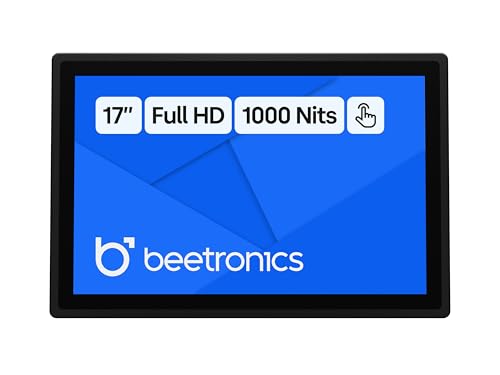 Beetronics 17 Inch High Brightness Touchscreen Monitor17 Inch1.7 x 16.42 x 11.02 inches8.6 PoundsCheck on Amazon
The eight listings side by side

10.1 Inch 1000 Nits Sunlight Readable Multi Touch PCAP Open Frame Touch Screen Monitor, Industrial LCD Display with 1280x800 Black


As an Amazon Associate we earn from qualifying purchases. Product prices and availability are accurate as of the date/time indicated.

Kimmybow 10.1 Inch 1200 Nits Sunlight Readable Touchscreen Monitor, 1280×800 IPS Capacitive Touch Display with HDMI Controller Board for Raspberry Pi 3/4, Outdoor Kiosk, EV Charger, Industrial HMI


As an Amazon Associate we earn from qualifying purchases. Product prices and availability are accurate as of the date/time indicated.

NORQIN 43" Large Touch Screen Monitor,Capacitive 10-Point Touchscreen | 43" Touchscreen Monitor 1920*1080 FHD,500nit,Sunlight Readable,Dual Speakers,DP,HDMI,USB,VGA,Commercial or Industrial Display


As an Amazon Associate we earn from qualifying purchases. Product prices and availability are accurate as of the date/time indicated.
Beetronics 17 Inch High Brightness Touchscreen Monitor | 17HB9M/U1 | Full HD 1080p | IP66 Waterproof & Dustproof | Industrial Sunlight Readable Outdoor Display for PC, Mac, Linux


As an Amazon Associate we earn from qualifying purchases. Product prices and availability are accurate as of the date/time indicated.

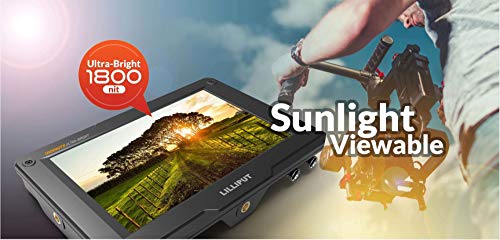
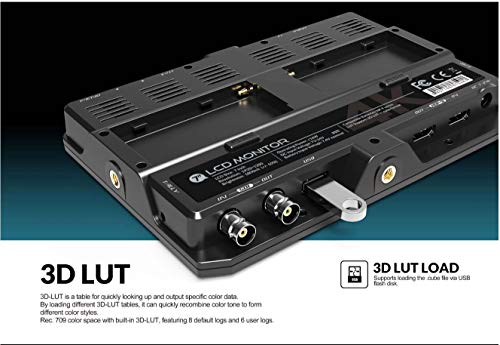
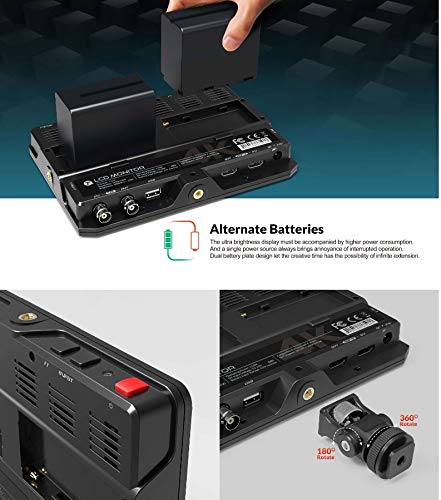
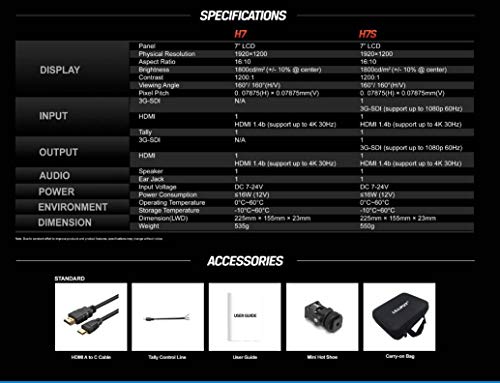
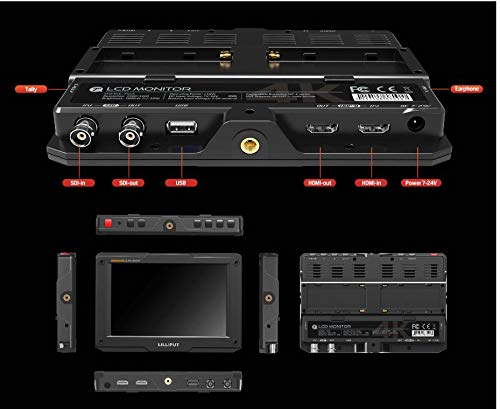
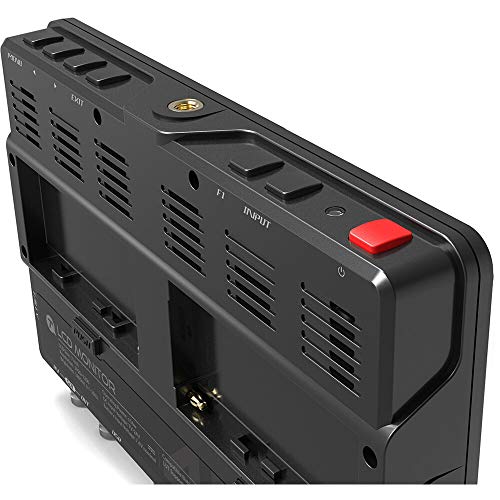
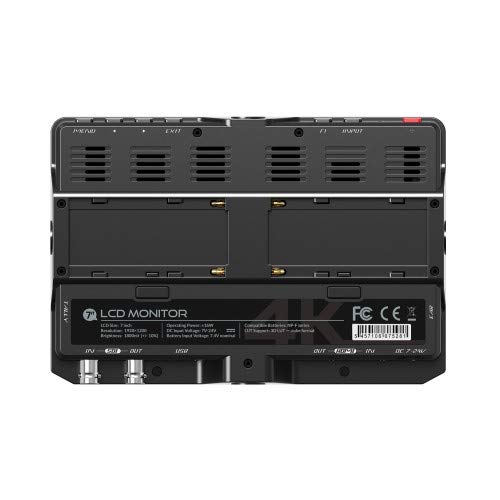
LILLIPUT H7S 7" 4K Sunlight Readable 1800nit On-Camera Monitor 1920x1200 HDMI 3G-SDI Input Output with 3D Lut

As an Amazon Associate we earn from qualifying purchases. Product prices and availability are accurate as of the date/time indicated.

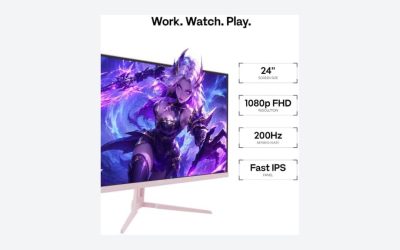
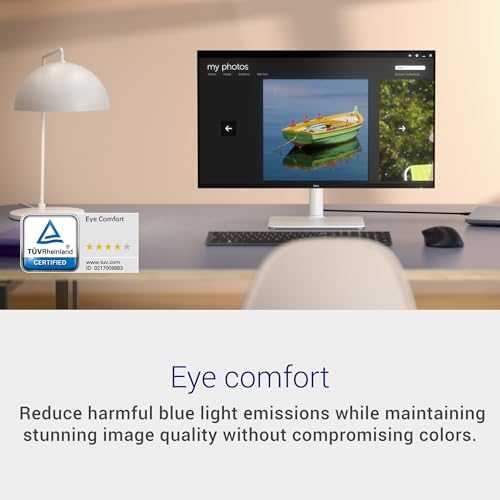
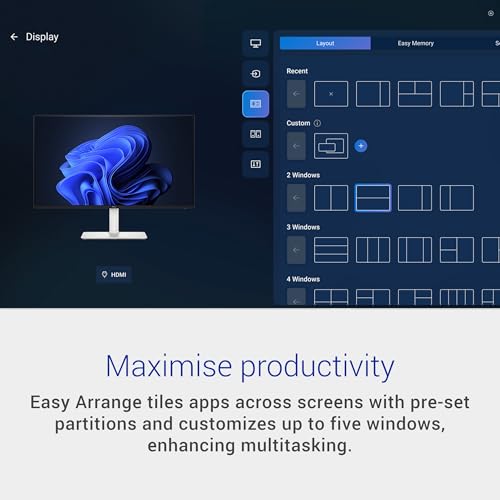
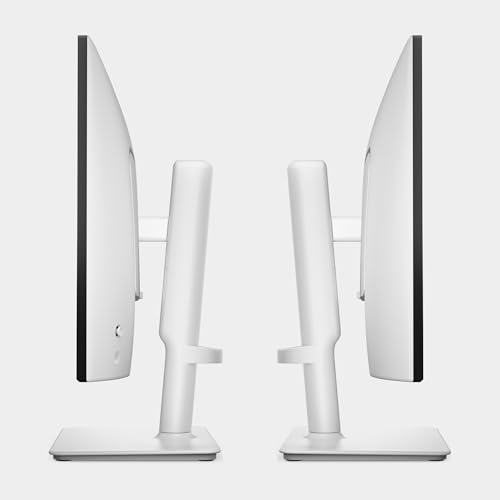
Dell 24 Plus Monitor - S2425HSM - 23.8-inch FHD (1920x1080) 144Hz 1ms Display, 2 x 3W Speakers, HDMI Connectivity, Height/Tilt/Pivot/Swivel Adjustability, AMD FreeSync - Ash White








As an Amazon Associate we earn from qualifying purchases. Product prices and availability are accurate as of the date/time indicated.

Amazon Basics 27-inch Computer Monitor, 120 Hz, 1080P, IPS, HDMI, DisplayPort, VESA Compatible for Office, Home


As an Amazon Associate we earn from qualifying purchases. Product prices and availability are accurate as of the date/time indicated.

Amazon Basics 27 Inch Monitor, FHD 1080P, 100Hz, IPS, Built-in Speakers, VESA Compatible, USB Ports, Black


As an Amazon Associate we earn from qualifying purchases. Product prices and availability are accurate as of the date/time indicated.
| Model | Key point from title | Price tier | Best for |
|---|---|---|---|
| Kimmybow 10.1-inch | 1200 nits, IPS touch, HDMI board | Mid-range | Pi kiosks, EV chargers |
| 10.1-inch open-frame PCAP | 1000 nits, multi-touch, 1280×800 | Mid-range | Embedded industrial builds |
| Beetronics 17-inch | IP66, Full HD, high brightness | Premium | Weather-exposed PC displays |
| LILLIPUT H7S 7-inch | 1800 nits, SDI and HDMI, 3D LUT | Mid-range | Camera operators |
| NORQIN 43-inch | 500 nits, 10-point touch, FHD | Premium | Shaded signage |
| Dell 24 Plus S2425HSM | 144Hz, no brightness figure | Budget | Bright rooms indoors |
| Amazon Basics 27-inch 120Hz | IPS, HDMI and DisplayPort | Budget | Shaded indoor desks |
| Amazon Basics 27-inch 100Hz | IPS, speakers, USB ports | Budget | Everyday indoor use |
Each listing in detail
Kimmybow 10.1-inch 1200-nit touchscreen
The title claims 1200 nits, the highest figure among the 10-inch panels here, on a 1280×800 IPS capacitive display. It comes with an HDMI controller board and names Raspberry Pi 3/4, outdoor kiosks, EV chargers and industrial HMI as uses, so think of it as a component you build around rather than a plug-and-play desk monitor. Coarse text at 1280×800 is normal at this size. Check the power input and cable list in the listing first, and look for how the touch connection reaches the host.
Pros
- Highest brightness claim of the 10-inch pair
- Touch and an HDMI board in one listing
- Named use cases match real outdoor jobs
Cons
- Small, low-resolution canvas
- You supply the enclosure and mounting
- Brightness is a seller figure only
Who it’s for: makers building a kiosk or charger display.
10.1-inch 1000-nit open-frame PCAP touchscreen
This listing pairs a 1000-nit claim with multi-touch PCAP, an industrial LCD and a 1280×800 panel. “Open frame” means a bare panel without a housing, designed to be fitted into a cabinet or enclosure. That suits fixed installations but not casual use, because exposed edges and electronics need protection from rain and dust. The title does not mention a controller board or inputs, so confirm what is in the box before ordering. Mounting holes and bezel details also matter for a clean install.
Pros
- 1000-nit claim is in the sunlight-capable range
- Multi-touch PCAP for gesture input
Cons
- Bare panel needs an enclosure
- Title is silent on inputs and included electronics
- Lower claim than the Kimmybow panel
Who it’s for: integrators fitting a panel into a cabinet.
Beetronics 17-inch IP66 high-brightness monitor
The only listing here that pairs a Full HD 1080p panel with an IP66 waterproof and dustproof rating, and it names PC, Mac and Linux as hosts. It is called high brightness and sunlight readable, yet the title gives no nit figure, so ask for it or read the specification table. At 17 inches and 1920×1080, pixel density is about 130 pixels per inch, sharp enough for text. IP66 describes the enclosure, not the screen’s glare handling.
Pros
- IP66 enclosure rating stated up front
- Full HD on a usable desktop size
- Works with common operating systems
Cons
- No brightness number in the title
- Highest price tier in the set
Who it’s for: workshop, dock or outdoor-kiosk users who need real weatherproofing.
LILLIPUT H7S 7-inch on-camera monitor
A camera-side field monitor claiming 1800 nits, 1920×1200, HDMI plus 3G-SDI in and out, and 3D LUT support. The title also says “4K”, which sits oddly beside a 1920×1200 panel; it most likely refers to accepted input signals, but confirm that before relying on it. It is built for video work, so there is no touch or desk stand to speak of. As a general-purpose PC display, seven inches is cramped, and the price reflects broadcast features rather than screen area.
Pros
- Brightest claim in the set
- SDI and HDMI inputs for camera workflows
- 3D LUT support for monitoring looks
Cons
- Tiny for anything other than a camera
- Ambiguous “4K” wording in the title
Who it’s for: filmmakers shooting in bright daylight.
NORQIN 43-inch 500-nit touchscreen
A large 1920×1080 touch display with 10-point capacitive input, dual speakers, and DP, HDMI, USB and VGA ports. The title calls it sunlight readable at 500 nits, which is a stretch for direct sun; read it as suited to bright, shaded spaces such as storefront windows. Stretching 1080p across 43 inches gives only about 51 pixels per inch, so view it from a distance rather than at a desk.
Pros
- Large canvas with 10-point touch
- Wide input choice including DisplayPort
- Built-in speakers
Cons
- 500 nits is half the usual outdoor figure
- Low pixel density up close
- Premium price tier for the brightness
Who it’s for: indoor signage near windows.
Dell 24 Plus S2425HSM
This is an indoor monitor, and the title offers no brightness figure. What it does list: 23.8-inch FHD, 144Hz and 1ms claims, FreeSync, two 3W speakers, HDMI, and height, tilt, pivot and swivel adjustment. Those features make it comfortable at a desk, not readable on a sunny deck. Include it as the sensible choice for a bright room where you can control glare with blinds or placement, and treat the 1ms and 144Hz wording as seller claims.
Pros
- Fully adjustable stand
- 144Hz claim for smoother motion
Cons
- Not designed for direct sunlight
- Only HDMI is named for connectivity
Who it’s for: bright home offices, not outdoor use.
Amazon Basics 27-inch 120Hz IPS
A plain 27-inch 1080p IPS monitor with HDMI, DisplayPort and VESA mounting, claiming 120Hz. At 27 inches and 1920×1080 the pixel density is about 82 per inch, which suits normal desk distance. It is a weaker class for this keyword: no sunlight claim, no weather protection. Its value here is as a budget baseline and as a candidate for a shaded indoor spot.
Pros
- Two video input types
- VESA compatibility for arms
Cons
- No brightness claim
- No outdoor or ruggedised design
Who it’s for: budget shoppers with a shaded workspace.
Amazon Basics 27-inch 100Hz with speakers
Close to a near-duplicate of the previous listing: 27-inch FHD IPS, VESA compatible, with 100Hz, built-in speakers and USB ports in the title. The differences are lower refresh and added conveniences, but the brightness story is the same, which is to say unstated. Check the specification sheet for peak nits before assuming it handles sunny rooms. Choose between the two Amazon Basics screens on ports and price rather than outdoor performance.
Pros
- USB ports and speakers on the title
- Same IPS panel type as the sibling
Cons
- Same lack of brightness data
- Overlaps heavily with the other listing
Who it’s for: indoor users wanting USB convenience.
How these were picked
We compared listing titles, published specifications and buyer feedback, then sorted the set by whether each product is designed for bright light. Brightness, ingress protection and screen size came from title wording only; where a title is silent we say so. Nobody on the team used or measured these units. Treat every nit figure as a seller claim and confirm it on the specification sheet before buying. Where two listings are near-duplicates we say so rather than pretend they differ.
What matters outdoors
Brightness, with the arithmetic
Sunlight does not only dim the picture, it adds reflected light on top. A rough model: reflected glare luminance equals surface reflectance times ambient light divided by pi. Our assumptions are estimates, not measurements: 4% diffuse reflectance, about 10,000 lux in shade, about 50,000 lux in direct sun, and a black level of 0.3 nits for every panel. That gives roughly 127 nits of glare in shade and 637 in sun. Effective contrast is (white + glare) divided by (black + glare):
- 300-nit panel: about 3.3:1 in shade, 1.5:1 in sun
- 500-nit panel: about 4.9:1 in shade, 1.8:1 in sun
- 1000-nit panel: about 8.9:1 in shade, 2.6:1 in sun
- 1800-nit panel: about 15:1 in shade, 3.8:1 in sun
A commonly quoted floor for comfortably readable large text is around 3:1, so only the brightest claims get there in full sun. Shade changes the picture dramatically.
Surface and viewing angle
A matte or anti-glare finish stops the sky mirroring in the glass, which matters as much as raw brightness when the screen faces open sky. IPS panels hold colour at an angle, useful when a kiosk is read from the side. Touch panels add a glass layer; ask whether it is treated, because a glossy cover can undo a bright backlight.
Inputs and cables
Match ports to the source. HDMI and DisplayPort versions differ in the bandwidth they carry, so a 1080p signal is easy but higher resolutions need cables and ports rated for them. See our guide to monitor cables and their bandwidth limits, and for pixel density trade-offs, the 1080p, 1440p and 4K resolution comparison.
Heat and power
Very bright backlights draw more power and run warm in closed enclosures. Ask the seller about operating temperature and voltage before mounting one behind glass, and leave airflow around open-frame boards. Heat in a sealed box is a common reason outdoor builds throttle brightness or fail early.
Mistakes buyers make
- Treating “sunlight readable” as a standard. It is a marketing phrase, so compare nit figures, and note that the 500-nit title and the 1800-nit title use the same words.
- Buying an open-frame panel and expecting weatherproofing. A bare panel needs a housing.
- Ignoring size and pixel density. A 43-inch 1080p screen is about 51 pixels per inch.
- Assuming a gaming monitor’s refresh rate helps in sunlight. It does nothing for glare.
- Skipping the cable check, especially adapters for VGA or SDI sources, where a passive adapter may not carry the signal you expect.
- Forgetting the mount. A 43-inch touchscreen is heavy and a 7-inch field monitor needs a cold shoe or arm; check weight and VESA hole patterns in the listing.
Verdict
For bright light, shortlist the Kimmybow for compact builds, the LILLIPUT H7S for camera work and the Beetronics when weatherproofing matters most. The NORQIN suits shaded signage rather than open sun, and its 500-nit claim is the weakest of the five purpose-built listings. The Dell and Amazon Basics monitors are fine indoors but off-type for this keyword, so skip them for a patio unless you can guarantee shade. Whichever you choose, ask the seller for the nit figure in writing and keep the return window in mind.
Related guides
- Low Latency 1080P High Refresh Monitors
- Monitor Refresh Rate Vs Frame Rate Explained
- Gaming Monitor For Competitive Shooters
Frequently asked questions
How many nits does a monitor need to be readable in sunlight?
There is no official threshold, but most purpose-built outdoor displays advertise roughly 1,000 nits or more, and the brightest listing here claims 1800. Shade or a canopy relaxes the requirement considerably. A 300-nit office panel can look fine on a covered porch yet wash out in direct sun. Always read the seller’s brightness figure as a claim, not a verified result.
Can I use a normal 1080p monitor outdoors?
You can, but expect a washed-out picture in direct light. The ordinary Dell and Amazon Basics screens in this set show no brightness figure in their titles, and indoor panels are rarely designed for glare or weather. They are acceptable in a bright room near a window, under a shaded awning, or when you can angle the screen away from the sun.
Does a matte or glossy screen matter more than nits?
Both matter. Brightness fights reflected light, while a matte or anti-glare surface scatters reflections so they do not form a mirror image of the sky. Glossy panels can look punchier indoors but turn into mirrors in daylight. Check the listing for the surface treatment, since titles often leave it out.
Is a touchscreen worth it for outdoor use?
Only if the job needs it, such as a kiosk, charger display or control panel. Capacitive touch adds a glass layer and a controller, so confirm driver support for your operating system and whether gloves or rain affect input. For simple viewing from a laptop or camera, a non-touch panel is simpler and easier to mount.
What cable should I use with these monitors?
Match the cable to the ports in each listing: HDMI on most of them, DisplayPort on the 43-inch, and 3G-SDI on the LILLIPUT. Older HDMI versions limit resolution and refresh rate, so a 1920×1080 signal is fine but anything higher needs a cable and source rated for it. For long outdoor runs, shielded and locking connectors reduce dropouts.