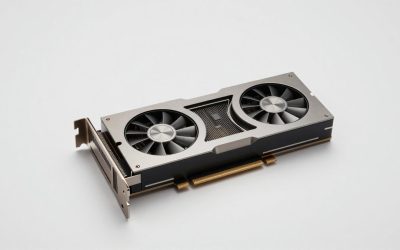
The GIGABYTE GeForce RTX 5080 Gaming OC 16G is the best overall RTX 5080 deal for most people buying a card on its own: it pairs the standard 16GB GDDR7, 256-bit, 960 GB/s memory subsystem and 360W-class power target with one of the largest air coolers in the entry band of the 5080 market, so you pay the lowest tier of 5080 money for near-flagship cooling. If you want a finished system rather than a card, the STORMCRAFT Phantom RTX 5080 Gaming PC with a Ryzen 7 9800X3D is the best-value prebuilt here, with the Alienware Aurora as the safer mainstream pick. Anyone building in a small-form-factor case should skip the triple-fan cards entirely and go to the NVIDIA GeForce RTX 5080 Founders Edition, which is still the only true 2-slot 5080. Below we track how the 5080 market prices out in 2026, when a bundle genuinely beats a standalone card, and the exact PSU, case and monitor numbers you need before you spend.
Our Top Picks
 GIGABYTE GeForce RTX 5080 Gaming OC 16G GraphicsRTX508013.46 x 5.59 x 2.76 inches4.03 poundsCheck on Amazon
 ASUS Prime GeForce RTX 5080 EVO 16GB GDDR7RTX5080|OC|EVO12 x 5 x 0.1 inches2.95 poundsCheck on Amazon


Top 3 picks at a glance
Quick Comparison
| Product | Best for | Key specs | Price tier |
|---|---|---|---|
| GIGABYTE GeForce RTX 5080 Gaming OC 16G | Best all-round standalone card value | 16GB GDDR7, 256-bit, 960 GB/s, WINDFORCE triple-fan, 360W-class TGP, 3-slot | Budget |
| PNY NVIDIA GeForce RTX 5080 Epic-X RGB OC Triple-Fan | RGB builds on a tight card budget | 16GB GDDR7, 256-bit, triple-fan, RGB lighting, factory OC, 360W-class TGP | Budget |
| ASUS Prime GeForce RTX 5080 EVO 16GB GDDR7 OC Edition | Quiet, understated builds | 16GB GDDR7, 256-bit, triple-fan, OC Edition, 360W-class TGP, 3-slot | Budget |
| STORMCRAFT Phantom RTX 5080 Gaming PC | Plug-and-play 4K with a top gaming CPU | Ryzen 7 9800X3D, RTX 5080 16GB, 32GB DDR5, 2TB SSD | Mid-range |
| MSI Gaming RTX 5080 16G Ventus 3X OC Black | Lowest-cost entry into a 5080 | 16GB GDDR7, 256-bit, Extreme Clock 2640 MHz, triple-fan, 360W-class TGP | Budget |
| NVIDIA GeForce RTX 5080 Founders Edition | Small-form-factor and 2-slot builds | 16GB GDDR7, 256-bit, 2-slot dual-fan flow-through, ~304 mm, 360W TGP | Mid-range |
| ZOTAC MEK Gaming PC, Ryzen 7 9800X3D, RTX 5080 16GB, Apocalypse | Premium prebuilt, no CPU compromise | Ryzen 7 9800X3D, RTX 5080 16GB, Apocalypse chassis, DDR5, NVMe SSD | Premium |
| ASUS ROG Strix G16 (2026) | High-refresh 1440p gaming on the move | 16″ 2.5K 240Hz/3ms Nebula HDR, Core Ultra 9 290HX Plus, RTX 5080 Laptop GPU | Premium |
| Alienware Aurora Gaming Desktop, RTX 5080, Intel Core Ultra 9 285 | Mainstream brand-name desktop | Core Ultra 9 285-class CPU, RTX 5080 16GB, compact Aurora chassis | Mid-range |
| ASUS ROG Strix Scar 18 (2026) | Desktop-replacement 4K gaming laptop | 18″ 4K 240Hz/3ms Nebula HDR, Core Ultra 9 290HX Plus, RTX 5080 Laptop GPU | Premium |
| Skytech Gaming PC Desktop, Ryzen 7 9800X3D, RTX 5080 | Prebuilt buyers who plan to upgrade | Ryzen 7 9800X3D, RTX 5080 16GB, 32GB RAM, 2TB SSD | Premium |
| HP Omen Max 45L RTX 5080 (Empowered PC) | Big-case thermals and PSU headroom | Ryzen 7 9800X3D, RTX 5080 16GB, 32GB DDR5, 2TB Gen4 SSD, 1200W Platinum, liquid-cooled | Mid-range |
A note on tiers: a “budget” RTX 5080 is not a cheap product in absolute terms. It means the card sits in the lowest band of the 5080 market, typically the models closest to the reference price. “Mid-range” covers cards and systems that add meaningful hardware — a Founders Edition cooler, a stronger chassis, a better CPU pairing — and “premium” covers flagship coolers, large-format systems and 4K gaming laptops. Because graphics card pricing moves week to week, this guide uses tier labels and general market ranges instead of fixed figures that go stale.
How We Chose
This roundup is built from published specifications, manufacturer listings and category-level research, not from lab testing. Every card and system below was selected against four criteria. First, spec integrity: does the product deliver the full desktop RTX 5080 specification — 16GB of GDDR7 on a 256-bit bus, 960 GB/s of memory bandwidth, a 360W-class total graphics power target, PCIe 5.0 x16, and the current display output set of DisplayPort 2.1b plus HDMI 2.1b? Second, category fit: standalone cards are judged on cooler size, slot width, length, power connector type and warranty, while prebuilts and laptops are judged on CPU pairing, memory and storage configuration, PSU quality and chassis airflow.
Third, use case: a 2-slot card for a small-form-factor build is not competing with a 3.5-slot flagship cooler on the same terms, so each product is matched to the buyer it actually suits rather than ranked in one flat list. Fourth, upgrade path: for complete systems we looked at whether the motherboard, PSU and case leave room for a future GPU swap, and for laptops whether the memory and storage are user-serviceable. Nothing here is described as tested or benchmarked. Performance figures are given only as approximate ranges typical of published reviews and are always framed as varying with resolution, settings, CPU and game patch. Where a number could not be verified from a listing or well-established brand specification, the product is described by spec class instead.
1. GIGABYTE RTX 5080 Gaming OC 16G – Best for the best all-round card value
As an Amazon Associate we earn from qualifying purchases at no extra cost to you.

The GIGABYTE Gaming OC is the card to buy when you want a full-size 5080 with a serious cooler and you are not willing to pay flagship-tier money for it. It sits in the lowest price band of the 5080 market, and the reason it earns the top spot is that GIGABYTE did not strip the cooling to get there. The WINDFORCE system on this card is a three-fan, multi-slot design with alternate spinning fans and a large heatsink, which is the same class of hardware you would normally find on cards one or two tiers up.
Key specs
- GPU: NVIDIA GeForce RTX 5080, Blackwell architecture
- Memory: 16GB GDDR7, 256-bit bus, 960 GB/s bandwidth
- Power: 360W-class total graphics power, 12V-2×6 (16-pin) connector
- Cooling: WINDFORCE triple-fan, multi-slot heatsink, screen cooling
- Bus: PCIe 5.0 x16, backwards compatible with PCIe 4.0
- Outputs: DisplayPort 2.1b and HDMI 2.1b (confirm the exact count on the listing)
- Features: DLSS 4 with Multi Frame Generation, 4th-gen RT cores, 5th-gen Tensor cores
Why it wins on value
Two things matter more than clock speed on a 5080. The first is thermal headroom, because a card that runs cooler sustains its boost clock longer and runs quieter while doing it. The second is physical size, because a bigger heatsink is only useful if your case accepts it. The Gaming OC takes the standard approach: it is a large card, and it uses that size to keep fan speeds down. In published reviews of similarly built 5080 partner cards, the practical difference between a well-cooled entry card and a flagship card is usually a few percent in frame rate and a noticeable difference in noise — not a generational gap.
Where this card is genuinely strong is the combination of price tier and physical compatibility. It uses the standard 12V-2×6 connector, which means an ATX 3.1 power supply with a native 600W cable connects directly with no adapter. It is a three-slot-class card, so a mid-tower with a mesh front and at least 360 mm of internal clearance handles it without drama. And because it is a factory-overclocked model rather than a reference-clocked one, you get the higher boost bin without paying the flagship markup.
Pros
- Lowest price tier in the 5080 market while keeping a full triple-fan cooler
- WINDFORCE cooling is a proven design that has been reused across several GPU generations
- Standard 12V-2×6 connector, no adapter needed with an ATX 3.1 PSU
- Full 16GB / 256-bit configuration with the full 960 GB/s of bandwidth
- Factory OC means you are not leaving boost clock on the table
Cons
- Large and heavy — it will not fit small-form-factor cases or shallow 2-slot builds
- GIGABYTE’s software stack for RGB and fan curves is functional but not the most polished
- At 360W-class power draw it still needs a 850W power supply in a typical build
- Noise under sustained 4K ray tracing loads will be audible in a quiet room
How it compares
Against the MSI Ventus 3X OC, the Gaming OC is the better long-term buy if your case can take the extra bulk: both sit in the same price band, but the GIGABYTE cooler is generally the larger of the two, and larger coolers translate into lower fan speeds at the same heat load. Against the PNY Epic-X RGB OC, the choice comes down to lighting versus raw heatsink volume — PNY leans into the RGB aesthetic while GIGABYTE leans into thermal mass. If you want the quietest possible experience and your case has good airflow, the ASUS Prime EVO OC is the closest competitor, but it is also the more restrained-looking of the three.
2. PNY RTX 5080 Epic-X RGB OC – Best for RGB builds on a tight card budget

PNY’s Epic-X RGB OC is the pick for a build where the card is part of the visual design. It sits in the lowest price band of the 5080 market alongside the other entry cards, but the money that would have gone into an oversized heatsink goes into an RGB-lit triple-fan shroud instead. That is a legitimate trade for anyone building a glass-panelled system where the GPU is the centrepiece.
Key specs
- GPU: NVIDIA GeForce RTX 5080, Blackwell architecture
- Memory: 16GB GDDR7, 256-bit bus, 960 GB/s bandwidth
- Power: 360W-class total graphics power, 12V-2×6 (16-pin) connector
- Cooling: triple-fan with RGB-illuminated shroud
- Bus: PCIe 5.0 x16
- Outputs: DisplayPort 2.1b and HDMI 2.1b (check the listing for port count)
- Features: DLSS 4 with Multi Frame Generation
What you actually get
PNY is one of the longest-standing NVIDIA board partners and has historically been the brand that ships closest to the reference design. That matters for buyers who care about predictability more than spectacle: a PNY card will do exactly what a 5080 is supposed to do, with the same 16GB of GDDR7, the same 256-bit bus and the same 960 GB/s of memory bandwidth as every other card in this guide. The factory overclock is modest but present, and the triple-fan layout is adequate for a 360W-class part as long as your case moves air.
The RGB element is worth thinking about honestly. Addressable lighting on a GPU shroud is usually controlled through the manufacturer’s utility or through motherboard sync software, and the quality of that software varies. If you plan to sync the card with the rest of your build, check that the listing confirms motherboard ARGB sync support before you buy, otherwise you may be running two separate lighting utilities.
On the power side, the same rules apply as with any 5080: a 850W ATX 3.1 unit is the sensible baseline, and the native 12V-2×6 cable is preferable to a bundled adapter. The connector on this generation of cards is the updated 12V-2×6 design, which is mechanically compatible with older 12VHPWR cables but safer when fully seated — always push until it clicks and give the cable a gentle tug to confirm.
Pros
- Entry price tier with a full factory-overclocked 5080 specification
- Triple-fan cooling rather than a compact two-fan design
- RGB shroud for builders who want the card to be visible
- PNY’s long history as an NVIDIA partner means driver support is a non-issue
- Standard 16GB / 256-bit memory configuration with no cut-down variant to worry about
Cons
- Smaller heatsink than the GIGABYTE Gaming OC, so it will run louder under sustained 4K loads
- RGB control software is not always as clean as the big three motherboard vendors’ utilities
- Still a three-slot-class card, so it does not solve small-case builds
- Fewer retail channels than GIGABYTE or ASUS, which can affect stock availability
How it compares
Against the GIGABYTE Gaming OC, this is a straightforward aesthetics-versus-thermals decision. If your case has strong airflow and you want the card visible through tempered glass, the Epic-X RGB OC delivers the same core performance with more visual impact. If your case is airflow-limited, the GIGABYTE’s larger cooler is the safer choice. Against the MSI Ventus 3X OC, the two are extremely close in price band and both target the entry buyer; the Ventus is the plainer card, while the Epic-X is the one you buy when you have already planned the lighting scheme.
3. ASUS Prime RTX 5080 EVO OC – Best for quiet, understated builds

The ASUS Prime RTX 5080 EVO OC is the card for a build that has to look like a workstation and run like a gaming rig. The Prime line exists precisely for this: no RGB, no aggressive angular shroud, no gamer typography, just a triple-fan cooler on a card that happens to be one of the fastest consumer GPUs you can buy. It sits in the entry price band of the 5080 market, which makes it a genuinely sensible purchase rather than a styling exercise.
Key specs
- GPU: NVIDIA GeForce RTX 5080, Blackwell architecture
- Memory: 16GB GDDR7, 256-bit bus, 960 GB/s bandwidth
- Power: 360W-class total graphics power, 12V-2×6 (16-pin) connector
- Cooling: triple-fan axial design, multi-slot, OC Edition factory overclock
- Bus: PCIe 5.0 x16
- Outputs: DisplayPort 2.1b and HDMI 2.1b
- Features: DLSS 4 with Multi Frame Generation, 4th-gen RT cores
The case for the Prime
ASUS positions Prime as its mainstream, no-frills tier, and the practical effect on a 5080 is a card that prioritises a clean thermal solution over extras. The EVO designation indicates a revised board and cooler revision within the Prime line, which is worth noting because it means the current version may differ physically from earlier Prime 5080 listings — check the card length and slot width on the specific listing you are buying from if you are working to a tight clearance.
For noise, the relevant physics is simple: the same 360W of heat has to leave the card, and the only variables are heatsink surface area, fan diameter and fan speed. A three-fan card with a full-length heatsink can move that heat at lower RPM than a shorter two-fan card, which is why the Prime’s restrained design is not just cosmetic. In a case with a mesh front and two or three intake fans, this card should be one of the quieter entry-tier options.
It is also worth understanding what the OC Edition badge does and does not mean. Factory overclocks on 5080 partner cards are typically small — the reference boost clock and the best partner boost clocks are close enough that the difference shows up as a low single-digit percentage in frame rate, not a tier change. What actually varies between cards is the power limit, the cooler, and the noise. Buy the Prime for its cooler and its looks, not for a clock number.
Pros
- Entry price tier without the gamer aesthetic, ideal for office or studio builds
- Full-length triple-fan cooler should run quieter than compact entry cards
- ASUS support network and warranty handling are among the most established in the industry
- Standard 16GB / 256-bit / 960 GB/s configuration
- OC Edition factory overclock included at no premium tier
Cons
- No RGB, which is a downside if you specifically want visible lighting
- Prime is ASUS’s value line, so the bundle and accessory package is minimal
- Still a large multi-slot card that will not fit small-form-factor cases
- EVO revisions can change dimensions, so verify clearance against the exact listing
How it compares
Against the GIGABYTE Gaming OC, the Prime EVO is the more discreet of the two and roughly equivalent in cooling class; the deciding factor is usually which one is in stock at the lower price when you buy. Against the PNY Epic-X RGB OC, the split is obvious — PNY for visible lighting, ASUS Prime for a build where nothing glows. Against the Founders Edition, the Prime offers a larger heatsink and more slot width, so it is the better choice in a normal mid-tower, while the FE remains the only option for a genuine 2-slot build.
4. STORMCRAFT Phantom RTX 5080 Gaming PC – Best for plug-and-play 4K gaming

The STORMCRAFT Phantom is the system to buy if you want the 5080 experience without spending a weekend on cable management. It pairs the RTX 5080 with a Ryzen 7 9800X3D, 32GB of DDR5 and a 2TB SSD, and it sits in the mid-range tier of this list — above the bare cards, below the flagship prebuilts. That combination is not accidental: the 9800X3D is widely regarded as one of the strongest gaming CPUs of its generation, and pairing it with a 5080 removes the CPU bottleneck that would otherwise cap a 4K-high-refresh build.
Key specs
- CPU: AMD Ryzen 7 9800X3D (3D V-Cache gaming part)
- GPU: NVIDIA GeForce RTX 5080, 16GB GDDR7
- Memory: 32GB DDR5
- Storage: 2TB SSD
- Form factor: desktop tower with the Phantom chassis
- Features: DLSS 4 with Multi Frame Generation via the installed 5080
Why the CPU pairing matters
There is a common misconception that once you are at 4K, the CPU stops mattering. That was closer to true in the era before upscaling and frame generation. With DLSS 4 and Multi Frame Generation, the GPU renders a base frame and the model generates additional frames on top — and the base frame rate is set partly by CPU-side game logic. A weak CPU caps the base rate, which in turn limits how good frame generation looks, because the added frames amplify an already-low base. Pairing a 5080 with a 9800X3D avoids that trap entirely.
The 32GB of DDR5 is the right capacity for 2026. Modern titles with large open worlds and heavy asset streaming routinely exceed 16GB of system memory, and 32GB leaves headroom for a browser, Discord and a capture tool running alongside the game. The 2TB SSD is generous by prebuilt standards — a 5080-class machine fills a 1TB drive quickly once you install a handful of 100GB-plus titles.
What you give up by buying a system rather than a card is control. Prebuilt vendors choose the motherboard, the power supply and the case, and those choices vary between configurations. Before buying any prebuilt with a 5080, confirm three numbers: the PSU wattage (850W minimum, 1000W preferred), the PSU certification and whether it is ATX 3.1 with a native 12V-2×6 cable, and the case’s GPU clearance in millimetres. Those three details determine whether the machine can be upgraded later or is a sealed box.
Pros
- Ryzen 7 9800X3D is a top-tier gaming CPU that will not bottleneck the 5080
- 32GB DDR5 and a 2TB SSD are both the right size for 2026 game libraries
- Arrives assembled, tested by the vendor and covered by a single system warranty
- Mid-range tier pricing relative to flagship prebuilts with similar GPUs
- Removes the risk of a DIY build failing to POST on first assembly
Cons
- You cannot choose the specific 5080 model installed — it varies by batch
- Prebuilt power supplies and motherboards are often the weakest link
- Less flexibility on aesthetics and case choice than a DIY build
- Shipping a heavy tower with a large GPU installed carries some risk in transit
How it compares
Against the Skytech desktop with the same CPU and GPU, the STORMCRAFT Phantom sits a tier lower on price, which usually reflects the chassis and PSU specification rather than the core hardware. If you plan to upgrade the GPU in three years, the Skytech’s higher-tier build quality may pay off; if you plan to run this machine as-is, the Phantom is the better value. Against the Alienware Aurora, the Phantom wins on CPU for gaming specifically, while the Aurora wins on brand support and service options.
5. MSI RTX 5080 Ventus 3X OC Black – Best for the lowest-cost way into a 5080

The MSI Ventus 3X OC is the value entry point of this list in the most literal sense. It is a 16GB GDDR7, 256-bit RTX 5080 with a triple-fan cooler and a factory overclock, listed at the bottom of the 5080 price band. If your goal is to get the full 5080 specification for the smallest possible outlay and you are willing to accept a plainer card, this is the one to watch.
Key specs
- GPU: NVIDIA GeForce RTX 5080, Blackwell architecture
- Memory: 16GB GDDR7, 256-bit bus, 960 GB/s bandwidth
- Extreme Clock: 2640 MHz (as stated on the listing)
- Power: 360W-class total graphics power, 12V-2×6 (16-pin) connector
- Cooling: Ventus 3X triple-fan, black shroud
- Bus: PCIe 5.0 x16
- Outputs: DisplayPort 2.1b and HDMI 2.1b
Reading the clock number correctly
The 2640 MHz Extreme Clock figure on the listing is a boost-clock ceiling, not a sustained clock. A 5080 will only hold its maximum boost while it stays within its power and thermal limits, which is why cooler size matters more than the number on the box. Two cards with the same 2640 MHz rating can differ by several percent in sustained performance depending on how well each one sheds 360W of heat. The Ventus 3X’s cooler is competent but not oversized, so in a case with weak airflow it will drop off its boost ceiling sooner than a card with a larger heatsink.
That said, MSI’s Ventus line has a long track record of delivering the reference experience reliably. There is nothing exotic here — no dual BIOS switch, no elaborate lighting, no oversized vapour chamber. It is a card designed to do the job, and for a large share of buyers that is exactly right. The money saved against a flagship-tier 5080 is real, and it can go toward the parts of the build that actually change your experience: a better monitor, a better power supply, or more storage.
One practical note on the Ventus 3X’s physical size: it is a three-slot-class card, so it blocks the PCIe slot below it. If you need that slot for a capture card, a second SSD adapter or a sound card, plan around it. Also confirm the power supply requirement — a 5080 at 360W-class TGP plus a modern gaming CPU comfortably exceeds what a 650W unit should be asked to deliver.
Pros
- Typically the lowest-priced path to a full-spec RTX 5080
- Triple-fan cooling rather than a minimal two-fan design
- MSI’s Afterburner utility remains one of the best GPU tuning tools available
- 2640 MHz Extreme Clock rating puts it in line with other OC cards
- Plain black shroud fits almost any build theme
Cons
- Smaller heatsink than the GIGABYTE Gaming OC, so higher fan speeds under load
- No RGB lighting, which some builders will see as a missed feature
- Three-slot width blocks the adjacent expansion slot
- Ventus cards are frequently out of stock at the lowest prices, so timing matters
How it compares
Against the GIGABYTE Gaming OC, the Ventus is the cheaper and smaller card and the Gaming OC is the better-cooled one — if the price difference is small, the GIGABYTE is the smarter long-term purchase. Against the PNY Epic-X RGB OC, the choice is purely about whether you want lighting. Against the Founders Edition, the Ventus offers a longer cooler and a more conventional airflow path, while the FE offers the 2-slot form factor that nothing else here matches.
6. NVIDIA RTX 5080 Founders Edition – Best for small cases and 2-slot builds

The Founders Edition is the only RTX 5080 in this guide that fits a genuine small-form-factor build, and that single fact makes it the default recommendation for anyone working inside a compact case. At roughly 304 mm long and two slots wide, it is dramatically smaller than the triple-fan partner cards, and it does it without a meaningful performance penalty because it uses the same 16GB GDDR7 configuration and the same 360W-class power target as every other desktop 5080.
Key specs
- GPU: NVIDIA GeForce RTX 5080, Blackwell architecture
- Memory: 16GB GDDR7, 256-bit bus, 960 GB/s bandwidth
- Power: 360W total graphics power, 12V-2×6 connector
- Cooling: dual-fan flow-through design, 2-slot
- Length: approximately 304 mm
- Bus: PCIe 5.0 x16
- Outputs: DisplayPort 2.1b and HDMI 2.1b
- Features: DLSS 4 with Multi Frame Generation, 4th-gen RT cores, 5th-gen Tensor cores
How the flow-through cooler changes your build
The Founders Edition uses a dual-fan arrangement in which one fan draws air through the card and pushes it out the far side. In practice that means the card does not simply dump heat into the case — it pushes a portion of it straight through toward the CPU cooler and rear exhaust. That is efficient in a well-planned case with strong rear and top exhaust, and it is a problem in a sealed case with no rear airflow, because the hot air has nowhere to go.
For small-form-factor builders, the practical rule is this: pair the FE with a case that has at least one rear exhaust fan within roughly 100 mm of the card’s exhaust face. Mesh-panel sandwich-style cases handle it well. Closed glass-front cubes with a single intake fan do not, and you will see fan speeds climb as a result.
Buying direct from NVIDIA is also a different experience from buying from a board partner. Stock is intermittent, purchase limits apply, and the card is typically sold at or near the reference price rather than at a partner markup. That price discipline is a genuine advantage — it is one of the few ways to buy a 5080 in the mid-range tier rather than the premium tier. The trade-off is availability: the FE sells out quickly whenever it restocks, so set a stock alert rather than checking manually.
Pros
- Genuinely 2-slot and roughly 304 mm — the only real option for compact builds
- Usually sold closest to the reference price rather than at a partner premium
- Flow-through cooling is effective in cases with proper rear exhaust
- Full 16GB / 256-bit / 960 GB/s specification with no cut-down variant
- Clean, understated industrial design that suits almost any build
Cons
- Persistent stock shortages make it hard to buy at the moment you want it
- The compact cooler is louder under sustained 4K loads than a large triple-fan card
- Purchase limits per customer are common
- No partner-style extras such as dual BIOS or bundled accessories
How it compares
Against the ASUS Prime RTX 5080 EVO OC, the FE trades cooling surface for size. In a mid-tower, the Prime will run quieter; in a 10-litre case, the Prime will not fit at all. Against the MSI Ventus 3X OC, the same logic applies in reverse — the Ventus is cheaper and larger, the FE is smaller and usually closer to reference pricing. If you are building in anything smaller than a 20-litre case, the Founders Edition is not one option among several; it is the option.
7. ZOTAC MEK RTX 5080 Gaming PC – Best for a premium prebuilt with no CPU compromise

The ZOTAC MEK with a Ryzen 7 9800X3D and an RTX 5080 sits in the premium tier of this list, and it earns that placement with the combination rather than any single component. ZOTAC is both a GPU board partner and a system builder, which means the MEK line is assembled by a company that designs the graphics card inside it. That vertical integration is the main argument for buying this machine over a generic system-integrator build.
Key specs
- CPU: AMD Ryzen 7 9800X3D
- GPU: ZOTAC NVIDIA GeForce RTX 5080, 16GB GDDR7
- Chassis: MEK Apocalypse tower
- Memory: DDR5 (capacity varies by configuration)
- Storage: NVMe SSD (capacity varies by configuration)
- Features: DLSS 4 with Multi Frame Generation
What premium tier buys you here
When a prebuilt is priced a tier above a comparable system with the same CPU and GPU, the difference is usually in the chassis, the cooling, the power supply and the quality control. The MEK Apocalypse chassis is a distinctly styled tower with a focus on airflow and a look that is deliberately not a generic black box. ZOTAC builds these systems around its own cards, so the card inside will be a ZOTAC 5080 rather than an unknown brand chosen by a third-party integrator.
The CPU choice is the important one. The 9800X3D’s 3D V-Cache gives it a large pool of L3 cache directly on the compute die, which is exactly the workload pattern games use — lots of small, repeated reads. That translates into high and consistent frame rates at 1080p and 1440p, where CPU limits bite hardest, and into a strong base frame rate for DLSS 4 Multi Frame Generation at 4K. If you play competitive titles at high refresh as well as single-player games at 4K, this is the CPU pairing that covers both without compromise.
For buyers comparing prebuilts, the questions to ask are consistent across brands: what wattage and certification is the power supply, does it have a native 12V-2×6 cable, what is the case’s GPU clearance, and how many M.2 slots are free after the build ships. A premium-tier machine should answer all four well. If a listing does not state them, treat that as a reason to look at one that does.
Pros
- Built by a company that also manufactures the graphics card inside it
- Ryzen 7 9800X3D is one of the best gaming CPUs of its generation
- Distinctive Apocalypse chassis with an airflow-focused design
- Single-warranty coverage across the whole system
- Premium tier generally means a stronger PSU and cooling than budget prebuilts
Cons
- Premium pricing relative to prebuilts with the same CPU and GPU combination
- Memory and storage capacities vary by configuration, so read the exact listing
- Bold chassis styling is a matter of taste and will not suit every room
- Less configurator flexibility than large system integrators that offer dozens of options
How it compares
Against the Skytech desktop with the same CPU and GPU pairing, the MEK is the more stylised and more integrated machine, while Skytech is typically the more configurable and often the better value at the same tier. Against the STORMCRAFT Phantom, the MEK is a tier higher and should reflect that in PSU quality and chassis construction — if it does not, the Phantom is the smarter buy. Against the HP Omen Max 45L, the MEK offers a more gaming-focused aesthetic while the Omen offers a larger, quieter chassis.
8. ASUS ROG Strix G16 (2026) – Best for high-refresh 1440p on the move

The ROG Strix G16 is the sensible laptop of this group. Its 16-inch 2.5K panel runs at 240Hz with a 3ms response rating, which is the sweet spot for a mobile gaming machine: high enough pixel density to look sharp, low enough resolution that a mobile GPU can actually drive high frame rates, and a refresh rate that makes