
The best galaxy projectors in 2026 depend on whether you want a realistic star field, a wide nebula for movie nights, or a quiet, timer-controlled light for sleeping: the Sega Homestar Flux leads for star accuracy, BlissLights Sky Lite Evolve is the easiest all-round bedroom choice, and Govee’s Galaxy Light Projector is the strongest option when app scenes and entertainment-room effects matter most.
As an Amazon Associate we earn from qualifying purchases at no extra cost to you.


Our Top Picks
 Northern Galaxy Light Aurora Projector with 33 Light4.3 x 6.3 x 3.9 inches6.5 x 4.5 x 4 inchesCheck on Amazon
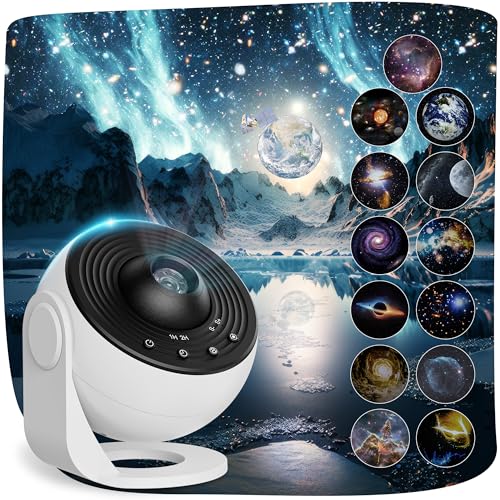


Top 3 picks at a glance
Quick comparison
| Projector | Best for | Star-field realism | Nebula coverage | Control and sound | Typical market range |
|---|---|---|---|---|---|
| Sega Homestar Flux | Astronomy-style rooms | Excellent; interchangeable optical discs | Limited compared with LED galaxy lamps | Remote; built-in timer; generally silent | Usually $100–$150 |
| BlissLights Sky Lite Evolve | Bedrooms and gaming desks | Good decorative stars | Wide blue, purple and multicolor cloud effects | App, voice-platform support on compatible versions, timer; no music playback required | Usually $50–$80 |
| Govee Galaxy Light Projector | Entertainment rooms and smart-home scenes | Moderate; prioritizes animated effects | Broad, vivid coverage | App, remote or smart-home control depending on model; some versions add music synchronization | Usually $50–$100 |
| Pococo Galaxy Star Projector | Quiet personal rooms and disc-based scenes | Good for a consumer disc projector | Varies by included projection disc | Remote and timer on many packages; sound features vary | Usually $50–$100 |
Which projector fits your room?
| Your situation | Choose | Why |
|---|---|---|
| You want constellations and a convincing night-sky effect | Sega Homestar Flux | Its optical disc approach produces sharper, more star-like points than many low-cost RGB cloud projectors. |
| You want soft color across a bedroom ceiling | BlissLights Sky Lite Evolve | It combines a broad nebula effect with simple app control and adjustable movement. |
| You want lighting that reacts to games, films or music | Govee Galaxy Light Projector | App scenes and smart-home integration are more important here than astronomical accuracy. |
| You want changeable themed scenes without relying on Wi-Fi | Pococo Galaxy Star Projector | Disc-based models can provide physical scene changes and local remote control. |
| You are lighting a large entertainment room | A brighter, wide-angle LED class | Check coverage and brightness before buying; a compact bedroom projector may look weak on a high or distant ceiling. |
What separates the best galaxy projectors
Star-field realism versus nebula coverage
These are different design goals. A star-disc projector uses an optical image, so its points can look relatively crisp and consistent. That makes the Sega Homestar Flux a better choice for a planetarium-like ceiling. It is less suited to the moving purple-and-blue cloud effect associated with modern gaming rooms.
LED galaxy projectors usually blend colored light with laser or LED star points. They cover more area and create a stronger visual impact, but their “stars” may appear as dots, speckles or short moving streaks rather than individual astronomical points. For a bedroom, that softness can be preferable. For a media room, broad coverage often matters more than exact star placement.
Brightness control and focus
Brightness should be adjustable independently from motion and color. A projector that looks impressive in a dark shop can be uncomfortable at night if its lowest setting is still intense. Look for multiple brightness levels or a dimming slider, plus separate controls for the nebula and stars.
Focus matters most when stars are projected onto a relatively near wall. Place the unit roughly 1.5–2.5 metres from the surface, then adjust focus until the smallest points are sharp. If the ceiling is farther away than the projector’s intended range, increasing brightness will not fix a soft image; reducing the projection distance or choosing a model with a stronger optical system will.
Sound, music sync and sleep use
Built-in speakers are convenient for casual ambience, but they rarely replace a dedicated sound system. If the room already contains gaming speakers or a soundbar, a quiet projector with no fan noise is usually the better purchase. Music-reactive modes can also become distracting: use low sensitivity or a static scene when the projector is beside a bed.
For sleep, prioritize a silent motor, a reliable 30-, 60- or 120-minute timer, and a status light that can be covered or disabled. A remote is useful after the room is dark; an app is more useful when you want schedules, saved scenes or smart-home routines.
Placement and safety
- Place the projector on a stable, ventilated surface rather than on bedding, carpet or an unstable shelf.
- Keep ventilation openings clear and leave the clearance specified in the manual, especially on brighter models that produce more heat.
- Do not aim a bright laser or concentrated light directly at anyone’s eyes. Wall or ceiling projection is the safer arrangement.
- Keep cables away from walkways and the edge of a bed. A short USB cable can still create a pull hazard if it crosses the floor.
- Keep the unit away from water, humidifiers and condensation-prone windows.
- Do not cover the projector to reduce brightness. Use its built-in dimming control or move it farther from the viewing position.
- For a child’s room, choose a model with a dependable timer and place it where the child cannot pull it down or access the power adapter.
A practical brightness and power setup
Start with the projector at about 30–40% brightness, nebula opacity around 25–35%, and slow movement. This is usually enough for a dark bedroom while preserving contrast between stars and colored clouds. For a gaming or entertainment room with some ambient light, try 60–75% brightness and keep the nebula below maximum; an overbright cloud can wash out the stars.
Power planning is simple but useful. Suppose a projector is rated at 5 watts and you run it for four hours each evening:
5 W × 4 hours = 20 Wh per night
Over 30 nights, that is approximately 600 Wh, or 0.6 kWh. A 10-watt model used for the same period would consume about 1.2 kWh per month. Actual energy use varies with brightness, USB supply efficiency and whether an integrated speaker is active, but the calculation shows why brightness and timer settings matter more than leaving the device on all night.
How to get better coverage without losing focus
- Measure the distance from the planned position to the ceiling or wall.
- Check whether the manufacturer describes coverage for a bedroom-sized space or a larger room; “wide angle” alone does not guarantee even illumination.
- Start with the projector aimed at the centre of the ceiling, not a corner.
- Use the lowest brightness that reaches the edges comfortably. Excessive brightness can make the centre look blown out while the edges remain dim.
- If the image is too small, move the projector back only if the focus range supports it. Otherwise, choose a wide-angle model rather than relying on digital enlargement.
Bottom line
Choose the Sega Homestar Flux when realistic, sharp stars are the priority. Choose the BlissLights Sky Lite Evolve for a balanced bedroom projector with broad nebula color and convenient controls. Choose a compatible Govee Galaxy Light Projector for app-driven scenes, music synchronization and a more theatrical entertainment-room effect. The Pococo Galaxy Star Projector is a sensible middle ground if you prefer changeable physical scenes and simple local operation.
Before buying, confirm four details in the current model listing: minimum brightness, focus range, timer length and whether the remote or app is included. Those features affect daily enjoyment more than a long list of colors or animated modes.









