
The best ultra short throw projectors for most rooms are the Hisense PX3-Pro, BenQ V5000i, Epson EpiqVision Ultra LS800, and Samsung The Premiere LSP9T—but the right choice depends more on gaming latency, screen type, room light, and wall geometry than on maximum advertised brightness.
As an Amazon Associate we earn from qualifying purchases at no extra cost to you.



![Portable Smart Projector [Bundled with Google TV Stick 14.0 & 4K Support & Dolby] with WiFi and Bluetooth HDR10,Ceiling Mini Movie Short Throw Projector Outdoor Auto Focus for Home Theater Bedroom](https://m.media-amazon.com/images/I/51NiI6zAPpL._SL160_.jpg)
Our Top Picks
 Optoma ML1080UST Photon GO Ultra Short Throw 1080p9.92 x 2.56 x 6.18 inches6.85 poundsCheck on Amazon
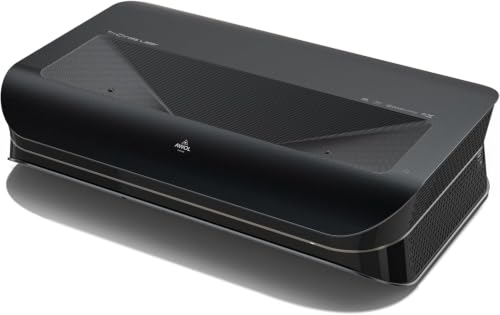 AWOL VISION LTV-3000 Pro 4K 3D Ultra ShortLTV-3000 Pro23.6 x 21.5 x 5.5 inches28 poundsCheck on Amazon


Top 3 picks at a glance
Quick comparison
| Projector | Best for | Throw distance for roughly 100 inches | Brightness class | Gaming input lag | Built-in audio |
|---|---|---|---|---|---|
| Hisense PX3-Pro | Gaming, movies, and flexible screen sizes | About 9–13 inches, depending on screen size | Very bright RGB laser | Typically around 16 ms at 4K/60; lower-latency modes can vary by signal | Strong integrated stereo system with Dolby Atmos support |
| BenQ V5000i | Console and PC gaming with accurate color | About 4–10 inches | Bright RGB laser | Typically in the low-to-mid teens at 4K/60 in game mode | Built-in 40 W-class stereo audio |
| Epson LS800 | Bright living rooms and very short placement | About 3–10 inches | Very bright laser-phosphor | Usually around 16 ms at 4K-enhanced/60, depending on mode | Integrated Yamaha-designed soundbar |
| Samsung LSP9T | Premium all-in-one home entertainment | About 4–9 inches | High-brightness triple laser | Usually around 50 ms in some standard modes; game mode is substantially better | Powerful built-in 4.2.2-channel audio |
| LG CineBeam HU915QB | Large-screen movies and smart-TV convenience | About 3–8 inches | High-brightness triple laser | Often around 50 ms in ordinary picture modes; check game-mode behavior carefully | Integrated 2.2-channel speaker system |
Input-lag figures above are approximate ranges commonly reported in published measurements and can change with resolution, refresh rate, firmware, HDMI settings, and picture mode. They are not a guarantee for every setup. For competitive gaming, prioritize a projector with a clearly documented low-latency mode rather than relying on its cinematic specifications.
Best overall: Hisense PX3-Pro
The Hisense PX3-Pro is the strongest all-round recommendation when one projector must handle games, streaming, sports, and movies. Its triple-laser light source produces a wide color gamut, while its ultra short throw design can create a large image without placing the projector in the middle of the room.
It is particularly attractive for gaming because it combines a useful low-latency mode with HDMI 2.1-oriented features on compatible inputs, including support for modern console and PC signals. Check the input menu carefully: enhanced HDMI bandwidth, HDR, variable refresh rate, and gaming modes may not all be available on every port or at every resolution.
The built-in speakers are good enough for everyday play and television, although a soundbar or AV receiver remains preferable for a dedicated gaming room. The PX3-Pro also supports a wide range of image sizes, making it easier to move from a 100-inch living-room setup to a smaller 80- or 90-inch image in a bedroom or office.
Best for gaming-focused rooms: BenQ V5000i
The BenQ V5000i is a compelling choice when low latency, color quality, and console compatibility matter more than having the biggest built-in streaming ecosystem. Its RGB laser system is designed for vivid color, and its gaming-oriented feature set makes it a natural match for PlayStation 5, Xbox Series consoles, and gaming PCs.
Its short throw ratio means the projector sits very close to the wall or screen. That saves floor space, but it also makes installation less forgiving: moving the chassis by a small amount can noticeably change the image position. Use the physical feet and careful placement before applying digital geometry correction, because heavy correction reduces usable pixels and can soften fine game text.
The V5000i’s integrated speakers are useful for casual play. For games with directional audio, connect headphones, a soundbar, or an AV receiver through the appropriate HDMI ARC/eARC or optical connection.
Best for the brightest living room: Epson EpiqVision Ultra LS800
The Epson LS800 is one of the best ultra short throw projectors for a room with daylight, open curtains, or pale walls. Its very short throw distance is among its biggest practical advantages: it can produce a large image while sitting only a few inches from the wall, leaving less opportunity for someone to walk through the light path.
Epson uses pixel-shifting rather than a native 4K imaging chip. That can still look highly detailed from normal seating distance, but very small PC text and fine UI elements may not appear as clean as they do on a native 4K projector. The LS800 is therefore excellent for console gaming and video, while PC users should test text clarity at their intended seating distance.
Its input lag is suitable for most single-player games, racing, action-adventure titles, and ordinary competitive play. Players focused on esports should compare current measurements at their preferred resolution and refresh rate before buying. The integrated Yamaha-designed soundbar is a meaningful advantage when there is no room for separate speakers.
Best premium all-in-one option: Samsung LSP9T
The Samsung LSP9T combines a triple-laser light source, a large 4K image, a full smart-TV platform, and unusually capable built-in audio. It is a good fit for a living room where the projector must replace both a television and a basic sound system.
Its main caution is gaming latency. Picture modes designed for movie processing can add noticeable delay. Switch to Game Mode, disable unnecessary motion interpolation and noise reduction, and verify the console’s output after changing modes. If you play rhythm games, fighting games, or competitive shooters, compare the LSP9T with a projector that publishes stronger low-latency results.
The LSP9T can work on a standard wall for casual viewing, but its performance improves substantially with a properly installed UST ambient-light-rejecting screen. A screen also reduces the visibility of wall texture and small alignment errors.
Best for movie-first rooms: LG CineBeam HU915QB
The LG HU915QB is aimed at buyers who want a premium triple-laser cinema projector with smart-TV features and strong built-in sound. It produces an impressive large image from a very short distance and is better suited to films, streaming, and sports than to latency-sensitive competitive gaming.
As with Samsung’s premium model, use Game Mode for play and avoid assuming that a projector’s 4K or HDR support means it will have gaming-friendly delay. The HU915QB is most appropriate when gaming is important but not the primary reason for the purchase.
Standard wall or ALR screen?
A standard white wall is acceptable when the room is dim, the wall is smooth and neutral-colored, and the image does not need to compete with daylight. It is also the cheapest way to begin. However, UST projectors reveal wall imperfections more readily than ordinary long-throw projectors because the light strikes the surface at a shallow angle. Ripples, orange-peel texture, and uneven paint can become bright bands or shadows.
A UST-specific ALR screen is the better choice for daytime viewing. Its optical surface sends more projector light toward the seating position while rejecting some light from above. Do not substitute a generic ceiling-light-rejecting screen: UST projectors require a screen designed for their unusually steep projection angle. A suitable screen improves perceived contrast, but it will not eliminate glare from windows directly opposite the screen.
| Your situation | Best direction | Why |
|---|---|---|
| Dark room, budget-conscious, occasional gaming | Project onto a smooth matte white wall or standard screen | Preserves wide viewing angles and avoids the cost of ALR material |
| Daylight, white walls, 100–120-inch image | Bright UST projector plus UST ALR screen | Improves perceived contrast and reduces washout |
| Competitive console or PC gaming | BenQ V5000i or Hisense PX3-Pro class | Prioritizes documented low-latency modes and modern gaming inputs |
| Projector must replace a TV and speakers | Samsung LSP9T or Epson LS800 class | Strong built-in audio and convenient smart-TV features |
| Small room with no space in front of seating | Ultra-shortest-throw model such as the LS800 | Can produce a large image from only a few inches of wall clearance |
How to calculate the required throw distance
UST projectors are specified by throw ratio. The basic calculation is:
Projector-to-screen distance = image width × throw ratio.
A 100-inch 16:9 image is approximately 87 inches wide. With a 0.25 throw ratio, the lens-to-screen distance is about 21.8 inches. With a 0.20 throw ratio, it is about 17.4 inches. Manufacturer diagrams may measure from the rear of the chassis, the lens, or a marked reference point, so leave extra room for the projector’s physical depth and ventilation.
Screen size also changes height. A 100-inch 16:9 image is about 49 inches tall, while a 120-inch image is about 59 inches tall. Measure the screen’s complete frame, not just the visible image, before choosing a cabinet, media console, or wall mount.
Setup settings that prevent common problems
- Align physically first: Place the projector square to the screen, level it, and adjust its feet before using keystone or four-corner correction. Optical alignment retains more detail.
- Use Game Mode: This reduces video processing and is usually the most important input-lag setting.
- Turn off motion enhancement for games: Frame interpolation can add delay and create artifacts around fast-moving characters.
- Set the console to 4K/60 initially: Confirm HDR, color range, and audio first. Then test 120 Hz or VRR if both the projector and HDMI source support those features.
- Use the correct HDMI cable: For 4K/120 or high-bandwidth PC signals, use a certified Ultra High Speed HDMI cable and connect directly to the projector before adding an AV receiver or switch.
- Fix washed-out HDR before changing brightness: Check that the source is outputting HDR only when the game supports it, and confirm that HDMI black level or RGB range matches between source and projector.
- Allow ventilation: Do not push the chassis tightly against a wall or cabinet. Heat can shorten laser and electronics life and may trigger fan noise or protection behavior.
Final buying recommendation
Choose the Hisense PX3-Pro for the best balance of gaming features, brightness, color, and flexible image size. Choose the BenQ V5000i when gaming performance and accurate color are the priority. Choose the Epson LS800 for the shortest placement and a bright family-room setup. Choose the Samsung LSP9T or LG HU915QB when premium built-in audio and movie presentation matter more than the lowest possible input lag.
Whatever model you select, budget for installation precision and consider a UST-specific ALR screen if the room has daylight. The screen and alignment often determine whether an ultra short throw projector looks merely large or genuinely impressive.









