This review analyzes published product information. We have not performed detailed research of this unit.
As an Amazon Associate, we earn from qualifying purchases.
A dense 4K display with a high-refresh brief
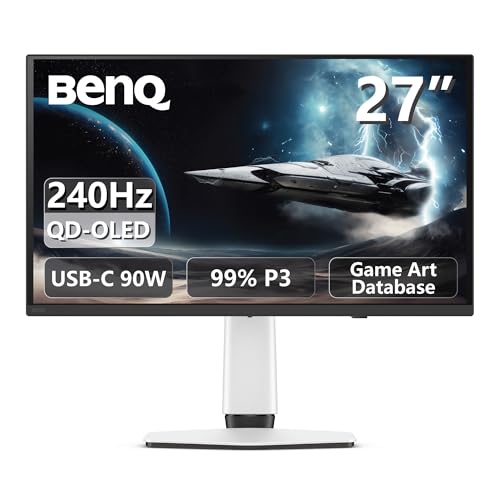
The BenQ MOBIUZ EX271UZ combines a nominal 27-inch screen, 4K resolution and a listed 240Hz refresh rate. That combination makes it worth considering if you want high-resolution gaming without moving to a larger display. Its QD-OLED panel and stated wide-gamut color coverage add an image-quality emphasis, while HDMI 2.1 and USB-C with advertised 90W power delivery suggest potential beyond a desktop-only gaming setup.
This review evaluates the supplied retailer specifications, not a tested sample. The listing identifies the screen as 27 inches in its title and size field, but specifies 26.5 inches in its feature text. It is therefore best understood as a 27-inch-class display. Several buying-critical details remain unspecified, particularly connection-specific refresh support and stand adjustment.
The supplied specifications at a glance
| Item | Listed specification |
|---|---|
| Model | BenQ MOBIUZ EX271UZ |
| Screen size | 27-inch class; 26.5 inches in feature text |
| Panel and resolution | 4K QD-OLED; described as fourth-generation QD-OLED |
| Refresh and response claims | 240Hz; 0.03ms response time |
| Color specifications | 99% DCI-P3, 10-bit color, Delta E below 2 |
| HDR designation | VESA DisplayHDR True Black 400 |
| Connectivity named | HDMI 2.1; USB-C with 90W power delivery |
| Adaptive sync | FreeSync Premium Pro |
| Additional features | Remote controller; Color Shuttle database with more than 120 profiles |
| Listed dimensions | 24 × 22 × 9.5 inches; orientation and stand configuration unspecified |
| Warranty claim | Three-year OLED burn-in warranty; detailed terms not supplied |
Panel quality: promising claims, incomplete context
The EX271UZ’s central attraction is its 4K QD-OLED panel. Editorially, putting 4K into this screen size favors buyers who value fine detail over sheer screen area. It also makes viewing distance and interface scaling worth considering: a compact high-resolution screen is not automatically the most comfortable choice for small text at default sizing.
BenQ’s listing describes a fourth-generation panel and advertises 99% DCI-P3 coverage, 10-bit color and Delta E below 2. Those are relevant specifications for colorful games and mixed entertainment use, but they do not establish how an individual unit performs. The evidence does not identify the measurement conditions, color mode or calibration procedure behind the accuracy claim. Wide gamut alone should not be mistaken for accurate rendering in every application.
The named DisplayHDR True Black 400 designation gives buyers a more specific reference than an unspecified HDR label. However, the supplied facts do not include brightness measurements across different image sizes, tone-mapping behavior or room-light testing. Consequently, there is no basis here to promise a particular HDR impact in a bright room.
The listing also promotes Spectral Color and Pixel Contrast processing, alongside more than 120 Color Shuttle game-art profiles. These provide a stated range of picture-tuning options. Whether their adjustments improve your preferred games is subjective; a large profile library is not proof that every preset preserves the original image more faithfully.
What 240Hz does—and does not—tell you
A listed 240Hz ceiling gives the EX271UZ a high-refresh specification alongside its 4K resolution. The practical buying question is whether your computer, chosen games and connection can take useful advantage of that combination. Do not assume that choosing a 240Hz monitor means every game will run at a matching rate, or that every available input supports its maximum mode.
The advertised 0.03ms figure needs even more restraint. The listing does not supply the test method or conditions, and pixel-response claims are not equivalent to measured input latency. This review therefore cannot establish motion clarity, end-to-end responsiveness or behavior across refresh rates.
FreeSync Premium Pro is named in the title. That is useful evidence of advertised adaptive-sync support, but the published listing information does not specify its operating range or document compatibility with every graphics platform. Buyers should verify their intended source device rather than treating the badge as a universal compatibility guarantee.
Connections and desk fit need a closer check
HDMI 2.1 and USB-C with 90W power delivery are attractive inclusions on paper. The USB-C power specification may be particularly useful for a compatible laptop, provided its charging requirements fit that output. It should not be interpreted as a guarantee that every gaming laptop can sustain its intended workload from monitor power alone.
The evidence does not establish port counts, DisplayPort provision, USB hub functions or USB-C video-mode limits. It also does not map 4K at 240Hz to individual inputs. Before planning a multi-device setup or a single-cable laptop arrangement, confirm those details. The listed remote controller is a welcome control option, although its exact functions are not described.
Desk planning is similarly conditional. The stated dimensions are 24 × 22 × 9.5 inches, but the listing does not explain axis order or whether these represent a particular stand position. They are not a reliable substitute for a stand-footprint diagram. Height adjustment, tilt, swivel, pivot and mounting compatibility are all unconfirmed in the supplied evidence. Those omissions matter if your keyboard position, shelf clearance or existing monitor arm constrains placement.
Frequently asked questions
Is the EX271UZ a 27-inch or 26.5-inch monitor?
It is best understood as a 27-inch-class display. The product title and size field identify it as 27 inches, while the feature text specifies 26.5 inches. This discrepancy is noted in the supplied retailer information, so buyers who need exact measurements should confirm the manufacturer’s current product details before planning their desk space.
Does the monitor include a burn-in warranty?
The listing claims a three-year OLED burn-in warranty. However, the published listing information does not include the exclusions, coverage conditions or claim procedures. The warranty is therefore relevant reassurance, but buyers should review the detailed terms before relying on it as complete protection against every possible burn-in-related issue.
Is 4K resolution comfortable for everyday desktop use on this screen?
It can be suitable, but comfort depends on viewing distance and interface scaling. The compact, high-resolution screen favors fine detail, while small text may not be comfortable at default sizing for every user. The article does not establish a universal comfort level, so desktop habits and preferred text size should factor into the decision.
Can the EX271UZ deliver its maximum refresh rate through every input?
That is not established by the published listing information. The listing names HDMI 2.1 and USB-C with 90W power delivery, but it does not map 4K at 240Hz to individual inputs or specify connection-specific refresh support. Buyers should confirm the intended input’s supported mode before planning a gaming or laptop setup.
What picture presets or profiles does the monitor provide?
The listing mentions Spectral Color and Pixel Contrast processing, along with a Color Shuttle database containing more than 120 game-art profiles. These indicate a broad range of picture-tuning options, but the article does not verify how each adjustment looks in practice. A large profile library also does not prove that every preset preserves the original image more faithfully.
Verdict: attractive specifications, with setup checks still necessary
The EX271UZ deserves consideration for a compact 4K gaming setup where QD-OLED image characteristics, high refresh capability and laptop power delivery all matter. Its strongest argument is that combined specification, not any demonstrated superiority in latency or picture quality. The advertised three-year burn-in warranty is relevant reassurance, but exclusions and claim procedures still need checking.
Prioritize confirmation of input-specific modes, ergonomics and warranty terms before committing. For broader selection context, see our 4K gaming monitor guide.
Sources: Supplied retailer listing for the BenQ MOBIUZ EX271UZ. Specifications and feature claims above come from that listing and have not been independently measured.
Check the exact product and current offer on Amazon