
Working or gaming while standing or walking on a treadmill desk puts unusual demands on a monitor. You move more, your viewing distance shifts, and mounting matters as much as the panel. The best monitor for this kind of active setup is chosen with ergonomics, stability, and readability in mind. Here is what to look for so the screen keeps up with you.
Our Top Picks
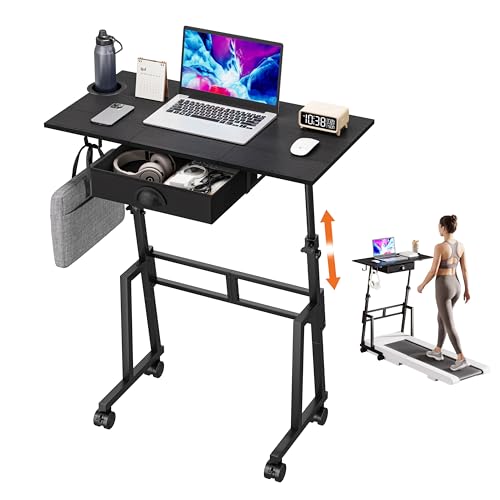 Adjustable Height Standing Desk with Drawer23.6 x 15.7 x 43.3 inches15.75 x 31.5 x 43.3 Inches18.4 poundsCheck on Amazon
 HUANUO 32x19 Inch Small Electric Standing Desk32" X 19"19 x 32 x 28 inches24.5 PoundsCheck on Amazon
 Enayplon Small Standing Desk with Wheels25" x 25" x 45"25 x 25 x 45 inches22.3 PoundsCheck on Amazon

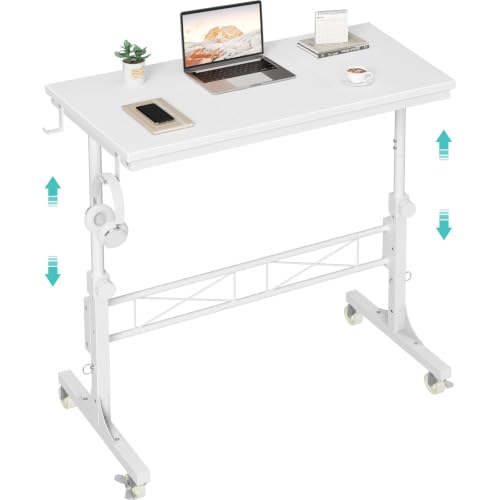
Top 3 picks at a glance
Ergonomics and Mounting Come First
On a standing or treadmill desk, your eye height and distance to the screen change more than they do sitting down, and gentle desk movement is common. That makes a solid, adjustable mount the top priority. A sturdy monitor arm, ideally clamped to a stable part of the desk, lets you fine-tune height and angle as you shift between standing and walking, and keeps the screen steady rather than wobbling with each step.
As an Amazon Associate we earn from qualifying purchases at no extra cost to you.




Priorities for an Active Setup
| Priority | Why it matters | Target |
|---|---|---|
| Adjustable mount | Eye level changes standing vs walking | Sturdy VESA arm |
| Panel brightness | Active spaces are often brighter | 300+ nits, matte finish |
| Text clarity | Reading while moving | 1440p or 4K |
| Comfortable size | Slightly greater viewing distance | 27-32 inch |
Panel Choices for Movement
Brightness and Finish
Treadmill and standing areas are often in brighter parts of a room, so aim for a panel that reaches at least 300 nits and has a matte or anti-glare finish to cut reflections. A dim, glossy screen becomes hard to read when you are moving and light is bouncing around.
Resolution and Size
Because you may stand slightly farther from the screen and your gaze bounces as you walk, sharp text reduces strain. A 27-inch 1440p or 32-inch 4K panel keeps fonts crisp at a modestly greater distance. Avoid going too large, since a huge screen forces more head movement while you are already in motion.
Stability and Comfort Features
Pick a monitor light in weight enough for your arm’s rating so it holds position without drooping. Flicker-free backlighting and a good low-blue-light mode matter more here because active sessions can be long. If you alternate sitting and standing frequently, a gas-spring arm that moves with a light touch makes repositioning effortless.
Dialing In Comfort for Movement
An active desk needs its screen positioned a little differently than a seated one, and a good arm makes those adjustments quick. When standing or walking, your eyes tend to sit higher and slightly farther from the panel than when seated, so set the arm to raise the monitor and tilt it a touch when you switch modes. Aiming the top of the screen at or just below eye level in your standing posture keeps your neck neutral, which matters even more when your body is already in gentle motion.
Readability while moving is the other thing to tune. The small bounce of a walking pace makes tiny text harder to track, so scale the interface up a step and favor a larger, cleaner font than you might use sitting still. Keep brightness high enough to stay legible in what is often a brighter, more open part of the room, and rely on the matte finish to keep glare from bouncing off the screen as light shifts around you. Enable flicker-free and low-blue-light modes for the long sessions an active desk encourages. With the mount adjusted for your standing posture and the image tuned for movement, the screen stays clear and comfortable whether you are standing at the keyboard or walking through a task.
Frequently Asked Questions
Does walking on a treadmill make the screen hard to read?
The gentle bounce of walking can make small text harder to track, which is why a sharp, high-resolution panel and a stable mount help so much. Keeping the screen at a comfortable distance and eye level, and using a slightly larger font, keeps reading easy even while you move at a walking pace.
Should I use a monitor arm or the included stand for a standing desk?
A monitor arm is strongly preferred for active setups. It lets you adjust height and angle quickly as you switch between standing and walking, keeps the screen stable, and frees desk space. A fixed stand cannot adapt to your changing posture the way an arm can, so the arm is the better ergonomic choice here.
Bottom Line
For a standing desk or treadmill setup, start with a sturdy adjustable arm, then choose a bright, matte, 27 to 32-inch 1440p or 4K panel with flicker-free comfort features. Prioritizing mounting and readability over flashy specs gives you a screen that stays clear and comfortable however much you move.









