
A video-editing monitor has to solve a very practical room problem: fitting a wide, useful timeline into a home office without swallowing the desk. A 38-inch-class ultrawide is often the sweet spot, giving editors more horizontal workspace for bins, scopes, and a full timeline while remaining easier to place than a 49-inch super-ultrawide.
Not every strong option is exactly 38 inches, however. This ranked list includes 34-inch, 37.5-inch, 38-inch, 40-inch, and 49-inch alternatives that make sense for different editing setups in 2026. We prioritized resolution, panel type, color specifications, USB-C convenience, adjustability, and price—not unsupported performance claims.
As an Amazon Associate we earn from qualifying purchases at no extra cost to you.






Our Top Picks
 LG 38WK95C-W UltraWide Monitor 38" 21:9 Curved WQHD+38"35.3 x 9.3 x 23.5 inches19.8 poundsCheck on Amazon
 M² Vision 40" 5K2K Ultrawide Monitor40" | 5120 x 21603.5 x 37.3 x 16.6 inches21 poundsCheck on Amazon


Top 3 picks at a glance
Quick Picks
| Product | Best for | Price |
|---|---|---|
| INNOCN 34" 5K 120Hz 5120 x 2160P | High-resolution editing on a smaller desk | Check on Amazon |
| Philips 34E1C5600HE | Video calls and USB-C laptop setups | Check on Amazon |
| LG 38WK95C-W | Best true 38-inch editing-focused pick | Check on Amazon |
| INNOCN 34C1R | Budget-conscious hybrid work and editing | Check on Amazon |
| INNOCN 40C1R | Extra-wide workspace with DCI-P3 coverage | Check on Amazon |
| M² Vision 40" 5K2K | Detailed 5K2K editing and MacBook use | $689 |
| LG 38BP85C-W | 38-inch-class LG USB-C workflow | Check on Amazon |
| INNOCN 49C1R | Replacing a dual-monitor editing setup | Check on Amazon |
How We Compared
For video editing, horizontal resolution matters because it determines how much of a timeline can remain visible without constant zooming or panel shuffling. We also looked for IPS or IPS Black panels, stated color-gamut information where available, HDR support, and USB-C connectivity for cleaner laptop-based workstations. Ergonomics count, too: height adjustment and tilt can make a wide monitor easier to position at a comfortable viewing angle.
Pricing is listed as provided and should be treated as a snapshot rather than a permanent sale price. A higher refresh rate can be pleasant for general desktop use, but resolution, panel technology, color coverage, and connectivity carry more weight for most editing rooms.
The 8 Best Picks
1. INNOCN 34" 5K 120Hz 5120 x 2160P Wide Monitor
This INNOCN is the top choice for an editor who wants unusually high pixel density without moving up to a physically larger 40-inch display. Its 5120 x 2160 resolution provides substantially more workspace than standard 3440 x 1440 ultrawides, making it appealing for detailed timelines, interface panels, and high-resolution footage. The 34-inch format also suits a compact home-office desk better than larger ultrawides.
- Pro: 5120 x 2160 resolution offers a very expansive, detailed workspace.
- Pro: 120Hz refresh rate supports smooth general desktop use.
- Con: It lacks the near-38-inch screen size targeted by buyers seeking a larger canvas.
Skip it if your priority is the physical width of a 38- or 40-inch screen rather than maximum resolution in a 34-inch class.
2. Philips 34E1C5600HE 34" UltraWide QHD Monitor
The Philips 34E1C5600HE is the practical value pick for an editor whose desk also doubles as a work-from-home station. Its 3440 x 1440, 21:9 format gives a familiar ultrawide timeline layout, while the built-in Windows Hello webcam, noise-canceling microphone, stereo speakers, and USB-C docking reduce desktop clutter. At around $310, it is an accessible entry point for creators editing social video, presentations, and lighter client work.
- Pro: Built-in webcam, microphone, and speakers simplify hybrid-work setups.
- Pro: USB-C docking and a 4-year advance replacement program add convenience.
- Con: Its 3440 x 1440 resolution is less spacious than 5K2K options.
Skip it if you need the finest possible timeline detail or a screen larger than 34 inches.
3. LG 38WK95C-W UltraWide 38" Curved WQHD+ Monitor
The LG 38WK95C-W is the clearest match for shoppers specifically searching for the best 38 inch ultrawide monitor for video editing. Its 38-inch curved IPS display uses a 3840 x 1600 resolution, a useful step up from 3440 x 1440 for editors who want extra vertical room for a timeline and controls. LG also lists sRGB 99% color gamut, HDR 10, USB Type-C, color calibration, and a height- and tilt-adjustable stand.
- Pro: The 3840 x 1600 format adds helpful vertical editing space.
- Pro: IPS panel, sRGB 99%, USB-C, and ergonomic adjustment are editing-friendly features.
- Con: At around $1,300, it is the most expensive monitor in this roundup.
Skip it if price is your main constraint or if 5K2K resolution matters more than a true 38-inch format.
4. INNOCN 34C1R 34" WQHD 180Hz IPS Monitor
The INNOCN 34C1R is for budget-minded editors who also use their computer for fast-paced gaming or everyday entertainment. It combines a 3440 x 1440 IPS panel with 180Hz refresh rate, Adaptive-Sync, G-SYNC compatibility, PIP/PBP, HDR, built-in speakers, and height adjustment. Those features make it flexible for a shared home setup, especially at around $260. For dedicated color-critical post-production, though, its listed specifications are less editing-specific than the LG 38WK95C-W or the 5K2K choices.
- Pro: IPS panel and height adjustment are strong basics at a low price.
- Pro: PIP/PBP can help compare sources or manage multiple devices.
- Con: 3440 x 1440 provides less editing area than 3840 x 1600 or 5120 x 2160.
Skip it if you are building a dedicated professional editing bay and need higher resolution first.
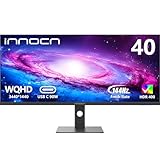
5. INNOCN 40C1R 40" WQHD 144Hz Monitor
The 40-inch INNOCN 40C1R is a compelling alternative for editors who want a larger physical canvas than a 38-inch screen can provide without jumping to a 49-inch super-ultrawide. It pairs a 3440 x 1440 IPS display with 95% DCI-P3, 500 nits, HDR400, USB Type-C, FreeSync Premium, and a tilt- and height-adjustable stand. Its around $480 price places it well below the two LG 38-inch-class models listed here.
- Pro: 40-inch size creates an expansive single-screen workspace.
- Pro: Listed 95% DCI-P3 coverage, HDR400, and USB-C suit modern creator desks.
- Con: Its 3440 x 1440 resolution is spread across a larger panel.
Skip it if you prefer higher pixel density or have a shallow desk that cannot comfortably accommodate a 40-inch ultrawide.
6. M² Vision 40" 5K2K Ultrawide Monitor
The M² Vision 40-inch 5K2K is the strongest value-oriented large-format resolution choice in this group. Its 5120 x 2160 resolution, 120Hz refresh rate, IPS Black panel, HDR600, USB-C with 65W power delivery, and height-adjustable stand address many needs of a laptop-based editing station. At $689, it costs meaningfully less than the LG 38WK95C-W while delivering a larger 40-inch panel and 5K2K workspace.
- Pro: 5120 x 2160 offers abundant room for timelines and editing panels.
- Pro: USB-C 65W power delivery supports a streamlined MacBook-compatible setup.
- Con: At 40 inches, it is larger than the traditional 38-inch sweet spot.
Skip it if your desk is sized specifically for a 38-inch monitor or if you want a lower-cost 3440 x 1440 display.
7. LG 37.5" 38BP85C-W QHD+ UltraWide Curved Monitor
The LG 38BP85C-W is another close-to-38-inch choice for editors who value LG’s 21:9 QHD+ format and USB Type-C connectivity. Its 37.5-inch curved screen, HDR10 support, and AMD FreeSync make it a sensible fit for a mixed-use creative desk where editing, office work, and smooth everyday use all matter. It is less expensive than the LG 38WK95C-W at around $1,000, though the provided specifications do not list color-gamut coverage or stand adjustments.
- Pro: The 37.5-inch QHD+ 21:9 format is closely aligned with 38-inch editing needs.
- Pro: USB Type-C and HDR10 support help modernize a laptop-centered desk.
- Con: It costs around $1,000 without the listed sRGB 99% claim of the 38WK95C-W.
Skip it if published color-gamut information is a must-have before you buy.
8. INNOCN 49C1R 49" Curved 5K2K Ultrawide Monitor
The INNOCN 49C1R is for editors replacing two displays with one sweeping 32:9 screen. Its 5120 x 1440 resolution, 120Hz refresh rate, 99% sRGB coverage, HDR400, USB Type-C, built-in speakers, and height and tilt adjustment create a feature-rich all-in-one workstation. The R1800 curve can help keep the far edges within a more natural viewing arc. At around $700, it is a substantial screen for the money.
- Pro: 32:9 width can replace a dual-monitor arrangement.
- Pro: 99% sRGB, USB Type-C, and ergonomic adjustment are useful creator features.
- Con: The 49-inch format demands considerably more desk width than a 38-inch monitor.
Skip it if you want a conventional single-monitor viewing distance or need more vertical pixels than 1440.
Buying Guide
Choose Resolution Before Refresh Rate
For editing, prioritize workspace. A 3840 x 1600 screen gives more vertical room than 3440 x 1440, while 5120 x 2160 provides the most detailed canvas in this list. Refresh rates from 100Hz to 180Hz can improve everyday motion, but they do not replace useful resolution.
Match the Screen to Your Desk
A 34-inch ultrawide is easier to accommodate in a compact office. A 37.5- or 38-inch model is the classic middle ground. A 40-inch display needs more space, while a 49-inch 32:9 monitor works best when you deliberately want a dual-screen-width layout.
Check Connectivity and Color Specifications
USB-C can reduce cable clutter and simplify laptop use; the M² Vision specifically lists 65W USB-C power delivery. For color-aware workflows, consider stated coverage such as sRGB 99%, 99% sRGB, or 95% DCI-P3, then use your preferred calibration process for your own workflow.
Our Verdict
The LG 38WK95C-W is the best direct answer for buyers who want a genuine 38-inch ultrawide for video editing: its 3840 x 1600 IPS panel, sRGB 99% claim, USB-C, and adjustable stand align well with the job. For better value and much higher resolution, the M² Vision 40-inch 5K2K is the standout alternative. Editors on a tight budget should start with the Philips 34E1C5600HE or INNOCN 34C1R.
FAQ
Is a 38-inch ultrawide good for video editing?
Yes. The 21:9 shape leaves room for a long timeline, preview window, bins, effects controls, and audio tools. A 3840 x 1600 38-inch-class display is especially useful because it adds vertical workspace beyond 3440 x 1440.
Is 3440 x 1440 enough for editing video?
It can be enough for social content, general projects, and casual editing. For more interface space and finer detail, 3840 x 1600 or 5120 x 2160 is the better fit when budget and desk space allow.
Should I buy a 38-inch or 40-inch ultrawide monitor?
Choose 38 inches for a more traditional ultrawide footprint and 40 inches for a bigger physical canvas. Resolution is equally important: a 40-inch 5120 x 2160 screen offers a different experience from a 40-inch 3440 x 1440 screen.
Do video editors need USB-C on a monitor?
USB-C is not mandatory, but it is convenient for laptop editors because it can consolidate connectivity. Check the monitor’s specific USB-C capabilities before buying; among these models, the M² Vision lists USB-C with 65W power delivery.









