
Buying a display for the PlayStation 5 Pro sounds like a simple errand until you actually start shopping. Then you hit the real question most buyers face: do you put your money into a dedicated gaming monitor, or do you buy a television that doubles as the centerpiece of your living room? The PS5 Pro outputs up to 4K at 120Hz over HDMI 2.1, so both categories can technically keep up — the difference comes down to screen size, room layout, and how the rest of your household uses the same screen. This guide breaks the choice down honestly, including what each option costs to live with over five years.
Our Top Picks


Top 3 picks at a glance


Quick Verdict
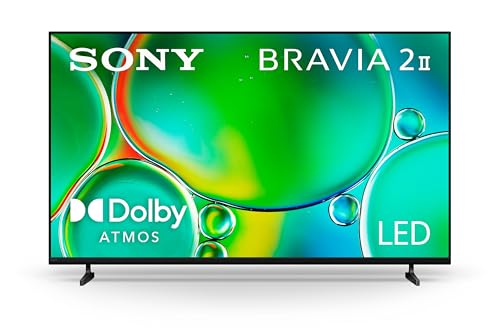
If your PS5 Pro lives in a shared living room and you play from a couch more than six feet away, buy a TV. A 55-inch 4K set like the TCL T7 (around $400) or the Sony BRAVIA 2 II (around $600) delivers the big-screen experience the console was designed for, and it serves everyone in the house. If your console sits at a desk and you play seated 20 to 30 inches from the screen, a gaming monitor wins on responsiveness, desk-friendly ergonomics, and price — something like the Samsung 32-inch Odyssey G5 at about $200 hits the sweet spot for most desk setups. Budget desk players can even start with a 22-inch 1080p monitor near $65, though it leaves some of the Pro’s 4K output on the table.
As an Amazon Associate we earn from qualifying purchases at no extra cost to you.


Side by Side
| Factor | Gaming Monitor | TV for PS5 Pro |
|---|---|---|
| Typical size | 22–32 inches; a 32-inch panel is roughly 28 inches wide | 43–75 inches; a 55-inch panel is roughly 49 inches wide |
| Viewing distance | 20–30 inches, desk seating | 5–9 feet, couch seating |
| Price range | $65–$250 for solid 1080p/QHD options | $400–$650 for 55-inch 4K with 120Hz/144Hz inputs |
| Console performance fit | QHD panels upscale 4K output well; 120Hz+ refresh common | Native 4K matches the Pro’s output; 120Hz modes on gaming-oriented sets |
| Comfort | Ergonomic stands (height, tilt, swivel) reduce neck strain at a desk | Fixed wall or stand placement; comfortable from couch but not adjustable |
| Durability | Fewer moving parts, but stands and thin bezels are fragile in transit | Larger glass panels are vulnerable to impact; wall mounting adds security |
| Maintenance | Dusting the panel and stand; minimal else | Same, plus cable management for larger runs and occasional firmware updates |
| Space needed | Desk at least 24 inches deep; 5–12 pounds for a 22–32 inch panel | TV stand at least 48 inches wide or a wall mount; a 55-inch set weighs 30–40 pounds without its stand |
| Look in a room | Discreet; blends into an office or bedroom desk | A focal point; anchors the living room |
| Best for | Solo players, desk setups, competitive play | Families, couch co-op, movie and streaming nights |
Where Gaming Monitor Wins
Responsiveness at a desk. Monitors in this class commonly run 120Hz to 144Hz over HDMI or DisplayPort, and smaller panels mean less distance for your eyes to travel. In fast competitive titles, sitting 24 inches from a 27- or 32-inch screen genuinely changes how much of the game you take in at once. High-refresh modes pair naturally with the PS5 Pro’s 120Hz output at 4K, and QHD panels like the Odyssey G5’s 2560×1440 resolution present a sharp image while accepting the console’s 4K signal cleanly.
Price to entry. You can be playing tonight for $65 with a 22-inch 1080p monitor like the Sceptre, which even includes built-in speakers and both HDMI and DisplayPort inputs. Step up to $200 and you get QHD resolution and a larger panel. Compare that to $400–$600 for a comparable 4K television and the monitor route is simply cheaper.
Desk ergonomics. Most gaming monitors offer height, tilt, and swivel adjustment, and they’re light enough — often under 12 pounds — to reposition or mount on an arm. A TV offers none of that flexibility once it’s on a stand or wall.
Space efficiency. A monitor and console fit on a 24-inch-deep desk in a studio apartment or dorm, no media wall required.
Where Tv for Ps5 Pro Wins
Screen size for the money. Nothing at the monitor price point competes with a 55-inch 4K panel. The PS5 Pro is built around 4K output, and a native 4K television like the TCL T7 shows the console’s games exactly as the developers framed them — with the detail intact, not downscaled.
Gaming-friendly TV specs have caught up. Sets like the TCL T7 include 144Hz gaming modes and low-latency game settings, while the Sony BRAVIA 2 II leans on Sony’s own ecosystem tuning, which pairs naturally with a PlayStation console. Features that used to be monitor-exclusive — high refresh rates, low input lag modes, HDMI 2.1 bandwidth — are now standard on mid-priced TVs.
One screen for everything. Streaming apps, sports, movies, and cable all live on the TV. Google TV built into both the TCL and Sony options means the display works as a smart hub the moment it’s plugged in, no extra streaming box needed.
Shared-household value. If three people use the same screen, the per-person cost of a $400–$600 TV drops fast compared to a monitor only one person can comfortably use.
Power efficiency per inch. A 55-inch LED TV typically draws 100–150 watts, while a monitor draws 25–50 watts — but per square inch of screen, the TV is often the more efficient way to deliver a big picture.
Cost Over 5 Years
Assume moderate daily use (4–6 hours) and electricity at roughly $0 per kWh.
Budget monitor route: a $65 1080p monitor drawing about 30 watts costs roughly $26 in electricity over five years, plus no subscription costs beyond your existing services. Five-year total: around $90.
Mid-range monitor route: a $200 QHD 32-inch monitor at 40–50 watts runs about $33–$41 in power over five years. Add an optional monitor arm ($30–$50) or external speakers ($40–$80) since many monitors in this class have weak or no audio. Five-year total: roughly $270–$330.
Budget TV route: a $400 55-inch 4K TV drawing 100–130 watts costs about $82–$107 in electricity over five years. Add a wall mount ($25–$60) if you hang it. Five-year total: roughly $510–$560.
Premium TV route: a $600 set costs about $82–$107 in power plus mount or stand accessories. Five-year total: roughly $710–$770.
Neither display type needs consumables or recurring fees — the main five-year variable is whether your needs outgrow the screen. Monitor buyers sometimes add a TV later for the living room; TV buyers rarely add a monitor unless someone in the house becomes a serious desk player. Budget for that possibility when you choose.
Which One for Your Home
Small apartment or studio
Space is your constraint, not screen size. A gaming monitor on a desk does double duty for a computer and console, weighs under 12 pounds, and leaves your single wall free. The Samsung 32-inch Odyssey G5 at about $200 gives you enough panel to enjoy the PS5 Pro without dedicating a media wall. If budget rules everything, the $65 Sceptre 22-inch gets you playing immediately — just know the Pro’s 4K output will be downscaled to 1080p.
Family with kids or pets
A TV wins, but mount it. A 55-inch panel on a wall stays out of reach of grabby hands and wagging tails, and a mount costs $25–$60. The TCL T7’s 4K QLED panel and gaming modes make it a strong family pick at $400, and Google TV handles everyone’s streaming profiles. Avoid putting an expensive monitor at kid height on a desk; small stands tip easily.
Rental or frequent mover
Both work, but weight and fragility matter. A monitor travels in a car seat and re-installs in minutes. A 55-inch TV weighs 30–40 pounds and its large panel is the single most damage-prone object in a move — if you relocate every year or two, lean monitor, or choose a TV you’re willing to transport carefully in its original box.
Long-term home
Invest in the TV. You’ll be in this living room for years, and a $600 Sony BRAVIA 2 II serves movie nights, parties, and gaming from one purchase. Position it at seated eye level (center of screen about 40–42 inches from the floor), leave 6–8 feet of couch distance for a 55-inch panel, and route cables through the wall or a raceway for a clean look. Add a modest monitor later if someone takes up desk gaming.
FAQ
Does the PS5 Pro need a 4K TV or monitor?
No. The console outputs to any HDMI display, downscaling to 1080p or QHD as needed. But you’ll see the most benefit from a native 4K screen, since the Pro’s enhancements target 4K resolution and 120Hz output.
Can a gaming monitor display the PS5 Pro’s full 4K at 120Hz?
Only monitors with a 4K panel and HDMI 2.1 input can, and those typically cost $500 or more. QHD monitors like the Odyssey G5 accept the console’s signal and present a sharp downscaled image with high refresh rates — a good compromise at $200.
Is input lag worse on a TV?
It used to be a real gap, but modern gaming-oriented TVs with low-latency modes are responsive enough that most players won’t notice a difference from the couch. Competitive players seated at a desk still tend to prefer monitors.
Should I wait for new models in 2026?
There’s always something newer coming, but the current generation of 120Hz/144Hz displays already matches what the PS5 Pro can output. Buy when your room and budget are ready rather than chasing a spec sheet.









