
Picking a monitor for photo editing around a Mac mini is a different exercise than shopping for a general-purpose display. The Mac mini has no built-in screen to fall back on, and its USB-C/Thunderbolt ports are your single pipeline for video, power delivery to accessories, and fast peripherals. For color work, you need a panel with accurate factory calibration, wide coverage of sRGB (and ideally P3), enough resolution to judge fine detail at 100% zoom, and a stand that actually adjusts — because your neck and your horizon lines both suffer when your display sits at the wrong height.
We focused this roundup on 4K USB-C displays in the 15.6- to 32-inch range that pair naturally with macOS, from budget workhorses under $300 to Thunderbolt-powered creative pro monitors. Every pick below connects over USB-C with power delivery or a clean single-cable setup, covers the color-critical basics, and has earned a place on a real editing desk. Here’s how the field shakes out.
As an Amazon Associate we earn from qualifying purchases at no extra cost to you.






Our Top Picks


Top 3 picks at a glance
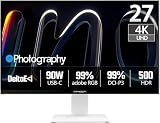
INNOCN 27" 4K USB-C Monitor for Laptop MacBook/Mac mini - 16:9 IPS...Check priceINNOCN 27" 4K 120Hz HDR500 USB-C 90W Monitor for MacBook/Mac mini -...Check priceCUNPU Z32UI06-TE 32 Inch 4K USB-C IPS Monitor for Laptop MacBook/Mac miniCheck priceQuick Picks
| Product | Best for | Price |
|---|---|---|
| INNOCN 27″ 4K USB-C Monitor (HDR400) | Best budget all-rounder | Check on Amazon |
| INNOCN CB27U1 27″ 4K 120Hz HDR500 | Best high-refresh value | Check on Amazon |
| CUNPU Z32UI06-TE 32″ 4K USB-C | Best big-screen on a budget | Check on Amazon |
| BenQ MA270U 27″ 4K | Best Mac-native experience | Check on Amazon |
| BenQ MA270UP 27″ 4K | Best Mac-native with upgraded panel | Check on Amazon |
| AG Neovo EM2751 27″ 4K USB-C | Best no-frills office/photo hybrid | Price n/a |
| Forzola 4K Portable Monitor 15.6″ | Best portable editing screen | Check on Amazon |
| BenQ PD2725U 27″ 4K Thunderbolt 3 | Best creative pro pick | Check on Amazon |
How We Compared
We filtered this list around the things that actually matter for photo editing on a Mac mini: native 4K resolution (3840 x 2160 or better) so you get the pixel density macOS expects; USB-C connectivity with video and, where listed, power delivery in a single cable; IPS panels with wide color reproduction, including claims of DeltaE under 2 or P3 gamut coverage; and ergonomics — height and tilt adjustment or VESA mounting — because color work means long sessions at the desk. We also weighted Mac-specific features like brightness and volume control from macOS, since those small conveniences add up. Prices reflect typical street pricing at the time of writing and fluctuate, so treat the figures as ranges rather than gospel.
The 8 Best Picks
1. INNOCN 27″ 4K USB-C Monitor (HDR400) — Best Budget All-Rounder
This is the entry point most Mac mini photo editors should start with. You get a 27-inch 16:9 IPS panel at 3840 x 2160, HDR400 support, and a factory-rated DeltaE below 2 — the spec that separates color-credible panels from generic office displays. With 1.07B+ colors, DisplayPort, and HDMI alongside USB-C, it slots into nearly any desk setup, and the built-in speakers and adjustable stand round out a complete package.
- Pros: DeltaE under 2 factory calibration makes it genuinely usable for color work; adjustable stand and built-in speakers at around $270.
- Pros: 1.07B+ color depth gives smoother gradients than stripped-down 8-bit panels.
- Con: HDR400 is entry-level HDR — fine for tone checking, not for judging HDR deliverables.
Skip it if you want 120Hz or Mac-specific software integration; step up to the CB27U1 or a BenQ instead.
2. INNOCN CB27U1 27″ 4K 120Hz HDR500 — Best High-Refresh Value
The CB27U1 is what happens when you add a 120Hz refresh rate and HDR500 to a photo-oriented 4K USB-C panel — and it’s a better combination than it sounds. Scrolling through large libraries in Lightroom feels noticeably smoother, playback of 4K timelines is fluid, and the 90W USB-C power delivery means it can charge a MacBook Pro over the same cable while serving as the display for your Mac mini.
- Pros: 120Hz at 4K makes macOS and photo library navigation feel premium; 90W USB-C power delivery.
- Pros: HDR500 with the same INNOCN color tuning lineage as the cheaper model.
- Con: At around $380 you’re paying a premium over the standard model for refresh rate you may not need for stills-only work.
Skip it if your editing is strictly stills and budget is the priority — the around $270 model covers the same color ground.
3. CUNPU Z32UI06-TE 32″ 4K USB-C IPS Monitor — Best Big Screen on a Budget
If you’d rather have screen real estate than a small desk footprint, the Z32UI06-TE delivers a 32-inch 4K IPS panel for around $280 — territory that used to cost twice as much. The extra eight inches over a 27-inch display means more room for side-by-side before/after views, fuller histogram panels, and a more comfortable 100% zoom on full-resolution files. USB-C keeps the single-cable Mac mini connection clean.
- Pros: 32 inches of 4K IPS for under $300 is exceptional real estate per dollar.
- Pros: USB-C simplifies the Mac mini setup to one cable.
- Con: Pixel density is lower than a 27-inch 4K panel, so fine text and fine detail are slightly softer up close.
Skip it if you sit close to your display and prioritize razor-sharp text — a 27-inch 4K will look denser.
4. BenQ MA270U 27″ 4K — Best Mac-Native Experience
The MA270U is the display BenQ built specifically for Mac users, and it shows in the details. Dual USB-C ports with 90W power delivery, Mac color match out of the box, and the ability to control brightness and volume directly from your Mac keyboard are conveniences no generic monitor matches. The P3 color gamut coverage is what matters most for photo work, since P3 is the color space iPhones and modern Macs live in. The height and tilt adjustable stand and built-in USB hub complete a polished package at around $550.
- Pros: P3 color gamut and Mac color match make it accurate for Apple-ecosystem work.
- Pros: Brightness and volume control from macOS — no fumbling with monitor buttons.
- Con: around $550 is a serious premium over the INNOCN picks for similar resolution.
Skip it if you’re on a tight budget or don’t care about Mac-specific integration.
5. BenQ MA270UP 27″ 4K — Best Mac-Native With Upgraded Panel
Slotting in at the same around $550, the MA270UP shares the MA270U’s Mac-first feature set — dual USB-C, 90W power delivery, Mac color match, macOS brightness and volume control, USB hub, P3 gamut, and the same height/tilt adjustable stand — while stepping up the panel itself. If you found the MA270U tempting but want the refined variant, this is the one to shortlist. Between the two, your choice comes down to current pricing and panel availability, since both target the same photo-editing workflow.
- Pros: Full Mac integration suite with P3 color for editing in Apple’s native color space.
- Pros: 90W power delivery keeps a MacBook charged while doubling as your Mac mini display.
- Con: Priced identically to the MA270U, so you’ll want to compare the two carefully before committing.
Skip it if the MA270U is cheaper at time of purchase — the feature sets overlap heavily.
6. AG Neovo EM2751 27″ 4K USB-C — Best No-Frills Office/Photo Hybrid
The EM2751 is the quiet workhorse of this list: a 27-inch 4K monitor with USB-C that doesn’t chase gaming specs or designer branding. That makes it a smart pick if your Mac mini doubles as a work-from-home machine and your photo editing is a serious hobby rather than a paid profession. You get the 4K IPS foundation and single-cable USB-C convenience at what’s typically a mid-tier price, leaving budget for a colorimeter to profile it yourself.
- Pros: Straightforward 4K USB-C package with no gimmicks inflating the price.
- Pros: Leaves room in the budget for a hardware calibrator.
- Con: Lacks the published color specs (DeltaE, P3 coverage) of the color-focused picks here.
Skip it if you need verified factory color accuracy out of the box — go BenQ or INNOCN.
7. Forzola 4K Portable Monitor 15.6″ — Best Portable Editing Screen
Not every editing session happens at the Mac mini desk. The Forzola is a 15.6-inch UHD panel with an unusual 3840 x 2400 (16:10) resolution, 450 nits of brightness, 139% sRGB coverage, and HDR support — wrapped in an aluminum body with a built-in stand, dual USB-C ports, mini HDMI, speakers, and VESA mounting. At 15.6 inches and just around $140, it’s the display you toss in a bag for tethered shoots, client previews, or editing in a hotel room.
- Pros: 450 nits and 139% sRGB are genuinely strong color specs for a portable at around $140.
- Pros: 16:10 aspect ratio gives extra vertical room for toolbars and histograms.
- Con: A 15.6-inch panel can’t replace a desktop display for judging final prints.
Skip it as your primary Mac mini monitor — treat it as a companion screen instead.
8. BenQ PD2725U 27″ 4K Thunderbolt 3 — Best Creative Pro Pick
At around $600, the PD2725U is the professional’s choice on this list. It pairs a 27-inch 4K IPS panel with Thunderbolt 3 — the fastest, cleanest connection a Mac mini offers — plus dual Thunderbolt/USB-C ports for daisy-chaining. BenQ’s creative pro lineup is built for exactly this workflow: color-accurate panels, robust on-screen controls, and Mac/Windows flexibility for hybrid studios. If photo editing pays your bills and you want a display with pro pedigree to match your M-series mini, this is the spend.
- Pros: Thunderbolt 3 daisy-chaining cleans up the most complex desk setups.
- Pros: Creative Pro tuning is aimed squarely at photographers and videographers.
- Con: At around $600 it costs more than double the budget picks for the same resolution.
Skip it if you’re a hobbyist — the BenQ MA series or INNOCN models deliver most of the value for far less.
Buying Guide
Color Accuracy Comes Before Everything Else
For photo editing, factory calibration matters more than refresh rate, HDR badges, or speaker quality. Look for published DeltaE values (under 2 is the credibility threshold — the INNOCN models here claim DeltaE below 2), wide gamut coverage of sRGB at minimum, and P3 support if your work stays in the Apple ecosystem. Whatever you buy, budget for a hardware calibrator eventually; even well-calibrated panels drift over time, and profiling every few months keeps your edits trustworthy.
Understand USB-C vs. Thunderbolt 3 on the Mac mini
The Mac mini’s USB-C/Thunderbolt ports handle everything, but not all monitors use them equally. A standard USB-C monitor carries video and data (and power delivery, useful if you dock a laptop at the same desk). A Thunderbolt 3 monitor like the PD2725U adds bandwidth for daisy-chaining drives or a second display — a real advantage if your workflow involves external SSDs and color-accurate screens side by side. For most photo editors, plain USB-C with power delivery is plenty; pay the Thunderbolt premium only if you need the chain.
Size, Resolution, and Desk Reality
A 27-inch 4K panel (around 163 pixels per inch) is the sweet spot for macOS: text is crisp, Retina scaling behaves, and the desk footprint is manageable. A 32-inch 4K like the CUNPU trades some pixel density for a big jump in workspace — ideal if you sit further back. Portable panels like the Forzola are supplements, not replacements. Measure your desk depth before buying; you want 30 inches or more of viewing distance for 27 inches and up, and confirm the stand offers height and tilt adjustment or a VESA mount fits your arm.
Our Verdict
For most Mac mini photo editors, the BenQ MA270U (around $550) is the pick: P3 color, Mac color match, and macOS brightness/volume control make it the most friction-free color-accurate display for the Apple ecosystem. If budget rules, the INNOCN 27″ 4K at around $270 delivers factory DeltaE under 2 and true 4K for less than half that — the best value in the field. Professionals with daisy-chain needs should stretch to the BenQ PD2725U, while anyone wanting a second travel screen should grab the Forzola at around $140 without hesitation. Heading into 2026, every display here connects to a Mac mini with a single cable — the only real question is how much color pedigree your work demands.
FAQ
Do I need a monitor with 90W power delivery for a Mac mini?
No. The Mac mini uses its own power supply, so power delivery only matters if you also connect a MacBook to the same display. A 90W USB-C monitor like the BenQ MA270U or INNOCN CB27U1 lets a laptop charge and display over one cable, which is a genuine convenience in a hybrid Mac household.
Is 4K enough resolution for photo editing on macOS?
Yes. At 27 inches, 4K (3840 x 2160) gives roughly 163 pixels per inch, which macOS scales beautifully and which is sharp enough to judge fine detail at 100% zoom on most files. Higher resolutions exist, but they demand more GPU horsepower and significantly more money for diminishing returns at this screen size.
Can I trust factory calibration, or do I need to buy a colorimeter?
Factory calibration on models advertising DeltaE under 2 — like the INNOCN and BenQ picks here — is a solid starting point for editing for web and social. If you print your work or deliver to paying clients, a hardware calibrator (typically $150–$300) is worth the investment, since panels drift and ambient lighting changes how colors appear.
Will a 120Hz monitor help photo editing?
Not for color — refresh rate has no effect on accuracy. What 120Hz does improve is how macOS feels: scrolling grids of thumbnails, panning around large images, and scrubbing timelines are all smoother. The INNOCN CB27U1 makes sense if you split time between photo editing and video work; stills-only editors can happily save money with a 60Hz panel.









