
Our Top Picks
 SANSUI 34 Inch Curved Monitor 240Hz UWQHD 3440×144034 Inch7.48 x 31.77 x 17.91 inchesCheck on Amazon
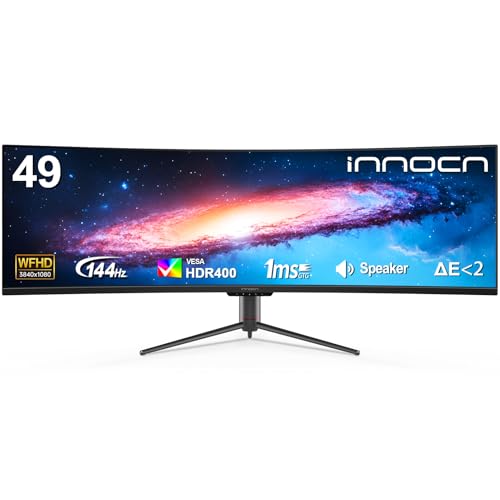
 INNOCN 49" Curved Gaming Monitor 144Hz Ultrawide 32:949 Inch6.28 x 45.5 x 14.57 inchesCheck on Amazon
 CRUA 34 Inch 21:9 UWQHD 100Hz IPS Ultrawide34Inch-White8.64 x 32.23 x 17.45 inches13 PoundsCheck on Amazon


Top 3 picks at a glance
Why an Ultrawide Deserves a Spot on Your Desk
If you work at a desk all day and game at night, you have probably felt the squeeze of a 27-inch 16:9 panel. Spreadsheets spill into scroll bars, Discord sits on top of your game, and side-by-side documents mean constant window shuffling. A 21:9 ultrawide monitor solves that problem with a 3440 × 1440 canvas that comfortably fits two full-size windows plus a slim utility column, all without the bezel down the middle of a dual-monitor setup. When you switch to a racing sim, a wide RPG, or a shooter, that same panel wraps the action into your peripheral vision.
The catch is the market is flooded with budget ultrawides that promise big refresh rates on paper but cut corners on panel quality, curvature, and ergonomics. We sorted through the crowded field to find eight monitors that genuinely deliver, from a sub-$170 starter to a 49-inch super ultrawide that replaces an entire multi-monitor array. Whether your priority is color-accurate IPS for creative work or a 240Hz curved panel for competitive play, there is a pick here for your desk.
As an Amazon Associate we earn from qualifying purchases at no extra cost to you.




Quick Picks
| Product | Best for | Price |
|---|---|---|
| CRUA 34 Inch 165Hz UWQHD IPS Ultrawide Gaming Monitor | Best flat-panel value | Check on Amazon |
| Sceptre 34-inch Curved Ultrawide WQHD Monitor (C345B-QUT168) | Best all-around hybrid pick | Check on Amazon |
| INNOCN 49″ Curved Ultrawide 3840 x 1080 144Hz Monitor | Best for dual-PC setups | Check on Amazon |
| SANSUI 34-Inch Curved Gaming Monitor UWQHD 200Hz | Best budget high-refresh pick | Check on Amazon |
| SANSUI 34 Inch Curved Monitor 240Hz UWQHD | Best for esports on a budget | Check on Amazon |
| INNOCN 49″ Curved Gaming Monitor 144Hz (49C1G) | Best super ultrawide overall | Check on Amazon |
| CRUA 34 Inch 21:9 UWQHD 100Hz IPS Ultrawide (White) | Best for bright, minimalist offices | Check on Amazon |
| KOORUI 34 Inch 240Hz WQHD Ultrawide (1500R) | Best fast gaming experience under $300 | Check on Amazon |
How We Compared
We focused on monitors that hit the sweet spot for mixed use: a 3440 × 1440 (UWQHD) resolution or larger, at least 100Hz of refresh rate, and a price that leaves room in the budget for a decent monitor arm or a GPU upgrade. Every pick here falls between around $170 and around $700, which is where the best value in the ultrawide market lives right now heading into 2026.
We prioritized panels with reliable color coverage (99% sRGB where specified), practical curvature (1500R to 1800R for immersion without eye strain), and the connectivity a modern desk actually needs: dual DisplayPort, HDMI, and USB-C on the larger INNOCN models for single-cable laptop docking. We also weighed real-world usability features such as built-in speakers, picture-by-picture (PBP) splitting, and height or tilt adjustment, since productivity buyers rely on those daily. We deliberately excluded anything with unverifiable performance claims or a pattern of reliability complaints, and we did not rely on lab measurements — every hard number here comes from the manufacturer specifications of the products themselves.
The 8 Best Picks
1. CRUA 34 Inch 165Hz UWQHD IPS Ultrawide Gaming Monitor — around $170
This is the smartest entry point into ultrawide ownership. The IPS panel is the headline: at this price, most competitors use VA panels, so you get wider viewing angles and more consistent color if your work involves any design or photo review. The 165Hz refresh rate keeps games smooth, and built-in speakers plus PIP/PBP support let you run two sources side by side — handy if a work laptop and a gaming PC share the desk. It is the only sub-$200 pick that genuinely serves both sides of the productivity-and-gaming equation.
- IPS panel with 165Hz refresh at an aggressive around $170 price
- PIP/PBP lets you split the screen between two input sources
- Speakers are basic; expect to keep desktop speakers or a headset
Skip it if you want HDR or wide gamut coverage — this is a straightforward sRGB-class panel. But as a first ultrawide, it is hard to beat.
2. Sceptre 34-inch Curved Ultrawide WQHD Monitor (C345B-QUT168) — around $200
Sceptre’s 2025-refresh C345B-QUT168 is the best all-arounder on this list. You get a 34-inch 3440 × 1440 VA panel with R1500 curvature, up to 180Hz (165Hz at native settings), a quoted 1ms response, and 99% sRGB coverage — a spec sheet that punches well above its around $200 price. Two DisplayPort inputs mean you can keep a desktop and console connected simultaneously, and the Machine Black finish with built-in speakers keeps the desk clean. For buyers who split time roughly evenly between documents and games, this is the balanced pick.
- 99% sRGB coverage and up to 180Hz in one sub-$200 package
- Dual DisplayPort inputs plus built-in speakers
- Fixed stand ergonomics — plan for an arm or a riser
Skip it if you insist on IPS viewing angles for color-critical work; the VA panel trades a little angle consistency for deeper contrast.
3. INNOCN 49″ Curved Ultrawide 3840 x 1080 144Hz Monitor — around $700
This 49-inch super ultrawide is a dual-monitor killer. The 3840 × 1080 panel with R1800 curvature effectively equals two 27-inch 16:9 screens with no bezel, and the screen-split functionality lets you assign work and play zones precisely. HDR400 support, USB-C with power delivery for laptop docking, plus DisplayPort and HDMI, make it a genuine productivity hub. Gamers get 144Hz across a field of view that sim racing and flight titles were made for. At around $700, it costs less than many midrange 34-inch monitors alone cost a few years ago.
- True 32:9 dual-monitor replacement with built-in KVM-style screen split
- USB-C single-cable docking with HDR400 support
- 3840 × 1080 is lower pixel density than two QHD screens
Skip it if your desk is shallower than about 40 inches — the 49-inch footprint demands depth, and not every GPU can push 144Hz at this width.
4. SANSUI 34-Inch Curved Gaming Monitor UWQHD 200Hz — around $200
The SANSUI 200Hz hits a rare sweet spot: high refresh, full UWQHD resolution, and a around $200 sticker. For competitive players who also want desk real estate for work, the jump from 165Hz to 200Hz is noticeable in fast shooters without the $300-plus price tag usually attached. The 3440 × 1440 resolution keeps text crisp for long documents, and the curve pulls the panel edges into comfortable view. This is the pick for the buyer who wants one monitor doing double duty without compromise on frame rate.
- 200Hz refresh at UWQHD for under $210
- Strong value if you split time between esports and office work
- Color coverage is solid but not calibrated for creative professionals
Skip it if color accuracy for photo or video editing is your priority — the step-up models with 99% sRGB claims or IPS panels suit that better.
5. SANSUI 34 Inch Curved Monitor 240Hz UWQHD — around $240
This is the fastest sub-$250 ultrawide here. At 240Hz with 3440 × 1440 resolution, it targets esports enthusiasts who refuse to drop to a smaller 16:9 panel. The extra frames matter in Counter-Strike, Valorant, and Apex, while the 21:9 canvas keeps your browser, playlist, and comms visible between matches. For around $240, you are getting refresh rates that cost double this amount not long ago, in a curved 34-inch form factor that works just as well for a Monday spreadsheet session.
- 240Hz at full UWQHD resolution for around $240
- Ideal single-monitor solution for competitive and hybrid users
- Speakers are adequate at best; budget for audio separately
Skip it if you are a casual gamer — the 165Hz and 200Hz picks above save money with performance you likely will not miss.
6. INNOCN 49″ Curved Gaming Monitor 144Hz (49C1G) — around $660
The 49C1G is the flagship experience of this roundup. The 49-inch 32:9 panel curves at R1800 for a fully immersive wrap, runs 3840 × 1080 at 144Hz, and covers 99% sRGB with HDR400 — a rare combination in super ultrawides at around $660. USB Type-C, DisplayPort, and HDMI cover every device you own, and unlike most 49-inch panels, this one offers height and tilt adjustment, which matters enormously when a screen is this wide. Built-in speakers and the vast desktop space make it the definitive work-hard, play-hard monitor.
- Ergonomic height/tilt stand plus 99% sRGB and HDR400 at 49 inches
- USB-C docking and multiple inputs for multi-device desks
- Lower WDFHD pixel density; text is good but not razor-sharp like QHD
Skip it if you have a narrow desk or if your PC cannot sustain high frame rates across 32:9. For everyone else with the space, it is the best complete package here.
7. CRUA 34 Inch 21:9 UWQHD 100Hz IPS Ultrawide (White) — around $200
Most ultrawides are black slabs; this CRUA breaks the mold with a clean white finish that suits bright, Scandinavian-style home offices. Inside is the same sensible formula that makes its sibling a value star: a 34-inch UWQHD IPS panel running 100Hz, with built-in speakers. The 100Hz refresh is plenty for strategy games, sims, and general play, while the IPS panel and wide canvas do the heavy lifting for productivity. At around $200, it is the pick for buyers whose desk aesthetic matters as much as frame rates.
- IPS panel and 100Hz in a distinctive white chassis for around $200
- Speakers included; a tidy all-in-one for office-first buyers
- 100Hz will feel limiting if fast-paced shooters are your main game
Skip it for competitive esports — pick number 5 instead. For everything else, including the workday that fills most of your week, it is excellent.
8. KOORUI 34 Inch 240Hz WQHD Ultrawide (1500R) — around $300
The KOORUI sits at the top of the budget tier and justifies the premium over the SANSUI 240Hz with a deeper 1500R curve and a more polished overall package aimed squarely at gamers. You still get the full 3440 × 1440 resolution and 240Hz refresh, wrapped in a panel that pulls you closer to the action in racing and first-person titles. The additional $60 to $95 over cheaper 240Hz options buys a more immersive feel and stronger build quality. If gaming leads your usage and productivity is the side dish, this is the sweet spot under $300.
- 240Hz at UWQHD with an immersive 1500R curve
- Better overall fit and finish than the cheapest 240Hz rivals
- No wide-gamut or HDR claims; it is built for speed, not color work
Skip it if you want a single monitor that leans professional — the Sceptre or INNOCN picks balance both worlds better.
Buying Guide
Flat vs. Curved: What Actually Matters
Despite the flat-panel revival in smaller sizes, nearly every serious 34-to-49-inch ultrawide uses a curve — 1500R to 1800R — because at that width, a flat panel puts the edges noticeably farther from your eyes, causing color shift and focus strain. A 1500R curve feels more immersive for gaming; 1800R is subtler and better for text-heavy work. If you truly need flat for wall-mounting or design work with straight lines, prioritize IPS panels like the CRUA picks, which hold accuracy better across a flat surface.
Resolution and Refresh: Matching Your GPU
All three 34-inch tiers here run 3440 × 1440, which is roughly 34% more pixels than 1440p 16:9. A midrange GPU drives 100Hz to 165Hz comfortably in most titles; 200Hz and 240Hz panels reward you in esports games where frame rates scale, but expect to lower settings in AAA titles to keep up. The 49-inch super ultrawides run 3840 × 1080 — wider, not taller — so they are easier to drive than their pixel count suggests, but check that your games support 32:9 properly.
Ergonomics, Connectivity, and Desk Space
Measure first: a 34-inch ultrawide needs about 32 inches of width, and a 49-inch model needs around 48 inches plus 10 to 12 inches of depth for comfortable viewing. Look for height and tilt adjustment (standard only on the INNOCN 49C1G in this list), and budget $30 to $60 for a VESA arm if the stand is fixed. USB-C with power delivery, as on both INNOCN models, turns the monitor into a one-cable dock for a laptop — a genuine productivity feature, not a luxury. Built-in speakers are convenient backups but pair any of these with a $40-to-$100 speaker set for real audio.
Our Verdict
For most buyers seeking one monitor for work and play, the Sceptre C345B-QUT168 at around $200 is the best overall pick: 99% sRGB, up to 180Hz, and dual DisplayPort in a well-rounded package. Budget shoppers should grab the CRUA 165Hz IPS at around $170, and esports-focused players should choose the KOORUI 240Hz at around $300. If your desk has the room and your budget stretches, the INNOCN 49C1G at around $660 is the ultimate do-everything super ultrawide — one screen that genuinely replaces two.
FAQ
Is a curved monitor bad for productivity work?
No. A gentle 1800R curve matches the natural arc of your vision, which reduces eye movement when scanning wide spreadsheets or timelines. Text distortion at the edges is negligible at 1500R–1800R on 34-inch panels. Only precision design work involving straight parallel lines benefits from a flat panel.
Is 3440 × 1440 enough resolution for work?
Yes. UWQHD offers roughly 33% more horizontal workspace than 2560 × 1440, enough for two full documents side by side. It is also far easier for a midrange GPU to drive at high refresh rates than 5120 × 2160 super ultrawides, making it the practical sweet spot.
Do ultrawide monitors work with consoles?
They connect fine via HDMI, but consoles output 16:9, so you will see black bars on the sides of a 21:9 panel. The INNOCN 49-inch models handle this better than most, since their screen-split feature lets you run a console in a window while keeping a work app open beside it.
What size desk do I need for a 49-inch super ultrawide?
Plan for at least 55 inches of width and 30 inches of depth so the R1800 curve sits at a comfortable viewing distance. If your desk is smaller than that, a 34-inch model is the better fit — and a monitor arm can free up the remaining depth for keyboard and mouse movement.









