
If you edit photos on a Mac in a bright home office, spare bedroom studio, or shared living room, you already know the pain points: reflections washing out shadows, scaling that makes Lightroom panels look soft, and a single USB-C cable that should handle video, charge, and peripherals but often does not. A true 5K panel at 218 pixels per inch matches macOS scaling pixel-for-pixel, so type stays crisp and 4K images preview at full size with room for tools.
Finding that combination without paying for features you will never use is the challenge. We prioritized Mac-ready connectivity, color coverage that photo editors actually need, and desk-friendly ergonomics to rank eight current options. In 2026 the best balance of resolution, color accuracy, and one-cable simplicity still comes from a native 5K Thunderbolt display, but several 4K and portable alternatives earn a place if your budget or space is tight.
As an Amazon Associate we earn from qualifying purchases at no extra cost to you.








Our Top Picks
 ViewSonic VP2788-5K 27 Inch 5K Mac Ready Monitor27-Inch 5K8.26 x 24.13 x 21.44 Inches14 poundsCheck on Amazon


Top 3 picks at a glance
Quick Picks
| Product | Best for | Price |
|---|---|---|
| BenQ PD2730S 27″ 5K 218 PPI Mac Monitor | Best Overall 5K for Mac Photo Editing | $1099.99 |
| INNOCN 27″ 4K USB-C Monitor | Best Budget 27-Inch 4K for MacBook | Check on Amazon |
| ViewSonic VP2788-5K 27 Inch 5K Mac Ready Monitor | Best Runner-Up 5K for Designers | Check on Amazon |
| KTC 32 Inch 4K UHD Monitor H32U6 | Best Large 32-Inch Value | Check on Amazon |
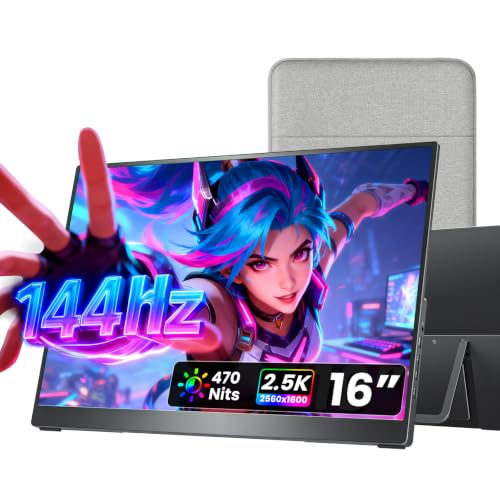
| VisionOwl Portable Monitor 16 Inch 2.5K QHD 144Hz | Best Portable Second Screen for Travel | Check on Amazon |
| cocopar Portable Monitor 16 Inch 2.5K QHD 144Hz | Best Budget Portable with High Refresh | Check on Amazon |
| INNOCN 15.6″ Portable Monitor OLED Touch PU15 Pre C6 | Best OLED Portable for Color-Critical Work | Check on Amazon |
| ASUS ProArt PA27UCDMR 27 Inch 4K 240Hz OLED | Best 4K OLED for Pro Color and Motion | $1289.98 |
How We Compared
We started with Mac compatibility first. A top pick for photo editing needs native 5K resolution to avoid fractional scaling on macOS, wide P3 coverage for accurate soft-proofing, and Thunderbolt or USB-C with power delivery so a MacBook Pro or MacBook Air runs on a single cable. We weighted factory color claims only when stated, such as 98% P3 or DeltaE less than 2, and treated uniformity, contrast, and matte coatings as practical differentiators for evaluating skin tones and shadow detail under office lighting.
Ergonomics and workflow features came next. Height adjustability, KVM switching, daisy chaining, and built-in speakers matter when the monitor serves as a home office hub. For 4K and portable models we looked at price-to-performance, sRGB or DCI-P3 coverage, and portability trade-offs. We did not invent lab measurements; we relied on manufacturer specs you can verify at checkout and flagged where a lower resolution or refresh rate means a compromise for stills-focused editors.
The 8 Best Picks
1. BenQ PD2730S 27″ 5K 218 PPI Mac Monitor
For photographers who want a true Retina-class desktop without workarounds, this is the anchor pick. The 27-inch 5K panel hits 218 PPI, so macOS renders at 2560 x 1440 HiDPI with no blur, while 98% P3 coverage, factory uniformity control, and 2000:1 contrast help you judge color and density accurately. Nano Matte panel control cuts glare in bright rooms without the sparkle of aggressive coatings. With 90W Thunderbolt 4, daisy chain, KVM, and height adjustment, it replaces a dock for MacBook users and suits 3D artists, VFX animators, and game designers who also retouch textures.
- Pro: Native 5K at 218 PPI for pixel-perfect macOS scaling and sharp type.
- Pro: 90W Thunderbolt 4 with daisy chain and KVM simplifies a Mac-based desk.
- Con: $1099.99 price is higher than capable 4K alternatives.
When to skip: Choose a lower-cost 4K option if you mostly export for web and do not need 1:1 Retina scaling.
2. INNOCN 27″ 4K USB-C Monitor for Laptop MacBook/Mac mini
This 27-inch 4K IPS display is the sensible budget alternative when 5K is out of reach. It delivers 3840 x 2160 resolution in a 16:9 format with HDR400 support, DeltaE less than 2, and 1.07 billion colors for reliable everyday editing and client proofing. USB-C, DisplayPort, and HDMI cover Mac mini, MacBook, and a second PC, and the adjustable stand plus built-in speakers keep a small desk tidy without extra accessories.
- Pro: DeltaE less than 2 and HDR400 at around $270 is strong value for color-aware work.
- Pro: USB-C single-cable connection with DisplayPort and HDMI flexibility.
- Con: 4K requires scaling on macOS, so text is not as razor-sharp as native 5K.
When to skip: If you need exact P3 coverage reporting or Thunderbolt daisy chaining, step up to a 5K Thunderbolt model.
3. ViewSonic VP2788-5K 27 Inch 5K Mac Ready Monitor
The VP2788-5K gives you native 5K on a 27-inch IPS panel without pushing over $1000. Positioned as a Mac-ready designer display, it targets photographers who prioritize resolution and macOS compatibility over dock features. At around $910 it undercuts the BenQ while keeping the Retina advantage, making it a compelling choice for detail work such as frequency separation, fine grain evaluation, and reading small Lightroom sliders without eye strain.
- Pro: Native 5K resolution preserves macOS HiDPI clarity for photo tools and fonts.
- Pro: around $910 pricing makes 5K accessible for home studios.
- Con: Lacks the 90W Thunderbolt 4, KVM, and daisy chain feature set of the top pick.
When to skip: If you need one-cable 90W charging and peripheral switching, the Thunderbolt-equipped option is worth the premium.
4. KTC 32 Inch 4K UHD Monitor H32U6
On a large desk or in a living room studio where viewing distance is greater, this 32-inch 4K UHD panel offers generous canvas for timelines, grids, and before/after splits. The 3840 x 2160 resolution at 60Hz pairs with 3000:1 contrast, HDR support, and 125% sRGB coverage for punchy, contrasty previews. Tilt, height, and swivel adjustments plus VESA wall mount support and HDMI and DisplayPort inputs make it easy to position for long culling sessions, with low blue light modes for evening edits.
- Pro: 32-inch size and 3000:1 contrast aid shadow evaluation at around $250.
- Pro: Fully adjustable stand with VESA support fits varied home office furniture.
- Con: 125% sRGB does not equal full P3 reporting, so soft-proofing needs a calibrator.
When to skip: For color-critical print work that demands documented P3 coverage, choose a monitor that lists P3 or DCI-P3 percentages.
5. VisionOwl Portable Monitor 16 Inch 2.5K QHD 144Hz
When your editing moves between kitchen table, coffee shop, and client site, a 16-inch 2.5K portable panel is the most practical second screen. The 16:10 QHD display provides more vertical space for Lightroom panels than standard 16:9, while 144Hz keeps scrolling smooth. USB-C and HDMI inputs cover MacBook, PC, and even PS5 or Xbox when work is done, and the built-in kickstand, VESA mountability, and integrated speakers keep your bag light and your setup quick.
- Pro: 2.5K resolution in 16:10 gives extra panel space for editing UI at around $180.
- Pro: USB-C and HDMI with HDR support and built-in speakers for travel.
- Con: Not color-graded for critical print work; treat as a culling and layout screen.
When to skip: If you need hardware-level color presets for print matching, use a desktop P3 or DCI-P3 monitor as your primary.
6. cocopar Portable Monitor 16 Inch 2.5K QHD 144Hz USB-C
Nearly identical on paper to the VisionOwl, this 16-inch 2.5K QHD portable targets editors who want flexible refresh support on the road. It runs 144Hz over USB-C and 120Hz over HDMI, with 110% sRGB coverage for more saturated previews than standard sRGB portables. The built-in speaker, kickstand, and VESA mount options make it a solid companion to a MacBook for tethered shoots or hotel room selects, all for around $180.
- Pro: 110% sRGB and high refresh over both USB-C and HDMI for smooth playback.
- Pro: Lightweight travel design with kickstand and VESA mounting.
- Con: 16-inch size limits fine retouching comfort versus a 27-inch desktop.
When to skip: If you edit for hours at home, a 27-inch 5K or 4K desktop will reduce neck strain and improve precision.
7. INNOCN 15.6″ Portable Monitor OLED Touch PU15 Pre C6
This 15.6-inch OLED touch monitor is the portable choice for photographers who still need serious color. The 4K OLED panel lists 100% DCI-P3, 100000:1 contrast, and 10-bit color, which helps you evaluate hue, saturation, and shadow separation away from the studio. Touch input speeds brush work and client presentations, and USB-C connectivity lets a MacBook or even a phone drive the display. The brown finish stands out from typical black portables while remaining professional on set.
- Pro: 4K OLED with 100% DCI-P3 and 100000:1 contrast for critical color on the go.
- Pro: Touch support with USB-C for laptops, phones, and consoles.
- Con: around $280 and smaller 15.6-inch canvas trade desktop comfort for portability.
When to skip: If you do not need touch or OLED contrast and prioritize screen size, a 27-inch desktop offers more editing room per dollar.
8. ASUS ProArt PA27UCDMR 27 Inch 4K 240Hz OLED Professional Monitor for Mac
Built for pros who split time between stills and motion, this 27-inch ProArt pairs 4K resolution with an OLED panel and an unusually fast 240Hz refresh rate. That combination smooths timeline scrubbing and high-frame-rate review while maintaining the deep blacks OLED is known for. As a Mac-focused professional monitor it complements a 5K workflow as a grading or proofing reference, though at $1289.98 it costs more than native 5K options. Consider it when video deliverables share priority with photo editing.
- Pro: 4K OLED with 240Hz ideal for hybrid photo and video workflows.
- Pro: Professional ProArt tuning aimed at Mac users.
- Con: 4K, not 5K, so macOS scaling is less crisp than 218 PPI Retina.
When to skip: For stills-only editing where Retina text clarity matters most, a native 5K IPS at lower cost is the better buy.
Buying Guide
Resolution and Scaling on Mac
Photo editors should decide between native 5K and scaled 4K early. A 27-inch 5K panel at 218 PPI maps perfectly to macOS HiDPI, so interface elements and 1:1 previews look sharp without fractional scaling artifacts. A 27-inch or 32-inch 4K panel still looks good but relies on scaling, which can soften type slightly. If you print often or pixel-peep at 100%, 5K is worth it; if you deliver primarily for web and social, a well-tuned 4K display saves hundreds.
Color, Contrast, and Coating
Look for explicit wide-gamut claims. The BenQ lists 98% P3, the INNOCN OLED portable lists 100% DCI-P3, and several IPS models list sRGB percentages and DeltaE. Uniformity compensation and high contrast ratios, such as 2000:1 or 3000:1, help you judge vignettes and shadow detail. For bright rooms, a matte treatment like Nano Matte reduces reflections without dulling color. Whatever you buy, plan to calibrate with a hardware colorimeter if you make prints for sale.
Connectivity, Power, and Ergonomics
One-cable workflow is a real quality-of-life gain. Thunderbolt 4 with 90W power delivery lets a 14-inch or 16-inch MacBook charge while driving video and a hub, and features like daisy chain and KVM let you share the screen between a Mac and a second machine. Height, tilt, swivel, and VESA support matter during long sessions. For travel, 16-inch QHD portables with USB-C and HDMI, kickstands, and built-in speakers keep your kit minimal while giving you extra screen for selects and tethered capture.
Our Verdict
Most Mac photographers will be happiest with the BenQ PD2730S at $1099.99 because it checks the three boxes that matter daily: native 27-inch 5K at 218 PPI, documented 98% P3 with uniformity and high contrast, and 90W Thunderbolt 4 that turns a MacBook into a desktop with one cable. If budget is the priority, the INNOCN 27-inch 4K at around $270 and the KTC 32-inch 4K at around $250 are strong value stops, while the ViewSonic VP2788-5K at around $910 keeps you in native 5K for less. Travel-heavy editors should add the INNOCN 15.6-inch 4K OLED Touch for color-critical portability, or grab the VisionOwl or cocopar 16-inch 2.5K portables at around $180 for affordable extra space.
FAQ
Do I need a 5K monitor for Mac photo editing?
You do not strictly need 5K, but it is the cleanest match for macOS on a 27-inch screen. At 218 PPI the system can render its Retina mode without fractional scaling, so text and Lightroom controls stay sharp while you view 4K files pixel-for-pixel. A 4K panel can still be excellent if it offers good sRGB or P3 coverage and you calibrate it, but expect slightly softer UI rendering.
Is Thunderbolt 4 with 90W power delivery important?
For MacBook users it is very convenient. A single Thunderbolt 4 cable carries 5K video, data for a KVM or hub, and up to 90W charging, which covers most 14-inch and many 16-inch workflows. If you use a Mac mini, Mac Studio, or keep your laptop docked with a separate charger, you can save money with DisplayPort and HDMI models.
What color specs should photo editors prioritize?
Prioritize 98% to 100% P3 or DCI-P3 coverage, low DeltaE, 10-bit color, and uniformity compensation. Contrast ratios of 2000:1 or higher and high OLED contrast like 100000:1 help you judge blacks. Even with strong factory specs, use a hardware calibrator and create separate presets for sRGB web export and P3 or Adobe RGB print proofing.
Are portable monitors good for serious editing?
Portable panels are best as second screens for culling, tethered capture, or client review. The 15.6-inch INNOCN 4K OLED Touch stands out for portable color with 100% DCI-P3, while 16-inch 2.5K models offer more space and high refresh for travel. For hours-long retouching, a 27-inch or 32-inch desktop with height adjustment remains more comfortable and precise.









