
A PS5 gaming setup often has to work harder than a dedicated PC desk. It may live in a bedroom, apartment living area, or compact media room where a television feels oversized but a basic office monitor cannot keep up with fast games. The right screen needs to make 4K detail feel worthwhile at a desk-friendly size while offering a clear path to 120Hz console play.
This ranking focuses on the stated display specifications, console-friendly connections, panel features, ergonomics, and price. For a 2026 PS5 setup, HDMI 2.1 is the most reassuring specification when 4K at 120Hz is the priority, though shoppers should always confirm the selected input and PS5 settings before buying. Dimensions, weight, and power consumption were not supplied for these models, so they are not estimated here.
As an Amazon Associate we earn from qualifying purchases at no extra cost to you.






Our Top Picks
 LG 32GS60QC-B Ultragear 32-inch Curved Gaming Monitor QHD32 inch8.9 x 27.6 x 20 inches13 PoundsCheck on Amazon




Top 3 picks at a glance
Quick Picks
| Product | Best for | Price |
|---|---|---|
| ASUS TUF Gaming VG27UQ1A 27 Inch 4K 160Hz G-SYNC Gaming Monitor | Competitive players wanting a 27-inch 4K option | Check on Amazon |
| Amzfast 32" 4K 120Hz Curved Gaming Monitor | Large-screen console play with PIP/PBP | Check on Amazon |
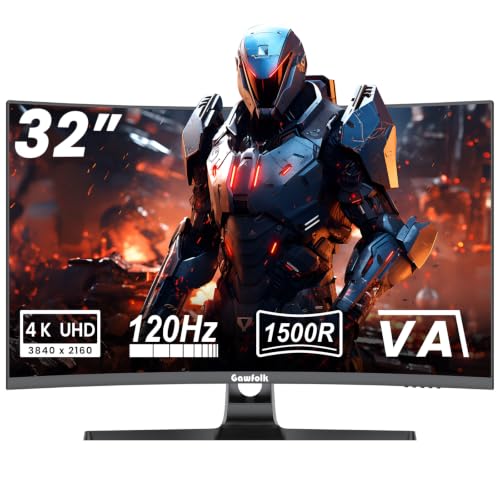
| Gawfolk 4K Curved Monitor 32 Inch, 4K 120Hz 1500R Gaming Monitor VA Panel | Lowest-priced 32-inch curved 4K choice | Check on Amazon |
| Dell 27 Monitor S2725QS, 4K UHD IPS, 120Hz, 5ms, FreeSync Premium | Desk, work, and casual gaming balance | Check on Amazon |
| CRUA 32" 4K UHD 160Hz Curved Gaming Monitor | Curved 32-inch screen with a higher refresh claim | Check on Amazon |
| LG 32GS60QC-B Ultragear 32-inch Curved Gaming Monitor QHD | PS5 players who prioritize QHD speed over 4K | Check on Amazon |
| FYHXele 27 Inch White 4K Gaming Monitor | White desk setups needing HDMI 2.1 | Check on Amazon |
| CUNPU 27" 4K 160Hz Ultimate Gaming Monitor | Value-focused 4K PS5 gaming with an ergonomic stand | Check on Amazon |
How We Compared
We prioritized models listed as 4K and 120Hz or higher, then gave extra weight to stated HDMI 2.1 support because it is directly relevant to a PS5-centered setup. Screen size matters, too: 27-inch models generally make sense at a close desk distance, while 32-inch displays better suit deeper desks or a more relaxed chair-and-controller arrangement.
We also considered panel type, adaptive-sync support, HDR claims, curve, stand features, speakers, and price. A higher refresh-rate figure can be useful for PC gaming, but it should not outweigh the basics for a PS5 buyer: 4K resolution, 120Hz support, and an appropriate input. Models without confirmed HDMI 2.1 are ranked for their broader feature mix rather than treated as automatic console-performance guarantees.
The 8 Best Picks
1. ASUS TUF Gaming VG27UQ1A 27 Inch 4K 160Hz G-SYNC Gaming Monitor
The ASUS TUF Gaming VG27UQ1A is a strong pick for players who want a compact 27-inch 4K screen and also expect to use the monitor with a gaming PC. Its listed 160Hz refresh rate gives it extra headroom beyond a PS5-focused 120Hz target, while G-SYNC branding adds appeal for buyers who use compatible PC hardware. At around $340, it is the most expensive option in this roundup, so its value depends on whether its gaming-first positioning fits your full setup.
- Pro: 27-inch size is well suited to close desk seating.
- Pro: Listed 4K and 160Hz specifications support mixed console and PC use.
- Con: HDMI version is not provided in the supplied specifications.
Skip it if: You need confirmed HDMI 2.1 in the product listing or want a larger 32-inch panel.
2. Amzfast 32" 4K 120Hz Curved Gaming Monitor
The Amzfast is one of the clearest on-paper matches for a PS5 living-room-style desk setup. It combines a 32-inch 4K display, 120Hz refresh rate, HDMI 2.1 with VRR, and a 1500R curve. Its stated PIP/PBP support is especially handy for a hybrid workstation, while built-in speakers can simplify a minimal setup. The listed 3000:1 contrast ratio and 131% sRGB coverage add to its broad feature list, though the around $330 price is close to the ASUS.
- Pro: HDMI 2.1 with VRR is explicitly listed.
- Pro: PIP/PBP and built-in speakers add everyday versatility.
- Con: A 32-inch curved display needs more desk depth than a 27-inch model.
Skip it if: You prefer a flat panel or want to spend closer to $200.
3. Gawfolk 4K Curved Monitor 32 Inch, 4K 120Hz 1500R Gaming Monitor VA Panel
At around $210, the Gawfolk is the budget standout for shoppers who specifically want a 32-inch 4K, 120Hz curved monitor. Its VA panel and 1500R curve target a more immersive, centered gaming experience, making it a sensible fit for single-player games played from a slightly farther desk position. It does not arrive with the detailed connectivity and extra-feature list of some higher-ranked choices, which is the tradeoff for its notably lower price.
- Pro: One of the lowest prices for a listed 32-inch 4K 120Hz display.
- Pro: VA panel and 1500R curve suit immersive solo play.
- Con: HDMI 2.1 support is not stated in the published listing information.
Skip it if: You want confirmed console-specific connectivity or built-in productivity features.
4. Dell 27 Monitor S2725QS, 4K UHD IPS, 120Hz, 5ms, FreeSync Premium
The Dell S2725QS is the practical choice for someone whose monitor must handle work, streaming, and PS5 gaming without looking overly gaming-focused. It pairs a 27-inch 4K UHD IPS panel with 120Hz, 5ms response time, and FreeSync Premium. That specification mix favors buyers who value a straightforward flat-panel desk monitor rather than a curved, feature-heavy display. At around $270, it sits in the middle of the group and offers a sensible balance of resolution, refresh rate, and everyday usability.
- Pro: IPS panel is a strong fit for general desktop use.
- Pro: Listed 4K and 120Hz meet the core display target.
- Con: HDMI 2.1 is not listed.
Skip it if: Your purchase decision depends on explicit HDMI 2.1 support or a curved screen.
5. CRUA 32" 4K UHD 160Hz Curved Gaming Monitor
The CRUA offers an appealing middle ground for buyers drawn to a bigger curved screen but unwilling to pay premium pricing. For around $300, it lists a 32-inch 4K UHD display, 160Hz refresh rate, 1500R curvature, and AMD FreeSync. The higher refresh specification may matter most to PC users, but the 4K resolution and expansive size are the bigger attractions for PS5 players. Its concise feature listing leaves some console-specific questions unanswered, especially around input capability.
- Pro: 32-inch 4K screen offers a large, immersive presentation.
- Pro: Listed 160Hz refresh rate and AMD FreeSync add gaming flexibility.
- Con: HDMI version is not supplied.
Skip it if: You want a confirmed HDMI 2.1 port rather than a higher refresh-rate claim.
6. LG 32GS60QC-B Ultragear 32-inch Curved Gaming Monitor QHD
The LG 32GS60QC-B is a capable gaming monitor, but it is not a true answer to a search for the best 4K monitor for PS5 120Hz gaming. Its stated resolution is QHD, 2560×1440, rather than 4K. Still, its 32-inch curved design, 180Hz refresh rate, 1ms response time, AMD FreeSync, HDR10, and gaming tools make it relevant for shoppers willing to choose speed and price over 4K detail. At around $200, it is the least expensive option listed.
- Pro: 180Hz and 1ms specifications target responsive gaming.
- Pro: 32-inch 1000R curved screen creates a more enveloping view.
- Con: It is QHD, not 4K.
Skip it if: Native 4K resolution is nonnegotiable for your PS5 setup.
7. FYHXele 27 Inch White 4K Gaming Monitor
The FYHXele is an attractive value pick for a white desk setup that still takes PS5 connectivity seriously. It lists a 27-inch 4K IPS panel, 120Hz refresh rate, HDMI 2.1, DisplayPort 1.4, HDR400, 99% sRGB, and FreeSync and G-Sync compatibility. Built-in dual speakers and VESA 100×100 support further help buyers build a tidy setup. At around $230, it undercuts several competitors while retaining the core specs console buyers tend to seek.
- Pro: HDMI 2.1 is clearly listed for console use.
- Pro: IPS panel, HDR400, and 99% sRGB create a well-rounded feature set.
- Con: The white finish may not suit every gaming station.
Skip it if: You prefer a 32-inch screen or a curved panel.
8. CUNPU 27" 4K 160Hz Ultimate Gaming Monitor
The CUNPU earns its place as the best value-oriented PS5-ready choice in the lineup. At around $210, it combines a 27-inch 4K Fast IPS panel, 160Hz refresh rate, 1ms response time, HDR400, 99% DCI-P3, HDMI 2.1, and explicit PS5/Xbox 4K 120Hz support. Its full ergonomic stand is also a meaningful advantage for desk users who need flexible screen positioning. The compact size will not replace a television-like display, but it is a compelling specification package for the money.
- Pro: HDMI 2.1 is listed for PS5/Xbox 4K 120Hz.
- Pro: Full ergonomic stand adds practical desk flexibility.
- Con: A 27-inch display may feel small for couch-style gaming.
Skip it if: You want a 32-inch curved screen for a more cinematic setup.
Buying Guide
Prioritize HDMI 2.1 for a PS5-First Setup
A monitor can list 4K and a high refresh rate without providing the exact connection information a console buyer needs. The Amzfast, FYHXele, and CUNPU explicitly list HDMI 2.1. The CUNPU goes further by stating PS5/Xbox 4K 120Hz support. For the other models, verify the supported resolution and refresh rate on the specific HDMI input before placing an order.
Choose 27 Inches or 32 Inches Based on Your Room
A 27-inch monitor is typically the easier fit for a conventional desk, a keyboard-and-mouse workspace, or a small bedroom. It keeps 4K detail concentrated in a compact viewing area. A 32-inch screen better suits a deeper desk, a wider console station, or a chair positioned farther back. Curved models can make most sense when you sit centered in front of the display.
Do Not Pay for PC Features You Will Not Use
Several monitors list 160Hz or 180Hz refresh rates, G-Sync compatibility, FreeSync, and very fast response-time claims. Those features can be valuable if the display will also serve a PC. If the monitor is solely for PS5, direct support for 4K at 120Hz, sensible screen size, and the right HDMI connection deserve more attention than the highest advertised refresh number.
Our Verdict
The CUNPU 27-inch 4K 160Hz Ultimate Gaming Monitor is the strongest overall value because it explicitly lists HDMI 2.1 for PS5/Xbox 4K 120Hz, a Fast IPS panel, HDR400, and an ergonomic stand at around $210. Choose the Amzfast instead if a 32-inch curved screen, VRR, speakers, and PIP/PBP matter more than saving money. The FYHXele is the best alternative for a white 27-inch setup, while the LG is only worth considering when QHD is acceptable.
FAQ
Do I need HDMI 2.1 for PS5 4K 120Hz gaming?
For a PS5-focused purchase, HDMI 2.1 is the safest specification to look for when you want 4K at 120Hz. In this list, the Amzfast, FYHXele, and CUNPU explicitly list HDMI 2.1.
Is a 27-inch or 32-inch monitor better for PS5?
Choose 27 inches for close desk use and a compact setup. Choose 32 inches if you have a deeper desk, sit farther away, or want a more TV-like presentation for controller gaming.
Is the LG 32GS60QC-B a 4K monitor?
No. The LG 32GS60QC-B is listed as QHD with a 2560×1440 resolution. It can be a budget gaming choice, but it does not meet a 4K requirement.
Which monitor here is the cheapest with listed HDMI 2.1?
The CUNPU is the lowest-priced option in this roundup with listed HDMI 2.1, at around $210. It also explicitly states PS5/Xbox 4K 120Hz support.









