
A Mac mini can make an elegant desk setup, but the monitor choice often determines whether the workspace feels polished or frustrating. In a home office, studio corner, or shared family workspace, a 32-inch 4K screen gives you generous room for side-by-side documents, large creative canvases, and a more comfortable view from a typical desk position. The challenge is choosing a display that suits Apple-centric use without paying for features you will never use.
For 2026, the best 32-inch 4K monitor for Mac mini depends on whether you prioritize USB-C convenience, color-focused work, gaming-ready refresh rates, touchscreen input, or a lower upfront price. We ranked these eight options by their stated Mac-friendly features, connectivity, stand flexibility, display technology, and value at their listed prices.
As an Amazon Associate we earn from qualifying purchases at no extra cost to you.







Our Top Picks


Top 3 picks at a glance
INNOCN 32" 4K 120Hz / FHD 240Hz HDR400 USB-C 90W Monitor for...Check priceDell 32 Monitor S3225QS, 4K UHD VA, 120Hz, FreeSync Premium, Eye ComfortCheck priceQuick Picks
| Product | Best for | Price |
|---|---|---|
| INNOCN 32" 4K 120Hz / FHD 240Hz HDR400 USB-C 90W Monitor | High-refresh work and play | Check on Amazon |
| Dell 32 Monitor S3225QS | Value-focused 120Hz viewing | $329 |
| ViewSonic VX3276-4K-MHD | Lowest-cost straightforward 4K setup | Check on Amazon |
| CUNPU Z32UI06-TE 32 Inch 4K USB-C IPS Monitor | Affordable USB-C and IPS display needs | Check on Amazon |
| 32 Inch 4K Touch Monitor, 144Hz UHD | Touchscreen productivity and interactive work | Check on Amazon |
| BenQ MA320UP | Mac-centered creative desks | Check on Amazon |
| BenQ MA320U | Premium Mac mini workspace integration | Check on Amazon |
| LG 32UP83AK-W | Adjustable all-around home-office setup | Check on Amazon |
How We Compared
We focused on the features that matter most for a Mac mini desk: 4K resolution, connection options, screen type where stated, refresh rate, USB-C capability, charging support, ergonomic adjustment, and Mac-specific controls. Price was also important, particularly because this list ranges from around $260 to around $650.
A few distinctions are worth keeping in mind. USB-C power delivery is most useful when the same monitor also serves a MacBook, while a Mac mini setup may rely more heavily on the display’s available video inputs and hub features. Higher refresh rates can benefit scrolling and motion-heavy work, but they are not essential for every office or creative workflow. We also gave extra weight to displays that explicitly mention Mac color matching or Mac-based brightness and volume control.
The 8 Best Picks
1. INNOCN 32" 4K 120Hz / FHD 240Hz HDR400 USB-C 90W Monitor — Best for High-Refresh Flexibility
The INNOCN is the most flexible choice for a Mac mini desk that also handles fast-moving content or a separate PC setup. It combines a 32-inch 4K mode at 120Hz with an FHD mode at 240Hz, plus HDR400 and USB-C with 90W power delivery. That makes it especially appealing for someone who wants a single display for work, entertainment, and higher-refresh use without moving to a smaller screen. At around $450, it sits in the middle of this group rather than at the premium end.
- Pro: Offers both 4K 120Hz and FHD 240Hz operating modes.
- Pro: USB-C provides up to 90W power delivery.
- Con: It does not list Mac-specific color or system-control features.
Skip it if your work is strictly document-based and you would rather spend less on a 60Hz 4K monitor.
2. Dell 32 Monitor S3225QS — Best Value 120Hz Option
The Dell S3225QS is a strong pick for buyers who want a larger 4K screen with a 120Hz refresh rate at a comparatively restrained $329. Its stated 4K UHD VA panel, FreeSync Premium support, and Eye Comfort positioning make it a practical candidate for a multipurpose home desk where work, streaming, and general everyday use all share the same monitor. It costs substantially less than the INNOCN while retaining 120Hz, which is the key attraction here. It is a clean value play for shoppers who do not require USB-C charging or a Mac-focused hub.
- Pro: Delivers 4K UHD at 120Hz for $329.
- Pro: Includes FreeSync Premium and Eye Comfort features.
- Con: The listed specifications do not mention USB-C connectivity or power delivery.
Skip it if USB-C is central to your setup or if you specifically want an IPS panel.
3. ViewSonic VX3276-4K-MHD — Best Budget 4K Basic
The ViewSonic VX3276-4K-MHD is the most budget-conscious route to a 32-inch 4K UHD monitor in this roundup. At around $260, it is the least expensive model listed, yet it still includes HDR10, HDMI, and DisplayPort. This is the monitor for a Mac mini owner who wants a large, sharp desktop canvas for email, browser windows, spreadsheets, photo viewing, and streaming, without making premium connectivity or advanced refresh performance a priority. Its feature set is simpler than the more expensive competitors, but that is precisely why its value proposition is easy to understand.
- Pro: Lowest listed price in the roundup at around $260.
- Pro: Includes both HDMI and DisplayPort, along with HDR10.
- Con: No USB-C connection or power-delivery feature is listed.
Skip it if you want a USB-C-centered desk or a monitor with a listed refresh rate above a standard office-oriented setup.
4. CUNPU Z32UI06-TE — Best Affordable USB-C IPS Pick
The CUNPU Z32UI06-TE stands out because it brings together a 32-inch 4K screen, USB-C connectivity, and an IPS panel at around $280. For a buyer building a practical Mac mini station while also occasionally connecting a laptop or MacBook, that combination is compelling at this price. IPS is particularly relevant for shoppers who value the panel type in their search, while USB-C adds useful flexibility beyond a basic HDMI-and-DisplayPort display. It is not positioned with the detailed Mac integration of the BenQ models, but it covers the essential feature checklist efficiently.
- Pro: Combines 4K, USB-C, and IPS at around $280.
- Pro: Explicitly identifies compatibility use cases for laptops, MacBooks, and Mac mini.
- Con: The listing does not specify power-delivery wattage, refresh rate, or stand adjustments.
Skip it if you need confirmed 90W charging, a high-refresh display, or dedicated Mac color-match features.
5. 32 Inch 4K Touch Monitor, 144Hz UHD — Best for Interactive Work
This 32-inch 4K touch monitor is the specialized choice for interactive workflows. Its 3840 x 2160 resolution, 144Hz refresh rate, 10-point touchscreen, HDR400, HDMI 2.1, DisplayPort 1.4, and Type-C connectivity create a notably broad feature package. It also includes a height-adjustable and rotatable stand and is VESA mountable, making it well suited to a flexible workstation. At around $480, it is for shoppers who know they will use touch input rather than those simply shopping for the least expensive large 4K screen.
- Pro: Adds 10-point touchscreen capability to a 4K 144Hz monitor.
- Pro: Includes HDMI 2.1, DisplayPort 1.4, Type-C, and an adjustable rotating stand.
- Con: At around $480, it costs more than several non-touch 4K alternatives.
Skip it if touchscreen control is not part of your workflow and you prefer a simpler monitor for less money.
6. BenQ MA320UP — Best for Mac-Centered Creative Work
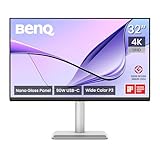
The BenQ MA320UP is built around the details that make a Mac mini desk feel more cohesive. It has a 32-inch 4K 3840 x 2160 display, dual USB-C ports, 90W power delivery, a USB hub, Mac Color Match, and brightness and volume control on Mac. Its P3 color gamut and height- and tilt-adjustable stand further strengthen its appeal for creative users and home-office buyers who want a more refined workstation. At around $650, it is the premium choice for someone who values the Mac-focused experience over the lowest purchase price.
- Pro: Includes Mac Color Match plus Mac brightness and volume control.
- Pro: Provides dual USB-C, a USB hub, and 90W power delivery.
- Con: It is tied for the highest listed price at around $650.
Skip it if you only need a basic 4K screen and do not need its Mac-specific controls or USB hub.
7. BenQ MA320U — Best Premium Mac Mini Desk Upgrade
The BenQ MA320U mirrors the premium Mac-oriented formula of the MA320UP: a 32-inch 4K 3840 x 2160 display, dual USB-C ports, 90W power delivery, USB hub, Mac Color Match, Mac brightness and volume control, P3 color gamut, and a height- and tilt-adjustable stand. For a Mac mini owner who also uses a MacBook Pro or MacBook Air, those features can help consolidate a workspace around one display. Its around $650 price places it firmly in premium territory, so its strongest audience is the buyer who prioritizes integration and desk convenience.
- Pro: Designed around MacBook Pro, MacBook Air, and Mac-focused controls.
- Pro: Includes dual USB-C connectivity and 90W power delivery.
- Con: Costs around $650, well above the budget-oriented options.
Skip it if you do not use USB-C peripherals or a MacBook alongside your Mac mini.
8. LG 32UP83AK-W — Best Adjustable All-Around Option
The LG 32UP83AK-W is a balanced 32-inch UltraFine 4K UHD IPS monitor for a home office that needs practical everyday features. It has a 3840 x 2160 resolution, 60Hz refresh rate, HDR10, built-in speakers, Reader Mode, HDMI, DisplayPort, and USB Type-C with 60W power delivery. Its white finish and height, tilt, and pivot adjustment make it especially attractive for a clean, adaptable desk setup. At around $380, it costs more than the most basic options but remains below the high-refresh INNOCN and the premium BenQ displays.
- Pro: IPS panel with USB Type-C 60W power delivery and built-in speakers.
- Pro: Height, tilt, and pivot adjustments support a flexible workspace.
- Con: Its listed refresh rate is 60Hz rather than 120Hz or 144Hz.
Skip it if high-refresh motion is a priority or if you need the 90W charging offered by select other models.
Buying Guide
Choose Connectivity for Your Actual Desk
HDMI and DisplayPort are useful for a straightforward Mac mini connection. USB-C becomes more valuable when you also connect a MacBook or want a cleaner cable arrangement. The BenQ MA320UP and MA320U include dual USB-C and a USB hub, while the LG offers USB Type-C with 60W power delivery. The INNOCN and both BenQ models list 90W power delivery.
Decide Whether Refresh Rate Matters
A 60Hz monitor such as the LG can suit conventional office tasks, browsing, and creative work. For buyers who want higher-refresh capability, the Dell and INNOCN list 120Hz, while the touchscreen monitor lists 144Hz. The INNOCN also offers an FHD 240Hz mode. Choose these models when motion performance is part of your decision, not simply because the number is higher.
Pay for Mac Features Only When You Will Use Them
The BenQ MA320UP and MA320U justify their premium positioning with Mac Color Match and brightness and volume control on Mac. Those details can matter for an Apple-centered workspace. If your goal is simply a large 4K display, the ViewSonic at around $260 or CUNPU at around $280 may be the more economical fit.
Our Verdict
The BenQ MA320UP is the best premium 32-inch 4K monitor for a Mac mini because its Mac Color Match, Mac controls, dual USB-C, 90W power delivery, USB hub, P3 color gamut, and adjustable stand are directly relevant to an Apple-focused desk. For a less expensive high-refresh option, choose the Dell S3225QS at $329. For the strongest budget value, the ViewSonic VX3276-4K-MHD delivers straightforward 32-inch 4K UHD capability for around $260. Buyers who want USB-C and IPS without moving into premium pricing should look closely at the CUNPU Z32UI06-TE.
FAQ
Is a 32-inch 4K monitor a good match for Mac mini?
Yes. A 32-inch 4K monitor provides a large desktop workspace for multitasking, documents, media, and creative applications. The best choice depends on your desired ports, refresh rate, panel type, stand adjustments, and budget.
Do I need USB-C for a Mac mini monitor?
No. Several options here include HDMI and DisplayPort. USB-C is most useful if you also connect a laptop or want features such as power delivery and a hub. The CUNPU, INNOCN, BenQ, LG, and touchscreen models list Type-C or USB-C connectivity.
Which model has the best Mac-specific features?
The BenQ MA320UP and BenQ MA320U have the most explicitly Mac-focused feature sets. Both list Mac Color Match, brightness and volume control on Mac, dual USB-C, 90W power delivery, and a USB hub.
What is the cheapest monitor in this roundup?
The ViewSonic VX3276-4K-MHD is the least expensive option at around $260. It offers a 32-inch 4K UHD screen with HDR10, HDMI, and DisplayPort.









