
If you design from a small home office, studio apartment, or a shared spare bedroom, you know the pain of cable clutter and cramped desks. Designers need accurate color, sharp text for UI work, and a single-cable connection that powers a MacBook or Windows laptop while carrying video and data. A 27 inch USB-C monitor solves that, but the wrong pick leaves you with washed-out prints, soft type, or a battery that drains even while plugged in.
We focused this roundup on real designer workflows in tight spaces: photo retouching, illustration, layout, and light video. That means prioritizing 27-inch 4K and QHD panels with strong sRGB and P3 coverage, factory calibration, and USB-C power delivery that actually matches your laptop. As of early 2026, single-cable USB-C has become the default for creative setups, so every pick below was judged on color fidelity, sharpness, ergonomics, and how cleanly it simplifies your desk.
As an Amazon Associate we earn from qualifying purchases at no extra cost to you.





Our Top Picks




Top 3 picks at a glance
Quick Picks
| Product | Best for | Price |
|---|---|---|
| Dell 27 Monitor S2725QC | Best 4K Value for Everyday Design | Check on Amazon |
| BenQ PD2706U Mac-Ready Monitor 27” 4K UHD | Best Color Accuracy for Print and Photo | Check on Amazon |
| LG 27U631A-B 27-inch QHD IPS Computer Monitor | Best Budget QHD for Students | Check on Amazon |
| Philips 27″ Computer Monitor 4K UHD IPS USB-C Charging HDR400, 27E1N5900R | Best Affordable 4K With USB-C Charging | Check on Amazon |
| BenQ PD2706QN 27” 2K QHD Mac-Ready Monitor | Best QHD for Mac-Based UI Design | Check on Amazon |
| Dell 27 Plus QHD USB-C Monitor – S2725DC | Best High Refresh QHD for Motion Designers | Check on Amazon |
| ASUS ProArt PA279CRV 27 Inch 4K UHD USB-C HDR Professional Monitor for Mac | Best ProArt Pick for Mac Color Workflows | $399 |
| BenQ GW2790C 27″ IPS Computer Monitor 1080P FHD | Best Ultra-Budget USB-C for Secondary Display | Check on Amazon |
How We Compared
For designers, a great 27 inch USB-C monitor has to do three jobs at once: show color you can trust, keep text and vector edges razor-sharp, and clean up your workspace with reliable USB-C. We started with panel specs that matter for creative work, including resolution, color gamut coverage, factory calibration, and uniformity, then weighed USB-C power delivery, hub features, and ergonomics for long editing sessions.
We did not run lab tests or invent scores. Instead we used the manufacturer specifications you can verify and cross-checked them against typical designer needs, like 4K UHD for print detail versus QHD for smoother performance on integrated graphics, or 90W USB-C for 14-inch and 16-inch MacBook Pro charging versus 15W for lightweight laptops. We also considered refresh rate and response time for motion and interaction design, HDR support for previewing content, and practical extras such as KVM switches, daisy chaining, height adjustment, and anti-glare coatings. Price was the final filter to ensure each recommendation earns its spot at its exact price point.
The 8 Best Picks
1. Dell 27 Monitor S2725QC
The Dell S2725QC is the sweet spot for designers who want true 4K sharpness without paying a pro-monitor premium. With a 4K UHD IPS panel, 99% sRGB, and a 120Hz refresh rate, it makes type, icons, and photo detail look crisp while keeping scrolling and canvas panning fluid. The 4ms response and FreeSync Premium help if you do light motion or 3D previews alongside static work.
- Pro: 4K UHD resolution gives you more usable space for tool palettes and artboards
- Pro: 120Hz and 99% sRGB balance design accuracy with everyday smoothness
- Con: No stated high-wattage USB-C power delivery for power-hungry laptops
When to skip: If you need verified wide P3 coverage for video or 65W+ charging for a 16-inch laptop over USB-C, step up to a Mac-ready pro model.
2. BenQ PD2706U Mac-Ready Monitor 27” 4K UHD
Built for color-critical work, the BenQ PD2706U pairs a 27-inch 4K UHD IPS panel with 99% sRGB and 95% P3, DeltaE less than or equal to 3, and DisplayHDR 400. Factory calibration and Uniformity technology plus AQCOLOR help keep color consistent edge to edge, which matters for print proofs and skin tones. With 90W USB-C, plus DisplayPort, KVM, USB Hub, and the HotKey Puck, it streamlines Mac and PC workflows at around $400.
- Pro: Wide gamut plus factory calibration supports photo, print, and video work
- Pro: 90W USB-C powers most creative laptops with a single cable
- Con: At around $400 it costs more than general-purpose 4K options
When to skip: If your work stays in sRGB and you do not need a hardware puck or KVM, a lower-cost 4K IPS will save you money.
3. LG 27U631A-B 27-inch QHD IPS Computer Monitor
The LG 27U631A-B is a practical QHD choice for students and junior designers. Its 27-inch QHD 2560 x 1440 IPS panel hits 100Hz with a 5ms response time, and it covers the essentials with HDR10, Reader Mode, and Flicker Safe for long reading and layout sessions. USB Type-C with 15W PD handles video and light charging, plus HDMI for a second device, all for around $170.
- Pro: QHD at 100Hz feels smoother than standard 60Hz for UI and timeline work
- Pro: Reader Mode and Flicker Safe reduce eye strain during long edits
- Con: 15W USB-C will not sustain charge on larger laptops under load
When to skip: If you edit 4K video or need pixel-perfect print soft-proofing, choose a 4K panel with wider P3 and factory calibration.
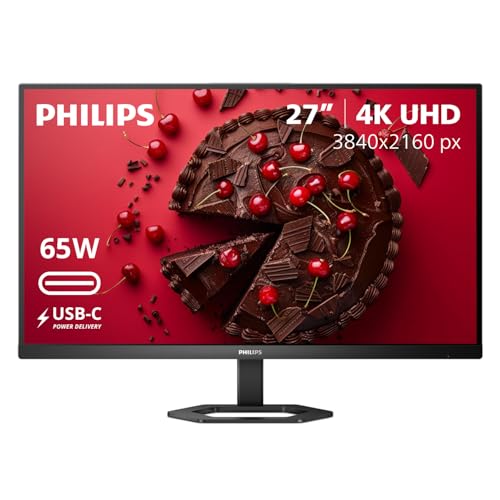
4. Philips 27″ Computer Monitor 4K UHD IPS USB-C Charging HDR400, 27E1N5900R
The Philips 27E1N5900R brings 4K UHD IPS and HDR400 to a budget-friendly price of around $230 while keeping the single-cable USB-C charging designers want for cleaner desks. You get the pixel density needed for sharp vector work and detailed photo zoom-ins, plus an IPS panel for consistent viewing angles when collaborating side by side.
- Pro: 4K UHD IPS sharpness at a lower price than most USB-C 4K monitors
- Pro: USB-C charging reduces clutter for laptop-first setups
- Con: No published wide gamut or DeltaE specification for color-critical proofing
When to skip: If you need guaranteed 95% P3 or factory-calibrated DeltaE for client-facing color, consider a PD or ProArt series instead.
5. BenQ PD2706QN 27” 2K QHD Mac-Ready Monitor
The BenQ PD2706QN is ideal for UI and product designers who prefer QHD performance on Mac. It offers a 27-inch 2K QHD 2560×1440 IPS panel with 100% sRGB/Rec.709 and 95% P3, plus Uniformity and factory calibration for dependable color. The 90W USB-C powers MacBooks, 100Hz keeps interactions smooth, and Daisy Chain MST plus an Anti-Glare Nano Matte coating and height adjustment support tidy, ergonomic studios. Price is around $300.
- Pro: 100% sRGB and 95% P3 coverage suits both web and video deliverables
- Pro: 90W USB-C plus daisy chain capability simplifies multi-monitor Mac setups
- Con: QHD is less sharp than 4K for fine print and pixel-level retouching
When to skip: If you regularly deliver large-format print or need maximum pixel density, a 4K UHD panel is the better investment.
6. Dell 27 Plus QHD USB-C Monitor – S2725DC
The Dell S2725DC in Ash White targets motion and interaction designers who want speed and clean connectivity. Its 27-inch QHD 2560×1440 display runs at 144Hz with a 1ms response time and AMD FreeSync, so timeline scrubbing and prototype animations look fluid. Built-in 2 x 3W speakers, USB-C, HDMI, and DisplayPort 1.4 cover your inputs, while height, tilt, pivot, and swivel adjustments make long editing days more comfortable. Price is around $260.
- Pro: 144Hz and 1ms response excel for motion, gaming previews, and smooth panning
- Pro: Fully adjustable stand plus integrated speakers saves desk space
- Con: QHD resolution trades some sharpness compared with 4K for print detail
When to skip: If your priority is color proofing at 4K with verified P3 calibration, choose a 4K designer monitor instead.
7. ASUS ProArt PA279CRV 27 Inch 4K UHD USB-C HDR Professional Monitor for Mac
The ASUS ProArt PA279CRV is a professional 27-inch 4K UHD USB-C HDR monitor tuned for Mac color workflows. The 4K UHD panel delivers the pixel density designers need for typography and high-resolution imagery, while the ProArt pedigree focuses on accurate, consistent color and HDR preview. USB-C keeps your MacBook connected with a single cable for video, data, and charging. Price is $399.
- Pro: 4K UHD with HDR support for detailed photo and video preview
- Pro: USB-C workflow designed to pair cleanly with Mac setups
- Con: At $399, you pay a premium over general-purpose 4K displays
When to skip: If you work primarily in sRGB web layouts and want to maximize budget, a sub-$300 4K IPS is more cost effective.
8. BenQ GW2790C 27″ IPS Computer Monitor 1080P FHD
The BenQ GW2790C is the budget-friendly second screen that still offers modern essentials. This 27-inch IPS delivers 1080P FHD at 144Hz with Game-Ready responsiveness, Visual Optimizer, Flicker-Free, Low Blue Light, and TUV-Certified Eye-Care. The ultra slim bezel keeps a dual-monitor setup looking clean, and USB-C simplifies laptop connections. At around $120, it is the most affordable way to add USB-C to your desk.
- Pro: 144Hz and eye-care features make it comfortable for long work and review sessions
- Pro: Lowest price in the roundup with USB-C convenience
- Con: 1080P FHD is not sharp enough as a primary monitor for detailed design work
When to skip: If this will be your only display for print, photo, or 4K video, invest in a QHD or 4K panel for greater detail and color fidelity.
Buying Guide
Resolution and Color for Design
For most designers, 4K UHD on a 27-inch panel is the gold standard because it renders type and vector edges sharply and gives you more effective desktop space. QHD 2560 x 1440 is still a strong pick if you use an older laptop or prefer higher refresh rates without taxing your GPU. For color, look for 99 to 100% sRGB as a baseline, 95% P3 if you deliver for screens and video, factory calibration, and a stated DeltaE of 3 or less. Features like Uniformity compensation, IPS viewing angles, and an anti-glare matte coating help keep color consistent when you lean in to retouch or share the screen with a client.
USB-C Power and Connectivity
USB-C should carry video, data, and power over one cable, but wattage matters. A 90W USB-C port will charge 14-inch and many 15- and 16-inch laptops under typical creative loads, while 15W ports will only trickle charge or maintain power during light use. If you plan to dock peripherals, favor monitors with a USB hub and KVM so you can share a keyboard and mouse between desktop and laptop. Daisy chain MST is useful for dual QHD setups from a single laptop output. Check for additional inputs like DisplayPort and HDMI so you can keep a console or secondary machine connected without reaching behind the desk.
Ergonomics, Motion, and HDR
Design days are long, so height adjustment, tilt, swivel, pivot, and low blue light or flicker-free modes reduce strain. Refresh rate affects how smooth your canvas feels: 60Hz is fine for static work, 100Hz to 120Hz adds comfort for scrolling and UI animation, and 144Hz with a 1ms response is best for motion graphics previews. HDR400 and HDR10 are helpful for previewing HDR content but do not replace a grading monitor for final delivery. Speakers rated at 2 x 3W can handle client calls and quick audio checks, though dedicated speakers or headphones remain better for critical audio.
Our Verdict
For most designers buying a 27 inch USB-C monitor, the BenQ PD2706U at around $400 is the safest all-rounder thanks to its 4K UHD panel, 99% sRGB and 95% P3 coverage, DeltaE less than or equal to 3, factory calibration, Uniformity, and 90W USB-C with practical extras like a USB Hub, KVM, and HotKey Puck. If budget is tight but you still want 4K sharpness over a single cable, the Dell S2725QC at around $300 and the Philips 27E1N5900R at around $230 deliver strong value, while QHD favorites like the BenQ PD2706QN at around $300 and Dell S2725DC at around $260 trade a bit of sharpness for higher refresh rates and flexible ergonomics.
FAQ
Is 4K necessary for design on a 27-inch monitor?
Not strictly, but it helps. 4K UHD makes small type, icons, and fine photo detail noticeably sharper and lets you keep more palettes open. QHD 2560 x 1440 remains a solid compromise for smoother performance and higher refresh rates, especially if your laptop struggles to push 4K at 60Hz or higher.
How much USB-C power do I need?
Match wattage to your laptop. Ultrabooks often do fine with 45 to 65W, while 14-inch and 16-inch performance laptops charge best with 90W USB-C like on the BenQ PD2706U and PD2706QN. A 15W USB-C port, such as on the LG 27U631A-B, can handle video and light charging but will not keep a large laptop topped up under load.
What color specs should designers prioritize?
Start with 99 to 100% sRGB for web and print, add 95% P3 if you work in video or wide-gamut, and look for factory calibration with a stated DeltaE of 3 or less. Uniformity compensation and an IPS panel help keep color and brightness consistent across the screen, which is critical when you soft-proof or color grade.
Will a 144Hz or 120Hz monitor improve design work?
Higher refresh rates make scrolling, panning, and animation previews feel smoother and can reduce eye fatigue, though they do not improve static color accuracy. If you split time between static design and motion, a 120Hz or 144Hz QHD panel is a nice advantage, while print-focused designers may prefer to prioritize 4K resolution and calibration instead.









