
The best 1440p 144Hz monitor under $200 for most gamers in 2026 is the Acer Nitro KG271U N3, which pairs a 27-inch 2560×1440 IPS panel with a 180Hz refresh rate, so it beats the 144Hz target with room to spare and usually sells around $150–$170. If you want a stand that adjusts properly and built-in speakers for a desk that doubles as a workspace, the Dell 27 Plus S2725DSM is the better buy, with a 144Hz 1ms QHD panel, height, tilt, pivot and swivel adjustment, and two 3W speakers.
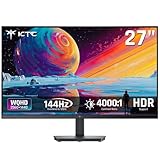
The budget KTC H27T27S is the pick when every dollar counts and you value contrast for dark games, since its listed 4000:1 contrast points to a VA panel. Samsung’s 27-inch Odyssey G5 (G51F) is a strong mainstream option, and the 32-inch curved Odyssey G55C is the one to get if you want a bigger, more immersive screen while staying near the $200 ceiling.
As an Amazon Associate we earn from qualifying purchases at no extra cost to you.



Our Top Picks
 Acer Nitro 27in QHD 2560x1440 IPS 180Hz Gaming27-inch8.28 x 24.2 x 18.14 Inches12.1 poundsCheck on Amazon


Top 3 picks at a glance
Top picks at a glance
- Best overall: Acer Nitro 27 KG271U N3, QHD IPS, 180Hz.
- Best for work and play: Dell 27 Plus S2725DSM, QHD 144Hz, fully adjustable stand.
- Best cheap QHD: KTC 27 inch H27T27S, 144Hz, 4000:1 contrast.
- Best 32-inch curved: Samsung 32″ Odyssey G55C, QHD, 1000R curve.
- Best brand-name 27-inch alternative: Samsung 27″ Odyssey G5 G51F.
Spec comparison
| Monitor | Size | Resolution | Refresh | Panel / feature | Typical price |
|---|---|---|---|---|---|
| Acer Nitro KG271U N3 | 27 in | 2560×1440 | 180Hz | IPS | $150–$170 |
| Dell 27 Plus S2725DSM | 27 in | 2560×1440 | 144Hz, 1ms | Height/tilt/pivot/swivel, 2 x 3W speakers, FreeSync | $180–$200 |
| KTC H27T27S (listing 1) | 27 in | 2560×1440 | 144Hz | FreeSync and G-Sync compatible | $140–$150 |
| KTC H27T27S (listing 2) | 27 in | 2560×1440 | 144Hz | 4000:1 contrast | $140–$150 |
| Samsung Odyssey G5 G51F | 27 in | 2560×1440 | High refresh (check listing) | Flat gaming panel | $150–$180 |
| Samsung Odyssey G55C | 32 in | 2560×1440 | High refresh (check listing) | 1000R curve | $180–$200 |
Reviews of each monitor
Acer Nitro 27 KG271U N3: best overall
The Nitro’s 180Hz refresh rate gives it the highest ceiling in this group. With a GPU that can push more than 144 fps in esports titles such as Valorant, Counter-Strike 2 or Overwatch 2, the extra headroom makes motion look a little smoother. Its IPS panel delivers wider viewing angles and more consistent color than VA panels, which helps if you also edit photos or watch videos at an angle.
Trade-offs: budget IPS panels usually show some glow in dark scenes and have lower contrast than VA. Stands on budget Nitro models are typically tilt-only, so plan on a monitor arm if you need height adjustment.
Dell 27 Plus S2725DSM: best for a mixed work and gaming desk
Dell’s S2725DSM delivers exactly the target spec: 27 inches, 2560×1440, 144Hz with a 1ms response rating, plus AMD FreeSync. What sets it apart under $200 is the stand, which adjusts for height, tilt, pivot and swivel. That makes it far easier to set at the correct eye level and even rotate into portrait mode for documents or code. Two 3W speakers and HDMI plus DisplayPort 1.4 round out the package, and the Ash White finish suits lighter desk setups.
Trade-offs: at 144Hz it has the lowest maximum refresh here, and built-in speakers are fine for calls but no replacement for a headset or desktop speakers.
KTC H27T27S: best budget QHD
Two listings in this list are the same KTC H27T27S model, so treat them as one choice and buy whichever is cheaper or in stock. It offers 27-inch QHD at 144Hz with FreeSync and G-Sync compatibility, and the listed 4000:1 contrast ratio is typical of VA panels. VA’s deeper blacks make horror games, space sims and dark movie scenes look richer than on most budget IPS screens.
Trade-offs: VA panels often show some dark-level smearing in fast motion and narrower viewing angles. Competitive players who care most about motion clarity may prefer the Acer’s IPS panel.
Samsung 27″ Odyssey G5 (G51F): brand-name alternative
The G51F is Samsung’s 27-inch flat QHD Odyssey model, positioned for gamers who want a recognizable brand and Samsung’s software features. It typically sells in the same window as the Acer and KTC. Check the listing for its exact refresh rate and panel type before you buy, because Samsung offers several similar Odyssey G5 variants.
Trade-offs: less clearly differentiated than the Acer or Dell; buy it if the price is right on the day.
Samsung 32″ Odyssey G55C: best for immersion
If you sit about two to three feet from your screen and play racing, flight or open-world games, a 32-inch 1000R curved monitor fills more of your view than a 27-inch flat panel. QHD on a 32-inch screen yields roughly 92 pixels per inch, slightly softer than 27-inch QHD at about 109 PPI, but still noticeably sharper than 1080p at the same size.
Trade-offs: it takes more desk depth, the curve is less ideal for spreadsheets and design work, and it usually sits at the top of the under-$200 range.
How to choose a 1440p monitor on a $200 budget
Refresh rate: 144Hz is the floor, not the ceiling
Monitors at 165Hz and 180Hz have pushed into this price range, so do not overpay for a 144Hz model unless it adds something else, like the Dell’s adjustable stand. Note that higher refresh only helps if your PC can deliver the frame rate; a mid-range GPU in 2026 typically reaches 100 to 200 fps at 1440p in esports titles and well under 100 fps in demanding AAA games.
IPS versus VA
IPS offers better color and viewing angles and is usually cleaner in fast motion. VA offers roughly two to three times the contrast, meaning deeper blacks, but can smear in dark transitions. Choose IPS for competitive and mixed use, and VA for cinematic single-player games and movies.
Adaptive sync
FreeSync or G-Sync compatibility eliminates tearing when your frame rate falls below the refresh rate. Every monitor here supports some form of adaptive sync, and NVIDIA GPUs can use G-Sync Compatible mode over DisplayPort on most FreeSync monitors.
Ports and cables
Use DisplayPort when possible for the full refresh rate. Some budget monitors only reach their maximum refresh over DisplayPort, with HDMI capped lower.
Stand and ergonomics
A height-adjustable stand is rare under $200. If your pick has a tilt-only stand, a VESA monitor arm, usually $30–$60, fixes that and frees up desk space.
FAQ
Is 1440p worth it over 1080p at 27 inches?
Yes. At 27 inches, 1080p looks noticeably soft, while 1440p is the sweet spot for sharpness and GPU demand.
Can a budget GPU run 1440p at 144Hz?
In esports and older titles, often yes. In new AAA games, expect to lower settings or use upscaling like DLSS or FSR.









