Our Top Picks
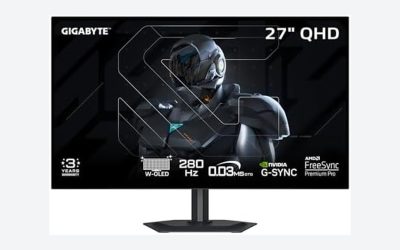
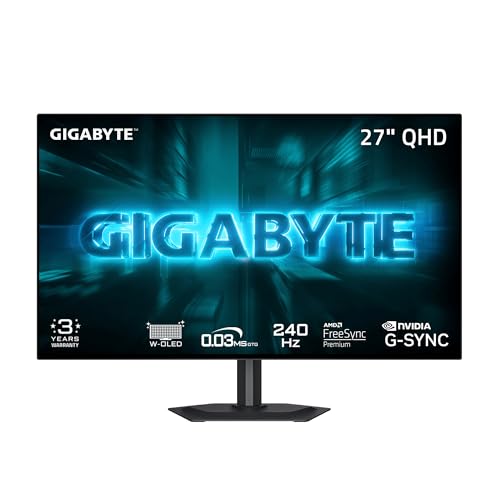 GIGABYTE GO27Q24G 27" W-OLED 240Hz QHD Gaming Monitor27" QHD7.38 x 23.8 x 20.73 inches16.5 PoundsCheck on Amazon

The Short Answer
Yes — OLED is worth it for competitive FPS if your GPU can push 240+ frames per second at the resolution you’re buying. That’s the one condition. If you’re playing Valorant or CS2 on a mid-range card that only hits 120–150 fps, you’ll leave most of an OLED’s advantage on the table, and a fast, cheaper IPS panel will serve you just as well. If you’re genuinely running 240 fps or higher, the near-instant pixel response is the single biggest upgrade you can make to a monitor — more so than raw refresh rate alone.
What You Actually Get
Every gaming monitor sold today can hit 240Hz, so the real question isn’t speed on paper — it’s how the panel gets there. OLED pixels switch states essentially instantly. Where a good fast-IPS panel transitions in roughly 2–4 milliseconds (with some overdrive artifacts along the way), OLED transitions in under a millisecond across virtually every shade change. In practice, that means less ghosting behind fast flicks, cleaner motion clarity when tracking a strafing target, and input latency that’s a frame or so lower end-to-end.
As an Amazon Associate we earn from qualifying purchases at no extra cost to you.


The second thing you get is image quality that no LCD matches: true blacks, near-infinite contrast, and wide viewing angles. For FPS players, this matters more than it sounds — dark corners on maps like CS2’s Nuke or any horror-adjacent shooter become genuinely visible instead of a smeary gray wash. OLED also gives you per-pixel illumination, so there’s no “dirty” backlight bleed behind HUD elements.
A good reference point is a panel like the GIGABYTE GO27Q24G, a 27-inch W-OLED at QHD (2560×1440) with a 240Hz refresh rate, currently selling around $350. That price point — under $400 for a 1440p 240Hz OLED — is what’s changed recently and what makes this question worth asking in 2026. OLED used to be a $900+ luxury; now it competes directly with premium IPS.
Pros
- Sub-millisecond pixel response. Motion blur behind fast-moving targets is dramatically reduced compared to even the best fast-IPS panels, which is exactly what matters when clearing angles or tracking a peek.
- Lower perceived input lag. Because pixels finish transitioning almost immediately, what you see on screen better matches what your mouse is doing.
- Perfect blacks and infinite contrast. Dark-scene visibility in competitive shooters is a genuine tactical advantage, not just eye candy.
- Excellent viewing angles and color. No gamma shift when you lean or when a teammate watches over your shoulder.
- Prices have come down hard. 1440p 240Hz W-OLED panels now sit in the $300–$450 range, competing with high-end IPS instead of doubling its cost.
Cons
- Burn-in risk is real for FPS players. Static crosshairs, HUDs, and minimaps are exactly the content OLED panels dislike. Most modern panels have mitigation (pixel shift, logo dimming, periodic refresh cycles), but heavy 8-hour-a-day players should still expect some risk over 3–5 years.
- Lower full-screen brightness than LCD. Typical full-field brightness lands around 200–275 nits; fine for a dim room, but a sunny window behind you will wash the screen out.
- Most OLEDs don’t play well with console-style fixed refresh or heavy HDR use. Peak HDR brightness on W-OLED is decent (600–1000 nits in small windows) but it’s not the HDR showcase Mini-LED can be.
- You need the frames. 240Hz at 1440p in a modern AAA shooter demands a serious GPU. In esports titles it’s easy; in Warzone or The Finals at max settings, it isn’t.
- QD-OLED variants can show text fringing due to subpixel layout — worth checking in person if you also do a lot of work on the same display.
Who Should Buy It
You run an esports title (CS2, Valorant, Overwatch 2, Apex) at 240 fps or higher, you play in a room you can control the lighting in, and you want the last few percent of motion clarity that separates very good setups from great ones. If you also play single-player games at night, the contrast upgrade is a huge bonus. Anyone picking up a panel like the GO27Q24G at around $350 alongside a GPU that actually delivers 240 fps at 1440p is getting genuinely excellent value.
Who Should Skip It
Skip OLED if you’re GPU-limited and can’t sustain high frame rates, if you game in a bright room during the day, or if you use your monitor for heavy static-content work (spreadsheet marathons, trading dashboards, streamed HUDs for hours daily) where burn-in risk compounds. Also skip it if your desk sits near a window — the brightness ceiling will frustrate you daily.
Cheaper Alternatives
| Option | Cost | Trade-off |
|---|---|---|
| Amzfast 24″ Curved Gaming Monitor — 1080p, 240Hz, 1ms, ultra-slim base (approx. 21.5″ wide × 15″ tall without stand weight around 8–9 lbs) | Check on Amazon | Voice-over-LAN image quality: expect a VA-class panel with decent but not class-leading response overdrive. Motion clarity trails OLED noticeably, and contrast/brightness are modest. But 240Hz at 1080p is far easier for a mid-range GPU to drive, and at this price it’s the smartest pick for budget esports players. |
| 27″ fast-IPS 1440p 240Hz (generic, various brands) | $180–$300 | 90% of the OLED competitive experience for LAN-party money. Slightly more ghosting, worse dark-scene detail, no burn-in anxiety, full brightness for bright rooms. |
| 27″ Mini-LED 1440p 240Hz | $350–$500 | Matches or beats OLED brightness and HDR punch, zero burn-in risk — but motion response and black levels still trail true OLED. |
FAQ
Does OLED actually reduce input lag in FPS games?
Slightly, yes — but not for the reason people think. Total input lag is mostly your GPU’s render time plus the display’s processing and refresh interval. OLED displays typically add very little processing lag (2–4 ms at 240Hz), and because pixels finish transitioning instantly, the effective “visible” lag is lower than a similarly specced LCD. It’s a small, real edge — usually a few milliseconds, not a game-changer on its own.
Will a static crosshair burn in my OLED monitor?
Modern OLEDs use pixel-shift, logo dimming, and compensation cycles that make burn-in much slower than it used to be. A crosshair alone is rarely the culprit; it’s the cumulative static load — HUD plus minimap plus chat plus hours per day. Casual-to-moderate players over a 3–4 year window generally have little to worry about. Heavy grinders should enable every mitigation setting, vary their window layout, and consider a warranty with burn-in coverage.
Is 1080p 240Hz or 1440p 240Hz better for competitive FPS?
For pure competition, 1080p 240Hz is easier to drive and totally sufficient — pro players mostly still use 1080p at 24–25 inches. 1440p 240Hz OLED (like the GO27Q24G) gives you sharper visuals and better dark-scene detail with the same frame rate, assuming your GPU can hold 240 fps at the higher resolution in the titles you play.
How much should I actually spend?
Under $150: a 1080p 240Hz panel like the Amzfast at around $120 — great value if your PC is the bottleneck. $180–$300: fast-IPS 1440p 240Hz, the safe all-rounder. $300–$450: entry 1440p 240Hz W-OLED, which is where the OLED “worth it” question flips to yes for most GPU-adequate buyers. Above that, you’re paying for size, 360Hz+, or 4K — nice, but not necessary to be competitive.