
Choosing between a QD-OLED and W-OLED gaming monitor is less about finding a universal “winner” and more about matching the screen to the way your home actually works. Both technologies deliver the deep blacks, fast pixel response, and high-refresh motion that make OLED so appealing for gaming. The difference is in the trade-offs: QD-OLED typically prioritizes colorful, punchy HDR and a more vivid image in a dim room, while W-OLED often offers stronger perceived black levels when the room has more ambient light and may suit buyers who value a less reflective screen.
For most shoppers, the real decision comes down to three questions: How bright is your room? Will the monitor also handle work, school, or streaming every day? And are you buying for a dedicated gaming desk or a shared family space? A 27-inch QHD 240Hz OLED is a particularly practical size for home use: its panel is roughly 23.5 inches wide by 13.2 inches high, and a complete monitor with its stand usually needs a desk footprint around 24 inches wide by 8 to 10 inches deep.
As an Amazon Associate we earn from qualifying purchases at no extra cost to you.




Our Top Picks
 AOC 27" Gaming Monitor QHD 240Hz QD OLED27" 240Hz Height Adjustable9.45 x 23.99 x 21.17 inchesCheck on Amazon
 msi MAG 274QP QD-OLED X24 27-Inch WQHD Gaming14" x 24" x 2.6"23.9 x 9.5 x 16.8 inches20.7 poundsCheck on Amazon
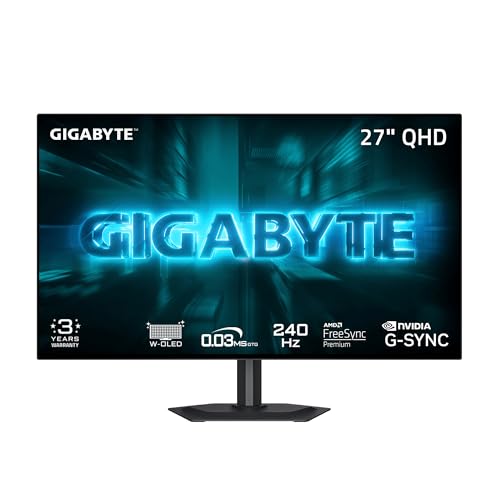 GIGABYTE GO27Q24G 27" W-OLED 240Hz QHD Gaming Monitor27" QHD7.38 x 23.8 x 20.73 inches16.5 PoundsCheck on Amazon

Top 3 picks at a glance
Quick Verdict
Choose a QD-OLED gaming monitor if you game mostly in a light-controlled room and want the richest color, dramatic HDR highlights, and a cinematic look for both games and movies. It is especially compelling for single-player games, racing games, and colorful competitive titles.
Choose a W-OLED gaming monitor if your desk sits near windows, you prefer a more conventional-looking image in a brighter room, or you want a monitor that feels especially versatile for a mixed-use home setup. W-OLED remains an excellent choice for high-speed gaming, with the same core OLED advantages: near-instant pixel transitions, exceptional contrast, and smooth 240Hz motion.
At current street prices, the gap is often small. For example, a 27-inch QHD 240Hz QD-OLED such as the AOC Q27GAZDV can appear around $310, while the MSI MAG 274QP QD-OLED X24 is listed around $350. Comparable W-OLED options include the GIGABYTE GO27Q24G at about $350 and the GIGABYTE MO27Q28GR at about $460. Features, warranty terms, stand design, and sale timing can matter more than panel type when prices are within $50 to $100.
Side by Side
| Buying factor | QD-OLED gaming monitor | W-OLED gaming monitor |
|---|---|---|
| Comfort | Excellent in a dim or controlled-light room; vivid color can feel immersive for long game sessions. | Excellent for mixed lighting; many buyers prefer its appearance when daylight reaches the desk. |
| Durability | OLED care is needed: static UI, taskbars, and HUDs should not stay unchanged for hours every day. | Also needs OLED care; panel-refresh and pixel-protection routines are part of ownership. |
| Typical price range | About $310 to $900 for 27- to 32-inch gaming models, depending on resolution and refresh rate. | About $350 to $850 for similar gaming sizes and specifications. |
| Maintenance | Use screen-shift and panel-care settings; clean gently with a dry microfiber cloth. | Same basic OLED upkeep; avoid pressure, harsh cleaners, and prolonged static content. |
| Space needed | A 27-inch model suits desks at least 42 inches wide and 24 inches deep. | Same practical footprint; wall or arm mounting can recover 8 to 10 inches of desk depth. |
| Look | Often delivers intensely saturated color and striking HDR in darker spaces. | Often feels more neutral in a brighter room, with strong contrast and a familiar OLED image. |
| Resale | Strong demand among enthusiasts, but condition and burn-in history affect value. | Likewise desirable; intact packaging, warranty transferability, and panel condition matter most. |
| Best for | Dark-room gaming, HDR movies, colorful games, and buyers who want the most visually dramatic image. | Bright or flexible rooms, mixed gaming-and-work setups, and buyers who prefer a less specialized feel. |
| Motion performance | Exceptionally fast pixel response; 240Hz is ideal for competitive PC play. | Exceptionally fast pixel response; equally well suited to fast shooters and racing games. |
Where QD-OLED Wins
QD-OLED’s defining strength is color. Rather than relying on a white subpixel, QD-OLED uses quantum-dot color conversion to produce red and green light. In practice, that can translate to particularly full-looking color volume and bold HDR scenes. Neon cityscapes, sunlit landscapes, fantasy games, and animated films can look unusually rich without losing OLED’s trademark black background.
QD-OLED is also a natural fit for a dedicated gaming room where you can control lighting. If you play after dark, use blackout shades, or position your desk away from direct window light, the panel’s glossy presentation can look luxurious. A 27-inch 2560 x 1440 display has a pixel density of about 109 pixels per inch, which is sharp enough for gaming at a typical 24- to 32-inch viewing distance without requiring the graphics horsepower of 4K.
For shoppers who want high performance without overspending, QD-OLED is no longer automatically the expensive option. The around $310 AOC Q27GAZDV and around $350 MSI MAG 274QP QD-OLED X24 illustrate why it is worth comparing sale prices closely. At those prices, a QD-OLED can cost little more than a good IPS gaming monitor while offering a substantially different contrast experience.
The caveat is room lighting. OLED pixels can produce true black when turned off, but reflected room light can make the screen surface look less black before the monitor is even powered on. QD-OLED is therefore at its most convincing in a room where lamps and windows are not reflecting directly onto the panel.
Where W-OLED Gaming Monitor Wins
W-OLED gaming monitors are often the easier recommendation for a home office that must do several jobs. They retain the sharp motion, high contrast, and low perceived blur that gamers want, but many models are designed with coatings and panel behavior that can feel more forgiving in an everyday room. That matters if the monitor faces a living area, sits in a bedroom with morning sun, or shares space with overhead lights.
W-OLED can also appeal to buyers who do not want their gaming display to look overly saturated. Its image can still be vivid and high-contrast, but it may feel more restrained in desktop use, web browsing, and ordinary video. This is a preference, not a performance failure: some households want maximum color impact, while others want the screen to blend more quietly into an all-day workspace.
There are strong value choices here as well. The 27-inch GIGABYTE GO27Q24G brings W-OLED, QHD, and 240Hz to roughly $350, while the GIGABYTE MO27Q28GR sits closer to around $460. Buyers should compare included connections, ergonomic adjustment, console support, and warranty coverage rather than assuming a higher price alone means a better panel for their room.
For either technology, text-heavy work deserves a realistic expectation. OLED subpixel layouts can make fine desktop text look different from a traditional LCD, especially at close range. A 27-inch QHD panel is very usable for documents and browsing, but people who spend eight hours a day in spreadsheets may prefer to pair the OLED with a second LCD work monitor or choose a larger, higher-resolution OLED.
Cost Over 5 Years
The purchase price is only one part of the budget. Assuming a 27-inch QHD 240Hz OLED is used for gaming and media about 4 hours per day, its average power draw may commonly land around 35 to 70 watts depending on screen brightness, HDR use, and scene content. Over five years, that works out to roughly 255 to 511 kilowatt-hours. At an electricity rate of around $0 per kilowatt-hour, that is about $41 to $82 in electricity.
That means a $350 monitor may cost approximately $391 to $432 to own over five years before any accessories or repair costs. A $456 model may total roughly $497 to $538 over the same period. The electricity difference between similarly sized QD-OLED and W-OLED monitors is unlikely to be the deciding expense; brightness settings and hours of use have a larger impact.
The bigger financial consideration is panel protection. Look for a manufacturer warranty that specifically addresses OLED burn-in or panel degradation, and keep the monitor’s automatic pixel-cleaning routine enabled. A monitor arm, typically $30 to $100, may be the most worthwhile add-on because it improves positioning and clears desk space without adding much to long-term cost.
Which One for Your Home
Small apartment
Pick a 27-inch QHD model, whether QD-OLED or W-OLED, rather than jumping immediately to a 32-inch screen. It fits a compact desk and does not dominate a room. Choose QD-OLED if you game mostly at night; choose W-OLED if the desk is near a window or shares space with daily activities. A monitor arm is especially useful in a small apartment.
Family with kids or pets
W-OLED may be the more relaxed choice if the screen is used in a busy, bright common area, but neither OLED type is ideal for a desk where the panel may be poked, bumped, or cleaned aggressively. Keep the display on a stable stand or VESA arm, use its screen-saver settings, and teach children not to touch the panel. OLED screens should be wiped only with a clean, soft microfiber cloth.
Rental
Choose based on light control rather than permanent room changes. A W-OLED is a safer bet in a bright rental where you cannot install blackout treatments. If you already use removable blackout curtains or your gaming desk is in an interior room, QD-OLED can provide the more theatrical image. Avoid wall mounting unless your lease permits it; a clamp-style monitor arm is usually renter-friendly.
Long-term home
For a dedicated media or gaming room, QD-OLED is a strong long-term choice because controlled lighting lets it show off its color and HDR strengths. For a multipurpose office, den, or family computer room, W-OLED is often the more adaptable option. In either case, buy the best warranty and ergonomic setup your budget allows. In 2026, OLED pricing is competitive enough that room fit should lead the decision.
FAQ
Is QD-OLED better than W-OLED for gaming?
Not in every home. Both are excellent for gaming because both offer OLED contrast and extremely fast pixel response. QD-OLED often has the edge for colorful HDR gaming in dark rooms, while W-OLED can be more comfortable in brighter, mixed-use spaces.
Can I use an OLED gaming monitor for work every day?
Yes, but use sensible habits. Enable pixel protection, hide static desktop elements when practical, vary your content, and let the monitor run its panel-care cycle when prompted. If your work involves static dashboards for many hours daily, an LCD companion monitor may be a more cautious choice.
Is 27-inch QHD 240Hz enough for a gaming desk?
For most PC gamers, yes. A 27-inch QHD 240Hz monitor balances sharpness, desk-friendly size, and achievable frame rates. It is particularly well suited to desks 24 to 30 inches deep and players who sit about 24 to 32 inches from the screen.
Should I pay more for HDMI 2.1?
Pay more only if you need it. HDMI 2.1 is valuable for modern consoles and certain high-bandwidth PC setups. For a PC-only QHD 240Hz monitor, DisplayPort 1.4 is often sufficient, but checking the monitor’s exact refresh-rate support and port specifications before buying is essential.









