For years the graphics card power cable was the least interesting part of a build. Then high-end GPUs began drawing enough current to need a single, dense 12-volt connector, and the power supply became the part that decides whether a new card runs cleanly or throws random shutdowns. That is the practical meaning of ATX 3.0: a power supply designed to supply that connector natively and to ride out the brief power spikes modern graphics cards produce.
A small wrinkle shapes this shopping list. Most units sold today are labeled ATX 3.1, a refinement of ATX 3.0 that renamed the connector to 12V-2×6, so the listings below use both labels and sometimes say they are compatible with both. If you are searching for ATX 3.0 because your new GPU needs it, a native 12V-2×6 cable, a gold-class efficiency rating and enough wattage are the checks that matter most in 2026. The eight picks that follow cover 650W to 1000W.
Our Top Picks
 Thermaltake Dr. Power III Pro; ATX Power SupplyIII Pro5.5 x 3 x 0.75 inches0.3 poundsCheck on Amazon



Top 3 picks at a glance
Quick Picks
As an Amazon Associate we earn from qualifying purchases at no extra cost to you.





| Product | Best for | Key spec taken from the title |
|---|---|---|
| CORSAIR RM1000x | High-end GPU builds that need headroom | 1000W, fully modular, Cybenetics Gold, native 12V-2×6 |
| CORSAIR RM850x | Balanced gaming rigs | 850W, fully modular, Cybenetics Gold, native 12V-2×6 |
| MSI MAG A850GL PCIE5 | Compact cases with a strong warranty | 850W, 80+ Gold, fully modular, 10-year warranty |
| Thermaltake Toughpower GT 850W | Quiet builds with a zero-fan mode | 850W, 80 Plus Gold, Smart Zero Fan, native 450W PCIe 5.1 connector |
| MSI MAG A750GL PCIE5 | Mid-range gaming PCs in compact cases | 750W, 80+ Gold, fully modular, 10-year warranty |
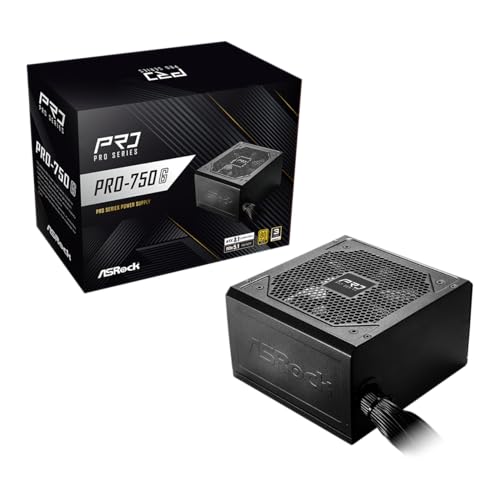
| ASRock PRO 750G | Straightforward 750W upgrades | 750W, 80 Plus Gold, 120mm low-noise fan, 3-year warranty |
| Rosewill VMG 750W | Gold-class value with full modularity | 750W, 80+ Gold, ATX 3.0 and 3.1 compatible, Japanese capacitors |
| Rosewill VSB 650W | Lower-power builds with a new connector | 650W, 80+ Bronze, semi-modular, 12V-2×6 |
The 8 Best Options
CORSAIR RM1000x
This is the largest unit in the group and the one for builders who want to stop thinking about power. The title lists 1000W, ATX 3.1 and PCIe 5.1 readiness, a native 12V-2×6 connector, fully modular cabling, low-noise operation and a Cybenetics Gold efficiency rating. It is the natural pair for a top-tier GPU and a powerful processor in the same case.
It suits enthusiasts who run a high-end graphics card, a multi-drive storage setup or a heavy overclock, and who want margin so the unit rarely runs near its limit. Fully modular cables also keep a large case tidy.
The practical value of a unit this size is how rarely it has to work hard. A power supply running well below its rated output tends to stay cooler and quieter, and it leaves space for a later graphics upgrade, extra drives, or a processor overclock. For a builder who changes parts often, buying the large unit once can be cheaper than replacing a smaller one in two years.
- 1000W gives the most headroom in the group.
- Native 12V-2×6 means no adapter is needed for modern GPUs.
- Fully modular cabling and a stated low-noise design suit clean builds.
- Capacity beyond what a mid-range build needs brings no benefit.
- The title does not state the warranty length, so confirm it on the full listing.
Skip it if your system draws far less than 750W, because a smaller unit would run in a better part of its efficiency curve. Compared with the RM850x next, it is the same family with 150 extra watts, so choose it for flagship graphics and the 850W for most others.
CORSAIR RM850x
The RM850x is the mainstream sweet spot for gaming desktops. The listing shows 850W, ATX 3.1 and PCIe 5.1 readiness, fully modular cables, low-noise operation, a Cybenetics Gold rating and a native 12V-2×6 connector. Nothing in the title is exotic, which is the point.
It fits a gaming build with a strong mid-to-high-end GPU and a modern processor, and it leaves room for storage, fans and RGB without worrying about total load. Builders who want one well-known brand and predictable features will find it easy to justify.
Part of its appeal is predictability. The listing has the same feature set as its larger sibling, so a buyer who is unsure about wattage can treat it as the default and move up only if the graphics card demands it. In an average gaming tower with a single GPU and a handful of drives and fans, 850W is a figure that rarely needs second guessing.
- 850W covers most single-GPU gaming systems with room to spare.
- Native 12V-2×6 connector is listed.
- Fully modular cabling simplifies installation.
- Not enough headroom for a very power-hungry flagship GPU paired with an overclocked processor.
- The title omits the warranty period.
Skip it if you want a longer stated warranty in the title or a lower-wattage, lower-cost unit. A buyer who plans to add a second storage array later should also count the connectors on the full page. Next to the MSI A850GL, it is the more conventional brand choice, while the MSI emphasizes compact size and a ten-year warranty.
MSI MAG A850GL PCIE5
MSI describes this model as a fully modular, compact gaming power supply with 850W output, an 80+ Gold rating, ATX 3.1 and PCIe 5.1 readiness, a native dual-color 12V-2×6 cable, and a 10-year warranty. The warranty line is the headline: it is the longest in the group.
The compact descriptor makes it a fit for cases that have limited space behind the motherboard tray. The dual-color cable is a small touch intended to help builders see that the connector is fully seated, a useful detail given how much attention that plug has received.
A compact fully modular body can make a real difference when the case has a short power supply shroud or a crowded cable channel. Shorter units leave more room for connectors to bend gently, and the dual-color cable is intended to make a poorly seated connector visible at a glance. Together with the long warranty, those details point to a unit designed with the installer in mind.
- A 10-year warranty is stated in the title.
- Compact, fully modular design suits tighter cases.
- Native 12V-2×6 cable is included.
- Fan noise and thermal behavior are not described in the title.
- Compact units give you less margin in awkward cable layouts.
Skip it if you want a stated low-noise fan or a zero-fan mode. Compared with the Thermaltake Toughpower next, the MSI offers the longer warranty, while the Thermaltake emphasizes a quiet fan mode.
Thermaltake Toughpower GT 850W
This Toughpower GT lists 850W, ATX 3.1 standard, 80 Plus Gold efficiency, a Smart Zero Fan mode and a native 450W PCIe 5.1 connector. The 450W detail is the connector rating stated in the listing, so compare it with the power your graphics card needs.
The Smart Zero Fan option means the fan can stay off under light loads, so the PC can be silent while browsing or working. It suits builders who split time between quiet tasks and gaming, and who want the unit to stay inaudible most of the day.
The zero-fan mode is the feature that sets it apart in this group. For a machine that spends most of the day on documents, video calls and web pages, a power supply whose fan never turns is a genuine comfort. During a long gaming session the fan will start, so judge the unit by its worst moments, not just its quiet ones. Check the specification sheet for how the PCIe connector is rated before pairing it with a very hungry GPU.
- Smart Zero Fan allows silent operation at low load.
- Gold efficiency and ATX 3.1 standard are both stated.
- Native PCIe 5.1 connector is included.
- The 450W connector rating is below the 600W maximum of the connector standard, so check your GPU needs.
- The title does not state whether the cables are fully modular or the warranty length.
Skip it if your graphics card is among the most demanding available and you want a 600W-class connector. Next to the MSI A750GL, it offers 100 extra watts and a zero-fan mode.
MSI MAG A750GL PCIE5
The A750GL is the 750W sibling of the first MSI. The title carries the same list: fully modular, compact, 80+ Gold, ATX 3.1 and PCIe 5.1 ready, a native dual-color 12V-2×6 cable and a 10-year warranty.
For many mid-range gaming PCs, 750W is a sensible figure. It supports a capable graphics card and a mainstream processor, and its compact size helps in small and medium cases. The same long warranty as the larger model means you do not lose coverage by choosing less wattage.
Seen as a whole, it is a sensible answer for the very common build that pairs a mid-range or upper-mid-range graphics card with a mainstream processor. Seven hundred and fifty watts is enough for that pair with margin, and buying the smaller unit keeps spending in check without giving up the warranty or the native cable that make the larger MSI attractive.
- 10-year warranty is retained at a lower capacity.
- Fully modular and compact for neat builds.
- Native 12V-2×6 cable is listed.
- Less headroom for high-end GPUs and overclocked processors.
- Few thermal or acoustic details in the title.
Skip it if you may upgrade to a power-hungry GPU soon, since you would need to replace it. Compared with the ASRock PRO 750G, it has the longer warranty and a modular layout.
ASRock PRO 750G
ASRock’s listing mentions 750W, 80 Plus Gold certification, ATX 3.1 and PCIe 5.1 readiness, a native 12V-2×6 connector, a 120mm low-noise fan and a 3-year warranty. It is a straightforward, uncomplicated unit.
It suits builders who are replacing an older power supply and want a modern connector without paying for extras. A 120mm fan is a common size that tends to run quietly at moderate loads, and the 3-year warranty is clearly stated so there is no guesswork.
Simplicity is its selling point. The title gives you wattage, efficiency class, connector, fan size and warranty, and little else. For a shopper who just wants to swap an aging supply for a modern one and does not care about extras, that is enough information to decide quickly, and anything missing from the title is a prompt to check the specification sheet.
- Native 12V-2×6 connector and ATX 3.1 readiness are listed.
- 120mm low-noise fan is stated.
- Clear 3-year warranty.
- The title does not state whether it is fully modular.
- Warranty is shorter than the MSI options.
Skip it if you want a long warranty or a fully modular design with certainty. Compared with the Rosewill VMG, it is the more conventional brand, while the Rosewill spells out full modularity.
Rosewill VMG 750W
The VMG lists 750W, 80+ Gold, ATX 3.0 and 3.1 compatibility, full modularity, low-noise operation, PCIe 5.1 with a 12V-2×6 connector and 100% Japanese electrolytic capacitors. It is the only listing here that names ATX 3.0 compatibility directly.
It suits shoppers who want a gold-class modular supply at a value-oriented brand and who like seeing the capacitor origin spelled out. The explicit ATX 3.0 and 3.1 wording answers the exact question many buyers have about this keyword.
For the exact keyword in this guide, it is the most literal match, because the title says ATX 3.0 and 3.1 compatible. That wording tells you the maker expects the unit to be used with either generation of connector, and it saves a buyer from guessing about the label. The capacitor claims are marketing, but they at least describe where the maker put its effort.
- ATX 3.0 and 3.1 compatibility is stated.
- Full modularity and Gold efficiency are listed.
- Japanese capacitors are highlighted.
- Warranty length is not shown in the title.
- Brand recognition is lower than the Corsair and MSI models.
Skip it if brand reputation or a long warranty matters more to you than a spec list. Next to the Rosewill VSB, this is the more complete model, with higher efficiency and full modularity.
Rosewill VSB 650W
The VSB is the entry point: 650W, 80+ Bronze, ATX 3.0 and 3.1 compatible, semi-modular, a PCIe 5.1 12V-2×6 connector, 105 degree Celsius Japanese capacitors and a 120mm fan. It is the only Bronze unit on the list.
It fits a lower-power system, such as a mid-range graphics card with an efficient processor, where the main aim is to obtain the modern connector. Semi-modular cabling keeps the essential cables permanently attached and offers removable ones for the rest.
A unit at this level makes sense for a build whose graphics card has modest power needs but which still uses the newer connector. It is less about winning an efficiency chart and more about getting a compatible cable at a low entry cost. Pair it with a sensible processor and a mid-range card, and it will do the job without drama.
- The 12V-2×6 connector is available at the lowest wattage in the group.
- 105 degree Celsius capacitors are named.
- Semi-modular cabling helps with tidiness.
- Bronze efficiency is lower than the Gold units.
- 650W leaves little room for high-end graphics cards.
Skip it if you plan a high-end GPU. Its place is as a budget bridge for a smaller build.
Why Buy a Native ATX 3.0 Power Supply
You do not need ATX 3.0 for every system, but the situations where it helps are clear and increasingly common.
You are buying a GPU with the new connector
Many current graphics cards use the single 12-volt high-power connector. A power supply with a native cable removes the need for a bulky adapter and the awkward bends that come with it, and it keeps the cabling consistent with what the card maker designed.
You want protection from power spikes
Modern GPUs can briefly draw much more power than their average. ATX 3.0 units are designed to handle these excursions, which reduces random shutdowns in demanding games. If your current supply has caused unexplained reboots after a graphics upgrade, a newer standard may be the fix.
You are building for the next few years
Even if you use an older card now, the connector and spike handling prepare the machine for a future upgrade. A well-chosen unit often outlasts two or three motherboards, which makes the power supply one of the better long-term purchases in a build.
The remaining reason is simple convenience. Native cables cut clutter, and the protection against power spikes means the unit was designed for the graphics cards that need the connector in the first place. If your next GPU is likely to use that plug, buying a matching unit now saves you from replacing the supply a second time and from living with an adapter in the meantime.
How to Choose an ATX 3.0 Power Supply
Wattage with headroom
Add your graphics card’s stated power to the processor’s maximum and about 100W for the rest, then add 20 to 30 percent margin. A system with a mid-range GPU is comfortable on 650W to 750W, a high-end GPU suits 850W, and flagship cards with strong processors justify 1000W. Do not buy much more than you need; large units can be less efficient at low load.
Native connector and cable length
Look for a native 12V-2×6 cable rather than an adapter. Check that the cable reaches your GPU in your case, especially in large cases with bottom-mounted supplies. The connector must seat fully, and tight bends near the plug should be avoided.
Efficiency rating
Gold ratings from 80 Plus or Cybenetics indicate good efficiency at typical loads and usually come with better components than Bronze. Platinum and Titanium give extra gains, but the difference in running cost is small for most gaming systems. Gold is the practical target.
Modularity
Fully modular supplies let you connect only the cables you need, which improves airflow and looks tidy. Semi-modular units keep the main cables attached. In compact cases, modularity matters more than on spacious towers.
Warranty and components
A longer warranty indicates the maker’s confidence. Ten years is the top end here, while three years is typical for budget lines. Capacitor quality, such as Japanese brands and 105 degree ratings, is a good sign, but it is only one of many factors.
Fan and noise behavior
A 120mm fan is common and efficient. Zero-fan modes keep the unit silent at low loads, but the fan will spin up under gaming. Ignore claims of quiet operation without detail, and prefer units that describe fan size and behavior. Where budget units cut corners is in fan quality, protection features and cable length, so read beyond the headline.
Several checkable thresholds sum up the section. For wattage, treat 650W as the floor for any build with a dedicated GPU, 750W as the mid-range target, 850W for strong cards, and 1000W only for flagship parts. For efficiency, Gold is the practical standard, with Bronze acceptable only on small systems. For cabling, count your drives and fans, then check that the unit offers enough SATA and peripheral connectors, and that the GPU cable length reaches. For safety, look for a stated warranty of at least three years, and treat a ten-year warranty as a sign of confidence.
It also helps to know what to ignore. Peak wattage claims, flashy LED colors on the box, and marketing phrases about gaming-grade power say little about quality. A sentence such as 100% Japanese capacitors describes components but not overall design. The better signals are efficiency class, protections, a native cable, the warranty and a maker with a clear support record. Budget units tend to cut corners on fan quality, cable length, the number of connectors and the depth of protection circuits, which is why a low price should prompt a longer look at the specification sheet.
Finally, take a moment to compare the connector counts. Some mainstream gaming systems need two or three eight-pin PCIe plugs for older cards, plus the processor cable, plus several SATA leads, and a compact supply may offer fewer of these than a large one. Matching the supply to the parts you already own, not only to the part you are about to buy, prevents a surprise at the moment you try to connect everything.
A last check concerns protections and the physical build. Look for over-voltage, over-current, short-circuit and over-temperature protection in the full specification, since a title rarely lists them. Check the cable lengths too: a main cable that is too short for a tall case forces awkward routing, and a graphics cable that barely reaches puts strain on the connector. Buyers of tower cases with a bottom-mounted supply should pay particular attention to the distance between the unit and the graphics card.
ATX 3.0 Versus ATX 3.1 Labels
The question buyers ask most is whether a unit marked ATX 3.1 satisfies a search for ATX 3.0. In practice, yes.
| Aspect | ATX 3.0 | ATX 3.1 |
|---|---|---|
| Connector name | 12VHPWR | 12V-2×6 |
| Spike handling | Required | Required, with refinements |
| Cable compatibility | Works with 12VHPWR cards | Works with 12V-2×6 and 12VHPWR cards |
| Listing wording | Older units | Most new units |
What changed between the two
ATX 3.1 keeps the structure of ATX 3.0 but revises the connector design and tightens some power delivery requirements. The new connector is meant to be compatible with cards built for the earlier one, which is why the Rosewill listings can say they are compatible with both.
Which label should you buy
Buy ATX 3.1 if you can, since it reflects the latest revision. An ATX 3.0 unit is also fine if it has a native cable. What matters more than the label is the quality of the unit, its wattage and the cable you receive.
One more way to frame the choice is by how long the unit will live in your case. A supply with a long warranty and Gold efficiency is a part you can move into your next build, while a low-cost unit is more likely to be a one-system purchase. Because the connector standard is the same across brands, the label matters less than the quality of the specific model, so spend on the unit that will survive your next two or three upgrades.
The two labels also affect wording in shops and filters. Many stores still sort by ATX 3.0 even when the product page says 3.1, so search both terms and read the specification sheet instead of relying on a category filter. A unit that omits any mention of a native 12-volt high-power cable, even if it claims the standard, deserves a closer look before you buy it.
Setup, Compatibility and Upgrade Tips
What to check before buying
Confirm your case supports the unit’s length, since longer fully modular models can crowd small cases. Check the number of connectors you need for storage and extra fans, and confirm your GPU’s connector type. A card with a traditional multi-plug design can still use a power supply with a native 12V-2×6 cable through included adapters, but check what comes in the box.
What to upgrade first
If your system is stable, you may not need to replace the power supply at all. Upgrade it when you change to a card that requires the new connector, when your supply is older than eight to ten years, or when you see unexplained shutdowns under load. Storage and memory upgrades rarely require a new supply.
Common compatibility traps
The common traps are a cable that is not fully seated, a bend placed too close to the connector, mixing modular cables from different models, and buying a unit that lacks enough PCIe connectors for older cards. Always use the cables supplied with your unit, since modular cable pinouts differ between models.
Before buying, switch off and unplug the old supply, photograph the existing cable layout, and note which connectors feed which parts. After installation, route the high-power GPU cable with a gentle curve, connect it fully until it clicks, and close the case only after a first boot confirms everything is detected. Leave a few centimeters of slack so side panels do not press on the plug, and avoid reusing cables from your old supply, which can have different wiring even when the plugs look identical.
If something looks wrong on first boot, shut the system down at once and reseat the cable instead of troubleshooting software. A warm or discolored connector, a burning smell or a sudden shutdown under load are signals to stop, unplug the system and inspect the plug and the socket before running the machine again.
Which One Fits Your Situation
You have a flagship GPU
The CORSAIR RM1000x provides 1000W, a native 12V-2×6 connector and full modularity. It leaves the most headroom and suits a build where the graphics card and processor together can draw heavily during gaming or rendering.
You have a compact case and want a long warranty
Choose the MSI MAG A850GL or A750GL. Both are fully modular and compact, with a 10-year warranty stated in the title. The 850W model suits stronger graphics cards, while the 750W model suits mid-range builds, so pick by the GPU you own.
You want a quiet system for work and play
The Thermaltake Toughpower GT 850W offers a Smart Zero Fan mode, so the fan stays off at low loads. It suits a desk where the computer runs all day and quiet matters.
You need the modern connector on a tight budget
The Rosewill VSB 650W provides a 12V-2×6 connector at 650W with Bronze efficiency, suited to a smaller system. It is a fit for office-plus-gaming machines with an efficient processor, and not for high-end graphics cards.
If you plan to keep your current motherboard, processor and memory, you may also want to confirm that the new unit offers the same processor power connectors as the old one. Most modern boards use one or two eight-pin processor cables, and a few high-end boards use more. Count them first, so that the new supply does not leave a connector unfilled, and keep the cables from the old supply in a labeled bag in case you need to compare layouts later.
Common Mistakes
- Buying more wattage than the system can ever use.
- Reusing old modular cables from a different power supply.
- Bending the 12V-2×6 cable sharply close to the connector.
- Ignoring the case length and cable routing space.
- Choosing by efficiency label alone and skipping the warranty.
- Assuming ATX 3.1 will not work with a card built for ATX 3.0.
Related guides
- Monitors For Digital Signage And Video Walls
- 24 Inch 240Hz Gaming Monitor For Esports
- Gaming Monitor For Competitive Shooters
Frequently Asked Questions
Is ATX 3.1 backward compatible with ATX 3.0?
The newer connector is designed to work with cards built for the earlier one. Most listings say compatible with both, but always confirm in the product details.
Is ATX 3.0 required for a card that uses regular PCIe cables?
No, older cards work with the traditional connectors on any supply. The new standard matters for cards with the single high-power connector.
How much wattage is enough?
Add your GPU and CPU power, add about 100W for other parts, then include a margin. Many gaming systems fit 750W or 850W.
What does Gold efficiency mean?
It means the unit meets a defined efficiency level at typical loads, which wastes less power as heat. Gold is a common sweet spot.
Is a fully modular unit better?
It is easier to build with and improves airflow, but it is not required for performance. Semi-modular is fine for simple systems.
Should the adapter that came with the graphics card be used?
A native cable is the cleaner option, because it avoids an extra connection point. If you must use an adapter, seat it fully and avoid sharp bends.
Final Words
The right ATX 3.0 unit matches your graphics card, your case and your plans, and the label on the box is only the start of that decision. For flagship systems the CORSAIR RM1000x leads the list. For most gaming builds, the RM850x, MSI A850GL and Thermaltake Toughpower provide balanced choices. For mid-range systems, the MSI A750GL, ASRock PRO 750G and Rosewill VMG fit well, and the Rosewill VSB handles smaller builds. Pick the wattage first, confirm the native cable, and then weigh warranty and noise. If two units look equal on paper, take the one with the longer warranty and the better-documented listing, because a power supply is the part you least want to troubleshoot later.