
For most buyers, the best Philips monitor in this set is the 346E2CUAE, a 34-inch curved ultrawide with USB-C power delivery, a USB hub and a height-adjustable stand, while the 24E2G2200 is the pick for cheap high-refresh gaming. The other six are five simpler 22 to 32-inch 1080p screens and a webcam-equipped ultrawide. Everything below rests on listing titles and published specifications, and we flag spelling slips and unclear refresh claims as we go. Price tiers describe cost relative to this set only, never absolute prices, so a Budget label here means among the cheapest of these eight, not a promise about quality.
Our Top Picks
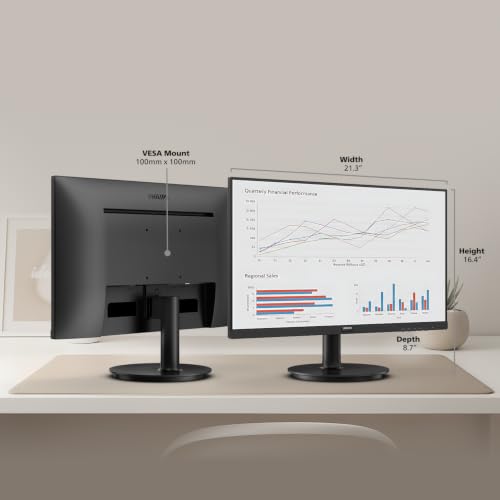
 Philips 24 Inch Computer Monitor FHD 100Hz VA24 inch 100Hz8.7 x 21.3 x 16.4 inches6.4 poundsCheck on Amazon
 Philips 22 Inch Computer Monitor FHD 100Hz VA22 inch 100Hz8.7 x 19.4 x 14.5 inches9.3 poundsCheck on Amazon
 Philips 34 Inch Curved Computer Monitor UWQHD 100Hz34"14.4 x 31.8 x 4.3 inches27.8 poundsCheck on Amazon
 Philips 24" Gaming Monitor FHD 180Hz Overlocked IPS24 inch 180Hz28.74 x 18.9 x 7.4 inchesCheck on Amazon
Philips lineup compared
Philips 24 Inch Computer Monitor FHD 100Hz VA VESA Flicker-Free, 241V8LB | 1920×1080 LED Monitor, 4ms GtG, Adaptive Sync, HDMI 1.4, Tilt Adjust, Low Blue Light, 4yr Advance Replacement Warranty




As an Amazon Associate we earn from qualifying purchases. Product prices and availability are accurate as of the date/time indicated.
Philips 22 Inch Computer Monitor FHD 100Hz VA VESA Flicker-Free, 221V8LB | 1920×1080 LED Monitor, 4ms GtG, Adaptive Sync, HDMI 1.4, Tilt Adjust, Low Blue Light, 4yr Advance Replacement Warranty


As an Amazon Associate we earn from qualifying purchases. Product prices and availability are accurate as of the date/time indicated.
Philips 27" Computer Monitor FHD 100Hz VA VESA Eye Care, 271V8LB | 1920×1080 LED Monitor, 4ms GtG, HDMI 1.4, VGA, Adaptive Sync, Flicker-Free, Low Blue Light, 4yr Advance Replacement Warranty
As an Amazon Associate we earn from qualifying purchases. Product prices and availability are accurate as of the date/time indicated.
Philips 34 Inch Curved Computer Monitor UWQHD 100Hz USB-C PD VA, 346E2CUAE | 3440×1440 Monitor, HDMI, DP, USB 3.2 Hub, Built-in Speakers, Height Adjust, Adaptive Sync, 4yr Advance Replacement Warranty


As an Amazon Associate we earn from qualifying purchases. Product prices and availability are accurate as of the date/time indicated.
Philips 34E1C5600HE 34" UltraWide QHD 21:9 Monitor with Built-in Windows Hello Webcam & Noise Canceling Mic, USB-C Docking, Stereo Speakers, 100Hz, 4-Year Advance Replacement,Black
As an Amazon Associate we earn from qualifying purchases. Product prices and availability are accurate as of the date/time indicated.
Philips 24" Gaming Monitor FHD 180Hz Overlocked IPS HDR10, 24E2G2200 | 1920×1080 LED Computer Monitor,144Hz Native / 180Hz OC, 0.5ms, VGA, VESA, Adaptive Sync, Low Blue Light, 4yr Warranty


As an Amazon Associate we earn from qualifying purchases. Product prices and availability are accurate as of the date/time indicated.
Philips 22 Inch Computer Monitor FHD 120Hz Overclocked IPS VESA, 22E2N1100 | 1920×1080 LED Monitor, 1ms MPRT, Adaptive Sync, HDMI 1.4, VGA, Flicker-Free, Low Blue Light, 4yr Advance Replacement Warranty
As an Amazon Associate we earn from qualifying purchases. Product prices and availability are accurate as of the date/time indicated.
Philips 32 Inch Computer Monitor FHD 100Hz VA, 32E1N1100L | 1920×1080 LED Monitor, 1ms MPRT, HDMI 1.4, VGA, VESA, Adaptive Sync, Flicker-Free, 4yr Advance Replacement Warranty
As an Amazon Associate we earn from qualifying purchases. Product prices and availability are accurate as of the date/time indicated.
| Model | Key point from title | Price tier | Best for |
|---|---|---|---|
| Philips 221V8LB | 22-inch 1080p VA, 100Hz, HDMI 1.4 | Budget | Tiny desks |
| Philips 241V8LB | 24-inch 1080p VA, 100Hz, 4ms GtG | Budget | Everyday office |
| Philips 271V8LB | 27-inch 1080p VA, 100Hz, VGA | Budget | Bigger basic screen |
| Philips 22E2N1100 | 22-inch IPS, 120Hz overclocked, 1ms MPRT | Budget | Small IPS with extra refresh |
| Philips 24E2G2200 | 24-inch IPS, 144Hz native, 180Hz overclocked | Budget | Cheap gaming |
| Philips 32E1N1100L | 32-inch 1080p VA, 100Hz | Mid-range | Living-room distance |
| Philips 346E2CUAE | 34-inch curved UWQHD, USB-C PD, hub | Mid-range | Laptop docking |
| Philips 34E1C5600HE | 34-inch UltraWide QHD, webcam, USB-C docking | Premium | Docking plus calls |
Every Philips model, smallest to widest
Philips 221V8LB 22-Inch FHD 100Hz Monitor
The title lists a 22-inch 1920×1080 VA panel with 100Hz, a 4ms grey-to-grey claim, Adaptive Sync, HDMI 1.4, tilt, flicker-free and low blue light modes, and a four-year advance replacement warranty. At about 100 pixels per inch it is the sharpest of the 1080p models. HDMI 1.4 is enough for 100Hz at 1080p by our estimate. It is the smallest screen of the set, so expect little desk space gain over a laptop display. The four-year cover is the feature to weigh against its basic panel, because the title gives no brightness or colour figures.
Pros
- Long warranty in the title
- High density for a 1080p screen
Cons
- 22 inches is small for multitasking
- Only HDMI 1.4 named, so older standard
Who it’s for: a student or secondary-desk user who wants a basic screen.
Philips 241V8LB 24-Inch FHD 100Hz Monitor
Almost identical in spec to the 221V8LB, but at 24 inches: VA panel, 100Hz, 4ms GtG, Adaptive Sync, HDMI 1.4 and tilt, with the same four-year replacement cover. It is a near-twin of the 22 and 27-inch models, so choose by size only, since the stated specs do not separate them. Our Philips 24-inch versus Samsung 32-inch comparison looks at how this model stacks up against a larger rival.
Pros
- Same warranty and 100Hz as the others
- 24 inches is a common office size
Cons
- Same spec family, so no standout feature
- VA contrast comes with narrower angles
Who it’s for: a typical home-office buyer.
Philips 271V8LB 27-Inch FHD 100Hz Monitor
The same VA, 100Hz, 4ms GtG and Adaptive Sync spec as the smaller siblings, but at 27 inches with HDMI 1.4 and VGA. At 1080p a 27-inch panel is only about 82 pixels per inch, so text looks softer than on the 22 or 24-inch versions. The VGA port helps with older computers. It costs little more than the 24-inch model, which makes it an easy size upgrade if you accept lower sharpness. Viewed from about 3 feet or more, the softness matters less.
Pros
- Larger screen at a low tier
- VGA input for older PCs
Cons
- Lower pixel density than the 24-inch
- HDMI 1.4 only is named
Who it’s for: someone who wants more screen for casual use.
Philips 22E2N1100 22-Inch 120Hz Overclocked IPS Monitor
This 22-inch 1080p IPS lists 120Hz overclocked, a 1ms MPRT claim, Adaptive Sync, HDMI 1.4 and VGA. The native refresh rate is not given, so the 120Hz is only available after enabling an overclock option. MPRT is a motion-blur measure and not the same as grey-to-grey response, so do not compare 1ms MPRT with a 4ms GtG claim directly. IPS gives wider viewing angles than the VA siblings, which matters if you share the screen or sit off-axis. Check the listing for the native rate before relying on 120Hz.
Pros
- IPS panel at a budget tier
- Overclock option adds refresh headroom
Cons
- Native rate not stated
- Overclock needs menu setup and may vary by cable
Who it’s for: a small-desk buyer who wants IPS.
Philips 24E2G2200 24-Inch 180Hz Overclocked IPS Gaming Monitor
The only gaming-labelled screen here lists 144Hz native and 180Hz overclocked, IPS, HDR10, 0.5ms, VGA and VESA. “Overlocked” in the title is a typo for overclocked. HDR10 on a budget IPS usually means the monitor accepts an HDR signal, not that it looks like HDR. The title names VGA but not HDMI or DisplayPort, and 180Hz at 1080p needs roughly 9 Gbps, so check which port reaches it. Variable refresh is listed as Adaptive Sync, so confirm compatibility with your graphics card.
Pros
- 144Hz native claimed
- IPS at a budget tier
Cons
- Port list is unclear for high refresh
- HDR10 label overstates what a budget panel does
Who it’s for: an entry-level esports player.
Philips 32E1N1100L 32-Inch FHD 100Hz Monitor
A 32-inch VA at 1920×1080, 100Hz, 1ms MPRT claim, HDMI 1.4, VGA and VESA mounting. At about 69 pixels per inch it is the coarsest panel in the set; fine text will look soft at desk range. Think of it as a large, inexpensive screen for viewing from further back. By the one-arcminute rule of thumb, individual pixels blur only beyond roughly 50 inches, so sit as far back as you can. For anything near 24 inches from your face, a smaller or higher-resolution screen is the better choice.
Pros
- Big screen at a modest price
- VESA mount available
Cons
- Lowest pixel density here
- 1080p stretched over 32 inches looks coarse up close
Who it’s for: a casual buyer who sits back from the screen.
Philips 346E2CUAE 34-Inch Curved UWQHD Monitor
The title lists a 34-inch curved VA at 3440×1440, 100Hz, USB-C PD, HDMI, DisplayPort, a USB 3.2 hub, speakers and a height-adjustable stand, with the four-year replacement. This is the most complete work screen in the set: one USB-C cable can carry video and charge a compatible laptop. USB-C power wattage is not stated, so check it. About 110 pixels per inch makes text sharp, and the 21:9 shape fits two documents side by side. The curve is helpful for wrap-around use but can complicate flat wall mounting.
Pros
- USB-C PD, hub and speakers in one
- Height adjustable
Cons
- USB-C wattage not in the title
- Curved ultrawide needs a deep desk
Who it’s for: a laptop user building a one-cable desk.
Philips 34E1C5600HE 34-Inch UltraWide QHD Webcam Monitor
This 34-inch 21:9 UltraWide QHD lists a Windows Hello webcam, noise-canceling mic, USB-C docking, stereo speakers, 100Hz and a four-year replacement. The word QHD on a 21:9 panel is ambiguous, so confirm the pixel count. It overlaps with the 346E2CUAE, adding a camera and removing no stated feature, so the price gap appears to be for the camera. Check whether the camera needs its own USB link and how the privacy shutter works.
Pros
- Webcam and docking combined
- Windows Hello camera claimed
Cons
- Pixel count needs confirming
- Priced above the 346E2CUAE
Who it’s for: a hybrid worker who joins calls daily.
Pixel density and sitting distance, worked out
Assumptions: 16:9 1080p panels, 3440×1440 for the ultrawides, and a one-arcminute visual limit (roughly 20/20 vision). Pixels per inch equals the pixel diagonal divided by the screen diagonal. The distance beyond which pixels blur is about 3,438 divided by PPI.
| Screen | Pixels per inch | Pixels blur beyond |
|---|---|---|
| 22-inch 1080p | about 100 | about 34 inches |
| 24-inch 1080p | about 92 | about 37 inches |
| 27-inch 1080p | about 82 | about 42 inches |
| 32-inch 1080p | about 69 | about 50 inches |
| 34-inch 3440×1440 | about 110 | about 31 inches |
Most people sit 24 to 30 inches from a desk monitor, so all of these show some pixel structure; the larger 1080p panels show it most. That is why the ultrawides read as sharper than the 32-inch.
What to look for in a Philips monitor
VA, IPS and the speed claims
Five of the eight titles say VA, which tends to give strong contrast but slower pixel transitions, and the two E2 models say IPS. The 4ms GtG, 1ms MPRT and 0.5ms figures are not comparable with each other: GtG measures a colour change, MPRT is a motion-blur figure, and all are seller claims, so do not choose on the smallest number alone. For a quick resolution refresher, see our 1080p vs 1440p vs 4K guide.
Cable limits
Titles listing HDMI 1.4 limit you to the refresh rates that standard can carry. In our estimate, 1080p at 100 to 120Hz fits, with roughly 5 to 6 Gbps needed against about 8 Gbps of usable HDMI 1.4 bandwidth (ignoring blanking), while 180Hz does not. For the ultrawides, use the DisplayPort cable. Our monitor cable guide explains lead versions.
Warranty and eye comfort
Several titles mention a four-year advance replacement warranty, which is a clear selling point to confirm on the listing, including who handles the swap. Flicker-free and low blue light modes are general comfort features, not medical claims; eye strain mostly depends on brightness, breaks and distance. A common ergonomic habit is to look away from the screen every 20 minutes or so, whichever monitor you pick. Brightness set to match the room, rather than maximum, is another easy comfort gain.
Size, stand and mounting
Only the 346E2CUAE title says height adjust; the others list tilt or VESA. If you need to raise the screen, a monitor arm or a riser is a cheap fix. Check the VESA pattern on the listing before buying an arm, and note that the 34-inch models are wide enough to need a deep desk. As a rule of thumb, a 34-inch 21:9 screen is about 31 inches wide, so measure your desk first and leave room for speakers or a keyboard tray.
Where to go next
If you are comparing manufacturers, our monitor brands roundup shows where Philips fits among its rivals.
How we picked these
We compared listing titles, published specifications, manufacturer documentation and buyer reviews, and kept eight Philips listings from entry-level to ultrawide. We did not use star ratings or review counts to rank them, and price tiers are relative to this set. Titles with typos or ambiguous wording are marked so you can verify them with the seller. Nobody on the team used or measured these units. Spec claims in titles, such as overclocked refresh rates and HDR10, are the sellers’ own.
Mistakes buyers make with Philips monitors
The first is comparing 1ms MPRT and 4ms GtG as if they were the same measure. The second is trusting an overclocked rate without checking the cable and port, or the on-screen menu setting that enables it. The third is buying a 32-inch 1080p screen for close desk use, where it looks soft. The fourth is treating HDR10 on a budget IPS as real HDR. The fifth is ignoring that the 221V8LB, 241V8LB and 271V8LB are one design in three sizes, so paying more for a larger one adds area, not features. A final slip is skipping the stand: most budget listings mention tilt only, so plan an arm or riser if height matters to you.
Verdict
The 346E2CUAE is the best all-round Philips here for work, with USB-C, a hub and height adjustment. The 24E2G2200 is the budget gaming pick if you confirm its ports, and the 241V8LB is the plain office choice. Add the 34E1C5600HE only if you want the webcam and have confirmed the pixel count. For a second screen on a tight budget, the 221V8LB or 22E2N1100 does the job; for a bigger, calmer view from further back, the 32E1N1100L can work if you accept its low sharpness.
Questions about Philips monitors
Are Philips 100Hz monitors good enough for gaming?
For casual and single-player games, 100Hz is a clear step up from 60Hz and the VA models list Adaptive Sync. Fast competitive players will want the 24E2G2200 or 22E2N1100, whose titles claim higher overclocked rates, though overclocked figures are seller claims and need the right cable. Always check which input supports the advertised rate before you buy.
What does overclocked mean in a Philips monitor title?
It means the panel is set to run above its native refresh rate when you enable an option in the on-screen menu. The 24E2G2200 title lists 144Hz native and 180Hz overclocked, while the 22E2N1100 gives only a 120Hz overclocked figure. Results vary by cable and graphics card, so treat overclocked rates as a bonus, not a guarantee.
Is HDMI 1.4 enough for these 100Hz screens?
At 1920×1080, our estimate is about 5 Gbps of picture data at 100Hz and 6 Gbps at 120Hz, which fits inside HDMI 1.4. It is not enough for 180Hz at 1080p, which would need about 9 Gbps. Several titles list HDMI 1.4, so confirm the maximum refresh rate for that port in the manual.
Why does the 32-inch Philips look soft?
A 32-inch 1920×1080 panel has only about 69 pixels per inch, so text and edges look coarser at normal desk distance. It is better treated as a living-room style screen or a monitor viewed from further back. For a desk, a 34-inch 3440×1440 model packs about 110 pixels per inch.
Which Philips here suits a laptop desk?
The 346E2CUAE and 34E1C5600HE both list USB-C, a docking-style setup that can reduce cable clutter on a laptop desk. The 346E2CUAE title specifies USB-C PD, a hub and a height-adjustable stand, while the 34E1C5600HE adds a webcam. Check USB-C power output on each listing to be sure it covers your laptop.









