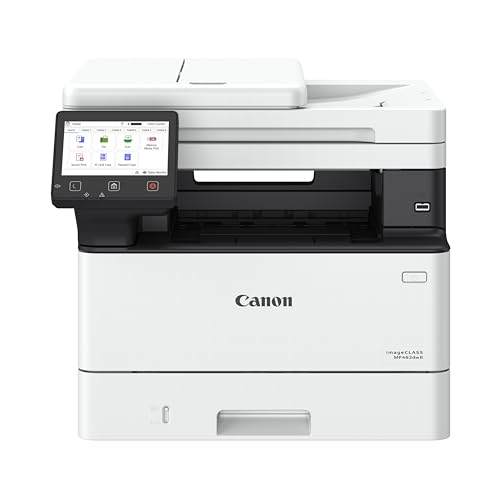
The best laser printer deal for most homes and small offices in 2026 is the Canon imageCLASS MF462dw II — a monochrome all-in-one that prints, scans, copies and faxes, duplexes automatically, and connects over Wi-Fi or Ethernet. It suits a home office or a one-to-five-person practice that produces anywhere from a few hundred to a couple of thousand pages a month and wants one box to handle everything. If your volume is light and the budget is tight, the HP LaserJet M209dw is the smarter buy, because you will never use the extra capacity of a premium all-in-one. If you need color, shortlist the HP Color LaserJet Pro MFP 3301sdw or the Canon Color imageCLASS MF662Cdw. The twelve models below are ranked on the three numbers that actually decide whether a deal is good: print speed, toner cost per page, and paper capacity. A cheap printer with an expensive cartridge is not a deal — it is a subscription you pay for one cartridge at a time.
Our Top Picks
 HP LaserJet M209dw Monochrome Laser PrinterPrinter13.98 x 11 x 8.07 Inches11.2 poundsCheck on Amazon
 Canon Color imageCLASS LBP646Cdw Wireless Laser PrinterMedium16.5 x 16.8 x 10.5 inches27.6 PoundsCheck on Amazon


Top 3 picks at a glance

Quick Comparison
| Product | Best for | Key specs | Price tier |
|---|---|---|---|
| Canon imageCLASS MF462dw II | High-volume home offices that need print, scan, copy and fax in one machine | Monochrome all-in-one; automatic duplex; Wi-Fi/Ethernet/USB; ~40 ppm class; 250-sheet cassette class plus multipurpose feed; automatic document feeder | Premium |
| HP LaserJet M209dw | Light home printing on a tight budget | Monochrome print-only; automatic duplex; wireless; ~30 ppm class; 250-sheet tray class | Budget |
| Canon imageCLASS LBP122dw | Dorms, single desks and second printers | Monochrome print-only; automatic duplex; wireless; ~30 ppm class; 250-sheet cassette class; compact footprint | Budget |
| Canon Color imageCLASS LBP646Cdw | Color documents when you already own a scanner | Color print-only; automatic duplex; wireless; 26 ppm (per the listing name); four-cartridge CMYK engine | Mid-range |
| HP LaserJet Pro 3101fdw | Small offices that still send and receive faxes | Monochrome all-in-one with fax; automatic duplex; wireless; ~40 ppm class; document feeder | Premium |
| HP LaserJet Pro 3101sdw | Small offices that need scanning but not fax | Monochrome all-in-one; automatic duplex; wireless; ~40 ppm class; flatbed plus document feeder | Mid-range |
| HP Color LaserJet Pro MFP 3301sdw | Small teams producing color handouts and reports | Color all-in-one; automatic duplex; wireless; ~25 ppm class black and color; four-cartridge engine | Premium |
| HP LaserJet Pro 3001dw | Pure monochrome volume with no scanning requirement | Monochrome print-only; automatic duplex; wireless; ~40 ppm class; office-grade paper path | Mid-range |
| HP LaserJet MFP M140w | Occasional printing, scanning and copying on a budget | Monochrome all-in-one; wireless; ~20 ppm class; flatbed scanner; check the listing for duplex | Mid-range |
| Canon Color imageCLASS MF662Cdw | Color all-in-one duty with a longer warranty | Color all-in-one; automatic duplex; wireless; ~26 ppm class; document feeder; 3-year limited warranty per the listing name | Premium |
| HP LaserJet M207dw | Cheapest route to duplex monochrome printing | Monochrome print-only; automatic duplex; wireless; ~30 ppm class; entry-class tray | Budget |
| Brother HL-L2405W | Compact, no-fuss monochrome printing with mobile output | Monochrome print-only; wireless; mobile printing; compact chassis; duplex not part of the headline spec set | Budget |
How We Chose
This roundup is built from published manufacturer specifications, the model naming conventions each brand uses, and the running-cost arithmetic that governs laser ownership over three to five years. Nothing here is based on personal use of the units.
Four filters decided which models made the list. First, spec transparency: every pick publishes enough about its engine — speed class, duplex support, paper capacity, cartridge family — for a buyer to compare it against a neighbour without guessing. Second, category fit: the list is deliberately spread across monochrome print-only, monochrome all-in-one, color print-only and color all-in-one, because those four categories solve different problems and a single “best” answer does not exist across them. Third, use case: each entry is assigned a realistic owner — a student, a two-person home office, a five-person team — rather than being ranked in the abstract. Fourth, upgrade path and running cost: a model earns its place if its cartridge family offers a high-yield option, if its paper handling can grow with the owner, and if the per-page cost does not quietly exceed the purchase price within a year of heavy use. Where a specification varies by region or revision, we describe the spec class rather than assert an exact figure, and we tell you to confirm the current number on the listing.
1. Canon imageCLASS MF462dw II — Best for high-volume home offices
As an Amazon Associate we earn from qualifying purchases at no extra cost to you.

The MF462dw II is the machine to buy when one device has to carry an entire household or small practice. It is a monochrome laser all-in-one, which means it prints, scans, copies and faxes from the same chassis, and it duplexes automatically so two-sided documents come out without you flipping the stack. That combination — a fast mono engine plus a document feeder plus fax — is what separates it from the print-only models that dominate the budget end of this list.
Who it suits: a home office, a small legal or accounting practice, a clinic front desk, or any household where a single printer handles school forms, contracts, invoices and the occasional fax. It is overkill for someone who prints twenty pages a month.
Key specs
- Type: monochrome (black-and-white) laser all-in-one — print, scan, copy, fax
- Speed class: roughly 40 pages per minute monochrome as rated by the manufacturer; confirm the current figure on the listing
- Duplex: automatic two-sided printing
- Connectivity: Wi-Fi, Ethernet and USB, plus mobile printing support
- Paper handling: 250-sheet front cassette class, a multipurpose feed for envelopes and labels, and an automatic document feeder for scanning, copying and faxing multi-page originals
- Toner: Canon’s replaceable cartridge family with both standard and high-yield options in the same series
- Warranty: Canon’s standard limited warranty — check the listing for the term that applies
Strengths
The case for the MF462dw II is throughput and completeness. A 40 ppm class engine turns a 200-page print job into a five-minute task, and the document feeder means a 30-page contract can be scanned to PDF without you standing at the glass. The paper cassette matters more than buyers expect: a 250-sheet class tray means a full ream goes in and stays in, so a household that prints 500 pages a month refills roughly twice monthly instead of every few days. The duplex unit halves paper consumption on any document longer than a page, which at 1,000 pages a month is 6,000 sheets a year saved — about twelve reams.
The all-in-one form factor also removes a piece of equipment from the desk. Fax is a genuinely useful inclusion in 2026 for anyone dealing with medical offices, property management or government paperwork, where PDF-by-email is still not universally accepted. And because it is monochrome, the toner economics stay simple: one cartridge, one yield figure, one cost per page, no color cartridge that dries out or gets drained by a single chart.
Pros
- Print, scan, copy and fax in one chassis — no second device needed
- Fast ~40 ppm class mono engine with automatic duplex
- 250-sheet cassette class means infrequent refills
- Automatic document feeder handles multi-page scans and copies
- Wired Ethernet as well as Wi-Fi, which matters for a fixed office desk
Cons
- Premium tier — you pay for capability you may not use
- Monochrome only; no color output at any price
- Larger footprint than a print-only unit, so it needs a dedicated surface
- High-yield cartridges cost more up front even though they cost less per page
How it compares with the nearest alternative
The closest competitor here is the HP LaserJet Pro 3101fdw. Both are monochrome all-in-ones with fax, duplex, a document feeder and a fast engine, so the decision usually comes down to running cost and cartridge family rather than features. Canon’s imageCLASS line is generally pitched at buyers who want a single high-yield cartridge and predictable per-page cost, while HP’s LaserJet Pro line leans on a broader cartridge ecosystem and a slightly different paper-handling arrangement. If you print mostly from a phone or tablet, both handle mobile printing; if you print mostly from a wired desktop, both offer Ethernet. The practical tiebreaker is which brand’s high-yield cartridge is cheaper per page in your region, and whether the model you are looking at ships with a starter cartridge — most do, and starter cartridges are usually rated well below a retail cartridge’s yield.
2. HP LaserJet M209dw — Best for light home printing on a budget
The M209dw is the sensible default for a household that prints a handful of pages a day and wants them to come out two-sided without paying for a scanner it will rarely lift the lid on. It is a monochrome laser printer with automatic duplex and wireless connectivity, sitting in the budget tier while still offering the two features that matter most at home: reliable text output and no ink to dry out.
Who it suits: a family that prints shipping labels, school permission slips, tickets and the occasional boarding pass; a remote worker who prints a few documents a week; a student who wants a printer that survives a summer of disuse without clogging.
Key specs
- Type: monochrome laser printer, print only
- Speed class: roughly 30 pages per minute class; confirm on the listing
- Duplex: automatic two-sided printing
- Connectivity: wireless, with mobile printing and USB for a direct connection
- Paper handling: 250-sheet input tray class, single-sheet priority feed class
- Toner: HP’s entry-class monochrome cartridge family with a standard and a high-yield variant
Strengths
Laser text is crisp and permanent, and that is the whole point of buying into this category at the budget end. The M209dw’s engine is fast enough that a ten-page document finishes before you have walked back to the desk, and the automatic duplex unit means you can default every print job to two-sided and cut paper use roughly in half without thinking about it. Because it is a laser, there is no printhead to clog after a month of inactivity — the failure mode that turns cheap inkjets into landfill. Setup is straightforward over Wi-Fi, and mobile printing means a phone can send a document without a driver installation.
The other quiet advantage is cartridge consistency. HP’s entry-class mono cartridges are sold in standard and high-yield versions, and the high-yield version is where the per-page cost drops noticeably. If you buy the printer and immediately standardise on high-yield, the total cost of ownership over three years is usually lower than buying a slightly cheaper printer whose cartridge family has no high-yield option at all.
Pros
- Budget tier with automatic duplex included — unusual at this price point
- Fast enough for household jobs, ~30 ppm class
- No ink drying problems; prints after long idle periods
- Wireless and mobile printing with no hub required
- Standard and high-yield cartridge options in the same family
Cons
- Print only — no scanner or copier
- Monochrome output only
- Entry-class paper tray; no cassette upgrade path
- Not built for thousands of pages a month
How it compares with the nearest alternative
The M207dw sits directly beneath it in the same family and is the obvious alternative. Both are monochrome, both duplex, both wireless, both in the budget tier; the M209dw is generally the higher-capacity sibling, with a larger tray and a slightly faster engine, while the M207dw is the leaner option. If your monthly volume is under 200 pages, the M207dw is usually the better-value pick and you will not notice the difference. If you routinely print 300–600 pages a month, the M209dw’s larger paper capacity pays for itself in fewer refill interruptions. Against the Brother HL-L2405W, the HP has the edge in duplexing, since Brother’s compact budget model emphasises wireless and mobile printing rather than two-sided output.
3. Canon imageCLASS LBP122dw — Best for dorms and single desks

The LBP122dw is Canon’s compact monochrome laser printer with duplex and wireless, and it is aimed squarely at the person who needs one reliable printer on one desk. It is print-only, which keeps the price in the budget tier and the footprint small enough for a dorm shelf or a corner of a home desk.
Who it suits: a university student in a shared flat, a remote worker in a small apartment, or anyone adding a second printer to a household that already has a scanner somewhere else.
Key specs
- Type: monochrome laser printer, print only
- Speed class: roughly 30 pages per minute class
- Duplex: automatic two-sided printing
- Connectivity: Wi-Fi with mobile printing support, plus USB
- Paper handling: 250-sheet front cassette class — a cassette rather than an open tray, which keeps paper dust-free and hidden
- Toner: Canon’s compact monochrome cartridge family with standard and high-yield options
Strengths
The front cassette is the detail that separates this from cheaper print-only units. An enclosed cassette means the paper stack is not exposed to dust, humidity or a cat, and it slides out like a drawer instead of forcing you to angle a tray. For a student printing essays at 2 a.m., that is a small but real quality-of-life difference. Automatic duplex matters too: university submission rules increasingly assume two-sided printing, and a duplex unit saves the manual flip that ruins page ordering.
Canon’s compact mono cartridge family is also well understood, with a standard cartridge for light users and a high-yield cartridge for anyone printing more than a few hundred pages a month. Because the printer is print-only, there is no scanner glass to clean, no ADF to jam, and fewer things to break. That simplicity is a genuine advantage for a device that may sit untouched for weeks between assignments.
Pros
- Compact footprint with an enclosed front cassette
- Automatic duplex at a budget price
- Fast ~30 ppm class engine for the size
- Wireless setup and mobile printing
- Fewer mechanical parts than an all-in-one, so fewer failure points
Cons
- Print only — no scanning or copying
- Monochrome only
- No Ethernet port on the compact chassis
- Paper capacity is fine at home but limiting in an office
How it compares with the nearest alternative
Against the HP LaserJet M207dw, the two are extremely close in concept: budget mono, duplex, wireless, print-only. The LBP122dw’s differentiator is the enclosed cassette and Canon’s cartridge economics; the M207dw’s is HP’s wider retail availability and the familiarity of the LaserJet ecosystem. Against the HP LaserJet M209dw, the LBP122dw is the smaller, more furniture-friendly machine, while the M209dw is the slightly more capable sibling with more paper capacity. If you are buying for a desk rather than a shelf, the LBP122dw’s form factor usually wins; if the printer will live on a utility cart in a busy household, the M209dw’s extra capacity is worth the step up.
4. Canon Color imageCLASS LBP646Cdw — Best for color printing when you already have a scanner

The LBP646Cdw is a color laser printer, print-only, with automatic duplex and wireless connectivity, and the listing names a 26 pages per minute engine. That combination — color output without the scanner and copier hardware — is the cheapest way into color laser printing, and it is the right answer for anyone whose scanning needs are already covered by a phone camera and a PDF app.
Who it suits: a small business printing branded one-pagers, menus, flyers and presentation handouts; a home user who prints color photos for school projects; anyone who wants color but refuses to pay for a flatbed they will use twice a year.
Key specs
- Type: color laser printer, print only
- Speed: 26 pages per minute, per the listing name
- Duplex: automatic two-sided printing
- Connectivity: wireless, with mobile printing and USB
- Engine: four-cartridge CMYK color laser — black, cyan, magenta, yellow are replaced independently
- Toner: Canon color imageCLASS cartridge family with standard and high-yield variants
Strengths
Independent CMYK cartridges are the single most important cost feature in any color laser. A combined cartridge forces you to replace all four colors when one runs dry, which is exactly what happens when you print mostly text with occasional color charts — the black is exhausted while cyan, magenta and yellow are still half full. Four separate cartridges mean you replace only what you actually consume, and in a text-heavy office that can cut color consumable spend substantially over a year.
Color laser output is also fundamentally different from color inkjet for business documents. Laser toner sits on the surface and does not bleed or feather, so small colored text and thin chart lines stay legible, and the output is not water-soluble in the way many dye-based inkjet prints are. For a restaurant printing menus that get handled, or an office printing forms that get stamped and filed, that durability is worth more than a wider color gamut. Automatic duplex doubles the value: a 40-page color proposal printed two-sided uses 20 sheets and takes half the time to collate.
Pros
- Lowest entry point to color laser output in this list
- Four independent CMYK cartridges — replace only what runs out
- 26 ppm engine, competitive for a color laser
- Automatic duplex saves paper on long color documents
- Wireless and mobile printing
Cons
- Print only — no scanning, copying or faxing
- Color cost per page is several times monochrome cost per page
- Four cartridges to track and stock
- Slower than the monochrome office models on this list
How it compares with the nearest alternative
Within Canon’s own range, the Color imageCLASS MF662Cdw is the same class of color engine wrapped in an all-in-one chassis with a scanner, copier and document feeder — and a three-year limited warranty per its listing name. If you need to scan and copy in color, the MF662Cdw is the correct buy and the LBP646Cdw is the wrong one. If you do not, the LBP646Cdw saves you the scanner hardware and the larger footprint. Against HP’s color all-in-one, the HP Color LaserJet Pro MFP 3301sdw, the same logic applies in reverse: the HP brings scanning and copying, the Canon print-only keeps the price and the desk space down. The decision is not about which printer is better; it is about whether a flatbed is part of your workflow.
5. HP LaserJet Pro 3101fdw — Best for small offices that still fax

The 3101fdw is a monochrome laser all-in-one with fax, duplex and wireless, and the model suffix tells you exactly what you are getting: the “f” is fax, the “d” is duplex, the “w” is wireless. It sits in the premium tier because it bundles a fast office-grade engine with a full multifunction feature set.
Who it suits: a small office or professional practice where fax is still a real requirement — healthcare administration, property management, legal filing, trades quoting — and where one machine needs to print, scan, copy and fax at office speed.
Key specs
- Type: monochrome laser all-in-one — print, scan, copy, fax
- Speed class: roughly 40 pages per minute class; confirm the current rating on the listing
- Duplex: automatic two-sided printing, scanning and copying
- Connectivity: wireless, Ethernet and USB, with mobile printing
- Paper handling: office-class cassette plus multipurpose feed, with an automatic document feeder for multi-page scan, copy and fax jobs
- Toner: HP LaserJet Pro cartridge family with standard and high-yield options
Strengths
Fax is the reason to pay the premium. A standalone fax machine costs money, occupies a phone line and adds another device to maintain; a multifunction unit with fax built in replaces it entirely. For practices that receive referral forms, prescriptions, purchase orders or signed contracts by fax, that single feature justifies the tier. The document feeder handles the rest of the workload — a 20-page scan-to-email job runs unattended while you do something else.
The engine is fast enough that a busy office will not queue behind it. At roughly 40 ppm class, a 300-page batch takes under ten minutes, and duplex scanning means both sides of a stack are captured in one pass on many jobs. Ethernet is included alongside wireless, which matters in an office where the printer sits on a wired network and wireless is reserved for guests. High-yield cartridge options in the LaserJet Pro family keep the per-page cost in the low single-digit cents at volume, and the tray capacity is designed for a ream-plus so refills are a weekly rather than daily chore.
Pros
- Built-in fax replaces a separate machine
- Fast ~40 ppm class monochrome engine
- Automatic duplex printing, scanning and copying
- Ethernet plus wireless plus USB
- High-yield toner available to reduce per-page cost at volume
Cons
- Premium tier — the most expensive way to buy monochrome printing here
- Monochrome only
- Fax is dead weight if nobody sends you faxes
- Large footprint; needs a dedicated table or cabinet
How it compares with the nearest alternative
The 3101sdw is the same family without fax, and it is the model most buyers should consider first. If you have not sent or received a fax in five years, the “f” in 3101fdw is a feature you are paying for and never touching, and the sdw version gives you the same scanning, copying, duplexing and engine speed for less. The rule is simple: choose the fdw only if fax is a documented workflow requirement, and choose the sdw if it is not. Against the Canon imageCLASS MF462dw II, the two are direct rivals in the mono all-in-one space — both duplex, both wireless, both with document feeders — and the tiebreaker is again cartridge economics and regional pricing rather than any structural advantage.
6. HP LaserJet Pro 3101sdw — Best for small offices that scan but do not fax

The 3101sdw is the fax-free version of the model above, and for most small offices it is the better buy. It prints, scans and copies, duplexes automatically, and connects over wireless — the “s” denotes scanning capability, the “d” duplex, the “w” wireless. Dropping fax removes a phone line, a feature you will not maintain and a chunk of the purchase price.
Who it suits: a three-to-ten-person office, a coworking desk, a clinic reception, or a home office that has grown past a print-only machine and now needs scan-to-PDF and copying as part of the daily routine.
Key specs
- Type: monochrome laser all-in-one — print, scan, copy
- Speed class: roughly 40 pages per minute class monochrome
- Duplex: automatic two-sided printing and copying
- Connectivity: wireless, Ethernet and USB, with mobile printing
- Paper handling: office-class main cassette plus multipurpose feed and an automatic document feeder
- Toner: HP LaserJet Pro monochrome cartridge family, standard and high-yield
Strengths
This is the sweet spot of the mono all-in-one category: fast enough for a real office, complete enough to replace three devices, and positioned a tier below the flagship because it omits one feature most offices no longer use. Scan-to-email and scan-to-folder workflows turn paper into searchable PDFs, and the ADF means a 50-page client file can be digitised without babysitting. Automatic duplex on both print and copy halves paper consumption across the whole office, not just on print jobs.
Running costs are where the LaserJet Pro line earns its place. The high-yield cartridge in this family is rated for substantially more pages than the standard version, and because the engine is monochrome, there is exactly one cartridge to track. An office printing 2,000 pages a month on a high-yield mono cartridge is looking at consumable spend in the tens of dollars per month rather than the hundreds a color machine would demand for the same volume. The paper cassette holds enough for a busy week, and Ethernet keeps the device on the wired network where it belongs.
Pros
- Full print/scan/copy functionality without paying for fax
- ~40 ppm class engine suited to genuine office volume
- Automatic duplex for printing and copying
- Ethernet, wireless and USB connectivity
- Single-cartridge monochrome economics with a high-yield option
Cons
- Mid-range to premium pricing in most markets
- No color output
- No fax — a problem if your industry still relies on it
- Larger than a home print-only unit
How it compares with the nearest alternative
The obvious comparison is the 3101fdw one step up: same engine, same scanning, same duplex, plus fax. Buy the sdw unless fax is genuinely required, because the fax hardware is the only meaningful difference and it is not free. The second comparison is the HP LaserJet Pro 3001dw, which is the print-only sibling. If nobody in your office ever scans or copies, the 3001dw gives you the same speed class and duplexing for less money and less desk space — but the moment you need one scan-to-PDF a week, the sdw’s scanner pays for itself. Against Canon’s imageCLASS MF462dw II, the choice is a coin flip on features and a real decision on cartridge cost per page in your market.
7. HP Color LaserJet Pro MFP 3301sdw — Best for small teams producing color documents

The 3301sdw is a color laser all-in-one with wireless and automatic duplex. It prints, scans and copies in color, which makes it the natural centre of a small team that produces branded material — proposals, menus, product sheets, presentation handouts — and needs to scan signed copies back into the workflow.
Who it suits: a design-adjacent small business, a marketing team of three to eight people, a real estate office printing listing sheets, or a home business where color output is part of the product.
Key specs
- Type: color laser all-in-one — print, scan, copy
- Speed class: roughly 25 pages per minute class in both black and color
- Duplex: automatic two-sided printing
- Connectivity: wireless, Ethernet and USB, with mobile printing
- Engine: four-cartridge CMYK color laser, cartridges replaced independently
- Paper handling: main cassette plus multipurpose feed and a document feeder for scanning and copying
Strengths
Color all-in-ones are expensive to run, and the 3301sdw’s most important design decision is the independent CMYK cartridge set. Four separate cartridges mean a text-heavy month does not force you to replace cyan, magenta and yellow you never used, and a chart-heavy month does not force you to replace a black cartridge that is still three-quarters full. Over a year of mixed use, that independence is usually worth more than a few dollars of purchase-price difference between competing models.
The scanner is the second half of the value. A color all-in-one that only prints would leave you photographing documents with a phone; having a flatbed and document feeder means contracts, IDs, signed forms and annotated proofs all stay digital. Automatic duplex keeps long color documents affordable — a 60-page color proposal becomes 30 sheets — and wireless plus Ethernet means the machine can sit on the network rather than tethered to one laptop. For a team producing client-facing material, this is the machine that stops people walking to a print shop.
Pros
- Color print, scan and copy in one device
- Independent CMYK cartridges reduce wasted toner
- Automatic duplex printing
- Wireless, Ethernet and USB, with mobile printing
- Document feeder for multi-page scan and copy jobs
Cons
- Premium tier purchase price
- Color cost per page is far above monochrome
- Slower than the mono office models — roughly 25 ppm class
- Four cartridges to monitor and keep in stock
How it compares with the nearest alternative
The Canon Color imageCLASS MF662Cdw is the direct rival: color all-in-one, duplex, wireless, document feeder, and a three-year limited warranty per its listing name. The two are close enough that warranty length and cartridge cost per page should decide it. If Canon’s three-year coverage is confirmed on the listing and HP’s standard term is shorter, that is a real ownership-cost difference, since a single service call out of warranty can exceed the price gap. If HP’s high-yield color cartridges are cheaper per page in your region, the HP wins on running cost instead. Against the print-only Canon Color imageCLASS LBP646Cdw, the 3301sdw costs more but adds scanning and copying — worth it the first time you need to digitise a signed page.
8. HP LaserJet Pro 3001dw — Best for pure monochrome volume

The 3001dw is a monochrome laser printer, print-only, with wireless and automatic duplex, and it is listed as a best-for-office machine. It exists for the buyer who prints a lot of black-and-white pages and has no interest in scanning, copying or faxing — and who therefore should not pay for any of that hardware.
Who it suits: an office that already has a separate scanner or multifunction device, a warehouse or workshop printing pick lists and packing slips, a department that runs high daily print volumes and wants the lowest cost per page rather than the most features.
Key specs
- Type: monochrome laser printer, print only
- Speed class: roughly 40 pages per minute class monochrome
- Duplex: automatic two-sided printing
- Connectivity: wireless and USB, with mobile printing
- Paper handling: office-class main tray with a multipurpose feed for envelopes and labels
- Toner: HP LaserJet Pro monochrome cartridge family with standard and high-yield options
Strengths
Speed and simplicity. At roughly 40 ppm class, this printer is designed for the moment when someone hits print on a 150-page document and walks away. Automatic duplex halves paper consumption on everything longer than a page, and the monochrome engine means one cartridge, one yield figure, one cost per page — no color management, no calibration, no wasted cyan. For a workshop or back office where the printer is a utility rather than a feature, that is exactly the right trade.
Because it is print-only, there is no scanner glass to clean, no ADF rollers to wear out and no flatbed to crack. The mechanical simplicity translates into fewer things that can break and a smaller footprint than any all-in-one on this list. High-yield mono cartridges in the LaserJet Pro family are rated for thousands of pages, which means an office printing 2,000 pages a month replaces toner roughly every couple of months rather than every few weeks, and the per-page cost drops accordingly.
Pros
- Fast ~40 ppm class monochrome engine
- Automatic duplex included
- Lowest running cost path for high-volume mono printing
- Compact compared with an all-in-one
- High-yield cartridge available in the family
Cons
- Print only — no scanning, copying or faxing
- Monochrome output only
- No Ethernet listed as part of the headline spec set — confirm connectivity on the listing
- Mid-range price for a device that does one thing
How it compares with the nearest alternative
The HP LaserJet Pro 3101sdw is the natural step up: the same speed class and duplexing plus scanning and copying, in a larger chassis and at a higher price. If your office scans even occasionally, the sdw is the better buy because the alternative is a second device. If your office genuinely never scans, the 3001dw is the correct, cheaper choice and the saved money is better spent on a high-yield cartridge. Against the HP LaserJet M209dw, the 3001dw is the more serious machine — faster engine, office-grade paper handling — while the M209dw is the household option. The dividing line is monthly volume: under about 500 pages a month, the M209dw is enough; above that, the 3001dw’s speed starts saving real time.
9. HP LaserJet MFP M140w — Best for occasional scanning and copying on a budget

The M140w is a monochrome laser all-in-one that prints, scans and copies, connects over wireless, and is positioned for easy setup and mobile printing. It is the entry point into multifunction laser printing: the cheapest way to get a flatbed scanner and a copier sitting on top of a laser print engine.
Who it suits: a household that occasionally needs to scan an ID, copy a passport page or print a return label; a student who needs copying as well as printing; a small home office where the scanner is used a few times a month rather than every day.
Key specs
- Type: monochrome laser all-in-one — print, scan, copy
- Speed class: roughly 20 pages per minute class monochrome
- Duplex: not part of the headline spec set — check the listing before buying if two-sided output matters to you
- Connectivity: wireless, with mobile printing and easy setup
- Paper handling: entry-class input tray with a manual feed for speciality media
- Toner: HP entry-class monochrome cartridge family
Strengths
The M140w’s value proposition is the flatbed. Copying a document without a copier means photographing it badly, and scanning a signed form without a scanner means a phone picture with the wrong perspective. A real flatbed scanner under a laser engine solves both, and it does so at a price that undercuts most color all-in-ones. Setup is deliberately simple — the listing emphasises easy setup and mobile printing — which matters for a buyer who does not want to configure a network print queue.
Laser output is the other advantage. Text is sharp and permanent, pages do not smudge when highlighted, and there is no ink to dry out during a long idle period. For a household that prints in bursts — nothing for three weeks, then twenty pages in an evening — that reliability is the entire reason to choose laser over inkjet. The monochrome engine also keeps the cartridge count at one, which is a meaningful simplification for a buyer who does not want to think about consumables.
Pros
- Print, scan and copy in a compact chassis
- Lowest-cost route to a multifunction laser
- Wireless with mobile printing and simple setup
- Laser text quality with no ink drying issues
- Single monochrome cartridge to maintain
Cons
- Slower than the rest of this list — roughly 20 ppm class
- Monochrome only
- Automatic duplex is not part of the headline spec set
- Entry-class paper capacity limits high-volume use
How it compares with the nearest alternative
The decision between the M140w and the HP LaserJet M209dw comes down to one question: do you need to scan or copy? The M209dw is a print-only machine with automatic duplex and a faster engine, and it is the better printer. The M140w is a slower printer with a scanner attached, and it is the better multifunction. If you scan more than once a month, take the M140w. If you never scan, the M209dw’s duplex and speed make it the stronger buy for the same rough spend. Against the Canon imageCLASS LBP122dw, the Canon is the faster, more furniture-friendly print-only option, while the HP adds the flatbed. The M140w also sits below the HP LaserJet Pro 3101sdw, which is the machine to choose once scanning and copying become daily rather than occasional tasks.
10. Canon Color imageCLASS MF662Cdw — Best for color all-in-one duty with a longer warranty

The MF662Cdw is a color laser all-in-one with wireless, duplex and a document feeder, and its listing carries a three-year limited warranty — a longer coverage term than most of this list. It is the machine for a small business that needs color printing plus scanning and copying, and that values not paying for a service call in year three.
Who it suits: a small business or practice that produces color documents and digitises paper regularly; a marketing or admin function in a company too small for a managed print contract; a home business where the printer is a revenue-generating tool rather than a convenience.
Key specs
- Type: color laser all-in-one — print, scan, copy
- Speed class: roughly 26 pages per minute class
- Duplex: automatic two-sided printing
- Connectivity: wireless with mobile printing, plus USB
- Engine: four-cartridge CMYK color laser, cartridges replaced independently
- Paper handling: main cassette plus multipurpose
Related guides