
Fighting games live and die on timing. A one-frame link in a combo lasts about 16.7 milliseconds at 60 frames per second, so anything the display adds between your button press and the pixels changing eats directly into your reaction window. Unlike a racing sim where you want an immersive ultrawide, a fighting-game monitor is about a clean, low-latency 16:9 panel that shows exactly what the engine renders, exactly when it renders it.
Our Top Picks
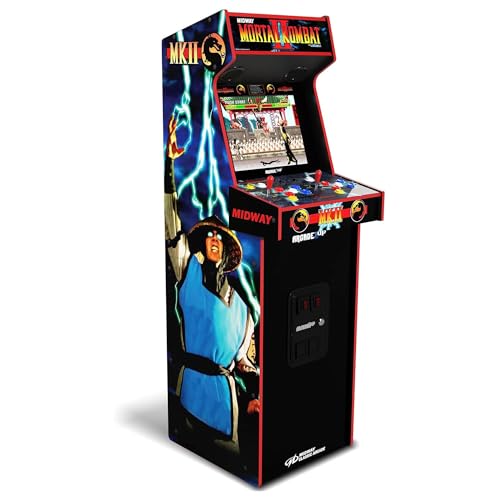 Arcade1Up Mortal Kombat II Deluxe Arcade Machine22.44" x 18.82" x 61"61 x 18.82 x 60 inches79.94 PoundsCheck on Amazon
 Alienware AW2725DF OLED Gaming Monitor27.0 OLED9.59 x 23.98 x 15.99 inches13.89 poundsCheck on Amazon
 QANBA 2009 Arcade Stick Desk Fatal Fury GamingWidth: 30 Inches36 x 10 x 25 inches25 PoundsCheck on Amazon


Top 3 picks at a glance
What actually matters for fighting games
Most modern fighters (Street Fighter, Tekken, Guilty Gear, Mortal Kombat) run at a locked 60 fps. That surprises people shopping for a 240Hz screen, but the frame cap is the whole point: the netcode and animation system are built around 60. So your priority order is input lag first, refresh rate a distant second.
As an Amazon Associate we earn from qualifying purchases at no extra cost to you.


Input lag over refresh rate
A 60Hz screen with 4 ms of processing lag will feel tighter than a flashy 165Hz panel that adds 20 ms of overdrive and scaler delay. Look for reviews that measure total display latency, not just gray-to-gray (GtG) response. A good target is under 10 ms of total input lag measured at the panel. Enabling the monitor’s low-latency or “game” mode usually strips out the extra image processing that inflates that number.
Panel type and motion
A fast IPS or a modern OLED both work well. OLED gives near-instant pixel response so there is no smearing on fast supers, while a quality IPS around 1 ms GtG is plenty for 60 fps content. Avoid slow VA panels that ghost on dark backgrounds, because many stages are dim and you will see trails on quick movement.
| Spec | Budget pick | Sweet spot | Enthusiast |
|---|---|---|---|
| Size | 24″ | 27″ | 27″ |
| Resolution | 1080p | 1440p | 1440p |
| Refresh | 75-120Hz | 144-165Hz | 240Hz OLED |
| Total input lag | <12 ms | <8 ms | <5 ms |
| Price range | $120-160 | $220-320 | $500-700 |
Size and distance
A 24-inch 1080p screen is still the tournament standard because you can take in the whole stage and both health bars without moving your eyes. At home a 27-inch 1440p panel is a comfortable upgrade, but going bigger than 27 inches makes you track corners with your neck, which is tiring across a long set. Keep the screen roughly arm’s length away, around 60-70 cm.
Do you need high refresh at all?
If you only play 60 fps fighters, a high-refresh screen mainly helps your desktop and menus feel smoother. It will not add frames to the game. The one exception is training-mode overlays and some PC ports that unlock frame rate, plus the general benefit of a snappier pointer. If you also play shooters, a 144Hz+ panel earns its keep elsewhere.
Setup tips that reduce lag for free
Connect over DisplayPort or a certified HDMI cable, turn off any “dynamic contrast” or motion-smoothing feature, and set the overdrive to a medium level that removes blur without adding overshoot halos. On console, enable the display’s low-latency/ALLM mode and disable Instant Game Response only if it introduces flicker. These changes routinely cut 5-15 ms with zero cost.
FAQ
Is 240Hz wasted on a 60 fps fighting game?
Mostly, yes, for the game itself, since the engine outputs 60 frames. But a 240Hz OLED still gives you the lowest input lag class available and instant pixel response, so it feels excellent even at 60 fps and future-proofs you for other genres.
Should I turn off V-Sync for fighting games?
Leave the in-game frame cap on so the game renders its intended 60 fps, but you generally do not need traditional V-Sync if your monitor supports adaptive sync (FreeSync/G-Sync). Adaptive sync removes tearing without the extra latency that classic V-Sync can add.
Bottom line
For fighting games, chase low measured input lag on a 24-27 inch fast IPS or OLED, not the biggest refresh number on the box. A tight 60Hz-class panel with sub-10 ms latency will make your links and reactions land more consistently than a mediocre 165Hz screen. Spend your money on latency and a clean 16:9 layout, and enable game mode to shave off the processing delay you already paid to avoid.









