
A 27-inch QHD monitor is one of the easiest ways to make a home office, bedroom desk, or compact gaming setup feel more spacious without taking over the room. The 2560×1440 resolution gives spreadsheets, design windows, and side-by-side browser tabs more breathing room than a basic Full HD screen, while the 27-inch size remains practical for most desks.
Finding the best 27 inch QHD monitor under 300 means deciding where your priorities sit: ergonomic flexibility for long workdays, a high refresh rate for gaming, or the lowest possible price for a secondary workstation. For 2026 shoppers, this list covers eight options from around $120 to around $270, with refresh rates ranging from 100Hz to 300Hz or higher depending on the model.
As an Amazon Associate we earn from qualifying purchases at no extra cost to you.





Our Top Picks
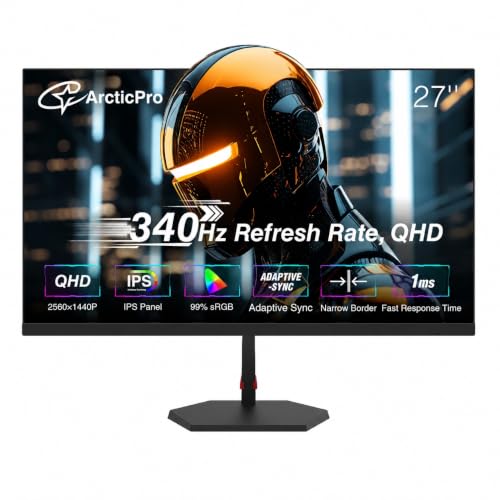 ArcticPro 27 Inch Gaming Monitor 340Hz 300Hz27" 340Hz QHD IPS24.17 x 2.68 x 14.27 inches11.2 poundsCheck on Amazon
 AOC 27" Gaming Monitor QHD 260Hz Overclocked IPS27" 240Hz IPS7.46 x 24.17 x 17.7 InchesCheck on Amazon


Top 3 picks at a glance
Dell 27 Plus QHD Monitor - S2725DSM - 27-inch QHD (2560x1440) 144Hz...Check priceLG 27G64NA-B 27-inch Ultragear G6 QHD IPS 300Hz 1ms HDR400 Gaming MonitorCheck priceArcticPro 27 Inch Gaming Monitor 340Hz 300Hz, QHD 1440p Monitor, 1ms, IPSCheck priceQuick Picks
| Product | Best for | Price |
|---|---|---|
| Dell 27 Plus QHD Monitor S2725DSM | Flexible work-and-play setups | Check on Amazon |
| LG 27G64NA-B UltraGear G6 | High-speed IPS gaming | Check on Amazon |
| ArcticPro 27-Inch Gaming Monitor | Shoppers comparing ultra-high-refresh options | Check on Amazon |
| AOC Q27G41ZE | Lowest-price high-refresh gaming | Check on Amazon |
| Acer KB270U E2biipx | Budget office desks | Check on Amazon |
| ASUS TUF Gaming VG27AQM5A | Premium gaming features under $300 | Check on Amazon |
| KTC H27E6 | White gaming setups | Check on Amazon |
| Acer Nitro KG271U N3bmiipx | Balanced value gaming | Check on Amazon |
How We Compared
Every monitor here has a 27-inch QHD, or 2560×1440, panel and costs less than $300. We ranked the group by how clearly each model serves a particular room and user: a work-from-home desk, a mixed-use family computer, a fast gaming station, or a color-coordinated white setup.
We also weighed the specifications that make the biggest practical difference. Refresh rate matters most to players, while stand adjustment and built-in speakers can matter more in a home office where separate accessories create clutter. IPS panel options were especially appealing for shoppers who want QHD resolution and strong gaming credentials without paying a premium. Product positioning is based on the stated specifications, features, and prices rather than invented performance measurements.
The 8 Best Picks
1. Dell 27 Plus QHD Monitor S2725DSM — Best Overall for Work and Play
The Dell S2725DSM is the most versatile choice for a shared office-and-gaming desk. Its 27-inch QHD 2560×1440 display pairs a 144Hz refresh rate and 1ms response time with AMD FreeSync, so it is positioned for smoother play without being limited to a gaming-only role. It also brings practical desk features that many budget gaming displays leave out: 2 x 3W speakers and height, tilt, pivot, and swivel adjustment. HDMI and DisplayPort 1.4 connectivity add useful flexibility for a desktop or console-adjacent setup.
- Pro: Full height, tilt, pivot, and swivel adjustment supports varied desk layouts.
- Pro: Built-in 2 x 3W speakers can reduce accessory clutter.
- Con: Its 144Hz refresh rate is lower than the dedicated high-refresh gaming models here.
Skip it if your sole goal is the highest available refresh rate under $300.
2. LG 27G64NA-B UltraGear G6 — Best for 300Hz IPS Gaming
The LG 27G64NA-B is for players building a fast, clean 1440p gaming station without reaching beyond a $300 ceiling. It combines a 27-inch QHD IPS panel with a 300Hz refresh rate, 1ms response time, and HDR400 designation. At around $230, it sits in the middle of this roundup’s price range while prioritizing speed. The IPS specification makes it an especially compelling pick for someone who uses one screen for competitive games, browsing, and everyday desktop tasks rather than reserving the monitor for a single purpose.
- Pro: 300Hz refresh rate is a major step up from standard office-monitor speeds.
- Pro: QHD IPS panel and HDR400 designation give it a well-rounded spec set.
- Con: The supplied specifications do not list stand-adjustment features.
Skip it if you need a monitor with specified ergonomic stand adjustments or want the lowest entry price.
3. ArcticPro 27-Inch Gaming Monitor — Best for Shoppers Comparing 340Hz-Class Specs
The ArcticPro 27-inch gaming monitor is aimed squarely at speed-focused shoppers. Its listing identifies a QHD 1440p IPS panel, 1ms response time, and both 340Hz and 300Hz in the refresh-rate description. At around $210, it presents an ultra-high-refresh alternative that costs less than the LG and ASUS options in this guide. This is a sensible model to consider for a dedicated gaming desk where the monitor’s refresh specification takes priority over office-oriented extras. Its IPS panel designation also helps it stand apart from bare-bones speed-first choices.
- Pro: QHD 1440p resolution and an IPS panel are clearly specified.
- Pro: around $210 pricing is competitive among the fastest models listed.
- Con: The listing includes both 340Hz and 300Hz, so confirm the applicable refresh setting before purchase.
Skip it if you want clearly stated connectivity, speakers, or stand-adjustment details.
4. AOC Q27G41ZE — Best Budget High-Refresh Gaming Monitor
The AOC Q27G41ZE makes a strong case for shoppers who want high-refresh QHD gaming at a notably low around $160 price. It is a 27-inch IPS gaming monitor with QHD resolution, a 260Hz overclocked refresh rate, and NVIDIA G-SYNC in its stated feature set. That combination makes it one of the most aggressive value picks in this roundup for a gaming-first setup. It is particularly attractive when a buyer wants more speed than a typical office display offers but would rather keep money available for a keyboard, chair, or desktop upgrade.
- Pro: 260Hz overclocked refresh rate is unusually ambitious at around $160.
- Pro: IPS panel and NVIDIA G-SYNC are included in the product description.
- Con: The published listing information do not specify built-in speakers or ergonomic stand functions.
Skip it if you need a monitor specifically designed around office-friendly adjustment features.
5. Acer KB270U E2biipx — Best 27-Inch QHD Office Monitor on a Tight Budget
At around $120, the Acer KB270U E2biipx is the clear value choice for a home office, student desk, or secondary workstation. It offers a 27-inch IPS display with QHD 2560×1440 resolution and a 100Hz refresh rate. That is a practical combination for people who want more workspace than Full HD provides without paying for gaming-focused 180Hz, 260Hz, or 300Hz hardware. The 100Hz specification also gives this model a faster stated refresh rate than a conventional 60Hz office screen, while the price leaves plenty of room in a modest furnishing budget.
- Pro: It is the least expensive monitor in this eight-model roundup.
- Pro: QHD 2560×1440 resolution and IPS panel suit everyday desktop use.
- Con: Its 100Hz refresh rate is modest beside the gaming-first alternatives.
Skip it if competitive gaming is central to your setup and you want 180Hz or higher.
6. ASUS TUF Gaming VG27AQM5A — Best Premium Gaming Pick Under $300
The ASUS TUF Gaming VG27AQM5A is the high-end choice for buyers who want a clearly gaming-oriented 27-inch 1440p monitor while staying below $300. Priced at around $270, it has a 300Hz refresh rate and NVIDIA G-SYNC in the stated product description. It costs more than every other pick here, but it remains below the target budget and gives fast-game enthusiasts a direct route to a 300Hz QHD screen from the TUF Gaming line. It is best suited to a dedicated PC gaming area rather than a minimal work desk.
- Pro: 300Hz refresh rate targets demanding, fast-paced play.
- Pro: NVIDIA G-SYNC is specifically listed.
- Con: At around $270, it is the highest-priced option in this guide.
Skip it if your priority is simple office work or getting the lowest possible QHD price.
7. KTC H27E6 — Best White Gaming Monitor
The KTC H27E6 is the standout for a white desktop setup where matching the monitor to a light-toned desk, keyboard, and shelving matters as much as refresh rate. This 27-inch QHD white gaming monitor is listed with 300Hz/320Hz capability and costs around $230. That puts it close to the LG in price while giving decor-conscious buyers a more specific aesthetic direction. It is a logical fit for a bedroom gaming corner or a bright home office that doubles as an after-hours play space, especially when a standard black monitor would feel visually heavy.
- Pro: White finish is a distinctive choice for coordinated setups.
- Pro: QHD resolution with 300Hz/320Hz listed capability is gaming-focused.
- Con: The listing presents two refresh figures, so verify the relevant mode before buying.
Skip it if color coordination does not matter and you prefer a model with more stated feature detail.
8. Acer Nitro KG271U N3bmiipx — Best Balanced Gaming Value
The Acer Nitro KG271U N3bmiipx is a straightforward choice for buyers who want a meaningful gaming upgrade without paying for 260Hz or 300Hz specifications. For around $150, it supplies a 27-inch QHD 2560×1440 IPS display with a 180Hz refresh rate. That makes it a strong middle ground between the 100Hz Acer office monitor and the ultra-high-refresh gaming models above. It is well suited to a first QHD gaming setup, a multipurpose bedroom desk, or anyone who would rather spend less than $160 while still prioritizing a clearly gaming-oriented refresh rate.
- Pro: 180Hz refresh rate offers a strong gaming focus at around $150.
- Pro: IPS panel and QHD 2560×1440 resolution provide a capable core specification.
- Con: It does not match the 260Hz and 300Hz options for maximum stated speed.
Skip it if you specifically want NVIDIA G-SYNC, built-in speakers, or a 300Hz-class monitor.
Buying Guide
Choose Refresh Rate Based on What You Actually Do
For office work, browsing, and document-heavy tasks, the Acer KB270U’s 100Hz specification may be enough. For mixed gaming and everyday use, 144Hz on the Dell or 180Hz on the Acer Nitro offers a stronger gaming emphasis. Buyers focused on fast play can look to the AOC’s 260Hz overclocked specification or the 300Hz models from LG and ASUS. Higher refresh rates are most relevant when gaming is the primary reason for the purchase.
Prioritize Ergonomics for a Work Desk
If the monitor will be used for long work sessions, stand movement can be more valuable than chasing the highest refresh number. The Dell is the only model here explicitly listed with height, tilt, pivot, and swivel adjustment. Pivot is particularly useful for documents and vertical layouts, while height and swivel adjustment can help when the desk is shared or the screen is positioned beside a laptop.
Set a Realistic Budget
The price spread is significant: around $120 for the Acer KB270U versus around $270 for the ASUS TUF Gaming VG27AQM5A. A buyer focused on QHD workspace can save substantially with the around $120 Acer. A gaming buyer can find 180Hz at around $150 or 260Hz at around $160, while 300Hz-class options range from around $210 to around $270 in this group. Spend for the features you will use, not simply the largest refresh number.
Our Verdict
The Dell 27 Plus QHD Monitor S2725DSM is the best overall choice because it combines QHD resolution, 144Hz, AMD FreeSync, speakers, multiple connectivity options, and the most complete stated ergonomic adjustment package for around $190. For gaming-first shoppers, the LG UltraGear G6 offers the most appealing 300Hz IPS combination at around $230. If price is the deciding factor, the Acer KB270U delivers a 27-inch QHD IPS screen for just around $120, while the AOC Q27G41ZE is the standout for high-refresh gaming value at around $160.
FAQ
Is 27 inches a good size for QHD?
Yes. A 27-inch screen with 2560×1440 resolution provides more room for multitasking than Full HD while remaining a manageable size for many home desks. It works well for office layouts, creative software windows, and gaming.
What is the cheapest monitor in this roundup?
The Acer KB270U E2biipx is the least expensive option at around $120. It has a 27-inch IPS panel, QHD 2560×1440 resolution, and a 100Hz refresh rate.
Which model has the best stated stand adjustment?
The Dell S2725DSM has the most clearly specified adjustment options: height, tilt, pivot, and swivel. The other supplied product descriptions do not list equivalent stand-adjustment details.
Which monitors offer 300Hz or higher?
The LG 27G64NA-B and ASUS TUF Gaming VG27AQM5A are listed at 300Hz. The ArcticPro listing includes 340Hz and 300Hz, while the KTC H27E6 is listed at 300Hz/320Hz. Confirm the applicable refresh mode for models that show more than one figure.









