Working from a small apartment, a dorm desk, or a kitchen table makes a second screen feel like a luxury you cannot fit. A 15-inch portable monitor solves that squeeze. It slides into a backpack, draws power over a single USB-C cable, and gives you a true dual-display setup for spreadsheets, photo edits, or game lobbies without claiming permanent desk space. For laptop users who move between rooms or between home and office, that flexibility is more useful than a bulky 27-inch panel that never leaves the desk.
The catch is that not every 15-inch option is actually portable, and not every OLED lives up to its contrast claims when you use it on battery. Some panels require two cables and a wall brick, others wash out in bright rooms, and many budget IPS models get lumped into OLED roundups and cause confusion at checkout. We sorted through resolution, panel type, power needs, and real-world connectivity to rank eight popular 15-inch and 15.6-inch portable monitors by who they actually serve best, with clear pricing as it stands in 2026.
As an Amazon Associate we earn from qualifying purchases at no extra cost to you.




Our Top Picks
 ASUS ZenScreen MQ16FC 15.6 Inch16:10 USB-C OLED Portable16 Inch0.4 x 14.1 x 9.2 inches1.5 poundsCheck on Amazon
 ViewSonic VX1655-4K-OLED 16 Inch 4K UHD OLED Portable15.6-Inch OLED0.6 x 13.9 x 8.78 inches1.5 poundsCheck on Amazon
 INNOCN 15.6 inch Portable Monitor Touchscreen 4K OLED15.6''0.6 x 14.15 x 9.4 inches6.4 poundsCheck on Amazon
 ASUS ZenScreen MB16ACV 15.6 Inch 1080p USB-C Portable16 Inch8.85 x 14.09 x 0.41 inches1.83 PoundsCheck on Amazon
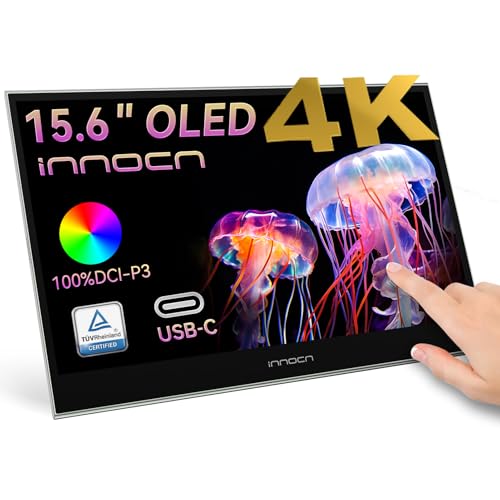 INNOCN 15.6" Portable Monitor OLED Touch Second Screen15.6''0.26 x 14.1 x 9.17 inchesCheck on Amazon

Top 3 picks at a glance
Quick Picks
| Product | Best for | Price |
|---|---|---|
| AYY Portable Monitor for Laptop 15 Inch | Best Budget Pick for Students | Check on Amazon |
| InnoView Portable Monitor, 15.6 Inch FHD 1080P | Best Value with Protective Case | Check on Amazon |
| ASUS ZenScreen MQ16FC 15.6 Inch 16:10 USB-C OLED | Best OLED for Everyday Laptop Use | $229 |
| ViewSonic VX1655-4K-OLED 16 Inch 4K UHD OLED | Best 4K OLED for Creators | Check on Amazon |
| INNOCN 15.6 inch Portable Monitor Touchscreen 4K OLED PU15-Pre | Best Touchscreen OLED with Battery | Check on Amazon |
| ASUS ZenScreen 15.6 Inch Portable Monitor MB16ACV | Best Eye-Care IPS for Long Work Sessions | $149 |
| INNOCN 15.6″ Portable Monitor OLED Touch PU15 Pre C6 | Best Color-Accurate OLED for Photo Editing | Check on Amazon |
| WCV Portable Monitor 15.6 Inch 1080P USB-C HDMI | Best Ultra-Slim Budget Extender | Check on Amazon |
How We Compared
We prioritized monitors that work cleanly with modern laptops over a single cable where possible, with USB-C for power and video and HDMI as a fallback for consoles and older machines. Panel type mattered most: true OLED models were ranked for contrast and color volume, while IPS models were judged on brightness, viewing angles, and portability for the price. We also weighed resolution versus battery drain, built-in speakers and kickstands versus add-on accessories, and whether a monitor included a protective case or required one separately. Price was kept as a hard filter using current retail pricing, so you can see exactly what you gain or give up as you move from under $50 to around $500.
The 8 Best Picks
1. AYY Portable Monitor for Laptop 15 Inch
The AYY 15 Inch FHD 1080P monitor is built for anyone who needs a cheap, light second screen for classes, remote work, or console gaming on the go. It uses an IPS panel with HDR support and connects via USB-C or HDMI, so it pairs with laptops, Macs, phones, and PS4, PS5, Xbox, and Switch without adapters. Built-in speakers keep your bag lighter when you present or stream. At around $42 it is the lowest price in this roundup that still offers a full 1080p image.
- Pro: Very affordable entry point with USB-C and HDMI for broad device compatibility
- Pro: Built-in speakers and travel-friendly 15-inch size for dorms and small desks
- Con: IPS panel cannot match OLED contrast or true blacks for photo and video work
When to skip: If you need perfect blacks, wide color gamut coverage, or color-critical editing, choose a true OLED instead of this budget IPS extender.
2. InnoView Portable Monitor, 15.6 Inch FHD 1080P
InnoView targets commuters and hybrid workers who want protection included in the box. This 15.6-inch FHD 1080P display covers laptops, desktops, MacBooks, tablets, phones, and consoles over HDMI and USB-C, and ships with a protective case that doubles as a cover and stand. The built-in speaker handles video calls and casual gaming without extra gear. At around $49 you get a slightly larger viewing area than flat 15-inch models and a case you would otherwise buy separately for $20 to $30.
- Pro: Includes protective case, saving added cost and adding durability for travel
- Pro: Flexible connectivity for laptop, desktop, and console use at a budget price
- Con: 1080p IPS limits sharpness and contrast compared to 4K OLED options
When to skip: If your workflow demands 4K detail or OLED color depth for editing, this value IPS will feel limiting.
3. ASUS ZenScreen MQ16FC 15.6 Inch 16:10 USB-C OLED
The ZenScreen MQ16FC is the most straightforward OLED pick for everyday laptop users who want OLED benefits without jumping to 4K pricing. The 15.6-inch OLED panel in a 16:10 aspect ratio gives you more vertical space for documents and timelines, while USB-C keeps cabling to a single cord for power and video. ASUS tunes this line for portability and low blue light, which helps during long work sessions. At $229 it sits in the middle of the price range and delivers the contrast and response that IPS cannot.
- Pro: True OLED contrast with taller 16:10 ratio for productivity
- Pro: Single-cable USB-C simplifies laptop setups and travel
- Con: No 4K resolution and no touch or battery option at this price
When to skip: If you need touchscreen control or built-in battery power for phone or camera use, look at the INNOCN PU15-Pre series instead.
4. ViewSonic VX1655-4K-OLED 16 Inch 4K UHD OLED
For creators who need maximum detail, the ViewSonic VX1655-4K-OLED offers a 16-inch 4K UHD OLED panel that pairs well with high-resolution laptops. The extra pixels make text razor sharp and let you judge 4K footage without scaling, while OLED supplies the deep blacks and per-pixel dimming that matter for grading. This is the premium choice for a portable reference display, not a budget extender. At around $500 it is the highest price in this group, reflecting its 4K OLED class.
- Pro: 4K resolution on OLED gives top detail and contrast for creative work
- Pro: 16-inch size provides more canvas without moving to a desktop monitor
- Con: Highest cost and higher power draw than 1080p portable monitors
When to skip: If you mainly handle email, spreadsheets, and video calls, the added resolution and cost will not pay off over a 1080p OLED.
5. INNOCN 15.6 inch Portable Monitor Touchscreen 4K OLED PU15-Pre
The INNOCN PU15-Pre blends 4K OLED image quality with convenience features that matter away from a desk. The 15.6-inch 4K OLED touchscreen supports USB Type-C and HDMI, works with laptops, Macs, tablets, phones, and consoles, and includes a battery so you can use it without draining your laptop or hunting for an outlet. Touch input speeds up navigation on Windows and Android, and the battery makes phone and Switch gaming more practical. At around $360 it undercuts other 4K OLED portables while adding touch and power independence.
- Pro: 4K OLED touchscreen with built-in battery for true portability
- Pro: USB-C and HDMI cover laptops, phones, and consoles in one panel
- Con: Battery adds weight and requires charging management on long trips
When to skip: If you want the lightest possible travel monitor and never need touch or off-grid power, a non-battery OLED saves weight and cost.
6. ASUS ZenScreen 15.6 Inch Portable Monitor MB16ACV
The ASUS ZenScreen MB16ACV is an IPS alternative focused on comfort and reliability for long workdays. The 15.6-inch 1080p Full HD IPS panel includes an anti-glare surface, Eye Care technology, and a built-in kickstand, with USB Type-C for single-cable laptop connection. It is also backed by a 3-year warranty, which is longer than most portable monitors offer at this size. At $149 it costs more than the budget IPS models but adds refinement, warranty coverage, and eye-comfort features.
- Pro: Anti-glare IPS with Eye Care and kickstand built in for daily use
- Pro: 3-year warranty provides stronger long-term support than typical budget options
- Con: Not OLED, so contrast and black levels trail the OLED picks above
When to skip: If your priority is cinematic contrast or DCI-P3 color work, pick one of the OLED models instead of this comfort-focused IPS.
7. INNOCN 15.6″ Portable Monitor OLED Touch PU15 Pre C6
Photo editors will find the INNOCN PU15 Pre C6 hits a sweet spot between color performance and portability. INNOCN lists this 15.6-inch OLED at 100% DCI-P3, 100000:1 contrast, and 10-bit color with 4K resolution and touch, which on paper covers the key specs for retouching and print prep. The brown finish and touch layer make it feel more like a mobile editing slate than a basic extender, and USB-C keeps it usable with laptops, PCs, phones, and consoles. At around $280 it is one of the most affordable ways to get a 4K OLED touch panel with wide gamut.
- Pro: 4K OLED touch with 100% DCI-P3, 100000:1, and 10-bit color for editing
- Pro: Lower price than other 4K OLED touch monitors with similar listed specs
- Con: High gamut and contrast still benefit from calibration for critical work
When to skip: If you do not need touch or wide-gamut editing and just want an affordable second screen, a $40 to $50 IPS does the job for less.
8. WCV Portable Monitor 15.6 Inch 1080P USB-C HDMI
The WCV 15.6 Inch 1080P monitor is the ultra-slim, zero-frame option for shoppers who care most about price and packability. It connects over USB-C and HDMI, works with laptops, Macs, phones, Xbox, PlayStation, and Switch, and uses a kickstand and IPS panel for wide viewing angles on a thin chassis. With no extra battery or touchscreen to power, it stays light in a backpack and sips less power from your laptop. At around $39 it is the least expensive pick in this roundup.
- Pro: Lowest price with ultra-slim, zero-frame design for easy travel
- Pro: Simple USB-C and HDMI connectivity for laptops and consoles
- Con: Basic 1080p IPS panel lacks OLED depth and 4K sharpness
When to skip: If you need color-accurate OLED or 4K resolution for creative work, this budget extender will not replace a higher-tier panel.
Buying Guide
Panel Type and Resolution: OLED vs IPS and 1080p vs 4K
OLED delivers true blacks and high contrast because each pixel emits its own light, which helps movies, games, and photo work look more dimensional. IPS costs far less, runs brighter in some budget models, and is usually lighter without a battery, but it cannot match OLED black levels. For resolution, 1080p is sharper than most expect at 15.6 inches and keeps power draw low over USB-C, while 4K adds visible clarity for text and timeline work but raises price and battery use. Choose 1080p OLED for balanced everyday use, 4K OLED for editing and grading, and 1080p IPS when budget or weight is the priority.
Connectivity and Power for Laptops
Most modern laptops can drive a portable monitor with a single USB-C cable that carries video, audio, and power. Check that your laptop port supports DisplayPort Alternate Mode and Power Delivery; without it you will need HDMI for video plus USB-C or a wall adapter for power. Touch and battery models need more wattage, so a 45W to 65W charger is a safe baseline if you plan to power the laptop and monitor together. If you switch between a MacBook, Windows laptop, and console, prioritize a monitor with both USB-C and HDMI so you are not stuck hunting for adapters.
Portability Details That Matter Daily
Look beyond the screen size to the stand and protection. A built-in kickstand or magnetic cover that folds into a stand saves you from carrying extra hardware, and an included protective case prevents scratches in a backpack. Weight differences of even half a pound matter when you commute daily, and a slimmer bezel makes the monitor easier to slide alongside a laptop. Built-in speakers are convenient for calls and casual use, but they are small and benefit from headphones for music or careful listening.
Our Verdict
If you want a true OLED experience for laptop use without the top-tier price, the ASUS ZenScreen MQ16FC at $229 is the cleanest all-around choice at 15.6 inches, with a productivity-friendly 16:10 panel and simple USB-C setup. Creators who need 4K should step up to the ViewSonic VX1655-4K-OLED at around $500 for maximum detail or the INNOCN PU15 Pre C6 at around $280 for 4K OLED touch with wide color on a tighter budget. Travelers and students who just need an affordable second screen will be well served by the sub-$50 IPS options like the WCV at around $39 and InnoView at around $49, with the understanding that contrast and color depth will trail OLED.
FAQ
Do I need two cables to run a 15-inch portable monitor from a laptop?
Not always. If your laptop has USB-C with DisplayPort Alternate Mode, a single USB-C cable can handle video, audio, and power for many of these monitors. If your port lacks that support, or you are connecting a desktop or older console, you will use HDMI for video and a separate USB-C cable or power adapter for power.
Is OLED worth it over IPS for a portable monitor?
OLED is worth it if you care about deep blacks, high contrast, and color volume for photos, video, or games. IPS remains a smart buy when you prioritize low price, lighter weight, or long sessions where a matte anti-glare coating and lower cost matter more than cinematic contrast.
Will a portable monitor drain my laptop battery quickly?
Any external panel draws power, but 1080p models draw less than 4K and OLED touch models with higher brightness. Using a USB-C power pass-through or connecting your laptop charger while the monitor is attached keeps battery levels stable. Battery-equipped models like the INNOCN PU15-Pre can also run independently for a time, reducing draw on the laptop.
Can these monitors work with phones and game consoles?
Yes, most options here list compatibility with phones, tablets, and consoles via USB-C or HDMI. For phones, you need a device that supports video output over USB-C. For Switch, Xbox, and PlayStation, HDMI is typically the most reliable connection, and built-in speakers or a headphone jack cover audio if you do not have external speakers nearby.